Dashboard builder
Drag, resize and configure widgets on a 12-column grid. Global, role and personal dashboards, with one set as each person's home screen.
For Perfex CRM 3.x · one module, 33 add-ons included
Drag-and-drop dashboards that read your whole Perfex CRM — invoices, leads, projects, stock, payroll, fleet and more. Click any number to see the records behind it, build your own metrics without code, forecast revenue and cash, and let the AI Brain tell you what changed.
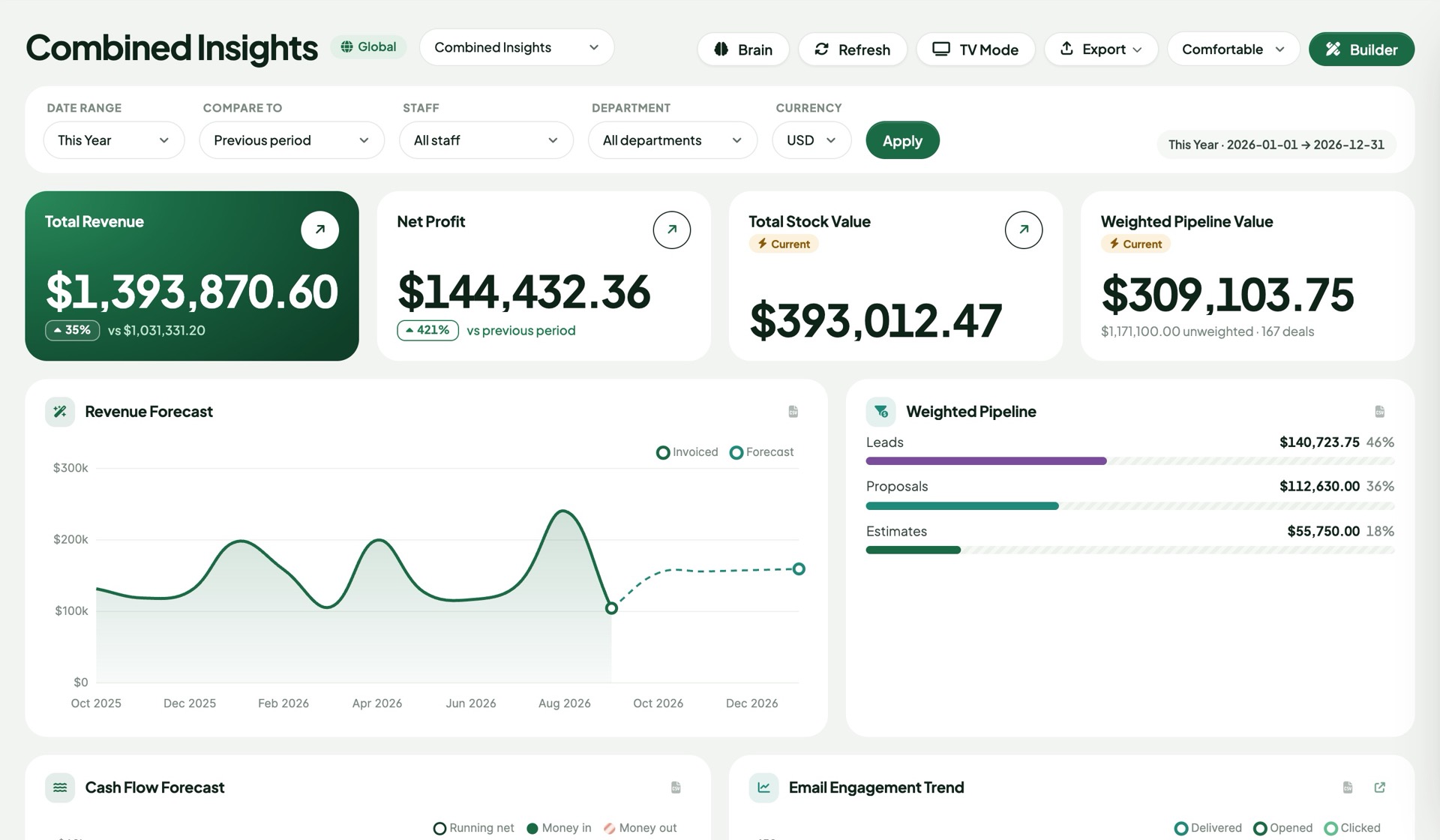
Reads the Perfex core and the modules your team already runs
Install once
Upload one zip and activate one module. Brain Pro looks at the Perfex modules you have and switches on the matching add-ons by itself — Accounting, Warehouse, HR, Fleet, Real Estate, Marketing Automation and 27 more. Install another module next month and its widgets simply appear.
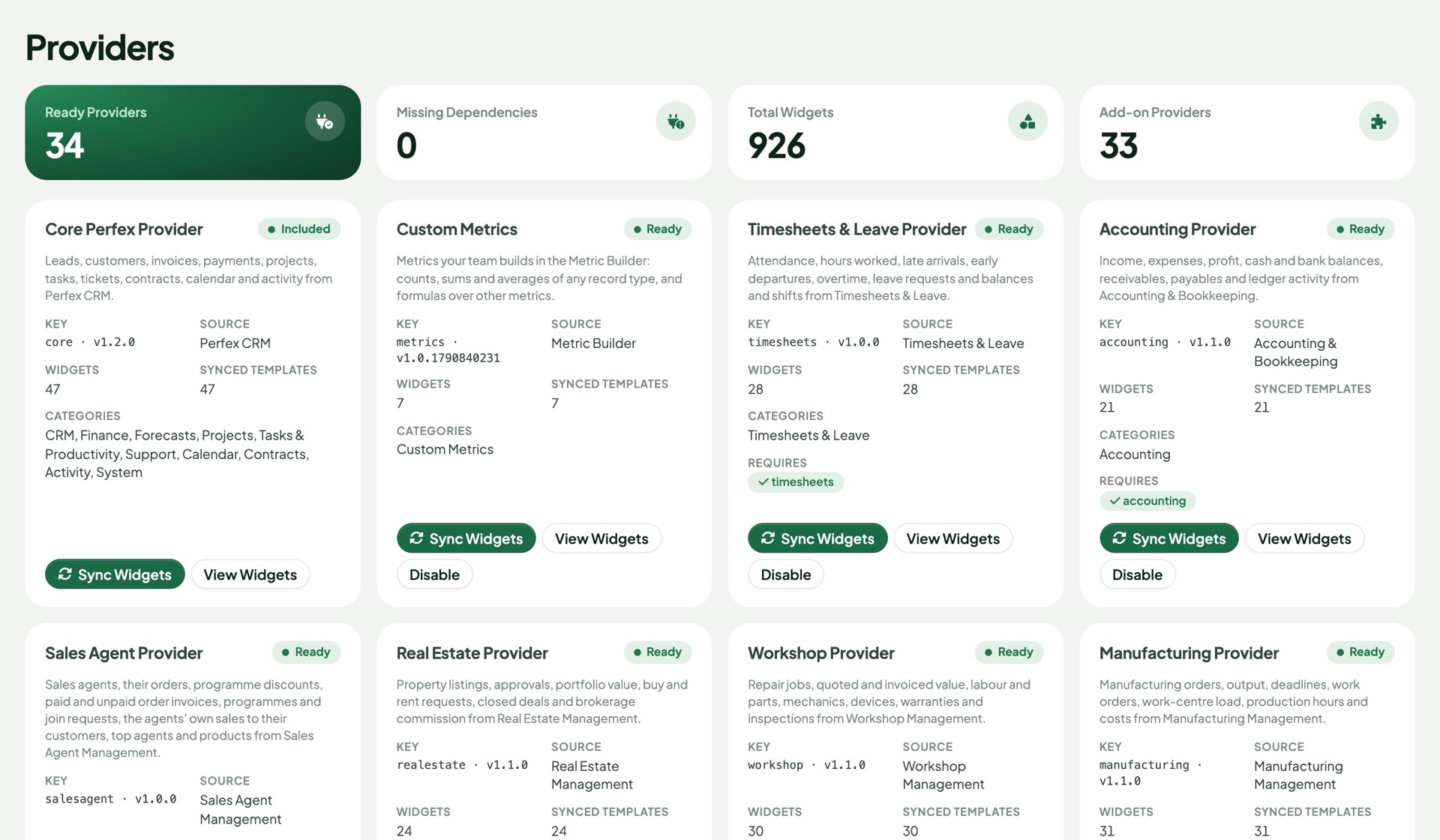
Everything in Pro
Every feature respects each viewer's own Perfex permissions — a sales agent sees their deals, the finance lead sees the company.
Drag, resize and configure widgets on a 12-column grid. Global, role and personal dashboards, with one set as each person's home screen.
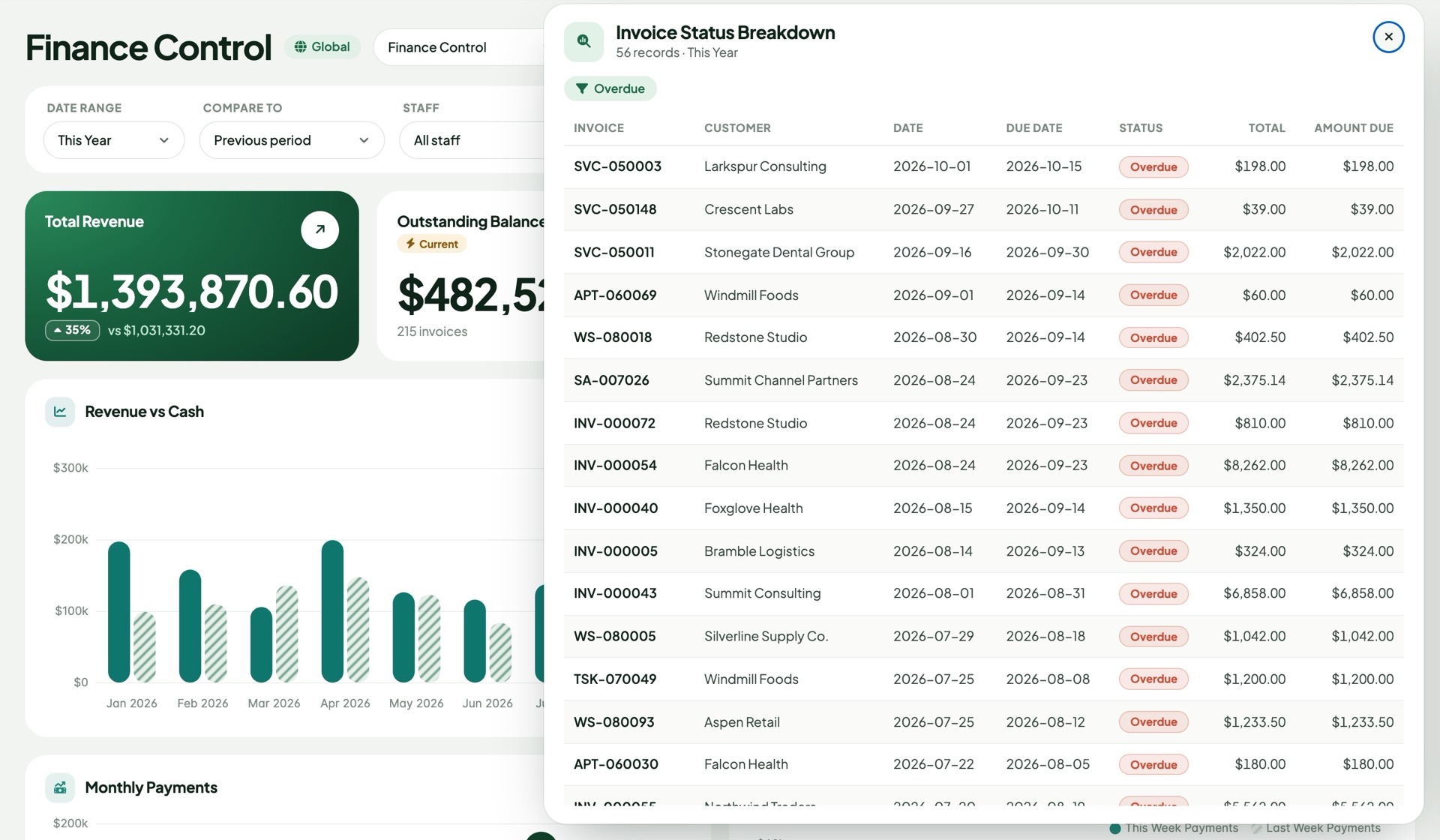
Click a number, a slice, a bar or a month and a panel lists the invoices, leads or jobs behind it — linked straight to the record.
Count, total or average any record type, add filters, break it down or trend it by month. Combine metrics in formulas like revenue ÷ customers.
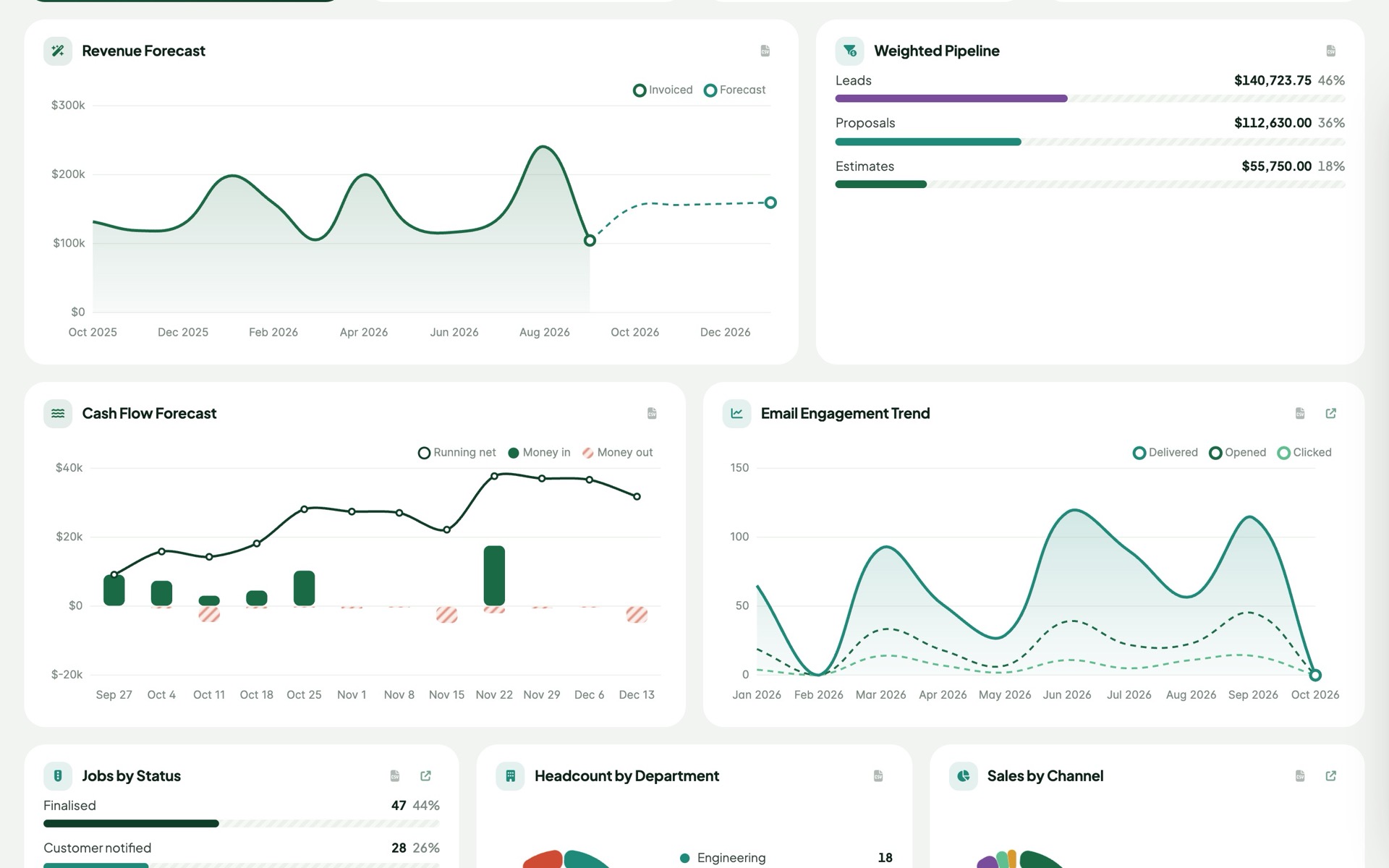
Revenue forecast from your own history, a weekly cash-flow forecast from due invoices and recurring items, and a weighted sales pipeline.
A plain-English summary of any dashboard and answers to questions about your numbers. OpenAI, Anthropic, Gemini or any compatible endpoint.
Email a dashboard daily, weekly or monthly as a link or PDF — with an optional AI summary — and post it to Slack, Teams or Telegram.
Get notified in Perfex and in chat when a number crosses a line: overdue invoices above $10k, stock below a minimum, tickets piling up.
Compare with the previous period or the same period last year. Current-state numbers are recorded every night, so stock and receivables get a history.
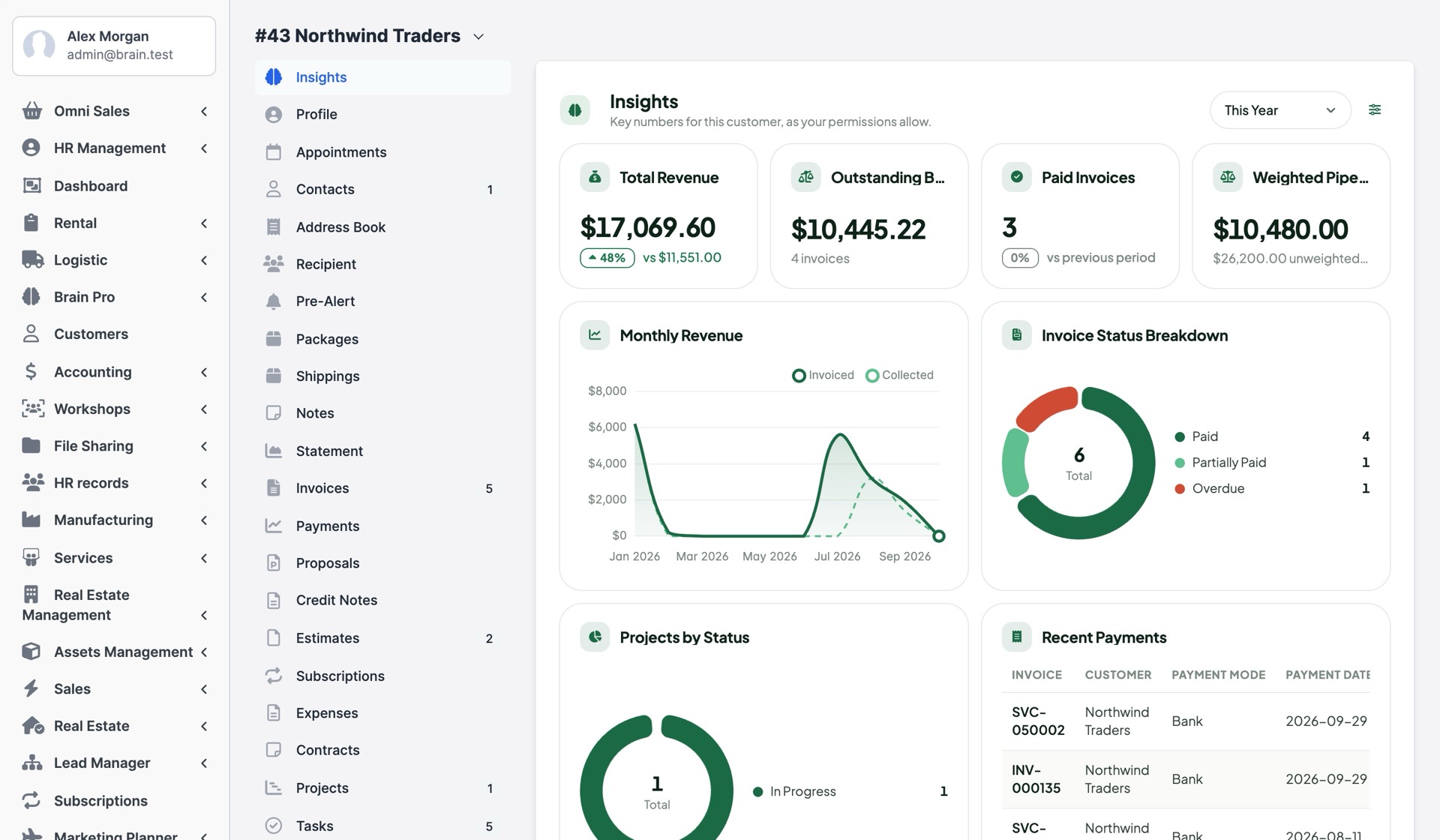
An Insights tab on each customer and project: revenue, balance, invoices, tasks and activity for that one record.
Give contacts a clean overview of their balance, invoices to pay, estimates, projects and tickets — limited by their contact permissions.
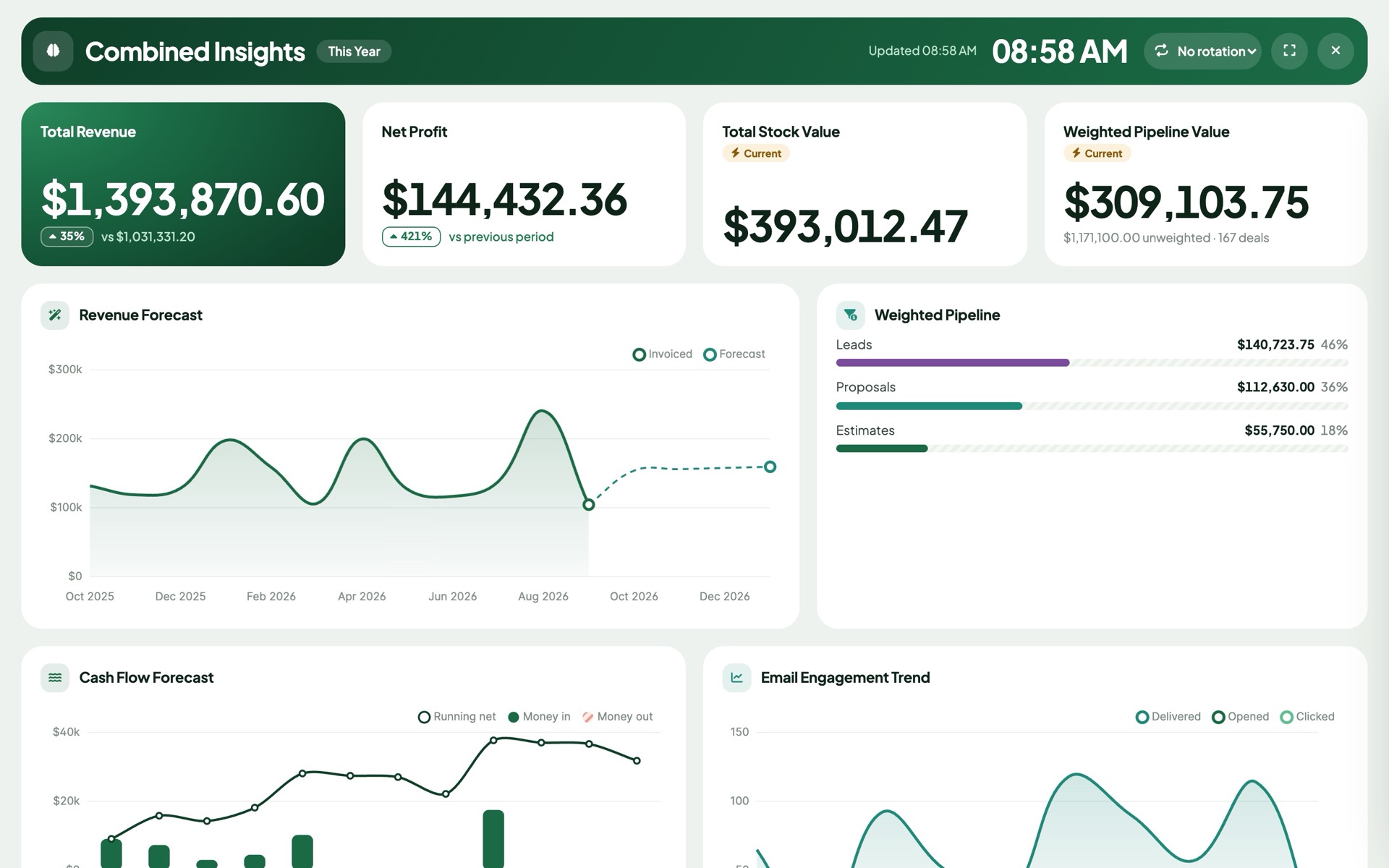
A full-screen wall display with a clock, automatic refresh and rotation through your dashboards.
PDF, CSV, print, expiring public links, and JSON import/export to move a dashboard between installs.
Type "invoiced revenue per sales agent" and the AI drafts the metric for you to check, tweak and drop on a dashboard.
Rename it, pick your accent colour and switch between light and dark themes. Every chart follows, with contrast checked for you.
English, Spanish, Portuguese (Brazil), French, German, Italian, Dutch, Turkish and Russian — the core and all 33 add-ons.
Runs inside every tenant of Perfex SaaS modules, and the SaaS add-on gives the platform owner MRR, churn, trials and plan revenue.
One click shows the numbers that moved unusually against last period and their own history — with an AI explanation if you want one.
Every Monday each person can get their own dashboard in their inbox: key figures, what changed and a short AI summary, within their permissions.
Rank your team by invoiced revenue, payments, deals won or accepted proposals, with movement since last period. Made for the office TV.
Personal, revocable data feeds turn any dashboard or widget into a live CSV or JSON source, still limited to what that person may see.
On first launch Brain Pro lists the modules it found, suggests dashboards for them and assigns a home dashboard to each role in one go.
Drill-down
Overdue: 56. Which ones? Click the slice. Brain Pro lists the exact invoices behind it, with the same filters, currency and permissions as the chart — so the list always adds up to the number you clicked.
Metric Builder
Pick records — invoices, leads, tasks, purchase orders, repair jobs, shipments, payroll lines — choose count, total or average, add conditions, and show it as one number, a breakdown or a monthly trend. A live preview updates as you click.
{revenue} / {paid invoices}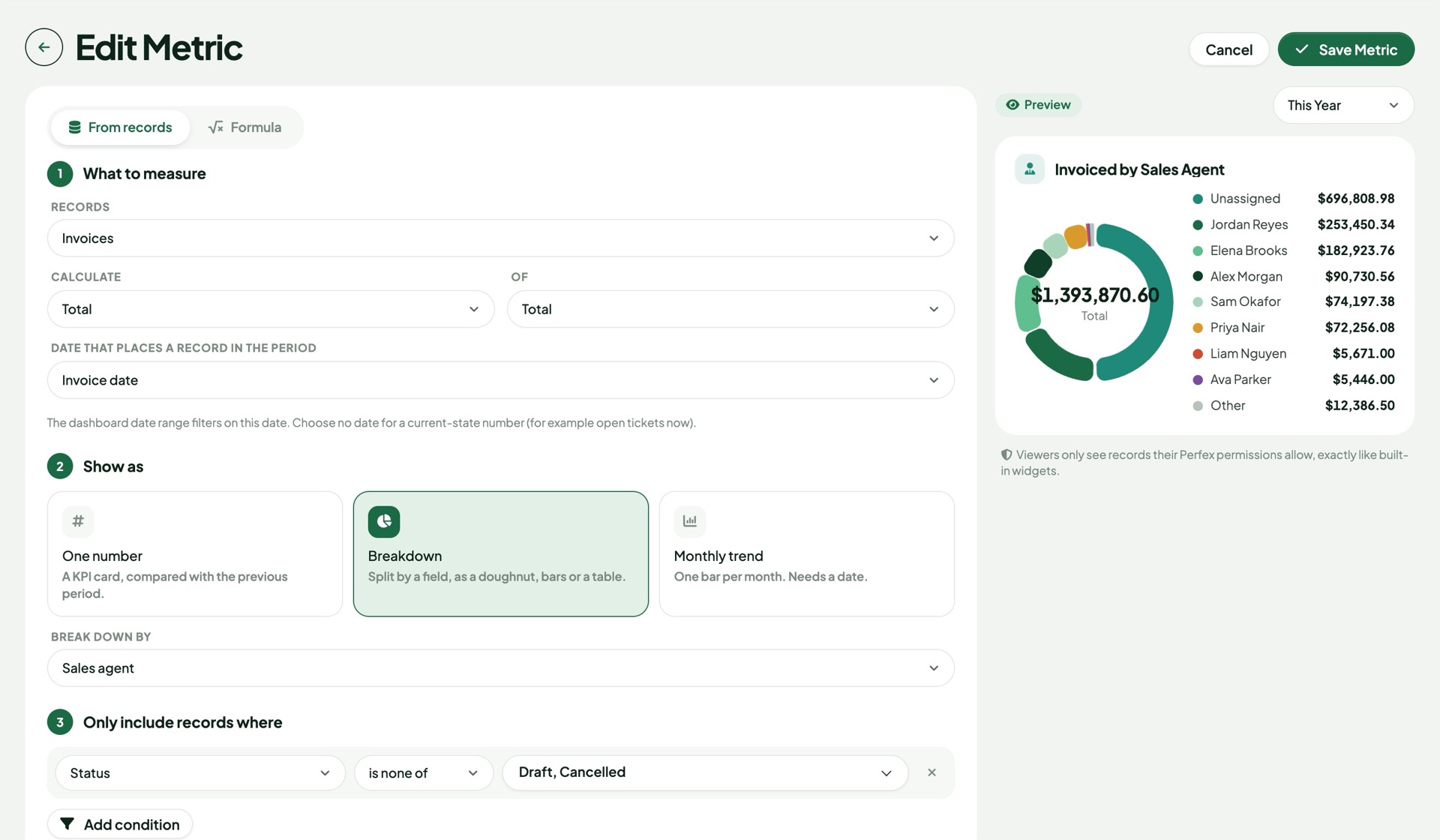
Forecasts
The revenue forecast learns from your completed months with a damped-trend model — it won't turn one good month into a boom. The cash-flow view lines up money in from due and recurring invoices against recurring expenses, week by week.
Insights tabs
Open any customer or project in Perfex and the Insights tab shows that record's numbers: revenue against last year, what is still owed, invoice status, payments, pipeline and project health. Admins choose the widgets once for everyone.
Builder
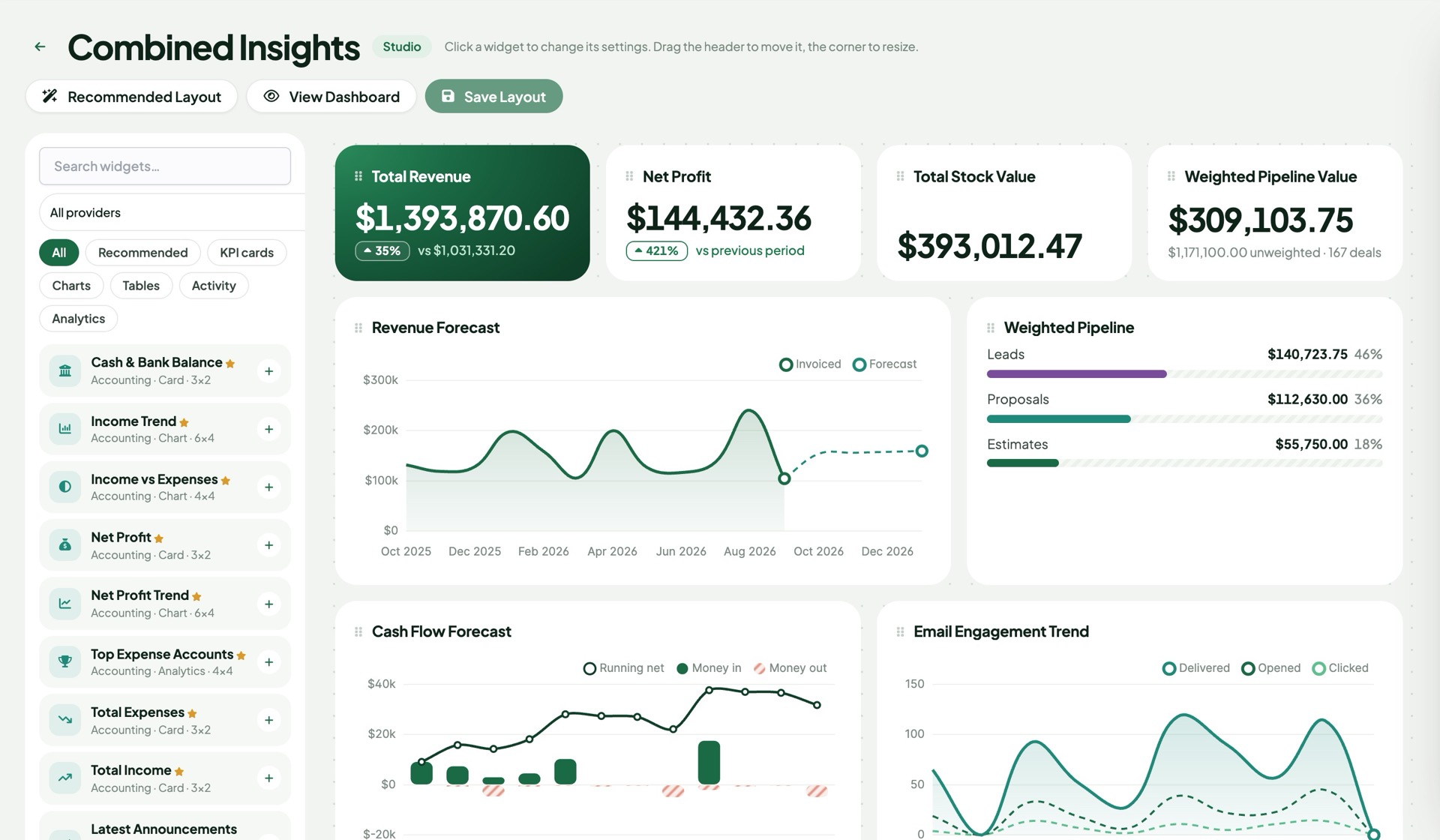
Search 795 widgets, drop them on the grid, resize, switch a chart to a table or a leaderboard, pick colours and a featured card. One click gives you a recommended layout to start from.
AI Brain
"Why did revenue drop this month?" "Which customers owe the most?" The Brain reads the same figures your dashboard shows — never raw records — and answers in plain language. It can also write a weekly summary straight into your scheduled report.
Revenue is down 16% on last month ($50.4k vs $87.5k), mostly because August had three large project invoices.
Overdue balance needs attention: 81 invoices, $180k — Falcon Health and Summit Consulting account for a third of it.
Next step: send reminders on the 10 oldest overdue invoices and review the two customers above.
Fleet: fuel $8.5k and maintenance $6.2k, together 61% of operating spend tracked in Brain Pro.
TV mode
Full screen, a big clock, refreshes itself every few minutes and rotates through your dashboards. Made for the office screen and the morning stand-up.
Included add-ons
Each one switches on when its Perfex module is installed. Every add-on has its own widgets, dashboard templates, drill-down and Metric Builder records.
Widget counts are per add-on. You need the matching Perfex module (bought separately from its author) for an add-on to show data.
Why Brain Pro
| Perfex default | Perfex Brain Pro | |
|---|---|---|
| Dashboards per role or person | — | Global, role and staff dashboards |
| Data from other modules | Each module on its own screen | 33 modules on one board |
| Click a number to see records | — | Drill-down everywhere |
| Your own metrics | — | No-code builder + formulas |
| Forecasts | — | Revenue, cash flow, weighted pipeline |
| Previous period / last year | — | Both, on every KPI |
| AI summaries and questions | — | Bring your own model |
| Scheduled reports, alerts, chat | — | Email, PDF, Slack, Teams, Telegram |
| Customer portal overview | — | Included |
Setup › Modules › Upload the zip and activate Perfex Brain Pro.
Brain Pro lists the modules it found and suggests dashboards for them. Tick, choose each role's home, done — numbers appear straight away.
Assign dashboards to roles, schedule a weekly report, put one on the office TV.
Roadmap
What we are building and planning. Plans can change, and we never promise dates: an item ships when it is ready and tested.
Search and notifications shared by every SellMyCode module you run.
New boards whenever a SellMyCode module adds data, with the same filters and alerts.
Update the module from the Perfex admin, with a backup first and a way back.
Pricing
Perfex Brain Pro
$89one-time
Licence for one Perfex CRM installation. Six months of support included, free updates. Sold by SellMyCode.
Buy now at SellMyCode Try the demo firstPlatform + add-ons bought separately
Total$576–706
Perfex Brain Pro
Total$89
Add-ons report on Perfex modules you already run. The modules themselves (for example Accounting or Fleet) are separate products from their own authors; you only need the ones you use. Separate prices are typical launch prices of dashboard add-ons sold one module at a time for Perfex CRM (October 2026).
The live demo is a full Perfex CRM with Brain Pro and every supported module installed, filled with fictional data. It resets on a schedule, so change whatever you like.
demo.perfexcrm.app
No. All 33 add-ons are inside the one module. Each one shows up by itself when you have the Perfex module it reads (for example Fleet needs the Fleet Management module).
No. Brain Pro is the reporting layer. It works fully with Perfex CRM on its own, and each add-on adds dashboards for a Perfex module you already run. Those modules are separate products sold by their own authors, and you only need the ones your business uses.
Perfex CRM 3.0 and newer, PHP 8.0+. It is tested on Perfex 3.4.1 with MySQL 8 in strict mode.
No. Every widget, drill-down, custom metric and AI answer is checked against the viewer's own Perfex permissions. Widgets a person may not see are locked or hidden.
Only if you switch the AI Brain on and add your own API key. Even then only aggregated figures from the dashboard are sent, never customer records. You can also point it at a model running on your own server.
No. Brain Pro uses the standard Perfex module hooks, so Perfex updates stay safe.
Yes. It is tested against the two popular SaaS modules for Perfex. Each tenant gets its own dashboards, settings and widget cache, and add-ons follow the modules each tenant has. Separate databases and per-tenant table prefixes are supported. On the master install, the SaaS add-on reports MRR, ARR, churn, trial conversion and revenue per plan.
Yes. Money is always shown one currency at a time and never mixed; the dashboard currency filter switches between them.
Yes, into English, Spanish, Portuguese (Brazil), French, German, Italian, Dutch, Turkish and Russian, following each staff member's Perfex language. All texts are in standard Perfex language files, so you can add another language like for any other module.
Perfex Brain Pro is sold directly by SellMyCode: buy it on sellmycode.net. You get the module zip with every add-on, the documentation and free updates.
Open a request on the Perfex Brain Pro support page at sellmycode.net. Six months of support are included with every licence. Please add your Perfex and PHP versions and the text from Brain Pro › System Health › Copy System Information.
Yes — the live demo at demo.perfexcrm.app has every feature and add-on installed.
Works with Brain Pro
Perfex Cash & Capacity is our second module: project and customer margins from your timesheets, invoice reminders that stop by themselves, a capacity schedule with utilisation and free-capacity forecast, and an A–D grade for every customer. With Brain Pro installed it adds 25 widgets and two ready dashboard templates.

One module, every add-on, permission-aware from the first widget.