For Perfex CRM 3.4 · Client files · Share links · Feedback · Roadmap

One place your clients
send, find and ask.

Give every customer and project a private file hub inside Perfex — folders, versions, previews, share links and upload requests — and give your clients a place to suggest ideas, report bugs, vote and follow your roadmap and changelog. In your client portal, with your permissions and your brand.

  • 2parts in one module: client files and feedback
  • 4ways to share: portal, link, request, widget
  • 16email templates, plus bells and portal updates
  • 0files reachable without a permission check
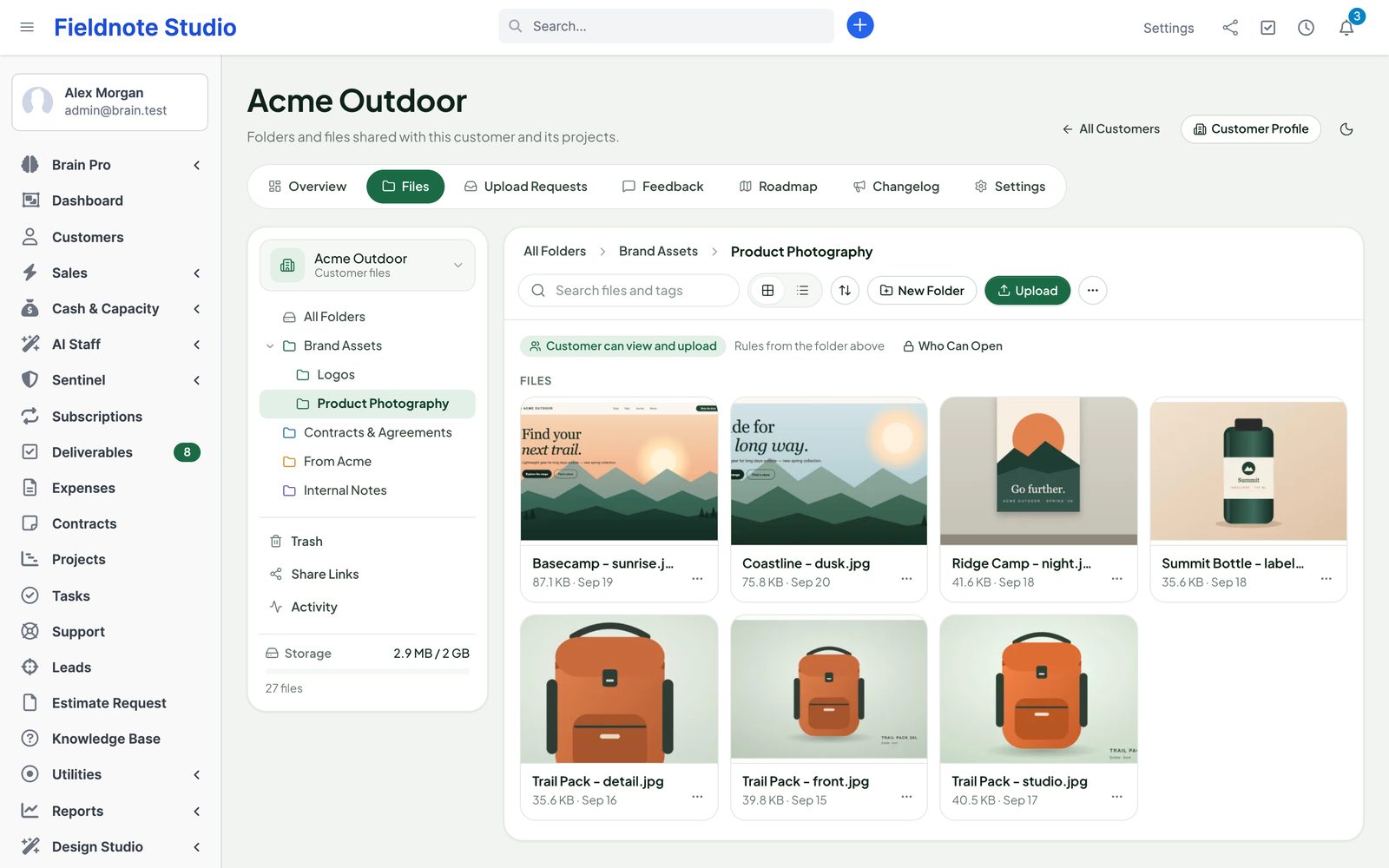
The files of a customer: folder tree, storage bar, access chip and photo thumbnails of a folder
Actual module interface on a Perfex 3.4.1 installation with fictional demonstration data.

Why Client Hub

Stop chasing files and feedback in email.

Contracts in one inbox, artwork in a file-transfer service, feature requests in a spreadsheet and "is this done yet?" in a chat. Client Hub puts all of it next to the customer in Perfex — and shows your clients only what is theirs.

"Can you send that file again?"

Attachments get lost, links expire, and nobody knows which version is the final one.

With Client HubEvery customer and project has its own folders with versions and previews. Clients find the latest file in the portal; you see who downloaded it.

"We still need your logo"

Asking for files means three reminder emails and a 25 MB attachment limit.

With Client HubSend an upload request with a due date and file types. The client uploads from the portal or a link — no account needed — and reminders go out on their own.

"Did anyone read my idea?"

Requests come in through every channel and disappear without an answer.

With Client HubClients post and vote on boards, see the status change, follow the public roadmap and get an email when it ships in the changelog.

Client Files

A private file hub per customer and per project.

  • Folders
  • Drag-and-drop upload
  • Large files
  • Versions
  • Previews
  • Tags & search
  • Per-folder access
  • Share links
  • Upload requests
  • Quotas
  • Trash
  • Activity log

Feedback & Roadmap

Ideas, bug reports and questions, in the open or private.

  • Boards
  • Voting
  • Comments & mentions
  • Internal notes
  • Statuses
  • Merge duplicates
  • Tickets, tasks, projects
  • Public roadmap
  • Changelog
  • Email updates
  • Widget
  • Moderation

Client files

A file hub for every customer and project.

Open a customer or a project and its files are there: a folder tree, thumbnails or a list, search across names and tags, and the storage bar. Drop files or whole folders; large files upload in parts and carry on after a dropped connection.

  • Folders and sub-folders, colours and descriptions, move, copy, rename, ZIP download
  • Versions: upload a new version with a note, see every earlier one, restore in one click
  • Previews for images, PDF, video, audio and text; office files show their type and download
  • Tags, descriptions, files hidden from the customer, trash kept for 30 days
  • Also on the customer profile and in the project, as tabs
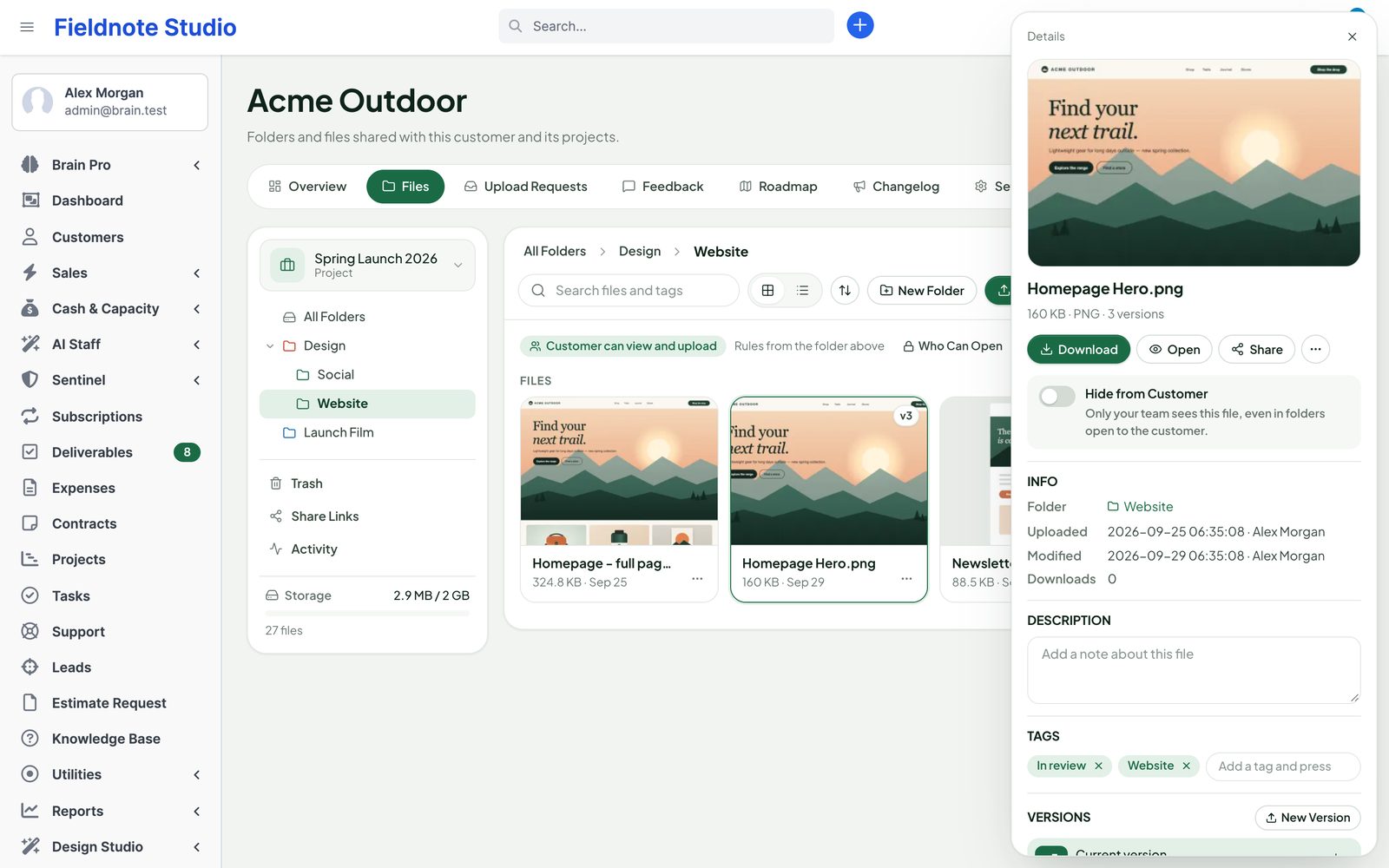
The details panel of a file with its preview, versions, tags and actions
Actual module interface with fictional demonstration data.
  • Who can open whatPer folder: customer contacts can view, upload or edit — all contacts or chosen ones. Staff by role, by customer or project, or named people. Internal folders stay staff-only.
  • Quotas and limitsLargest file, storage per customer and for the whole hub, versions to keep, accepted file types. Usage bars for each customer.
  • Activity logUploads, downloads, shares, access changes and deletions — filter it, export it as CSV.

Share links

Send a link, keep control.

Share a file or a whole folder with anyone — a printer, a partner, a freelancer — without creating an account. Every link has rules, and you can see and stop it at any time.

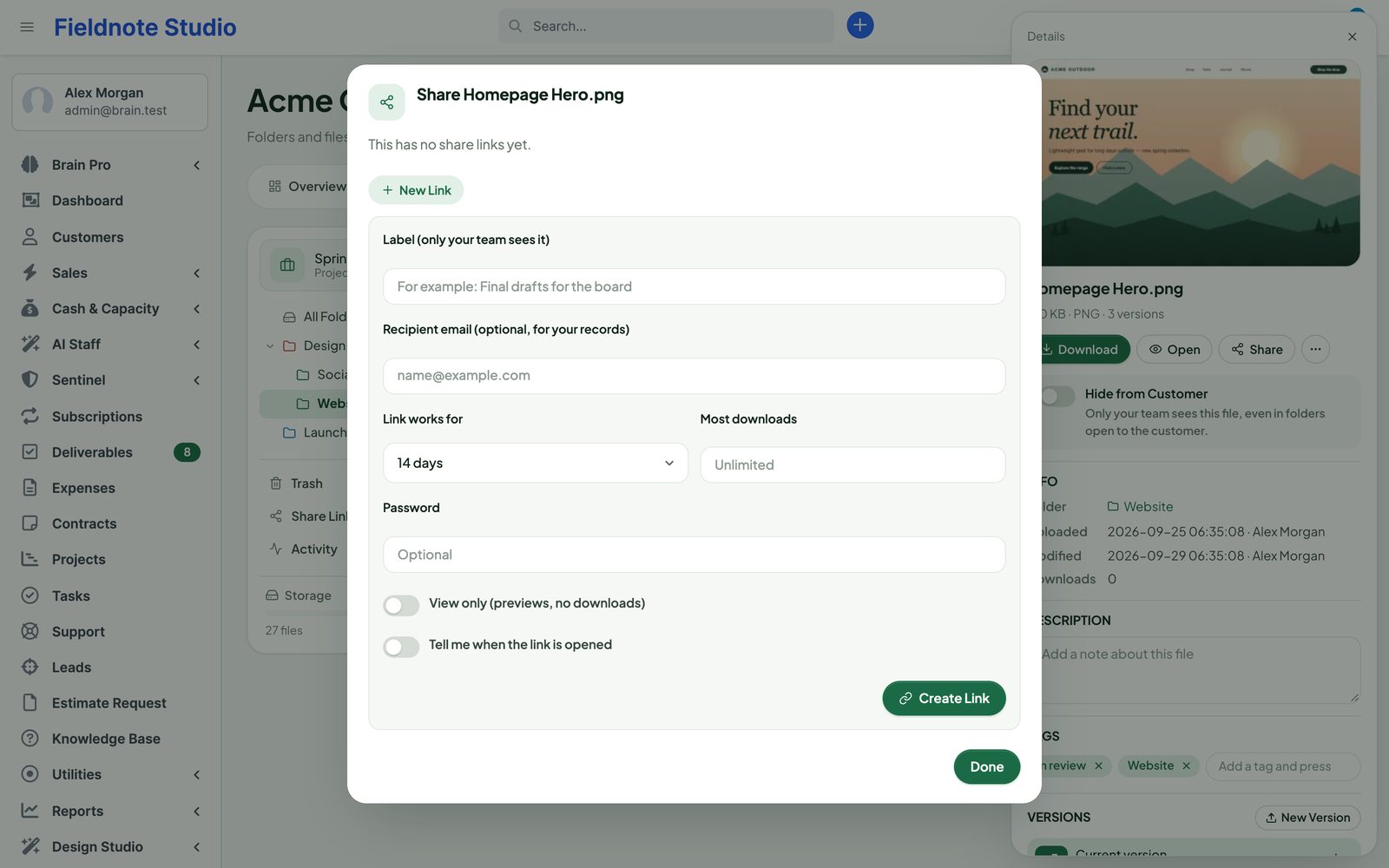
  • Expiry date, password and a maximum number of downloads
  • View-only links, or folder links that also accept uploads
  • Tell me when it is opened or downloaded; a log per link
  • Revoke a link in one click; all links of a customer on one page
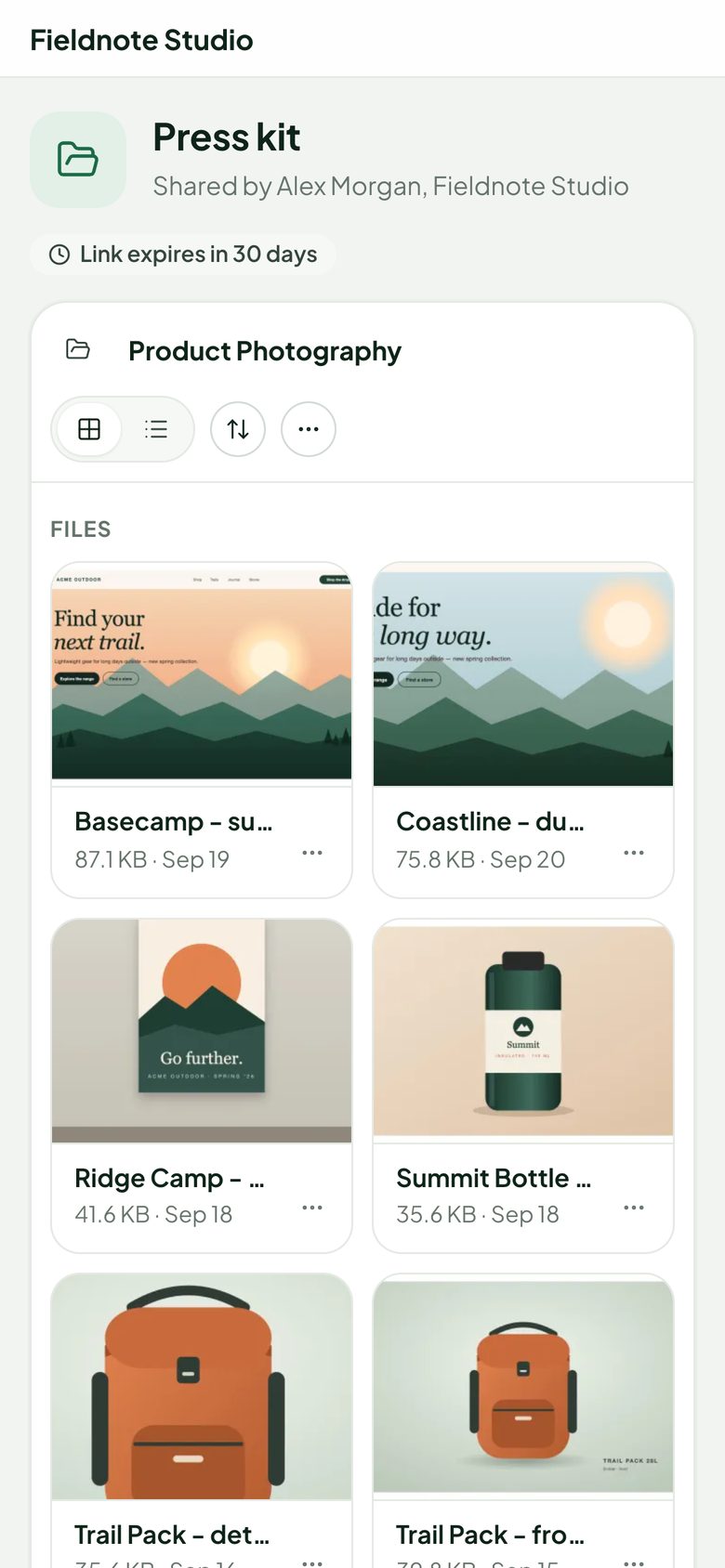
  • Share pages show only what was shared — never other folders, names or files
The share dialog of a file with expiry, password, download limit and notification options
The public page of a folder link on a phone

Upload requests

Ask for files. Get them on time.

Need a logo, a signed PO or 200 product photos? Send an upload request to a contact or to any email address. They upload from the portal or from the link in the email, straight into the folder you chose.

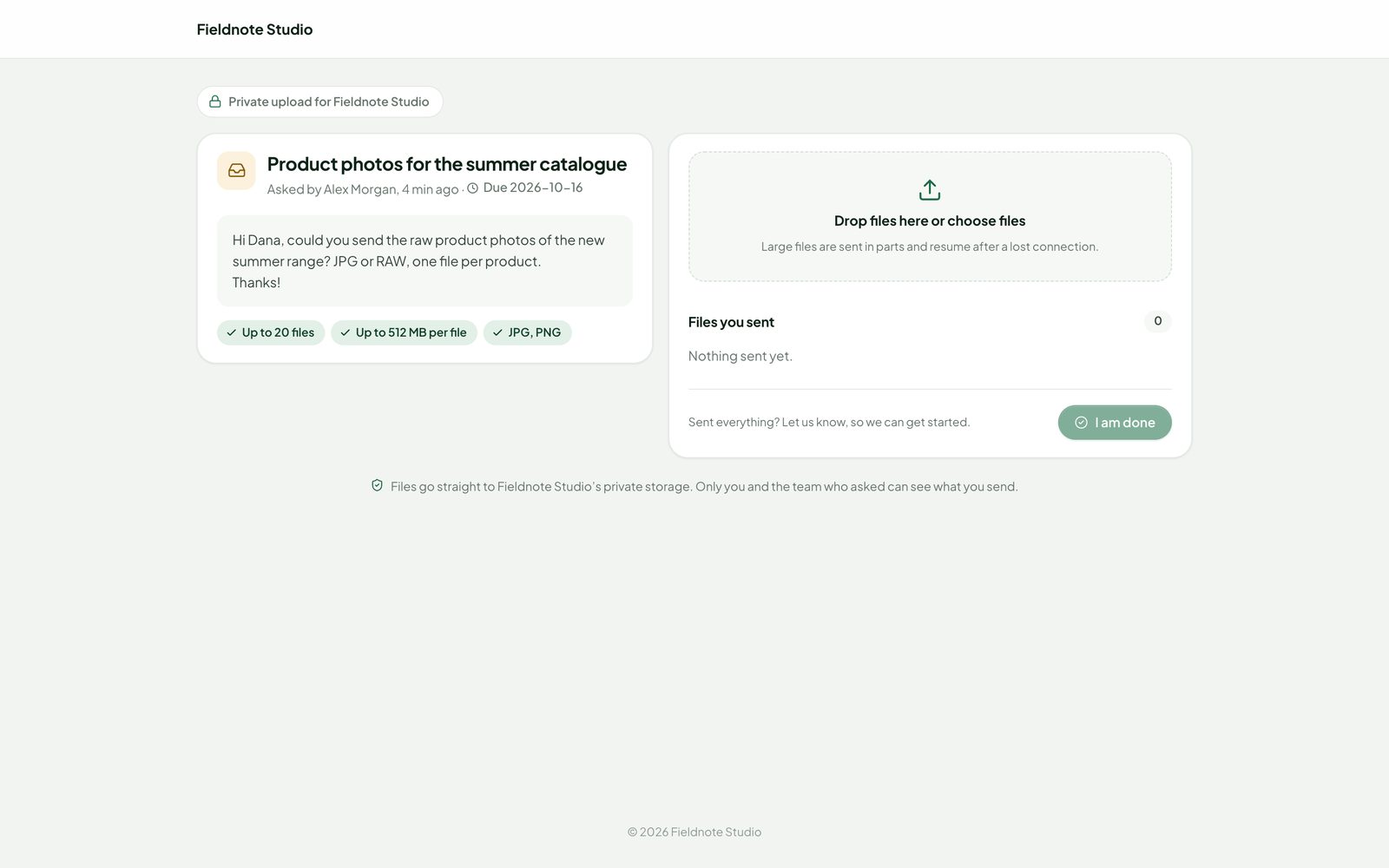
  • Due date, number of files, size and the file types you accept
  • Reminders two days before and one day after the due date
  • The client presses I am done — you get a bell and an email
  • Open, overdue and finished requests on one page, and on the overview
The upload page a client opens from a request email: who asks, the message, the due date and a drop zone
Actual module interface with fictional demonstration data.

Client portal

A home for your clients in the portal.

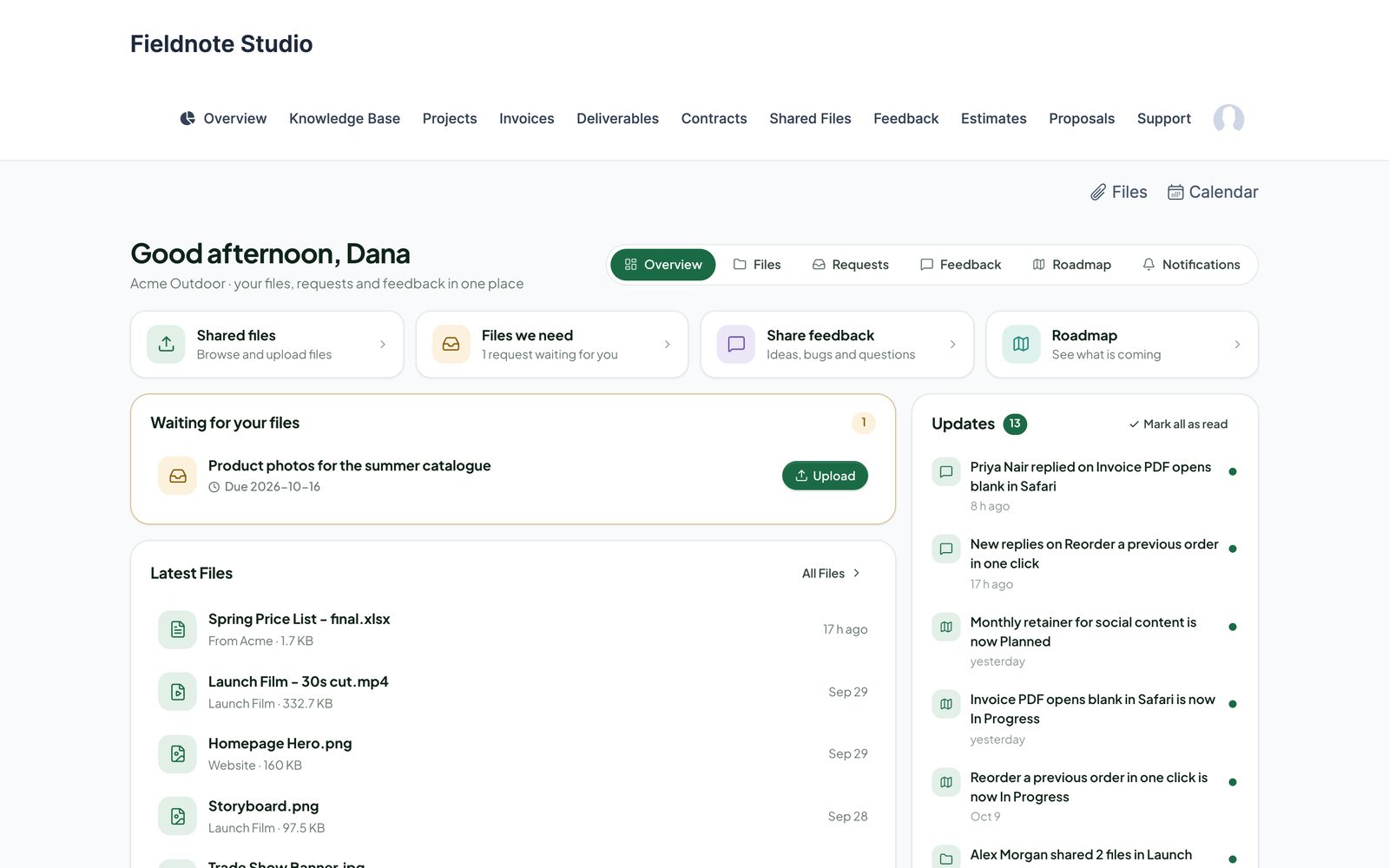
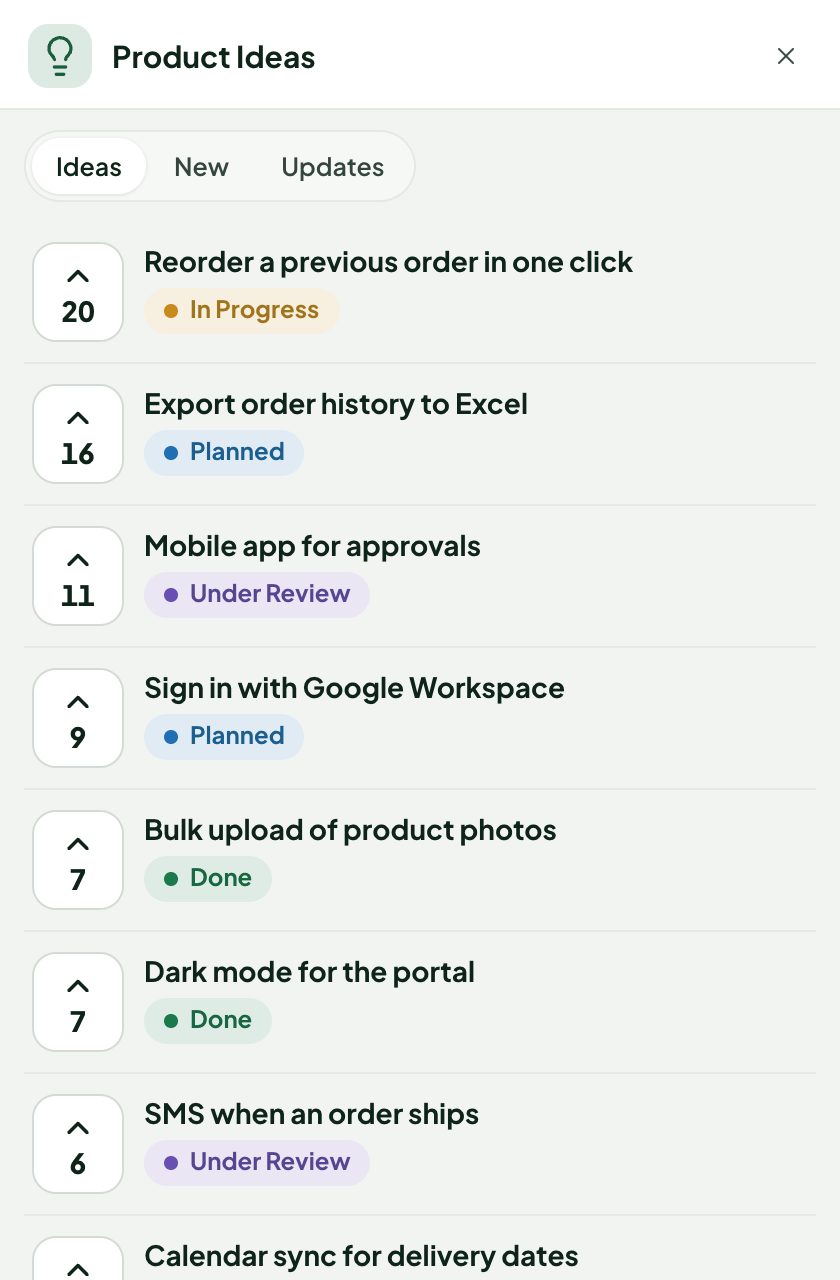
Signed-in contacts get a Client Hub home: requests waiting for them, the latest files, their feedback and an Updates list of what changed. It works with Perfex's customer theme and with the portal theme of Perfex Design Studio, light and dark, on phones too.

  • Files, Requests, Feedback and Roadmap in the customer menu — one item or separate ones
  • Contacts see only their own customer's folders, and only the ones open to them
  • Per contact: emails right away, a daily or weekly summary, or none
  • Perfex contact permissions decide who sees files and feedback
The Client Hub home of a contact in the client portal with a request waiting, latest files and updates
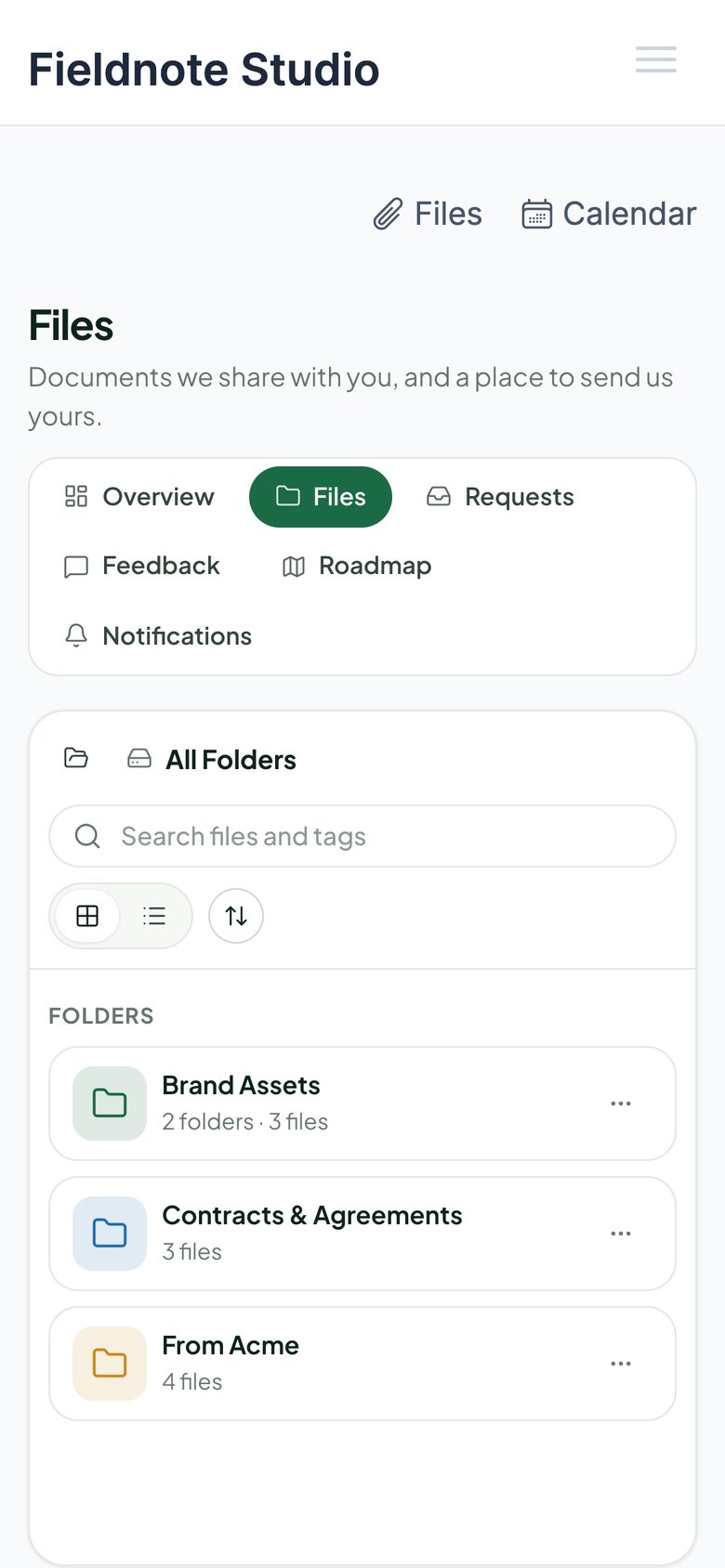
Shared files in the client portal on a phone

Feedback boards

Hear every client. See what matters most.

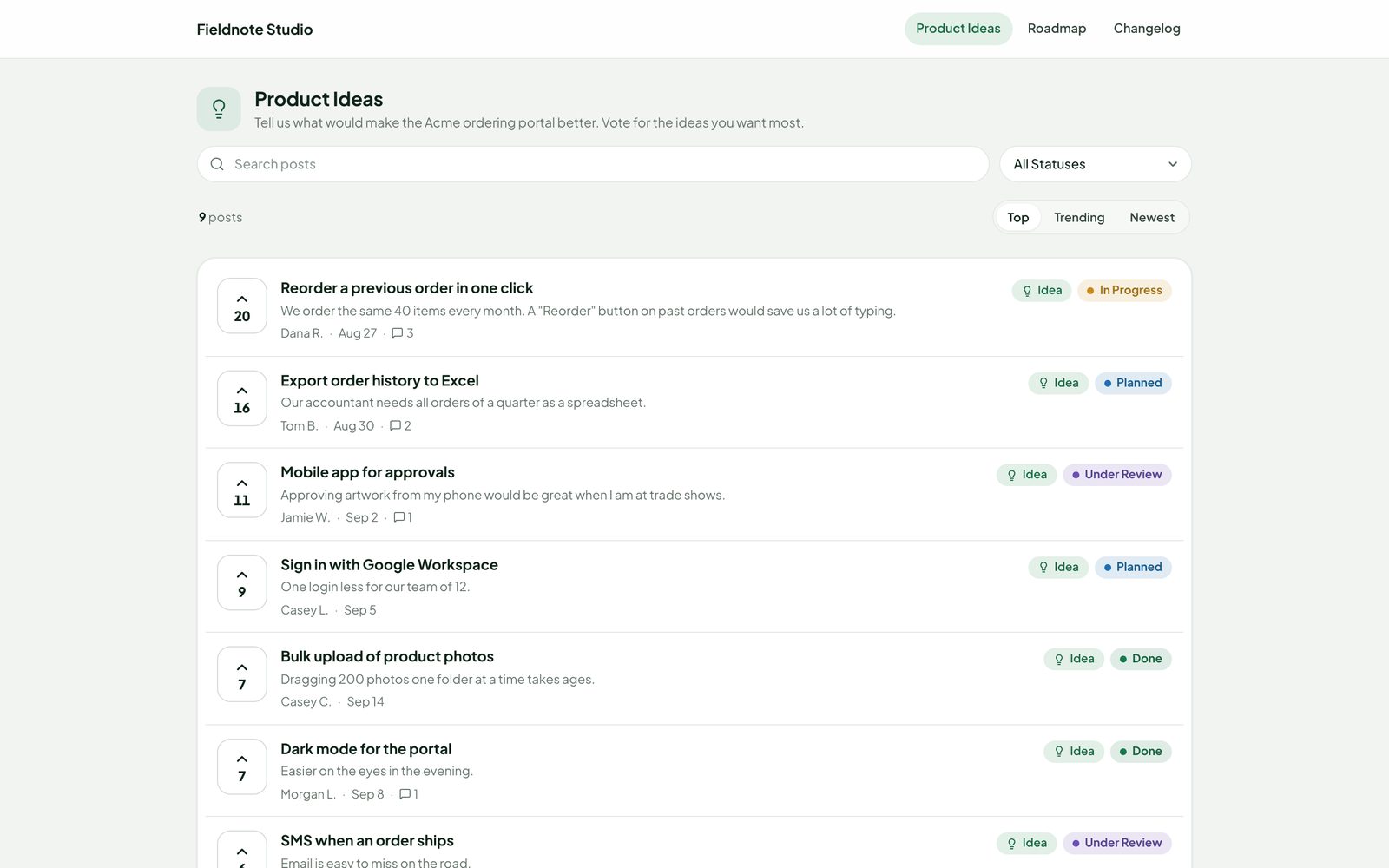
Boards collect ideas, bug reports and questions — public, for customers only, for one customer or for your team. The inbox sorts them by votes, trend, activity or the revenue of the customers who voted.

  • Votes from contacts, from staff on behalf of a customer (with a note), and from visitors confirmed by email
  • Bug reports with browser, system, steps and attachments; private to the customer if you like
  • Comments with mentions, internal notes for staff, a moderation queue
  • Statuses with a public note: Under Review, Planned, In Progress, Done, Declined — or your own
  • Merge duplicates (votes move along, undo is one click); link or create Perfex tickets, tasks and projects
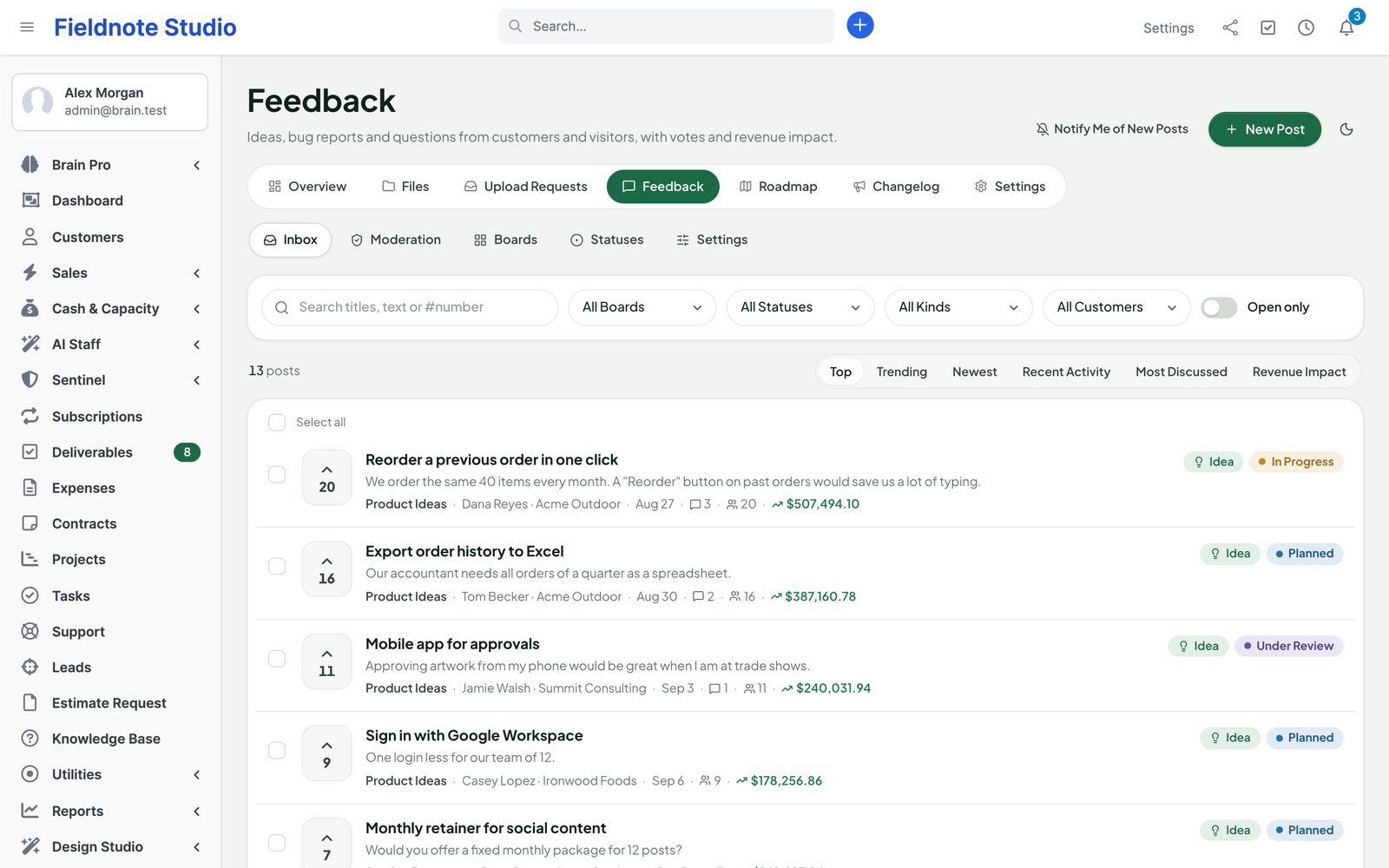
The feedback inbox: posts with votes, statuses, customers and revenue impact, with filters and sorting

Roadmap

Show what is coming. Move it with a drag.

The staff roadmap is a board of Planned, In Progress and Done. Drag a card to change its status and everybody who voted or follows it hears about it. Clients see the same roadmap in the portal, and the public one on its own page.

  • Public roadmap page in your brand, light or dark, with voting for visitors if you allow it
  • Customers-only boards stay out of the public roadmap; private posts never show
  • Let search engines index the roadmap and changelog, or keep them unlisted
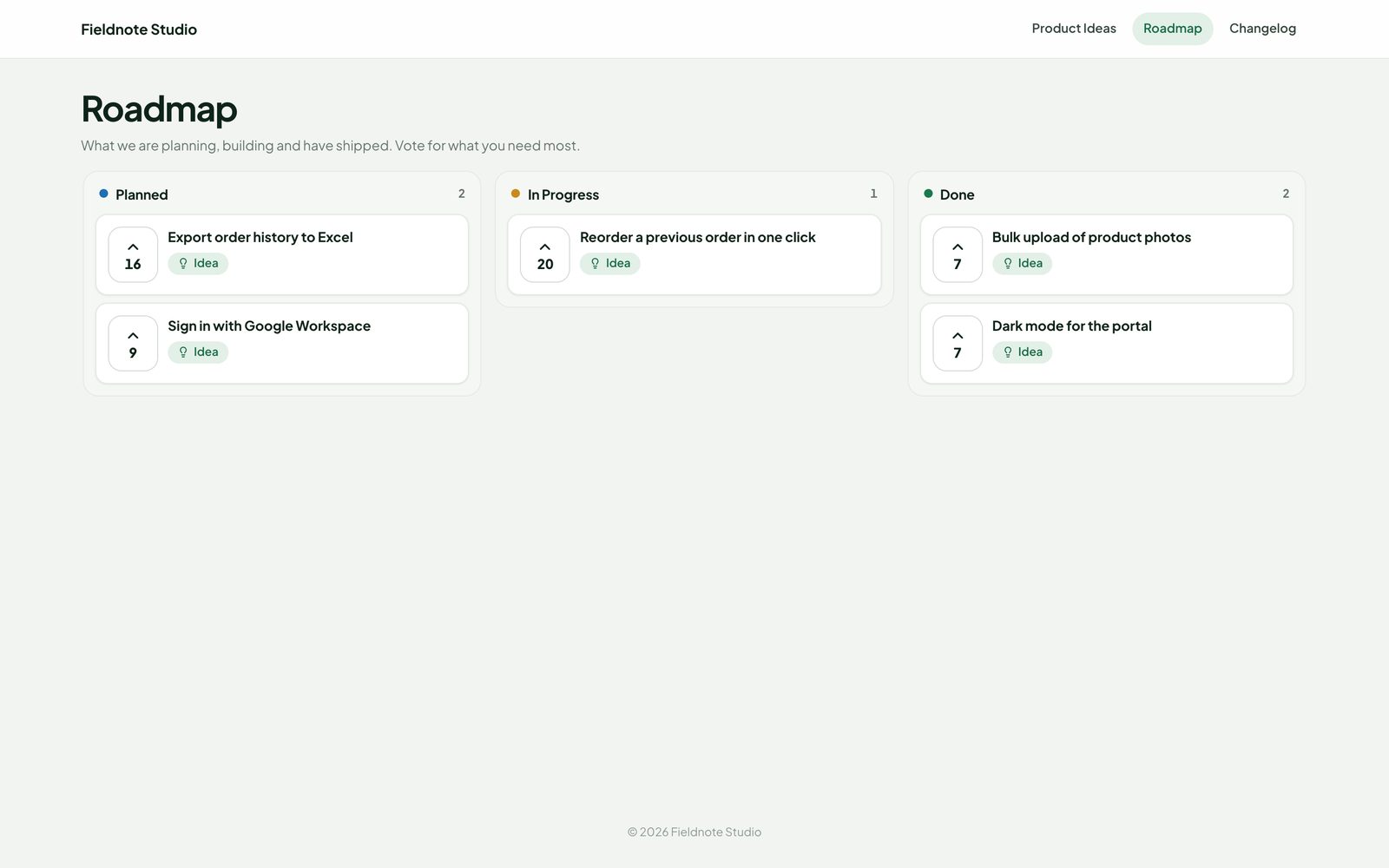
The public roadmap page with Planned, In Progress and Done columns and vote counts
Actual module interface with fictional demonstration data.

Changelog

Close the loop when it ships.

Write a changelog entry, link the posts it answers, and publish now or at a set time. Everybody who voted for those posts gets an email; subscribers get the news too.

  • Categories New, Improved, Fixed and Announcement; public or customers-only entries
  • Email subscriptions with confirmation, one-click unsubscribe, an Atom feed
  • Linked posts can be marked Done when the entry is published
  • Draft changelog from the posts that shipped since the last entry — you edit, you publish
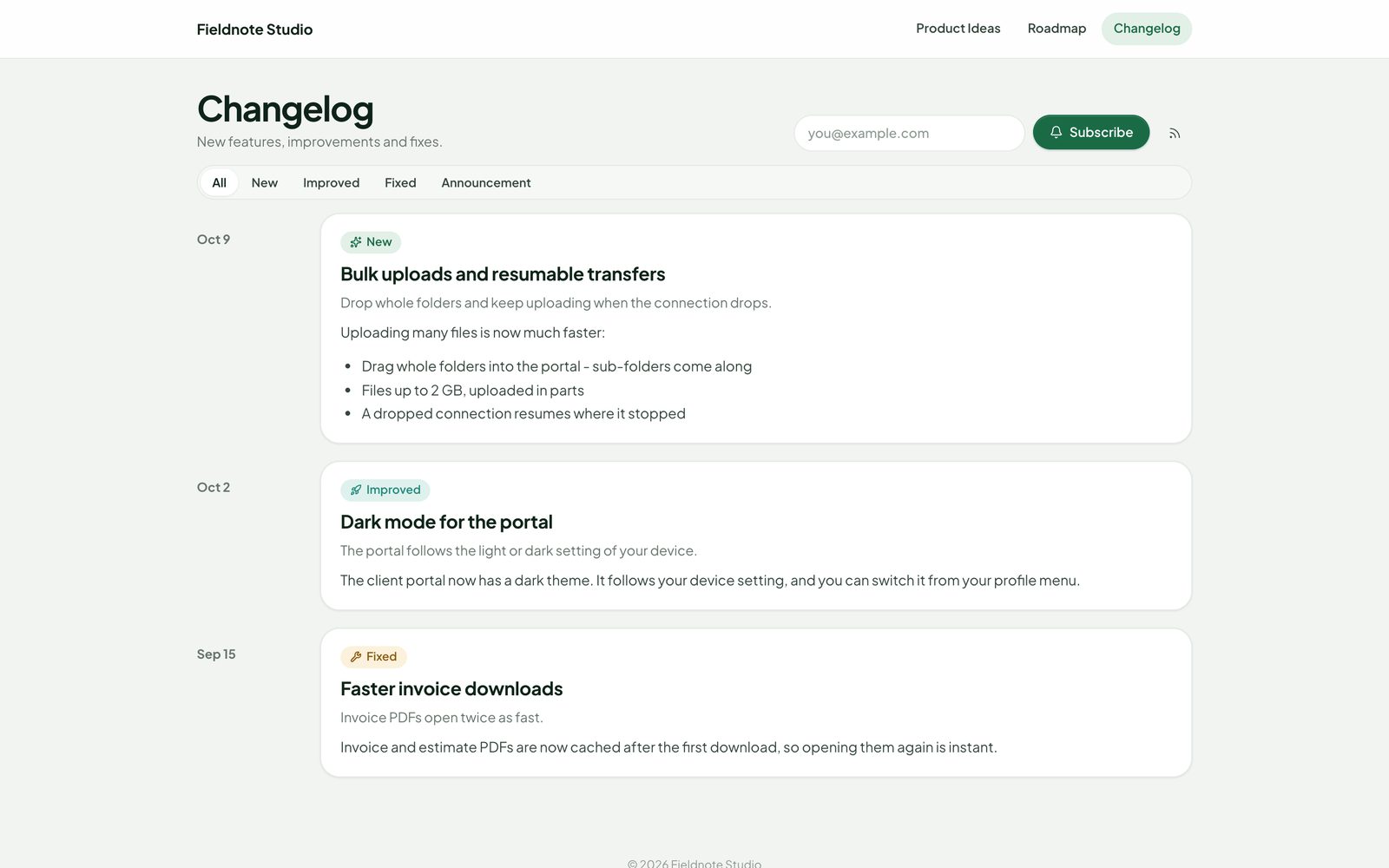
The public changelog with entries, categories and a subscribe box
Actual module interface with fictional demonstration data.

Embeddable widget

Collect feedback on your own website.

Paste one line of script and a feedback button appears on your website or app. Visitors see the top ideas of a public board, vote and — if you allow it — post, and get similar posts suggested before they write a duplicate.

  • Only on the websites you list; signed tokens, honeypot and rate limits on every request
  • Posts from visitors wait in the moderation queue; spam words are blocked
  • Switch the widget off for one board or for the whole hub
A public feedback board with ideas, votes and statuses
The feedback widget with top ideas and a vote button

AI helpers

Help with the busywork. You decide.

With Perfex AI Staff installed, Client Hub proposes — it never changes anything on its own. Each proposal waits on the post with Apply and Dismiss, for staff with the right to make that change.

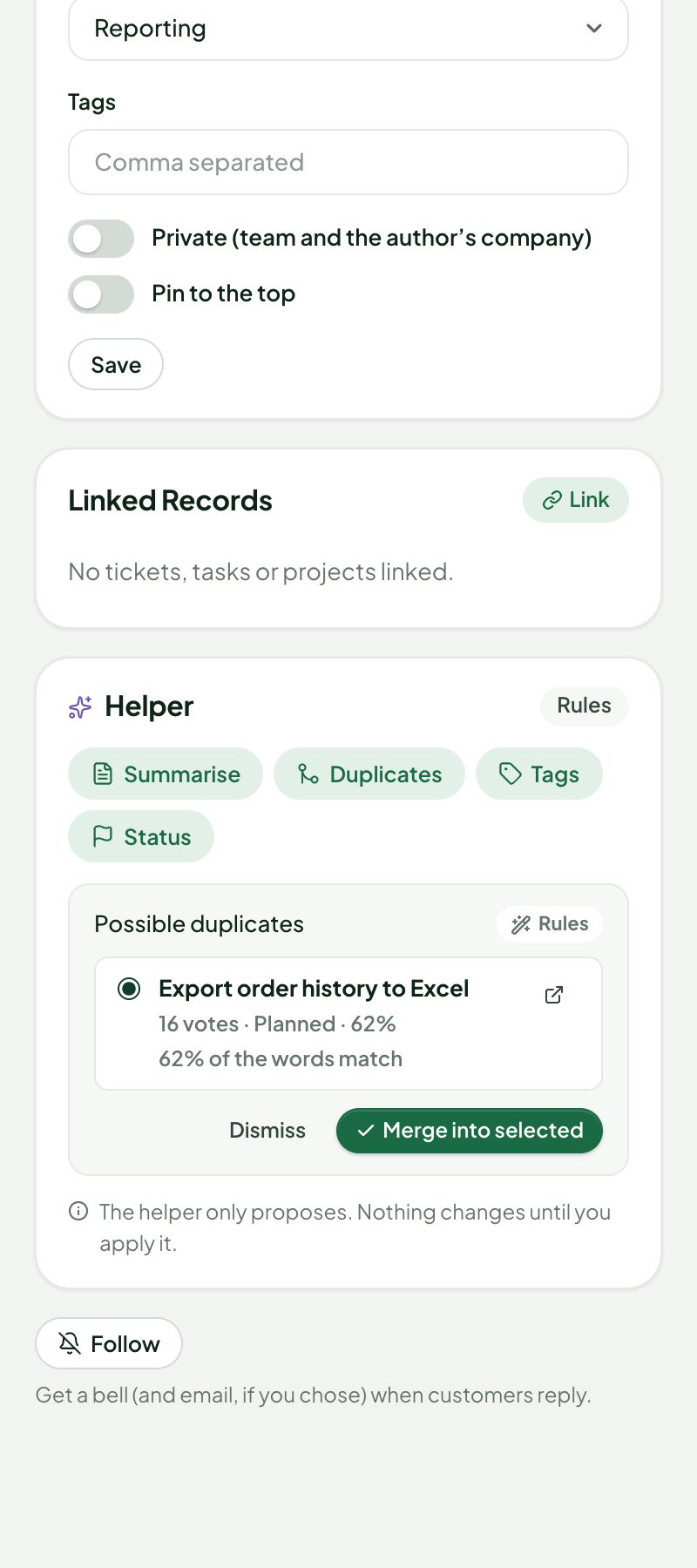
  • Duplicates: new posts are checked against open ones; merge in one click
  • Summaries of long threads, tags and a status from linked tasks and tickets
  • Changelog drafts from the posts that shipped
  • Tag suggestions for files from their names and folders
  • No author names, email addresses or file contents are sent; without AI the same buttons use simple built-in rules
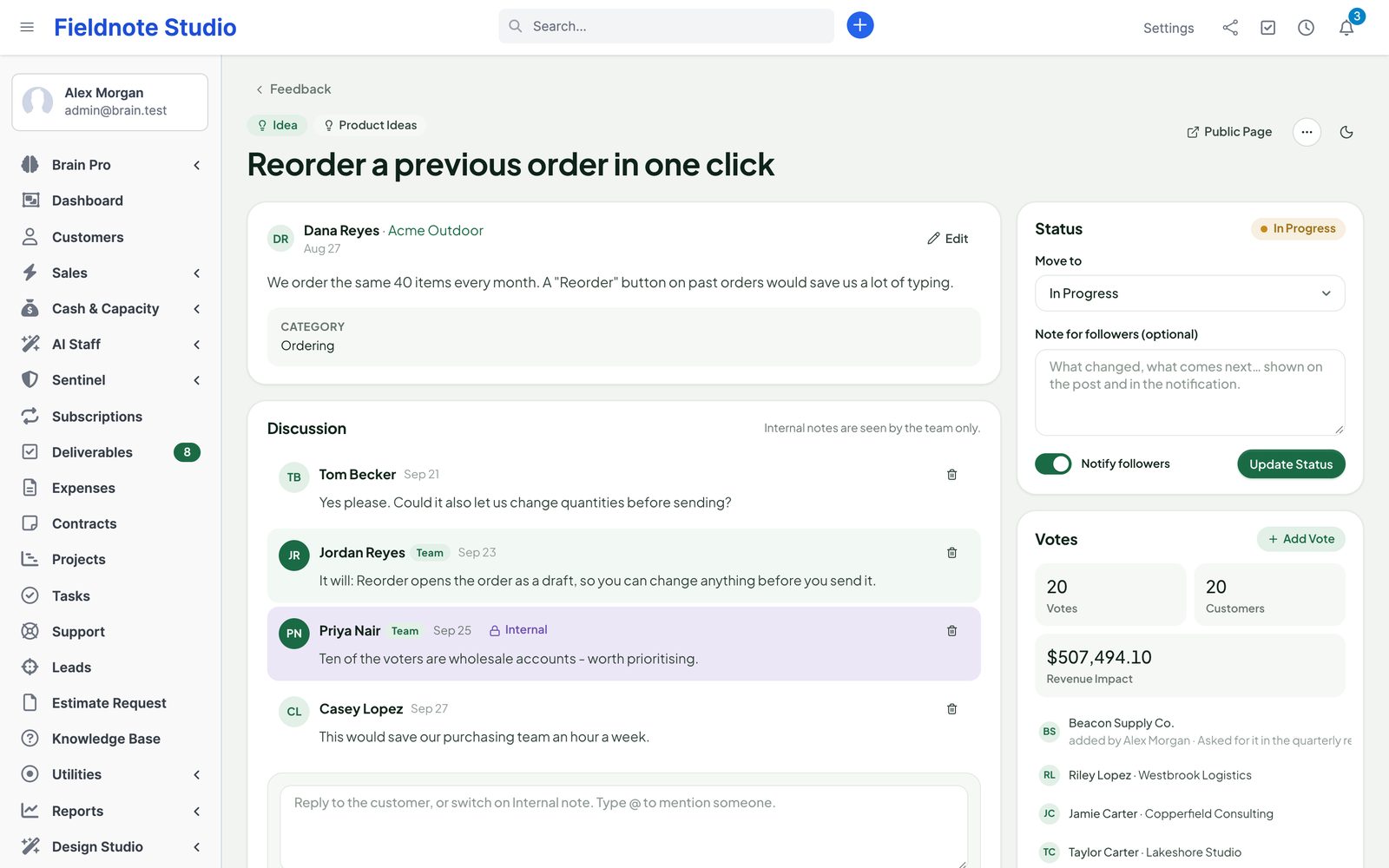
A feedback post for staff: status with a note for followers, votes with customers, discussion and an internal note
The helper card of a post proposing a likely duplicate with Merge into selected and Dismiss

Integrations

Works on its own. Plugs into our other modules.

▤

Perfex itself

Customer and project tabs, Perfex permissions and contact permissions, the customer menu, Perfex email templates and bells, and Save PDF to Client Hub on invoices and estimates.

✓

Perfex Deliverables

File approved deliverables into the project's Client Hub folder — by hand or automatically. New versions become versions, never duplicates.

✎

Perfex Document Studio

Invoice and estimate PDFs filed into the hub use your Document Studio design when it is active.

✦

Perfex AI Staff

Duplicate checks, summaries, tags, statuses and changelog drafts — proposals only, with AI Staff's provider, budgets and usage log.

▦

Perfex Brain Pro

Seven widgets: storage by customer, files added, files from customers, open share links, open feedback, top voted and roadmap progress.

⛨

Perfex Sentinel

Share links, downloads, access changes and deletions in Sentinel's audit log. Portal pages follow Design Studio's portal theme.

Security & storage

Private files stay private.

Files are kept outside the web folder by default, under random names, and reach a browser only through a page that checked who is asking. Public pages show only what they were made for and are rate limited.

  • Every upload is checked by its content; scripts and programs are refused, also behind a double extension such as .php.jpg
  • Downloads with safe headers (nosniff, content security policy, attachment for anything that could run)
  • Share and request tokens stored only as keyed hashes; passwords hashed; tries limited
  • Visitor IP addresses are never stored, only a keyed hash for rate limits
  • Every change is a POST with Perfex's CSRF token and a permission check
  • A main switch, an empty DISABLE file or PCH_SAFE_MODE turns the client side off at once
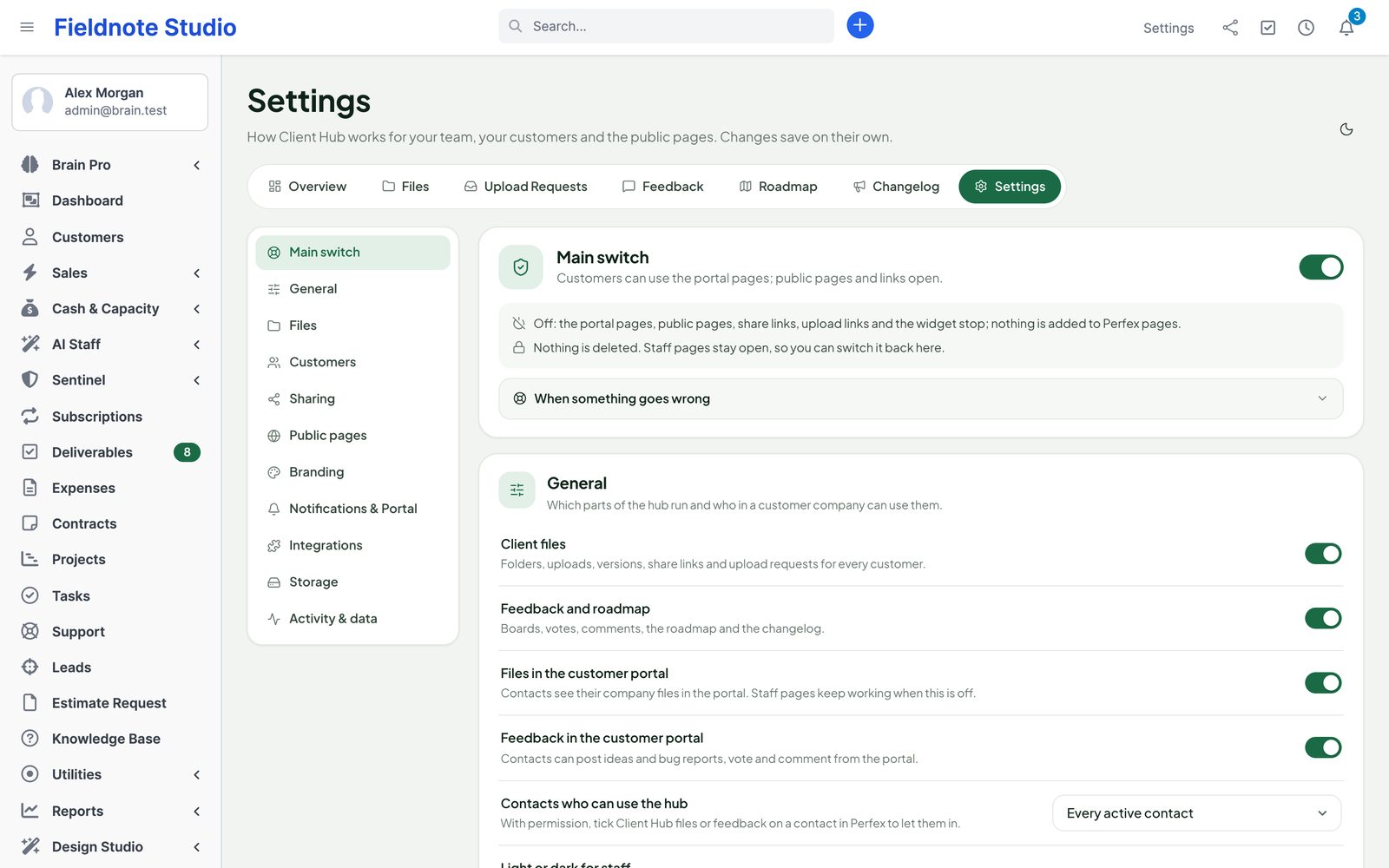
Client Hub settings: parts on or off, files, sharing, storage, public pages and branding
Actual module interface with fictional demonstration data.

Up and running in three steps

  1. 1

    Upload and activate

    Setup › Modules › Upload the zip and activate Perfex Client Hub. The Overview shows where files are stored and that the folder is private.

  2. 2

    Give access

    Choose the staff roles that see files and feedback, and which contacts see them in the portal. Set quotas and the file types you accept.

  3. 3

    Share and listen

    Add folders for your first customer, send an upload request, and open a feedback board. Turn on the public roadmap when you are ready.

Roadmap

What comes next for Client Hub

What we are building and planning. Plans can change, and we never promise dates: an item ships when it is ready and tested.

  • Next

    NPS surveys

    Ask customers how likely they are to recommend you, and follow up on the answers.

  • Planned

    Rewards and partner blocks

    Sales Growth points, tiers and partner links in the portal.

  • Planned

    Switch from other file-sharing modules

    Read-only import of shared files and folders, with undo by batch.

  • Planned

    One-click updates

    Update the module from the Perfex admin, with a backup first and a way back.

Pricing

One price. Every customer, every file.

Perfex Client Hub

$99one-time

One installation, every staff member, customer and contact. Licence and support terms are shown on the SellMyCode listing. No per-user or per-gigabyte fees. Sold by SellMyCode.

Buy on SellMyCode Read the documentation
  • File hub per customer and project: folders, versions, previews, tags, search, trash
  • Large, resumable uploads with folder drag and drop
  • Per-folder access for staff, roles and customer contacts
  • Share links with expiry, password, download limits and upload folders
  • Upload requests with due dates, file rules and reminders
  • Storage quotas, activity log with CSV export
  • Client portal home, files, requests, feedback, roadmap and notification choices
  • Feedback boards with voting, comments, statuses, merging, moderation and spam protection
  • Links to Perfex tickets, tasks and projects
  • Public roadmap, changelog with email subscriptions and an Atom feed
  • Embeddable feedback widget
  • 16 email templates, bells, daily or weekly summaries
  • AI helpers through AI Staff (optional); Deliverables, Document Studio, Brain Pro and Sentinel integrations
  • Module zip, offline documentation and license notices

Interface in nine languages. Optional AI help is billed by your AI provider through Perfex AI Staff; Client Hub works completely without it.

Questions

Where are the files stored?

By default in a folder next to your Perfex folder, outside the web root, so no file can be opened by its address. You can choose another place with PCH_STORAGE_PATH in app-config.php. If neither is writable, the hub uses a protected folder inside uploads/ and the settings page shows the server rules to add.

How large can files be?

You set the limit (512 MB by default, up to 20 GB). Files are uploaded in parts, so PHP's own upload limit does not matter, and an upload continues after a dropped connection.

Does it replace Perfex's own customer files?

No. Perfex's customer files stay as they are. Client Hub adds its own folders, which you can show in the customer menu as one Client Hub item or as separate items.

Can my clients see each other's files or feedback?

No. A contact only sees folders of their own customer that are open to them, and posts on boards they may see. Private bug reports are seen only by staff, the author and colleagues of the same customer. Public pages never show private posts, internal notes or other folders.

Do people need an account to use a share link or upload request?

No. Links work without signing in, with the rules you set: expiry, password, download limit. Contacts who are signed in to the portal see their requests there too.

Can visitors vote on the public roadmap?

If you allow it. Votes from visitors are confirmed by email (or counted anonymously with limits, your choice). Posts from visitors wait for moderation.

Does it need AI?

No. AI helpers need Perfex AI Staff and an AI provider. Without them the same buttons use simple built-in rules, and everything else works the same.

Does it change Perfex core files?

No. Client Hub uses Perfex's module hooks, its own tables and Perfex's email templates. Deactivate it and the portal menu items, tabs and public pages are gone at once; your data stays until you uninstall.

What are the requirements?

Perfex CRM 3.4 or newer (tested on 3.4.1), PHP 8.0 or newer with the fileinfo extension, MySQL or MariaDB, and Perfex's cron for emails and reminders. GD for thumbnails and ZipArchive for folder downloads are recommended.

Is it translated?

Yes. The interface ships in English, Spanish, Portuguese (Brazil), French, German, Italian, Dutch, Turkish and Russian, and emails use Perfex's email templates in each contact's language.

How do I get support?

Contact us through sellmycode.net. Six months of support are included with every licence. Please add the module, Perfex and PHP versions and a screenshot — never passwords.
Give your clients one place to go.

Files, requests, ideas and the roadmap — next to the customer in Perfex, private where it should be and public where you want it.