For Perfex CRM 3.4 · Catalog · Inventory · Fulfillment · Purchasing · WooCommerce · Shopify

Products and stock.
Inside Perfex, done right.

Product Hub turns Perfex items into a real catalog with stock in several warehouses, lots and serials, reservations from invoices, deliveries, purchase orders and a customer catalog — and publishes held stock to WooCommerce or Shopify without ever overwriting a store with a guess.

  • 1append-only stock journal: every unit and every cost traceable
  • 2valuation methods: weighted average or FIFO
  • 2stores: WooCommerce and Shopify, with held stock pools
  • 0Perfex core files changed — your items stay native
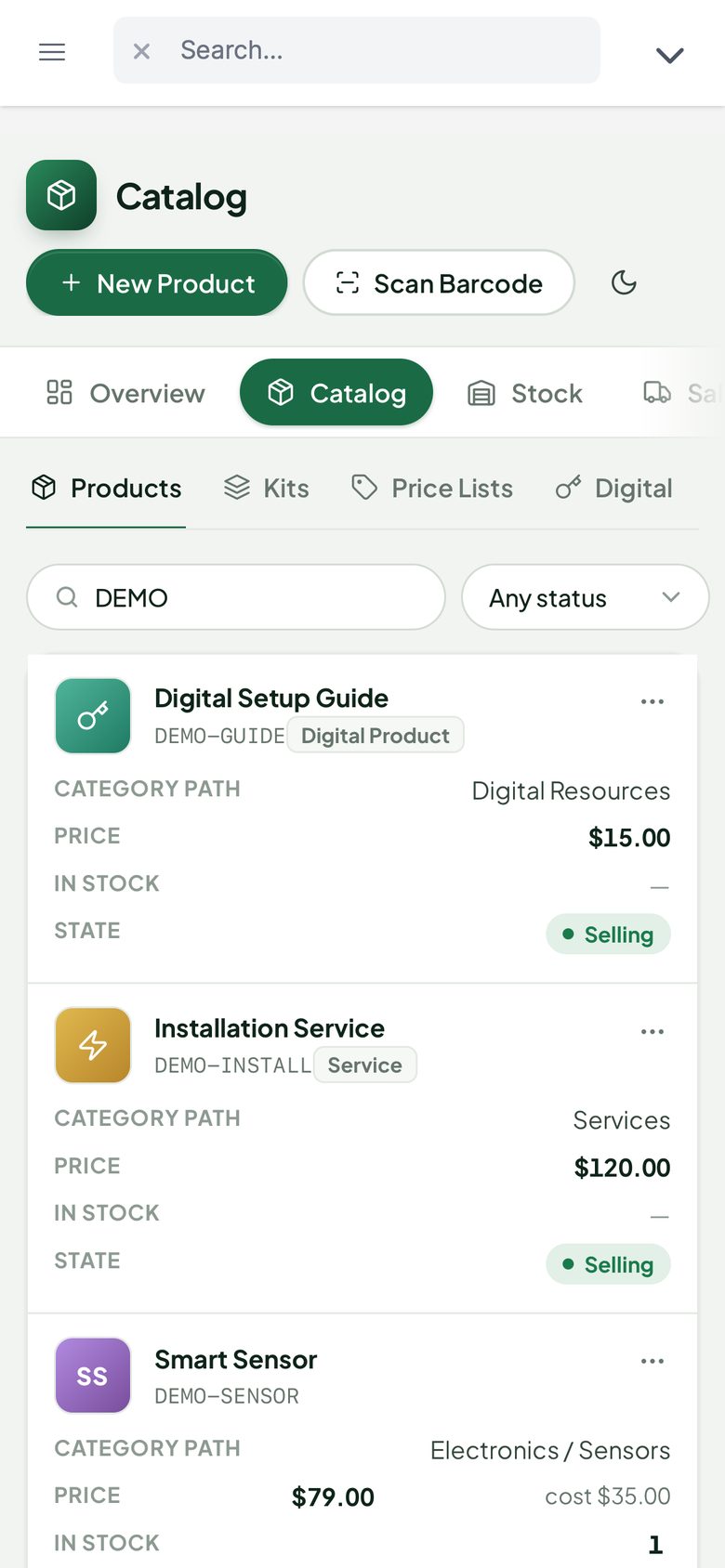
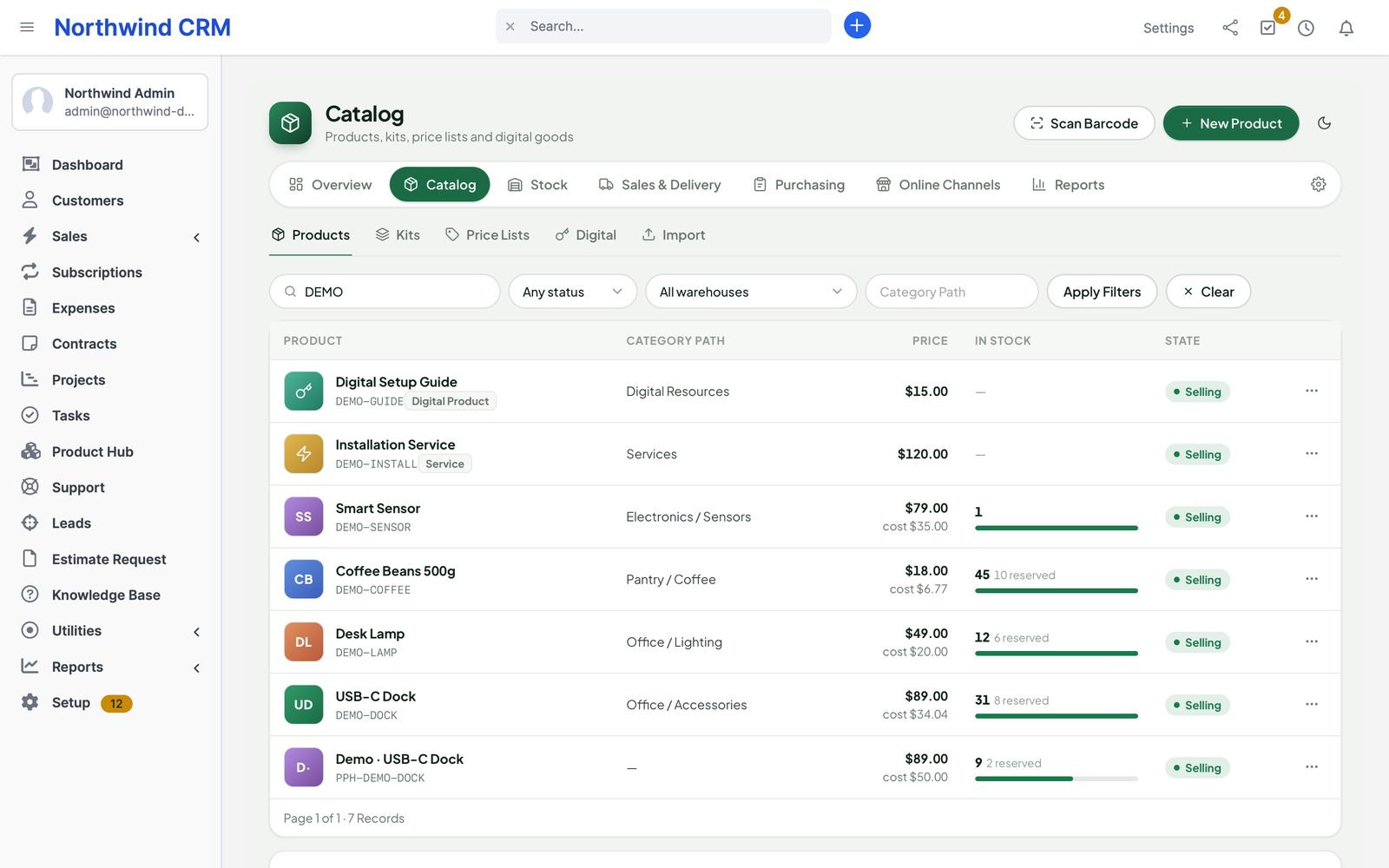
The Product Hub products list with SKU, lifecycle state, price, sellable and on-hand stock and quick actions
Actual module interface on a Perfex 3.4.1 installation with fictional demonstration data.

Why Perfex Product Hub

Sell what you have. Know what it cost.

Perfex has items but no stock. Teams that sell physical goods end up with a spreadsheet next to the CRM — and a store that sells what is no longer on the shelf.

“How many do we really have?”

Stock lives in a spreadsheet that nobody trusts after the first busy week.

With Product HubEvery receipt, transfer, reservation, delivery and adjustment is a journal row. On hand, reserved and sellable come from that journal — per warehouse, lot and serial.

“We invoiced it, then found it was gone.”

Two people sell the last unit; the store sells it a third time.

With Product HubInvoices and accepted estimates reserve stock. Stores only ever see a pool you hold for them, so the CRM and the shop never sell the same unit twice.

“What was our margin on that order?”

Cost prices change; nobody knows what a delivered unit actually cost.

With Product HubEach delivery freezes its revenue and cost of goods. Landed costs added later are allocated properly, and history is never silently rewritten.

What is inside

Five parts. One stock journal.

  • CatalogProducts, variants, kitsGoods, services, variant matrices, kits and digital products on top of Perfex items, with lifecycle approvals, attributes, files and price lists.
  • InventoryWarehouses and stockSeveral warehouses and bins, lots, serials and expiry, transfers, counts, approved adjustments, average or FIFO cost and landed costs.
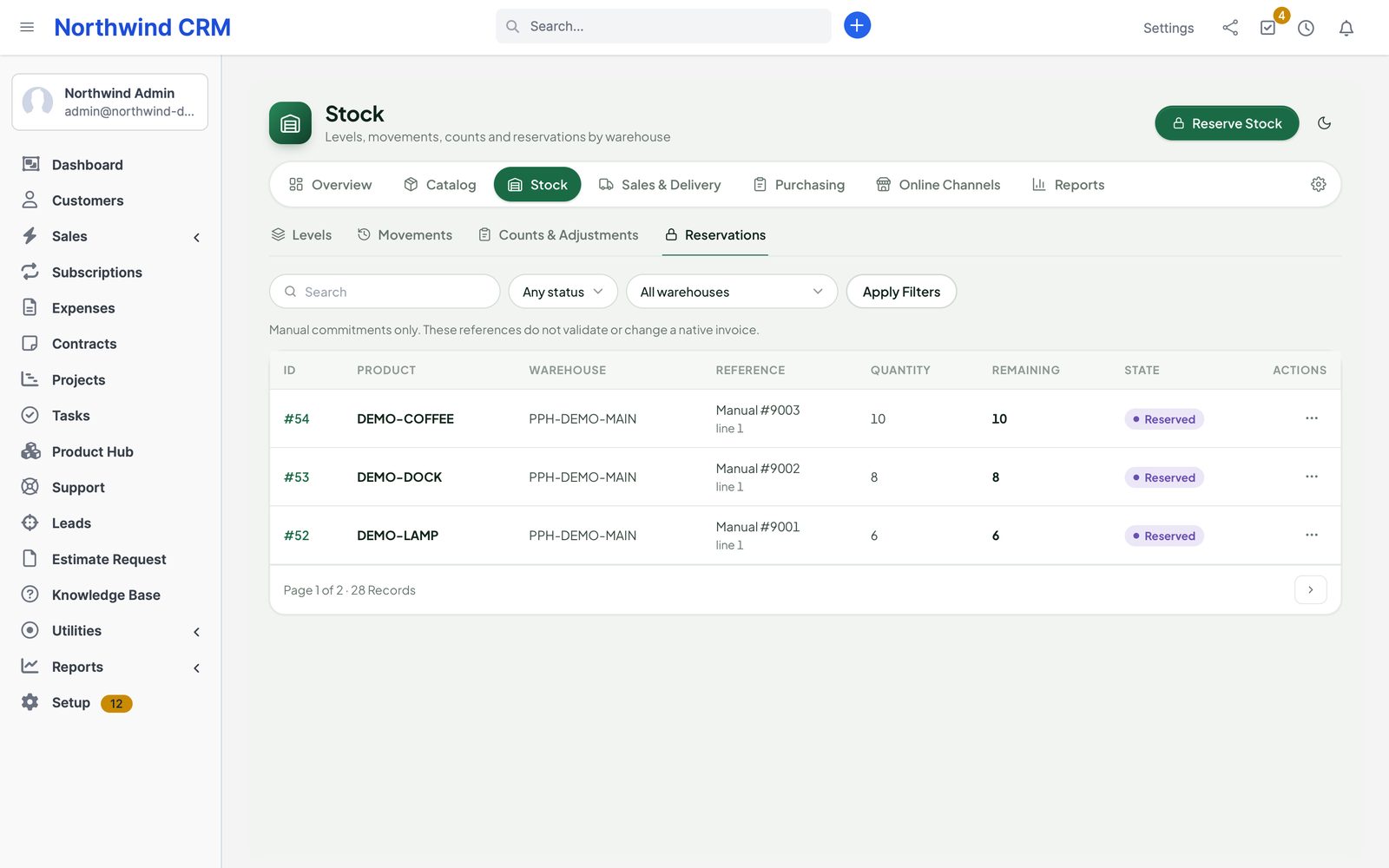
  • FulfillmentReserve, pick, deliverReservations from invoices and estimates, partial deliveries, tracking, delivery notes, returns and frozen margins.
  • PurchasingSuppliers and ordersLight purchase orders, approvals, partial receipts and reorder suggestions from min/max and demand.
  • ChannelsStores and customersWooCommerce and Shopify stock pools and order import, plus a customer catalog with quotes, reorders and downloads.

Catalog

Your Perfex items, grown up.

Adopt existing Perfex items or create products. Product Hub keeps the native item as the source of truth, so invoices, estimates and every other module keep working with the same item IDs.

  • Kinds: physical goods, services, variants, kits mixing services and components, digital products
  • Lifecycle: draft, review, selling, discontinued, archived — with approval if you want it
  • Price lists by currency, customer group, quantity, dates and priority
  • Category paths, brands, attributes, dimensions, HS codes and private files
  • CSV or Excel import with a dry run, row fixes and undo
  • Labels as Code 128, EAN-13 or QR on A4 or label rolls; camera or keyboard scanning
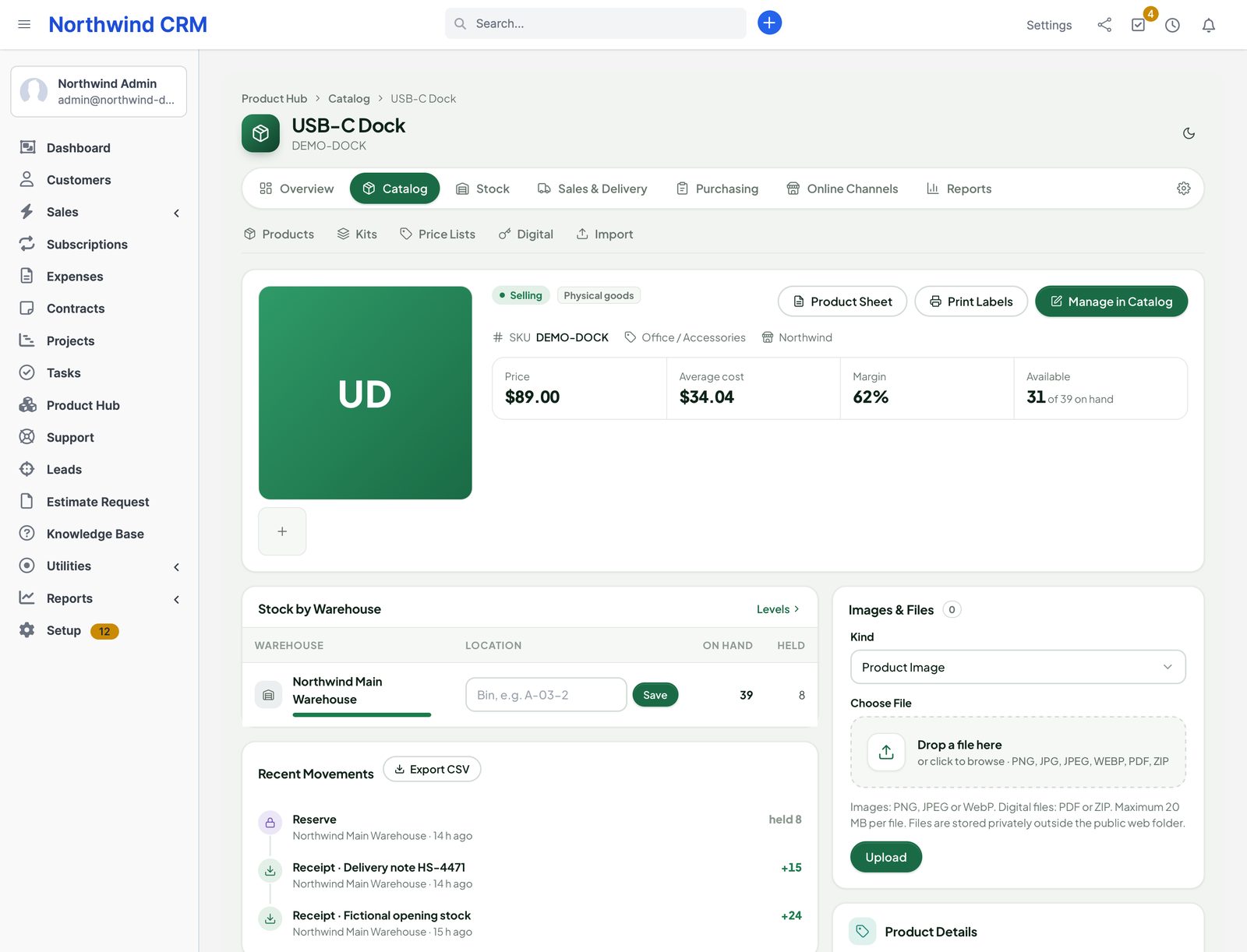
A product workspace with details, variants, price rules and stock by warehouse

Inventory

Every unit accounted for.

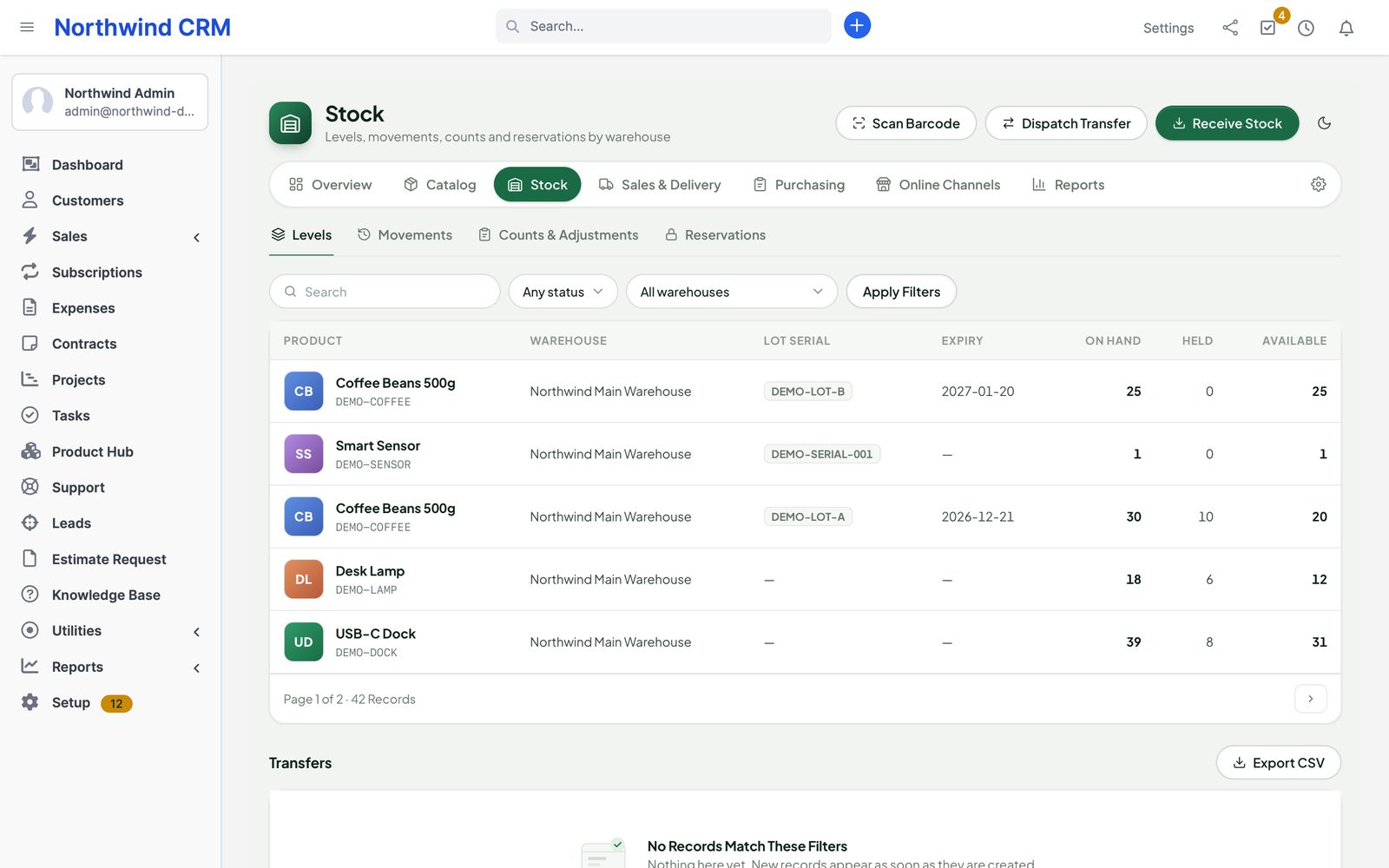
Receive into a warehouse with quantity, cost, lot, serial and expiry. Move stock between warehouses with an in-transit step, count it with the warehouse frozen, and correct it only through approved adjustments.

  • Weighted average by default, FIFO chosen once before the first posting
  • FEFO: expiring lots are reserved first
  • Transfers with partial receipt and loss or damage
  • Stock counts with review and a single posting
  • Late landed costs split between remaining stock and what was already sold
  • Stock, expiry, low-stock, dead-stock, valuation and movement reports with export
  • Integrity check that compares balances with the journal
Inventory by product and warehouse with lots, expiry, on hand and held quantities

Fulfillment

From invoice to delivery note.

Perfex invoices and accepted estimates reserve the exact products on their lines. Deliver all at once or in parts, add the carrier and tracking number, print the delivery note — and the margin of each delivered line is frozen at that moment.

  • Reserve on invoice or on accepted estimate; deliver manually or by policy (for example only when paid)
  • Partial deliveries and grouped delivery notes
  • Returns received at original cost after inspection
  • Stock and price shown on Perfex's own invoice and estimate forms
  • Paid digital products delivered as one-time download links or licence keys
Sales fulfillment: invoices with reserved, delivered and remaining quantities and delivery actions

Purchasing

Order before you run out.

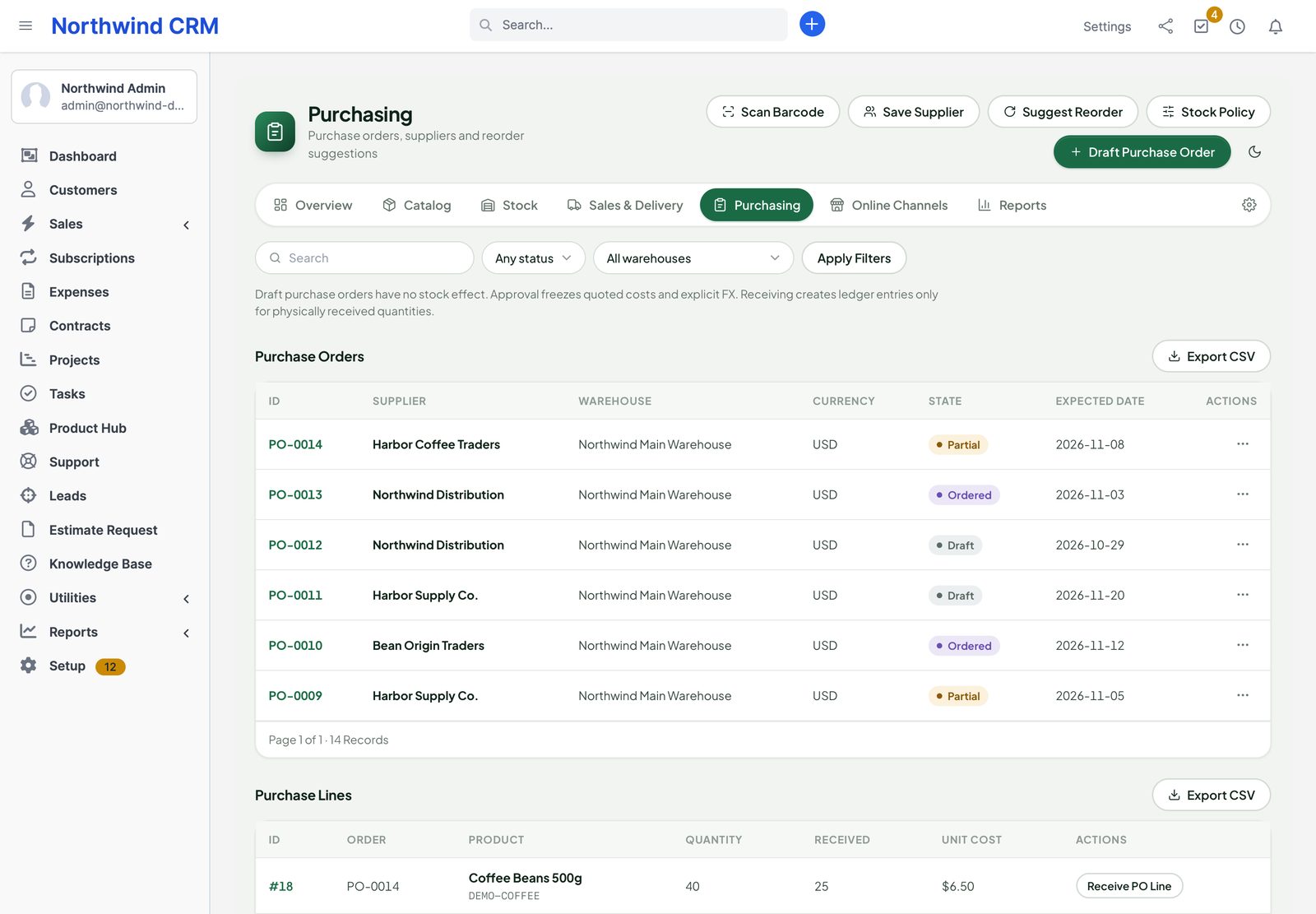
Suppliers, purchase order drafts, approval, a supplier PDF by e-mail and receipts against exact order lines. Min/max levels, lead time and 30/90-day demand suggest what to reorder; a suggestion becomes a draft, never an order sent on its own.

  • Partial receipts and receipt costs
  • Read-only import from a compatible Purchase module
  • Low-stock and expiry notifications
Purchase orders with suppliers, states and reorder suggestions

WooCommerce and Shopify

Stores sell only what you hold for them.

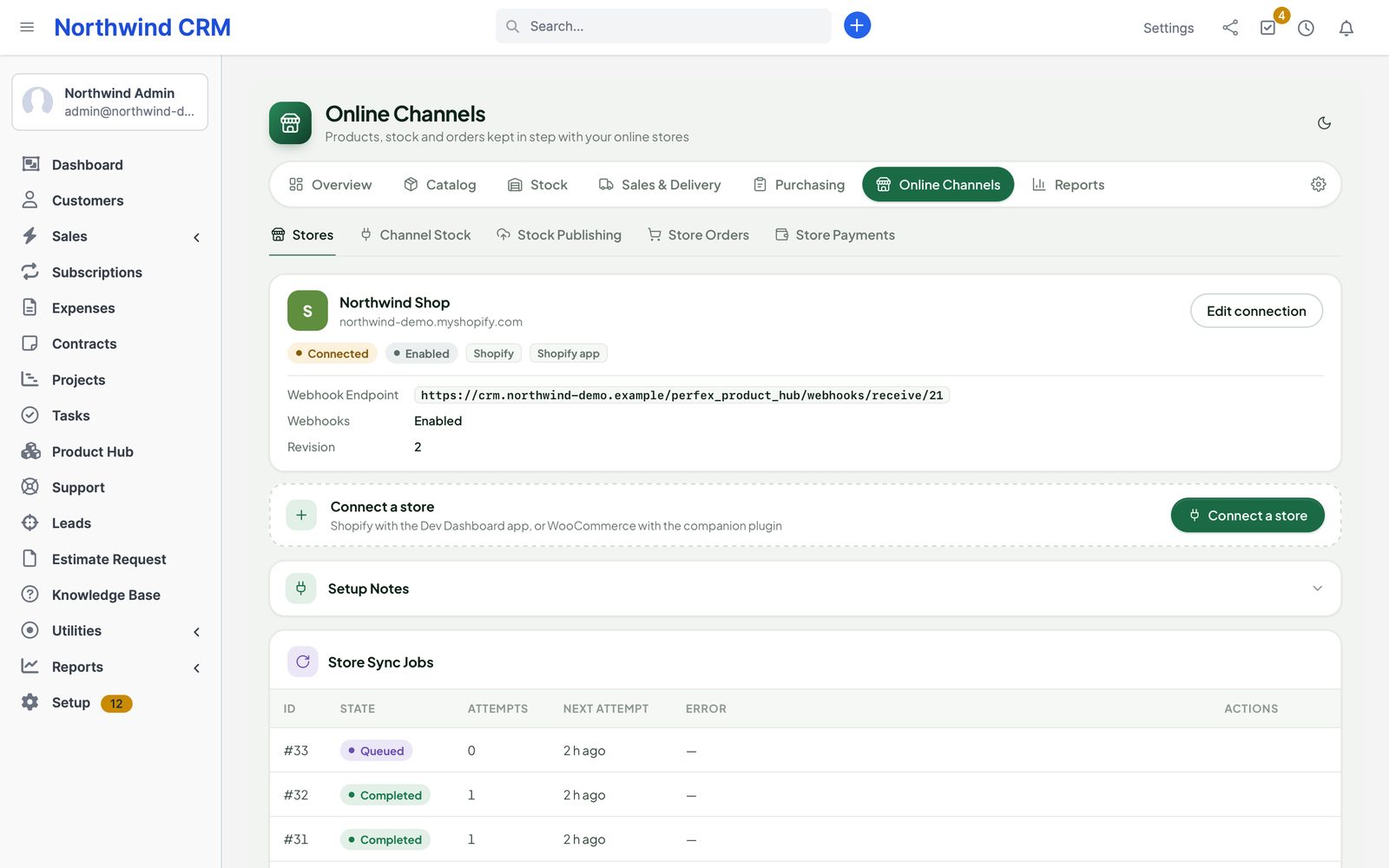
Product Hub never overwrites a store with the CRM's total. You allocate a pool of physical units to a store mapping; that pool is published and stays reserved. Store orders come back as reviewed Perfex invoices, and only then do the units move.

  • WooCommerce through a small signed companion plugin with atomic stock changes
  • Shopify Dev Dashboard apps (client credentials), OAuth install for client stores, or a legacy admin token
  • Every store change has a durable command key — a timeout never becomes a second change
  • Refill to a target pool size, withdraw a pool with remote confirmation
  • Store orders imported as unsent native drafts; payments recorded only from reviewed evidence
  • Reviewed price and description sync, one owner per field
Store connections for WooCommerce and Shopify with authentication mode, granted scopes, state and background jobs

Customer catalog

Your customers order from their own catalog.

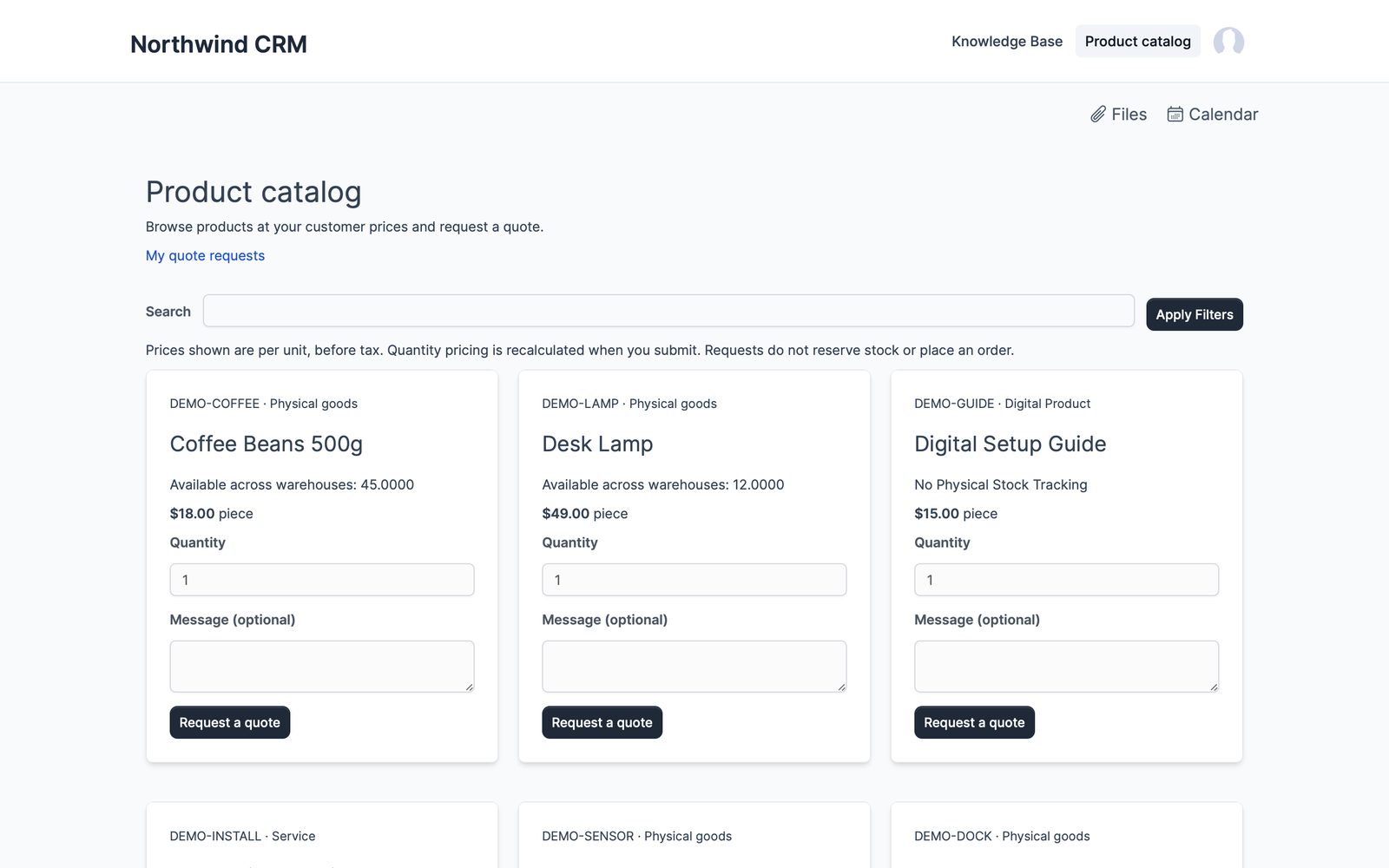
Publish selling products to the Perfex customer area. Contacts see their own prices, request quotes, reorder past purchases and download what they paid for.

  • Account prices from your price lists
  • Quote requests become one unsent Perfex estimate after review
  • Reorders use today's prices, never a copy of an old invoice
  • Paid downloads with short-lived one-use links
The customer catalog with product cards, account prices and quote request
Product Hub on a phone

Assets and equipment · new in 1.1

Know where every laptop, tool and rental item is.

An equipment register next to your products: who has it, when it comes back, when it needs service and what it is worth today.

Register

Numbered asset tags, categories with custom fields, serials, warranty, photos and documents, supplier, purchase order and catalog product.

Check out and in

To staff, customers (rentals and loans), projects or locations, with due dates, condition and a one-click receipt confirmation.

Maintenance

Plans every N days or months and work orders with cost, vendor and downtime; reminders as Perfex notifications.

Depreciation

Straight line or declining balance, monthly schedule and a book value report for any month.

Audits and labels

Print QR and Code 128 labels on A4 sheets, scan a room and see what is missing or found elsewhere.

Switching over?

Coming from another Perfex asset module: import it read-only, check first, undo by batch.

Ask AI Staff · new in 1.0.3

Ask about sales, profit and stock in plain words.

With Perfex AI Staff installed, the assistant answers from Product Hub's own figures — the same numbers as Reports › Margin, Stock and Dead Stock, for any period, compared with the one before. Costs and profit only for people allowed to see them.

“Top 5 products this month”

Units and revenue by product, variant, category, customer, warehouse or sales channel.

“Profit this month by category”

Revenue, cost of goods sold, gross profit and margin by product, category, order or customer.

“What is our stock worth?”

On hand, reserved, available and value per warehouse.

“Which products are not selling?”

Best sellers, slow movers, days of cover and dead stock.

Integrations

Works on its own. Plugs into our other modules.

▤

Perfex itself

Items, invoices, estimates, credit notes, payments, customers, contacts, projects, expenses, the customer area, e-mail templates, permissions and cron.

▦

Perfex Brain Pro

Catalog, stock and stock-value widgets on your dashboards.

◎

Perfex Cash & Capacity and Sales Growth

Product costs next to project costs; profit commission from real delivered cost.

⚡

Flow Studio and Connect

Stock and catalog triggers; read-only REST resources and a stock event for other systems.

✦

AI Staff, Inbox, Document Studio

Sales, profit and stock answers, scoped product reads and approved quote drafts; quotes from a conversation; product sheets, purchase orders and delivery notes as templates.

◐

Client Hub and Deliverables

A catalog card on the customer home page; paid digital files handed over with a project.

Security & control

Stock you can audit. Access you can limit.

⛨

Separate permissions

View, view own, create, edit, delete, approve, inventory, purchase, purchase approval, settings, store publishing and store payments.

▤

Exact maths

Decimal arithmetic, database transactions and row locks; corrections are counter-entries, never edits.

◎

Sealed secrets

Store keys and tokens encrypted with Perfex's key, never shown again; signed webhooks with replay protection.

Up and running in three steps

  1. 1

    Upload and activate

    Setup › Modules › upload the zip and activate Perfex Product Hub. Make sure Perfex's cron job runs.

  2. 2

    Choose costing and a warehouse

    In Setup choose weighted average or FIFO and the valuation currency, then create your first warehouse.

  3. 3

    Adopt items and receive stock

    Adopt your existing Perfex items or create products, then receive opening stock.

Roadmap

What comes next for Product Hub

What we are building and planning. Plans can change, and we never promise dates: an item ships when it is ready and tested.

  • Next

    Switch from other warehouse and purchase modules

    Read-only import of items, stock, suppliers and purchase orders, with undo by batch.

  • Next

    Inventory and cost postings to Perfex Books

    Stock value and cost of goods sold posted to the ledger. Needs Perfex Books.

  • Planned

    Manufacturing (2.0)

    Bills of materials, work orders, material planning, costing, lot and serial tracing, quality checks and subcontracting.

  • Planned

    Equipment rental

    Rent out assets with dates, returns and invoices.

  • Planned

    One-click updates

    Update the module from the Perfex admin, with a backup first and a way back.

Pricing

One price. Every warehouse and store.

Perfex Product Hub

$149one-time

One installation, unlimited products, warehouses, staff and store connections. Licence and support terms are shown on the SellMyCode listing. Sold by SellMyCode.

Buy on SellMyCode Read the documentation
  • Products, variants, kits, services and digital products on native Perfex items
  • Lifecycle approvals, price lists, categories, attributes and files
  • Warehouses, bins, lots, serials, expiry, transfers, counts and adjustments
  • Weighted average or FIFO, landed costs, valuation and stock reports
  • Reservations, partial deliveries, delivery notes, returns and frozen margins
  • Suppliers, purchase orders, receipts and reorder suggestions
  • CSV/Excel import with undo; labels and barcode scanning
  • WooCommerce (with the companion plugin) and Shopify stock pools and order import
  • Customer catalog, quote requests, reorders and paid downloads
  • Module zip, WooCommerce companion plugin, offline documentation and licence notices

Interface in nine languages. Requires PHP 8.1 with BCMath. Store accounts, payment gateways and hosting are your own.

Questions

Do my Perfex items change?

No. Product Hub links to your existing items by their real IDs and keeps them as the source of truth. It adds its own tables and an optional visible SKU custom field; it never adds columns to Perfex's tables.

Is this a POS?

No. Product Hub is catalog, stock, fulfillment, purchasing and store sync for Perfex. Sales are Perfex invoices and estimates.

Which Shopify setup do I need?

For your own store, a Dev Dashboard app installed through Custom distribution, with Client ID and Client secret — Product Hub fetches and refreshes the 24-hour token itself. For a client's store in another organization, the OAuth install mode. Existing stores with a legacy admin token keep working. The documentation has the exact steps.

What does the WooCommerce plugin do?

It receives signed stock changes from Product Hub and applies them with WooCommerce's own atomic stock functions, remembering each command so a retry never changes stock twice. Install it on the WordPress site; it is included in the download.

Will the store and the CRM sell the same unit?

No. The store only sees a pool of units you allocate to it, and those units are reserved in Perfex. Store orders transfer their units to the imported invoice.

Can I import my products and stock?

Yes: CSV or Excel for products, variants, prices and opening stock, with a dry run and undo; read-only import from compatible warehouse, Omni Sales and Product Lifecycle data.

Does it change Perfex core files?

No. Deactivate it and its menus and background work stop; your data stays until you uninstall with the explicit delete option.

What are the requirements?

Perfex CRM 3.4 or newer (tested on 3.4.1), PHP 8.1 or newer with BCMath, cURL, OpenSSL, GD and ZipArchive, MySQL or MariaDB with InnoDB, Perfex's cron job, and HTTPS for downloads, webhooks and camera scanning. The WooCommerce plugin needs PHP 7.4+ and WordPress 6.2+.

Is it translated?

Yes. The interface ships in English, Spanish, Portuguese (Brazil), French, German, Italian, Dutch, Turkish and Russian; the WooCommerce plugin ships a translation template.

How do I get support?

Contact us through sellmycode.net. Six months of support are included with every licence. Please add the module, Perfex and PHP versions and a screenshot — never passwords, API keys or tokens.
Stock you can trust, in the CRM you already use.

Catalog, warehouses, deliveries, purchasing and store sync on one journal.