For Perfex CRM 3.4 · Commissions · Points · Tiers · Coupons · Referrals

Pay your sellers right.
Bring your customers back.

Sales Growth turns Perfex invoices into commission for your team and points for your customers — earned on the money you actually collected, approved before anyone is paid, and explained line by line. Add membership tiers, coupons, promotions and referral links, all in the CRM you already run.

  • 1ledger for commission, points and payouts — never rewritten
  • 7kinds of beneficiary: sale agent, splits, team, role, manager, partner, customer
  • 9languages in the admin and the customer area
  • 0Perfex core files changed
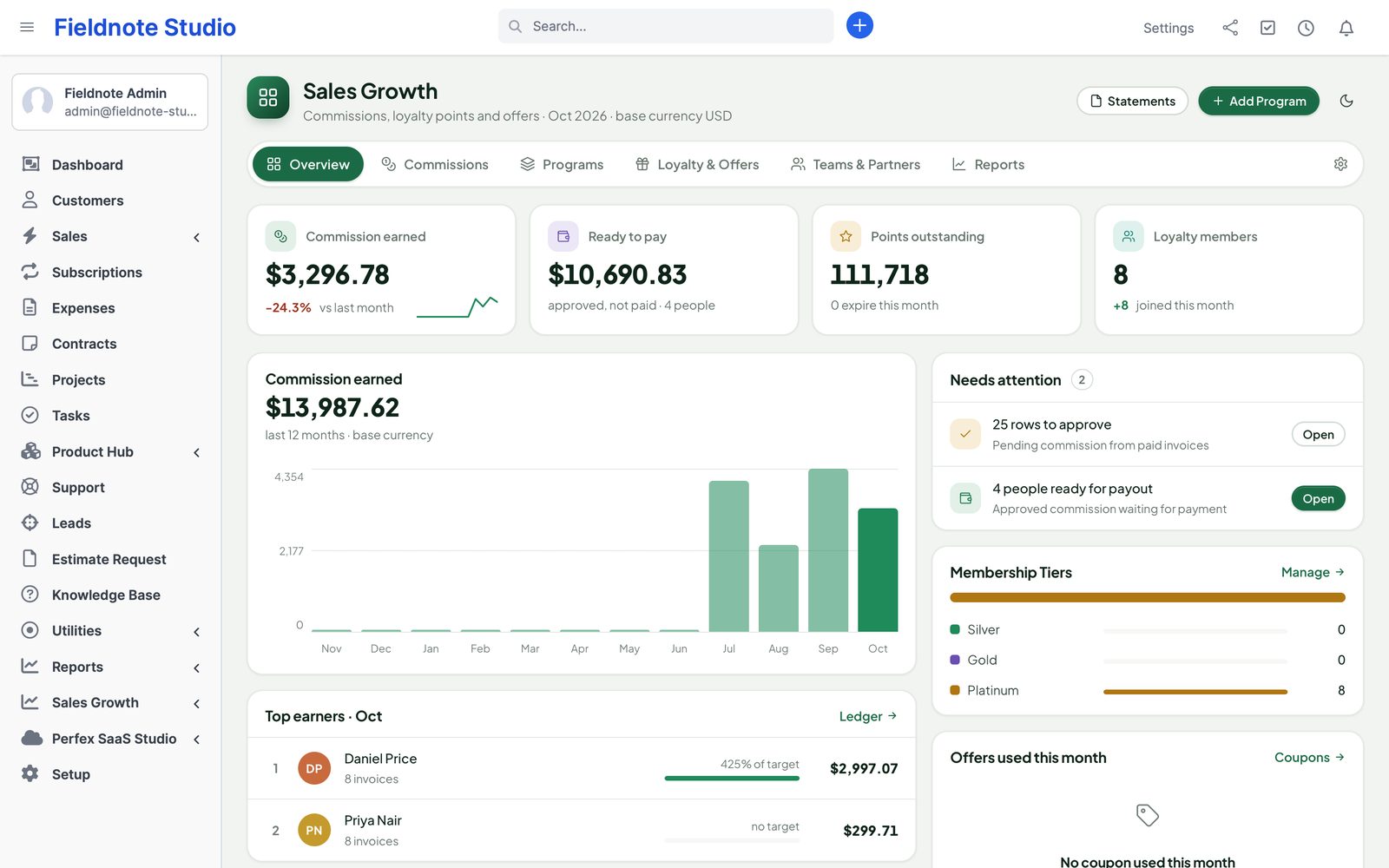
The Sales Growth overview: commission earned this month, ready to pay, points outstanding and loyalty members; a 12-month commission chart, top earners against target, what needs attention, membership tiers and coupons used
Actual module interface on a Perfex 3.4.1 installation with fictional demonstration data.

Why Perfex Sales Growth

Commission people trust. Rewards customers use.

Most teams work out commission in a spreadsheet at month end, argue about it, and never get round to a loyalty scheme. Sales Growth does both from the invoices and payments already in Perfex.

“Commission takes us two days a month.”

Exports, formulas, a refund nobody noticed — and a sales rep who disagrees.

With Sales GrowthPrograms earn automatically when invoices are paid. Each entry links to its invoice and rule, approvers approve in bulk, and a rep can open a dispute on any line instead of a long e-mail thread.

“We paid commission on an invoice that was refunded.”

Paid-out money is hard to claw back and impossible to explain.

With Sales GrowthCommission is earned on net cash collected. Credit notes and refunds reduce it; anything already approved or paid is never edited — a correction goes in as its own counter-entry for review.

“Our best customers get nothing for coming back.”

Loyalty schemes need another app, another login and another place for customer data.

With Sales GrowthCustomers collect points on what they pay, climb membership tiers, use coupons and share referral links — inside their own Perfex customer area, redeemed as real Perfex credit notes.

What is inside

Four tools on one ledger.

Use only commissions, only loyalty, or all of it. Every part writes to the same append-only ledger, so totals, statements and reports always agree.

  • CommissionsPrograms, approvals, payoutsPercent, profit, fixed and tiered rules for sale agents, splits, teams, roles, managers and partners; bulk approval, disputes, payout batches and statements.
  • LoyaltyPoints and membership tiersPoints on payments, expiry with reminders, bonuses for signup, birthday, first purchase and reviews, and tiers with discounts and point multipliers.
  • OffersCoupons and promotionsSingle and bulk one-time coupons with limits and scopes, and percent or buy-X-get-Y promotions staff confirm on invoices and estimates.
  • ReferralsLinks and partnersExpiring referral links for customers, outside partners with their own statement, and attribution that survives web-to-lead conversion.
  1. 1InvoiceA Perfex invoice is created with a sale agent, items and a customer — nothing new to type.
  2. 2CollectPayments earn proportionally; credit notes and refunds take it back.
  3. 3ApproveAn approver checks the pending entries and approves them in bulk.
  4. 4Pay outBatch the approved amounts, record full or partial payments and send the statement.

Commission programs

Your plan, written once.

A program says who earns, on what and when. Rules apply by invoice date, so a change next quarter never rewrites last quarter. Scope a program to customers, groups, items, item groups or products, and let several programs stack or keep only the best one.

  • Reward types: percent of the line, percent of profit, fixed per invoice, fixed per unit, points per amount
  • Beneficiaries: the invoice's sale agent, split shares per invoice, a team, a role, managers through a hierarchy, partners, customers
  • Tiers: volume bands per month, quarter or year, retroactive or marginal, plus multipliers for chosen items
  • Earn on payment, on invoice or only when fully paid; first-N-invoices and new or existing customer filters
  • Sales targets with quota, accelerator and an attainment report
  • Version history of every program change
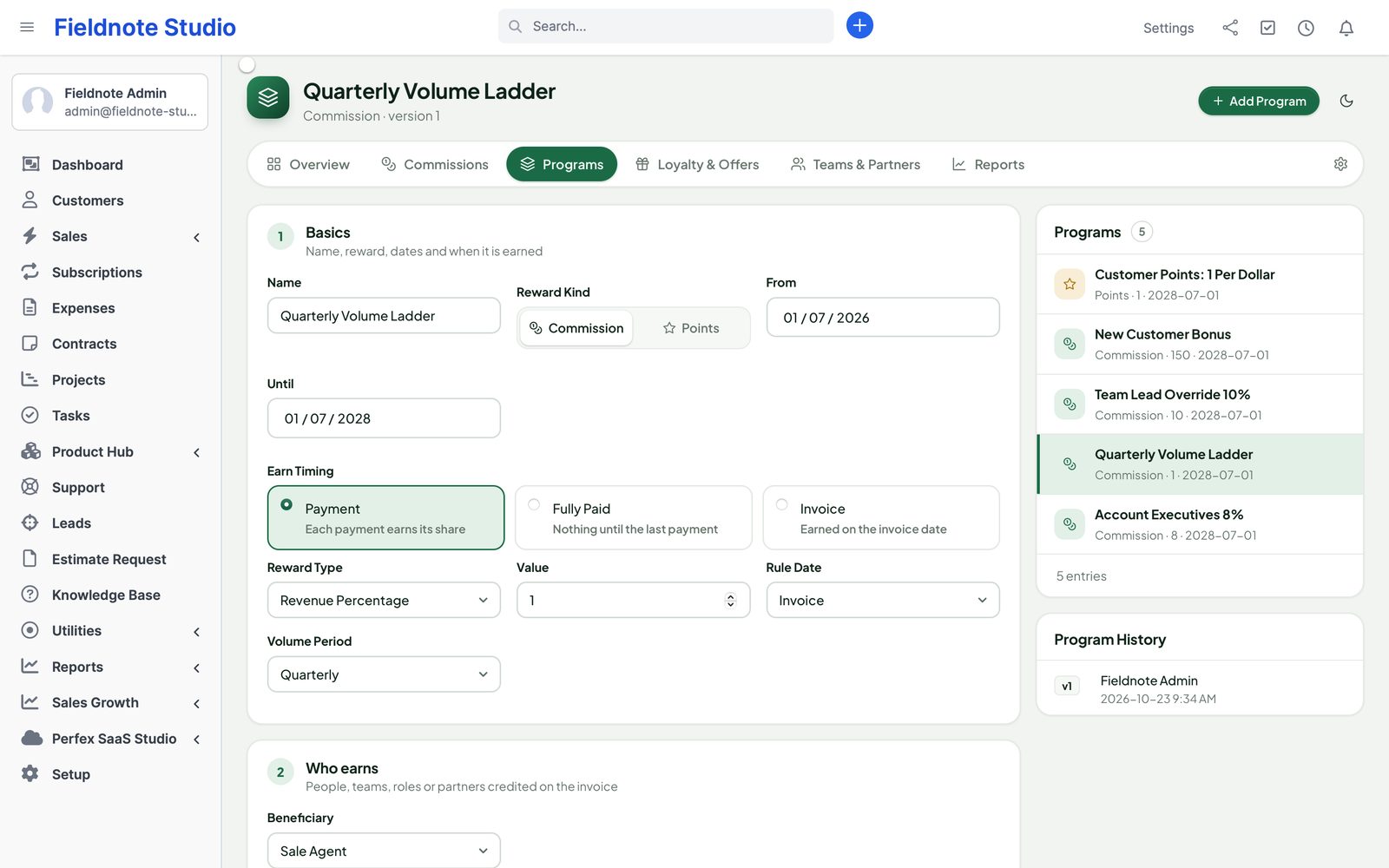
The programs page: the list of commission and points programs and the program editor with reward type, beneficiary, timing and scope

Approvals and payouts

Approved, paid, explained.

Pending entries wait for an approver — self-approval is off unless you allow it. Approved commission goes into payout batches; record the payment when the money leaves, in full or in parts, and optionally add it to Perfex expenses.

  • My Next Payout for every rep, per currency
  • Disputes on a single entry, with a resolution note and full workflow history
  • Statement PDF per person and period, by e-mail or download
  • Closed periods: late changes post to the next open period for review
  • Recording a payout writes accounting history — it never moves money
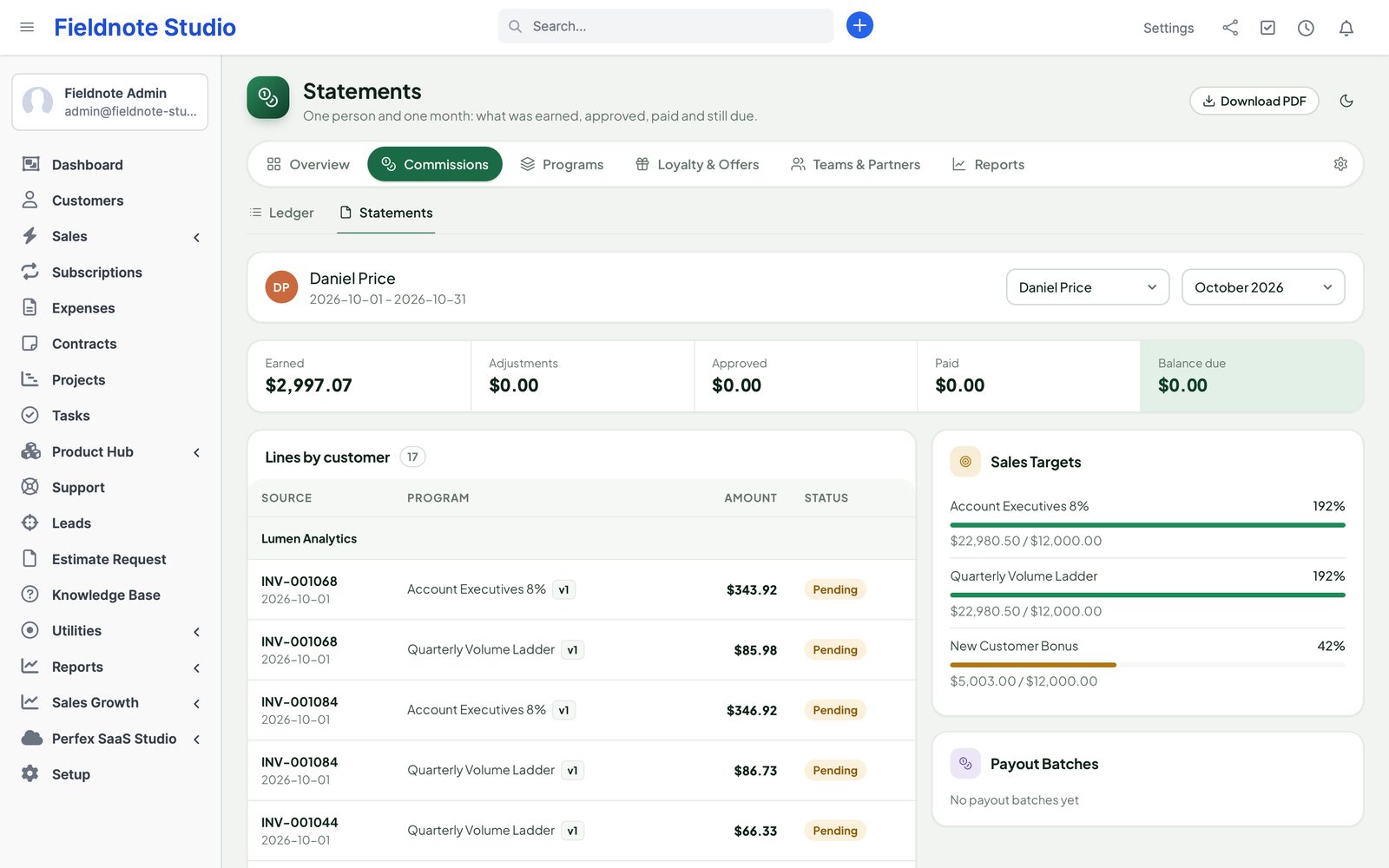
A monthly commission statement for one person: earned, adjustments, approved, paid and balance due, lines grouped by customer, target progress and payout batches

Points and tiers

A loyalty program without another app.

Customers earn points on what they pay. Points expire after the months you choose, with a reminder before they do. Membership tiers — by points or by spend over a look-back period — add a member discount, a points multiplier and tags other modules can read.

  • Redeem points on an unpaid invoice — applied as a real Perfex credit note
  • A minimum, a maximum share of the invoice and a value per point you set
  • Bonuses for signup, birthday, first purchase and reviews
  • Tier history with grace days, so customers are not dropped overnight
  • Opening balances from a CSV or an earlier loyalty setup, previewed and undoable
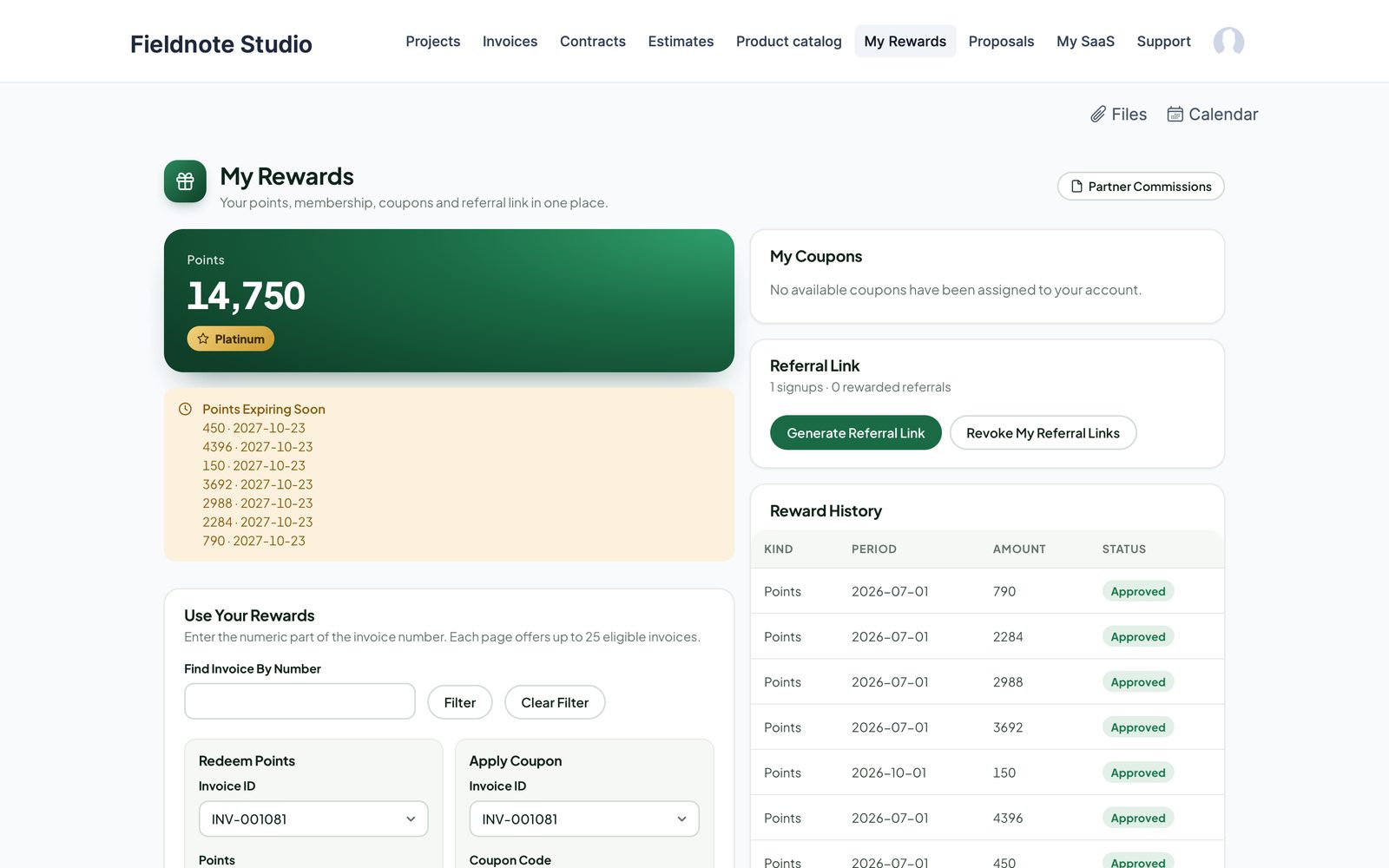
The customer's My Rewards page: points balance, membership, progress to the next tier, redeem on an invoice, coupons and the referral link
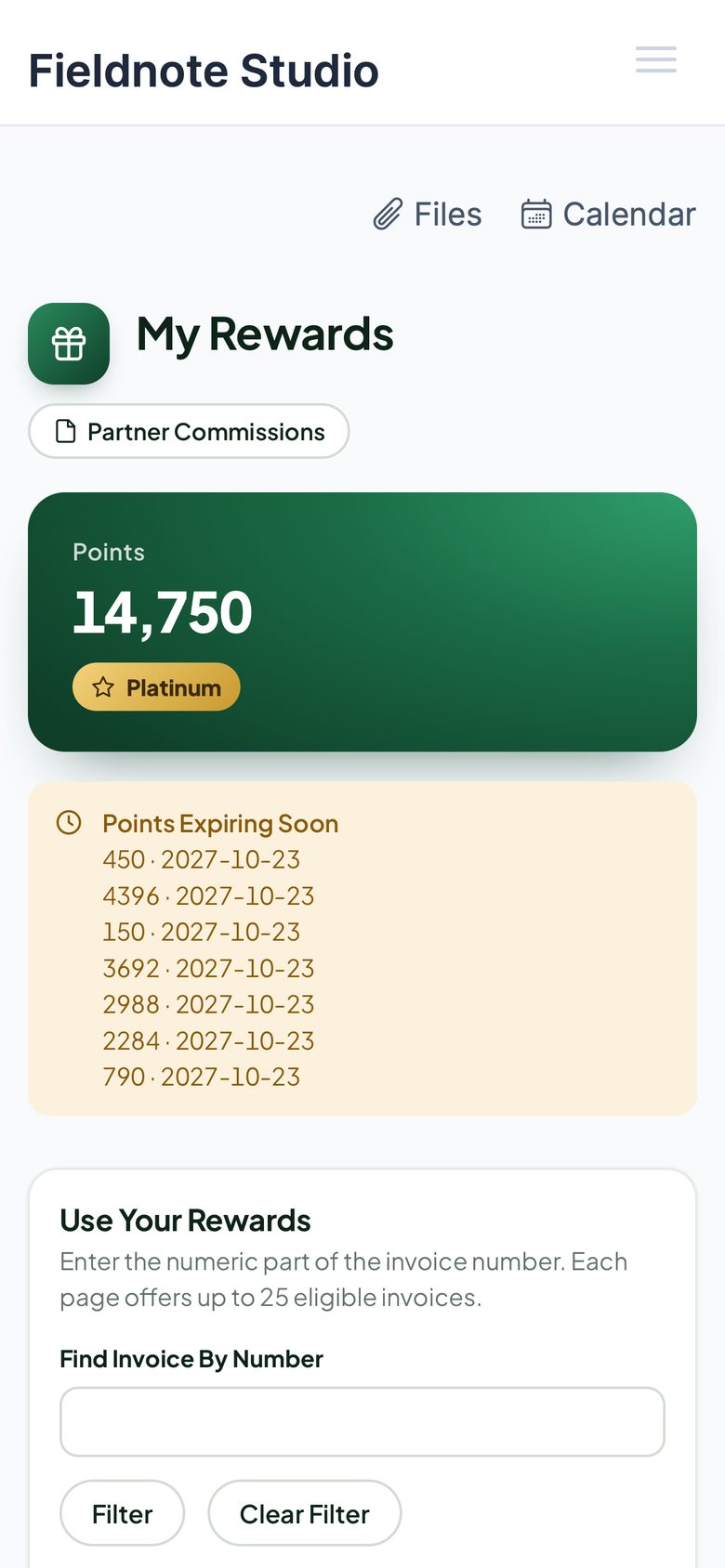
My Rewards on a phone

Coupons and promotions

Discounts with limits you control.

Create a coupon by hand or a batch of one-time codes downloaded once as CSV — only hashes are stored. Limit it by dates, minimum amount, total uses, uses per customer, customers, groups, items and item groups.

  • Applied on invoices and estimates as a credit note or an explicit discount line
  • Percent and buy-X-get-Y promotions, suggested on the document and confirmed by staff
  • Customers can enter a code, or use coupons assigned to them, in the customer area
  • Usage history per coupon; deactivate without losing the record
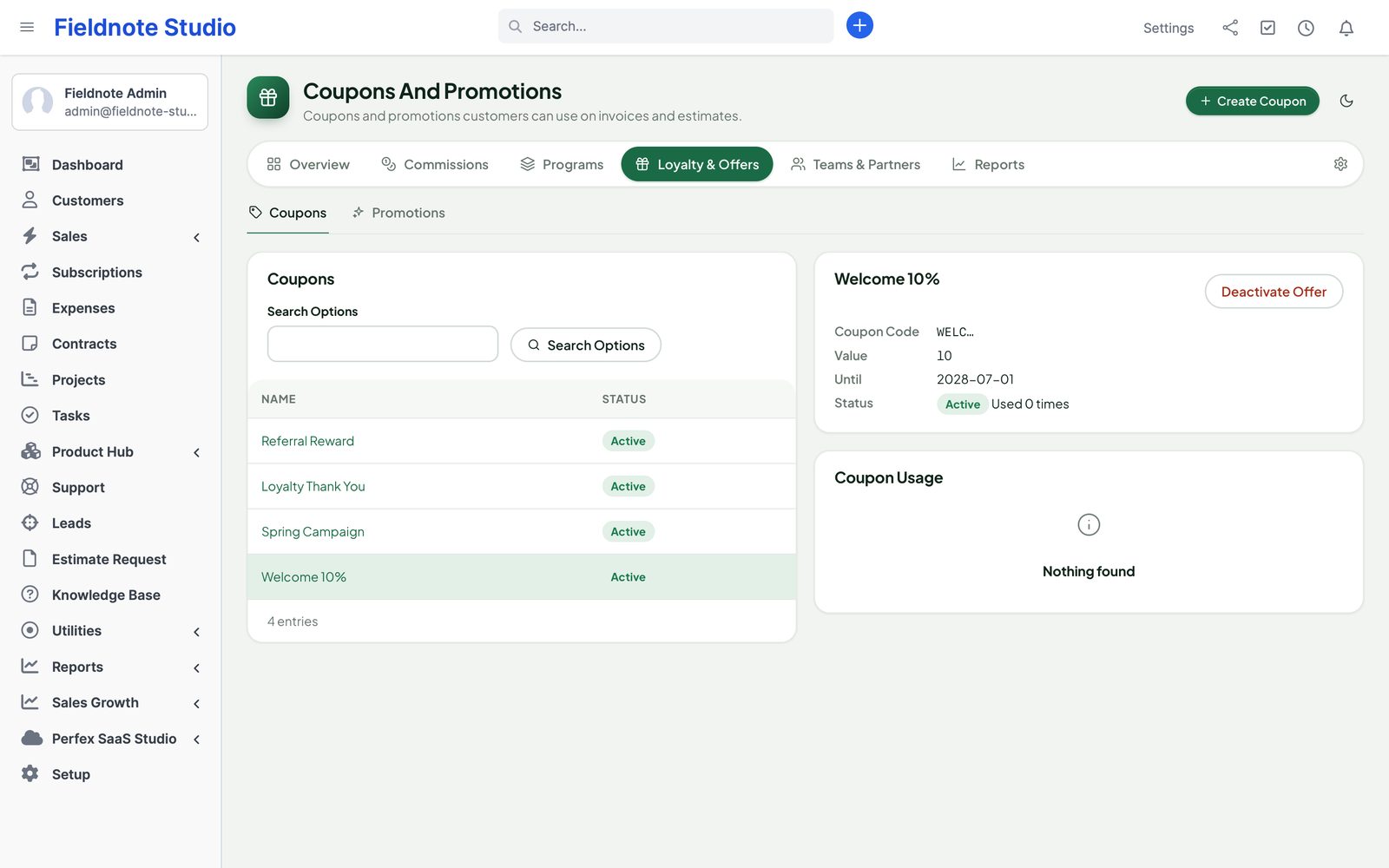
Coupons and promotions: the coupon list, a coupon's code hint, value, expiry and every use

Referrals and partners

Word of mouth, counted.

Customers create a referral link in their customer area. A new customer who registers or sends a web-to-lead form through it is attributed — even after the lead is converted — and the referrer earns points. Outside partners get commission through programs and see their own statement.

↗

Referral links

Random, expiring and revocable links stored as hashes; guessing is rate-limited. Signups and rewarded referrals are counted for the customer.

◎

Partner statements

Link a partner to a customer contact and they see earned, approved and paid commission, download the PDF statement and share their own link.

▤

Teams and hierarchy

Sales teams for team programs, and manager overrides: a manager earns a share of what their people earn.

One ledger

Money you can audit.

Every commission, point and payout is a row in an append-only ledger with its invoice, rule and period. Approved, paid and redeemed rows are never changed — corrections are counter-entries a person reviews.

  • Decimal maths throughout; row locks for redemptions, payouts and coupon limits
  • Monthly exchange rates per currency — a missing rate stays missing, never 1
  • Recalculate a date range: preview the difference first, then confirm
  • Split an ambiguous refund across its invoices, with an audit trail
  • Nightly integrity check of balances against the ledger
  • Company time zone for periods, birthdays and expiry
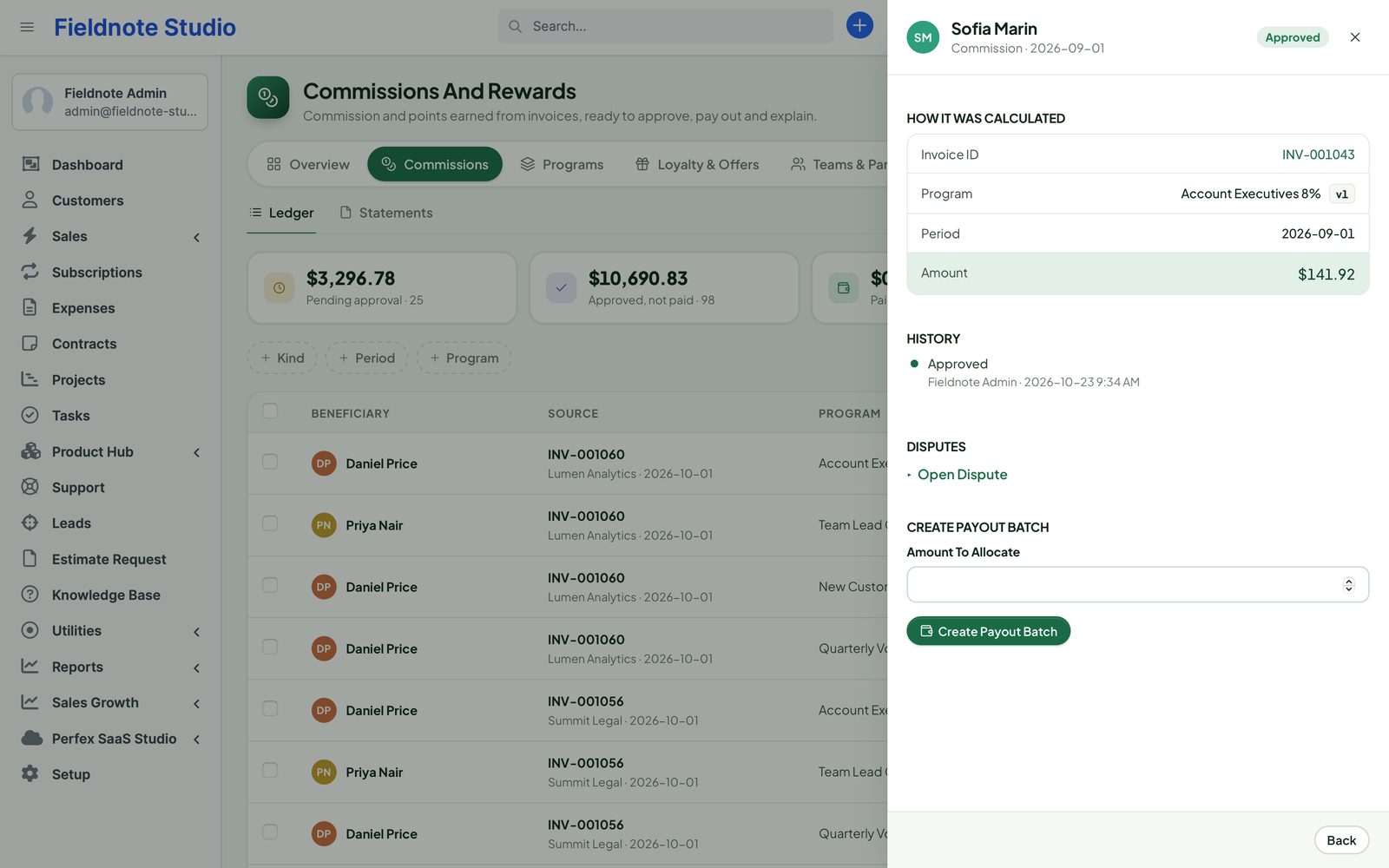
A ledger row opened in a side panel: invoice, program and version, period and amount, the approval history, disputes and payout batch

Ask AI Staff · new in 1.0.1

“Who earned the most commission this quarter?”

With Perfex AI Staff installed, managers and reps ask about commission and targets in plain words. The answers use the same numbers as the Commissions and Targets reports, and “view own” staff only ever see their own.

★

Top earners

“Top commission earners last month” — earned, payable, paid and pending per person, totals per currency, compared with the months before.

◎

Target progress

“How far is each rep from target?” — quota, achieved, attainment and what is left per person and month.

$

Commission payable

A ready suggestion chip for people who may read commission: what is approved and waiting to be paid.

Integrations

Works on its own. Plugs into our other modules.

▤

Perfex itself

Invoices, payments, credit notes and refunds, estimates, items, customers, contacts, staff, roles, expenses, e-mail templates, the customer area, web-to-lead and cron.

◎

Perfex Cash & Capacity

Approved commission becomes a cost in project and customer margins, without counting the payout expense twice; a commission and points outflow report.

▦

Perfex Brain Pro

Six widgets for commission, payouts, targets, points and liability on your dashboards.

⚡

Flow Studio, Connect, Inbox

Triggers and actions for points, coupons, tiers and approvals; REST and signed webhooks; points and coupon snippets in replies.

✦

AI Staff and Document Studio

Agents read commission and points within each person's rights and draft coupons for approval; statements as Document Studio templates.

◐

Product Hub and Client Hub

Profit commission from real product costs; rewards and partner cards on the Client Hub home page.

Security & control

Each person sees their own money.

Nine Perfex permissions separate viewing, own-only viewing, creating, editing, deleting, approving, paying out, adjusting points and configuring.

  • Reps with view own see only their entries, statements and exports
  • Customers and contacts only see their own customer's points, coupons and invoices
  • Every change is a POST with Perfex's CSRF token; retried commands never double up
  • Coupon codes and referral tokens stored as hashes
  • Imports are previewed and can be undone with counter-entries
  • No Perfex core file changed; deactivate it and your data stays
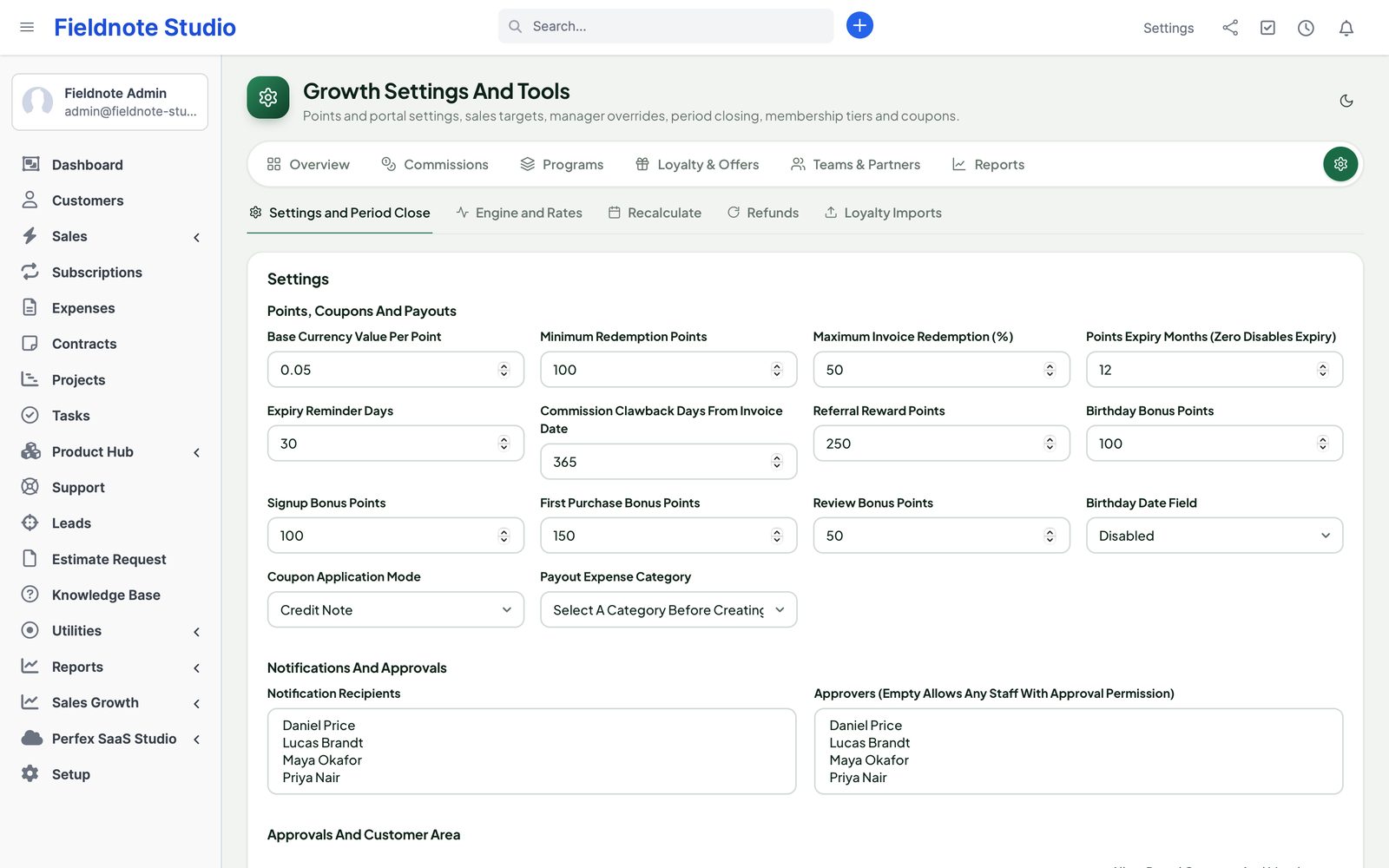
Settings and tools: points value, expiry and bonuses, approvers, customer area switches, targets and membership tiers
Actual module interface with fictional demonstration data.

Up and running in three steps

  1. 1

    Upload and activate

    Setup › Modules › upload the zip and activate Perfex Sales Growth. Make sure Perfex's cron job runs.

  2. 2

    Write your first program

    Sales Growth › Programs: for example 10% of paid invoices for the sale agent. Give approvers the Approve permission.

  3. 3

    Switch on rewards

    In Growth Settings, set the value of a point and turn on the customer area. Customers see My Rewards in their menu.

Roadmap

What comes next for Sales Growth

What we are building and planning. Plans can change, and we never promise dates: an item ships when it is ready and tested.

  • Next

    Switch from other commission and loyalty modules

    Read-only import of agents, rules, points and referrals, with undo by batch.

  • Next

    Commission postings to Perfex Books

    Approved commissions, payouts and points posted to the ledger. Needs Perfex Books.

  • Planned

    Rewards catalogue

    Customers trade their points for rewards you set up.

  • Planned

    Rewards in Client Hub

    Points, tiers and partner links in the customer portal.

  • Planned

    Shared monthly exchange rates

    One rate table with Cash & Capacity for multi-currency commissions.

  • Planned

    One-click updates

    Update the module from the Perfex admin, with a backup first and a way back.

Pricing

One price. Every rep, every customer.

Perfex Sales Growth

$129one-time

One installation, unlimited staff, customers, programs and coupons. Licence and support terms are shown on the SellMyCode listing. No per-user fees. Sold by SellMyCode.

Buy on SellMyCode Read the documentation
  • Commission programs: percent, profit, fixed, per unit, tiers and multipliers
  • Sale agent, splits, teams, roles, manager overrides and partners
  • Bulk approval, disputes, payout batches, partial payments and expenses
  • Statements as PDF and e-mail; targets with attainment
  • Customer points, expiry, bonuses and membership tiers
  • Coupons, bulk one-time codes and promotions
  • Referral links and partner statements in the customer area
  • Reports with CSV export; monthly exchange rates
  • Range recalculation, refund attribution, integrity check, imports with undo
  • Cash & Capacity, Brain Pro, Flow Studio, Connect, AI Staff and more
  • Module zip, offline documentation and license notices

Interface in nine languages. Requires PHP 8.1 with BCMath. Recording a payout keeps accounting history; it does not send money.

Questions

When is commission earned — on the invoice or the payment?

You choose per program: on payment (the default, proportional to what was collected), on the invoice, or only when the invoice is fully paid. Credit notes and refunds reduce what was earned; applied credits do not count as cash.

What happens when I change a program?

Rules apply by invoice date, and each change is versioned. Pending entries can be recalculated; approved, paid and redeemed entries never change — a difference becomes a counter-entry for review.

Does it pay my sales people?

No. It works out, approves and records commission. You pay the way you always do and record the payment in Sales Growth, optionally as a Perfex expense.

We invoice in several currencies.

Commission is kept in the invoice's currency and converted with the monthly rate you enter for that currency. An entry without a rate waits — it is never converted at 1.

How do customers redeem points?

In their customer area, on one of their unpaid invoices, or by staff on the invoice. The discount is a real Perfex credit note applied to the invoice, so your books stay right.

Can I bring in balances from another system?

Yes. Paste a CSV of opening points, or read an earlier commission or loyalty setup on the same Perfex database. Every import is previewed first and can be undone.

Who can see what?

View sees all entries, view own only one's own. Approve, Pay out, Adjust points and Configure are separate permissions. Customers only ever see their own points, coupons and invoices.

Does it change Perfex core files?

No. Sales Growth uses Perfex's module hooks and its own tables. Deactivate it and its menus and background work stop; your data stays until you uninstall.

What are the requirements?

Perfex CRM 3.4 or newer (tested on 3.4.1), PHP 8.1 or newer with BCMath, MySQL or MariaDB with InnoDB, and Perfex's cron job.

Is it translated?

Yes. The interface ships in English, Spanish, Portuguese (Brazil), French, German, Italian, Dutch, Turkish and Russian.

How do I get support?

Contact us through sellmycode.net. Six months of support are included with every licence. Please add the module, Perfex and PHP versions and a screenshot — never passwords or secrets.
Commission without the spreadsheet.

Programs that earn on cash collected, approvals and payouts, and a loyalty program your customers can actually use.