Perfex Connect documentation
Perfex Connect is the integration and automation hub for Perfex CRM. It adds a REST API for every core resource with keys you control, events for every change that you can send to webhooks, catch-hooks that take data in, automation rules, ready integrations for Zapier, Make, n8n, Facebook and Instagram Lead Ads and WooCommerce, and an MCP server for AI assistants.
By the numbers (Connect on a plain Perfex 3.4, counted from the code): 39 API resources · 486 API operations in an OpenAPI 3.1 file generated from the code · 119 event types · 197 MCP tools (9 in the compact tool style) · 31 workflow recipes · 9 languages · 2,600+ automated checks in the release test suites. Other modules add their own resources and events (Product Hub adds four resources).
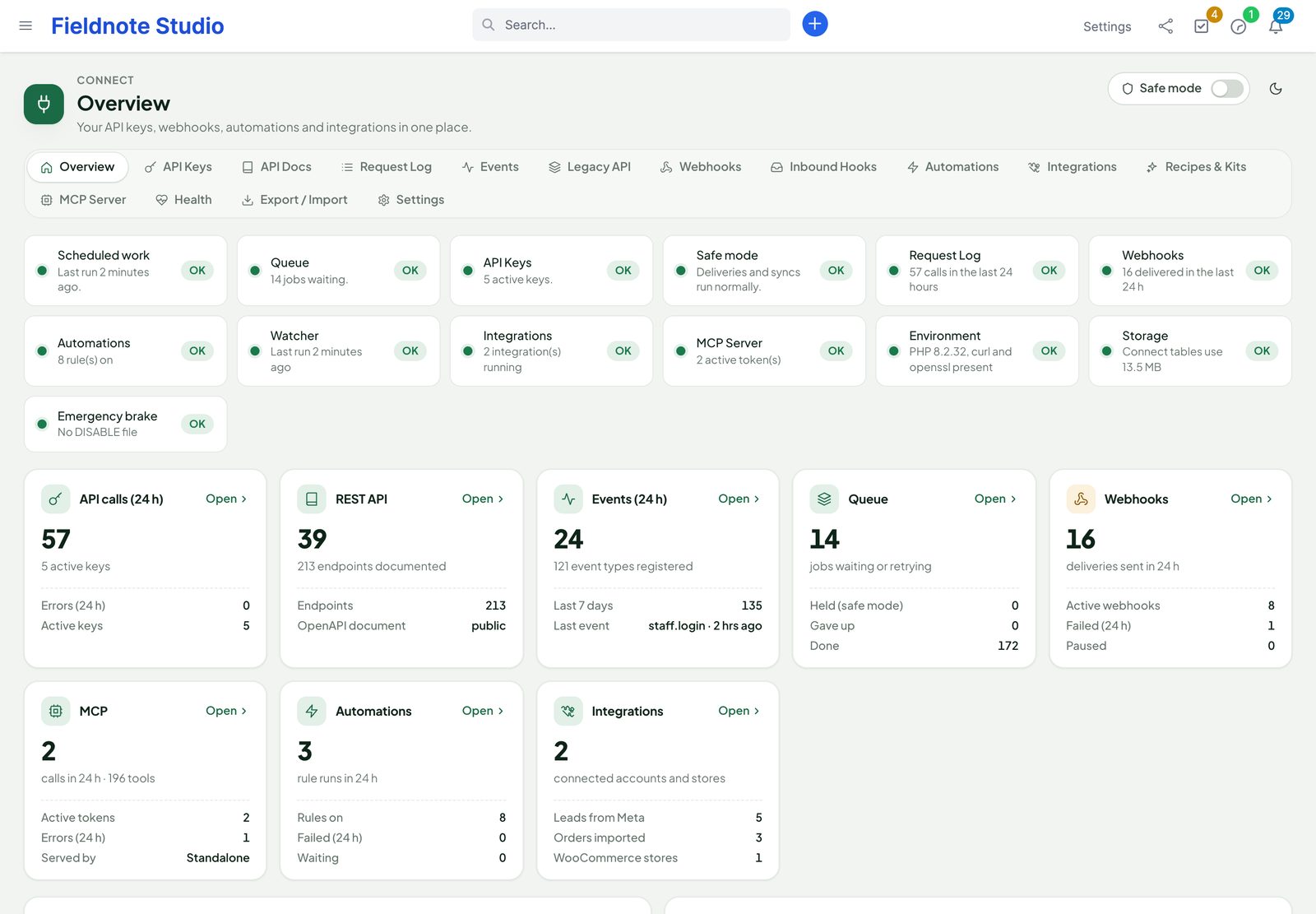
Everything lives under Connect in the Perfex sidebar. The pages share one header with a Safe mode switch: while it is on, nothing is sent out (see Safe mode).
Installation
Requirements
- Perfex CRM 3.4 or newer. Tested with Perfex 3.4.1.
- PHP 8.0 or newer with the
curl,openssl,jsonandzipextensions; MySQL or MariaDB. - Perfex's cron job running every minute (Setup › Settings › Cron Job shows the command). Retries, scheduled rules, reconciliation and clean-up run through it.
- HTTPS for your CRM when Meta or WooCommerce must reach it, and outgoing HTTPS from the server for webhooks, Lead Ads and WooCommerce.
- Perfex AI Staff, Brain Pro and Sentinel are optional.
Install
- Back up the CRM database and files.
- Extract the download
perfex-connect-1.1.1.zipon your computer. Inside are the installableperfex_connect-1.1.1.zip, this documentation, the developer kits, the changelog and the licenses. - In Perfex, open Setup › Modules, upload the inner
perfex_connect-1.1.1.zip, then install and activate Perfex Connect. - Open Connect in the sidebar. The overview shows the health checks and the cards of every part.
Files and tables
| Where | What |
|---|---|
modules/perfex_connect/ | The module, with its interface font and icons. Nothing is loaded from a CDN. kits/ holds the templates of the developer kits and recipes. |
Tables pcx_* | API keys (hashed), request log, idempotency, events, jobs, audit trail, webhooks and deliveries, inbound hooks and their log, rules and runs, integrations, sync map and log, MCP tokens and calls. |
Options pcx_* | Settings. Secrets (webhook signing secrets, Meta app secret, WooCommerce keys, tokens) are encrypted with your installation's key. |
Server notes
- Authorization header. Some Apache setups drop the
Authorizationheader before PHP sees it. If every API call answers 401 although the key is right, add to Perfex's.htaccess:SetEnvIf Authorization "(.*)" HTTP_AUTHORIZATION=$1. - Behind a proxy or load balancer. IP allow-lists and the request log use the client address PHP sees. Add your proxy's address to
$config['proxy_ips']inapplication/config/config.phpso the real client address is used. - Public addresses. Connect's public endpoints (
perfex_connect/api/…,hooks_in/…,hooks_meta/…,hooks_woo/…,oauth/meta/callback,mcp/rpc) take no session and are excluded from Perfex's CSRF check automatically. - Perfex Sentinel in enforce mode. Connect's public paths count in Sentinel's portal rate limit (300 requests a minute per address by default). If an automation platform with many keys shares addresses, raise that limit or allow its addresses in Sentinel › Firewall › IP rules. Prefer JSON over form posts for catch-hooks; never put these paths behind Sentinel's admin-only stage — Meta and WooCommerce call them without cookies.
First steps
- Check that Perfex's cron runs: the overview's Scheduled work check says when it last ran.
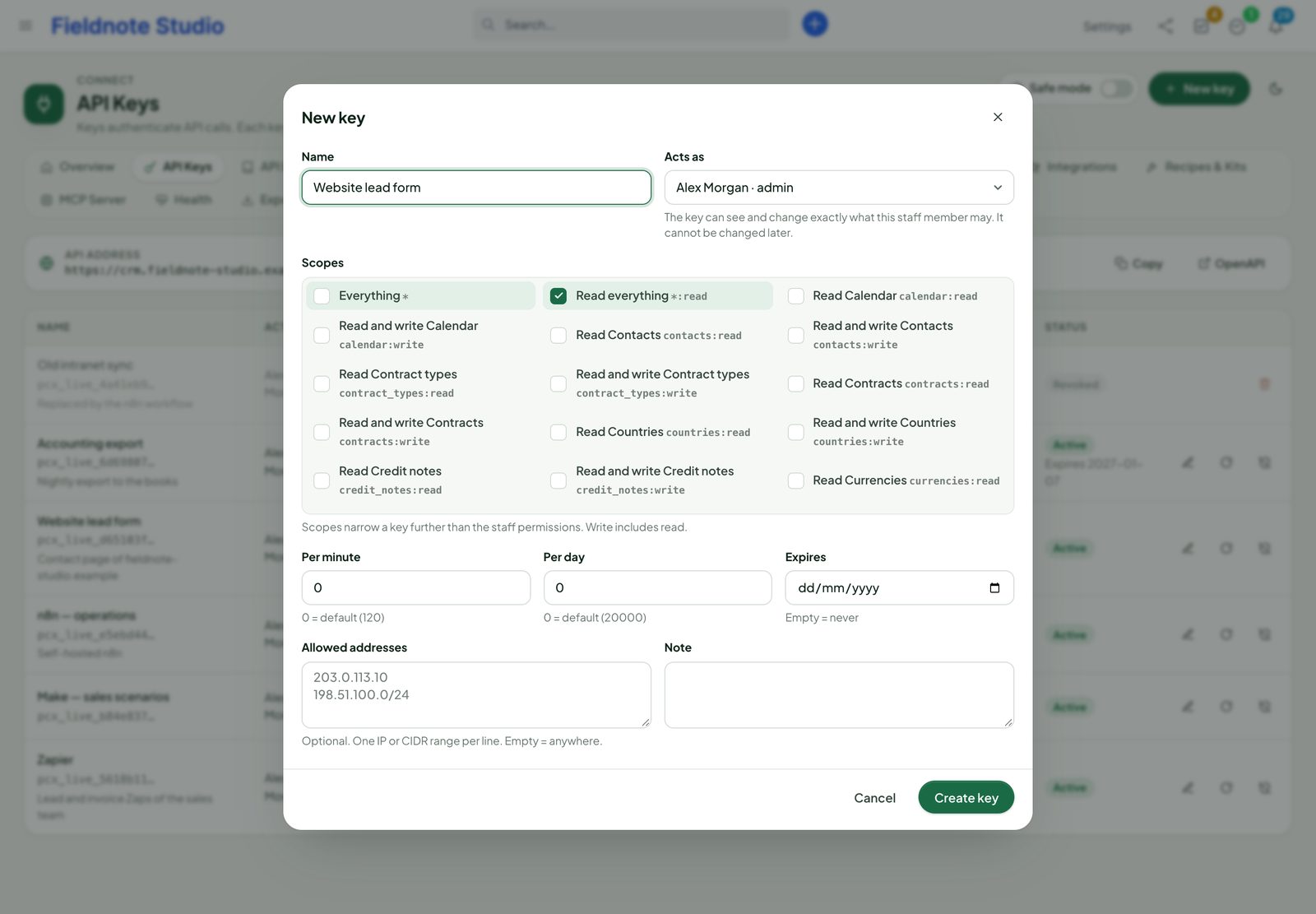
- Open Connect › API Keys, click New key, choose a name, the staff member the key acts as, the scopes and, if you like, limits, allowed addresses and an expiry. Copy the key — it is shown once.
- Open Connect › API Docs, pick List customers, choose the key in Try it and press Send request.
- Add a webhook (Connect › Webhooks › New webhook) or connect an automation platform (Connect › Integrations).
- In Setup › Staff › Roles, give the right Connect permissions to the people who manage integrations (see Permissions).
API keys and scopes
A key belongs to one staff member: every API call runs with that member's Perfex permissions. A key of an administrator sees everything; a member with View (Own) on invoices only gets their own invoices. On top of that, the key's scopes decide which resources it may use.
| Setting | Meaning |
|---|---|
| Scopes | <resource>:read or <resource>:write (write includes read), *:read for everything read-only, * for everything. Area scopes: webhooks:read|write (subscriptions), events:read (event log), automations:read|write (rules). |
| Limits | Requests per minute and per day; empty = the defaults in Settings › Default limits for API keys (120 a minute, 20,000 a day). |
| Allowed addresses | One IPv4 / IPv6 address or CIDR range per line; empty = any address. |
| Expiry | The key stops working after this date. |
| Note | For you: what uses this key. |
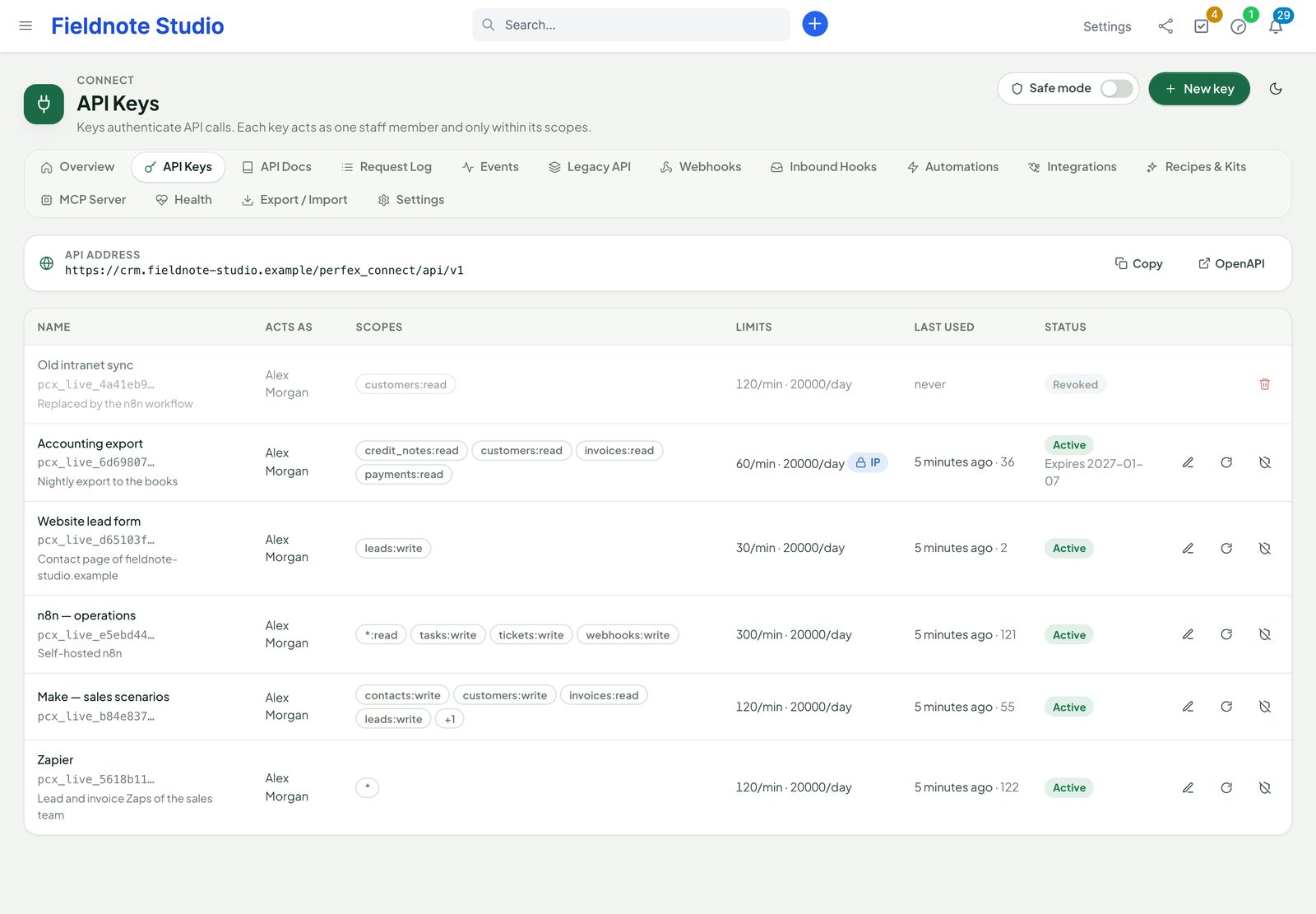
Keys look like pcx_live_ followed by 48 characters. Connect stores only a SHA-256 hash and the first characters for display, so a lost key cannot be shown again: rotate it (new secret, same settings) or create a new one. Revoke stops a key at once. Administrators can create keys for any staff member; other staff with the Manage API keys right only for themselves.
REST API
The base address is https://<your-crm>/perfex_connect/api/v1. Everything answers JSON. Resources: customers, contacts, leads, lead statuses and sources, projects, milestones, tasks, timesheets, tickets, ticket statuses, priorities and services, departments, invoices, estimates, proposals, contracts and contract types, expenses and expense categories, payments and payment modes, credit notes, items and item groups, staff, custom fields, files, calendar, notes, reminders, knowledge base articles and groups, currencies, taxes, countries, customer groups and statuses. GET /resources lists them with their fields; GET /me tells who a key is.
Authentication
curl https://crm.example.com/perfex_connect/api/v1/me \
  -H "Authorization: Bearer pcx_live_…"
Only the Authorization: Bearer header is accepted — never a key in the address, never a Perfex session cookie. Wrong keys answer 401; after 30 failures a minute from one address, that address waits a minute.
Lists and filters
| Parameter | Example |
|---|---|
page, per_page | page=2&per_page=100 (1–200, default 25) |
sort | sort=-datecreated,company (“-” = descending) |
q | q=northwind — searches the resource's searchable fields |
filter[field] | filter[status]=2 |
filter[field][op] | filter[total][gte]=500; ops eq ne gt gte lt lte in like null (in takes a comma list, null 1 or 0) |
created_since, updated_since | updated_since=2026-10-01T00:00:00Z |
fields | fields=id,company,city |
include | include=customer,custom_fields |
{
  "data": [ { "id": 63, "company": "Northwind Agency", "city": "Portland" } ],
  "meta": { "page": 1, "per_page": 25, "total": 1, "total_pages": 1 },
  "links": { "next": null, "prev": null }
}
Related records sit under their parent, for example /customers/63/contacts, /customers/63/invoices, /projects/12/tasks, /tasks/40/comments, /tickets/9/replies. Actions: POST /invoices/{id}/send, /invoices/{id}/mark, /estimates/{id}/convert and the same for proposals, contracts and credit notes. Each resource's fields, filters and sorts are listed in the in-app reference.
Writes
POSTcreates,PATCHchanges the fields you send,PUTreplaces all writable fields,DELETEremoves. Bodies are JSON (or form posts). Dates areYYYY-MM-DD.- Writes use Perfex's own models: the activity log, notifications, custom fields and other modules behave as if a colleague did it. Totals of invoices, estimates, proposals and credit notes are computed on the server from the item lines.
- Custom fields:
"custom_fields": {"vat_region": "EU"}by slug or id. - Idempotency-Key header on
POST,PATCHandPUT: the same key within 24 hours replays the first answer instead of creating twice; the same key with a different body answers 409. - ETag / If-Match: a single record answers an
ETag; send it back asIf-Matchand the change is refused with 412 if someone else changed the record meanwhile. - Bulk:
POST /<resource>/bulkwith up to 100 operations;"atomic": trueapplies all or nothing. - Files: multipart upload to
/customers/{id}/files,/projects/{id}/files,/tasks/{id}/files…; a file'sdownload_urlis signed and expires (one hour by default).
curl -X POST https://crm.example.com/perfex_connect/api/v1/leads \
  -H "Authorization: Bearer pcx_live_…" -H "Content-Type: application/json" \
  -H "Idempotency-Key: form-2026-10-16-0042" \
  -d '{"name":"Hannah Price","email":"hannah.price@example.com","company":"Price & Partners","source":1}'
Errors and limits
{ "error": { "code": "validation_failed", "message": "Validation failed for 1 field.",
"details": { "name": "This field is required." }, "request_id": "a1b2…" } }| Status | Code | When |
|---|---|---|
| 400 | bad_request | The body or a parameter cannot be read. |
| 401 | unauthorized | No key, a wrong, revoked or expired key, or an address outside the allow-list. |
| 403 | insufficient_scope, forbidden | The key lacks the scope, or its staff member lacks the Perfex permission. |
| 404 / 405 | not_found | Unknown record or address; method not allowed. |
| 409 | conflict | Idempotency key reused with another body, or a duplicate. |
| 412 | precondition_failed | If-Match no longer matches. |
| 422 | validation_failed | details holds a message per field. |
| 429 | rate_limited, rate_limited_day | Limit reached; wait the seconds in Retry-After. |
Every answer carries X-Request-Id (find the call in the request log with it) and X-RateLimit-Limit, X-RateLimit-Remaining, X-RateLimit-Reset.
Reference, OpenAPI and Postman
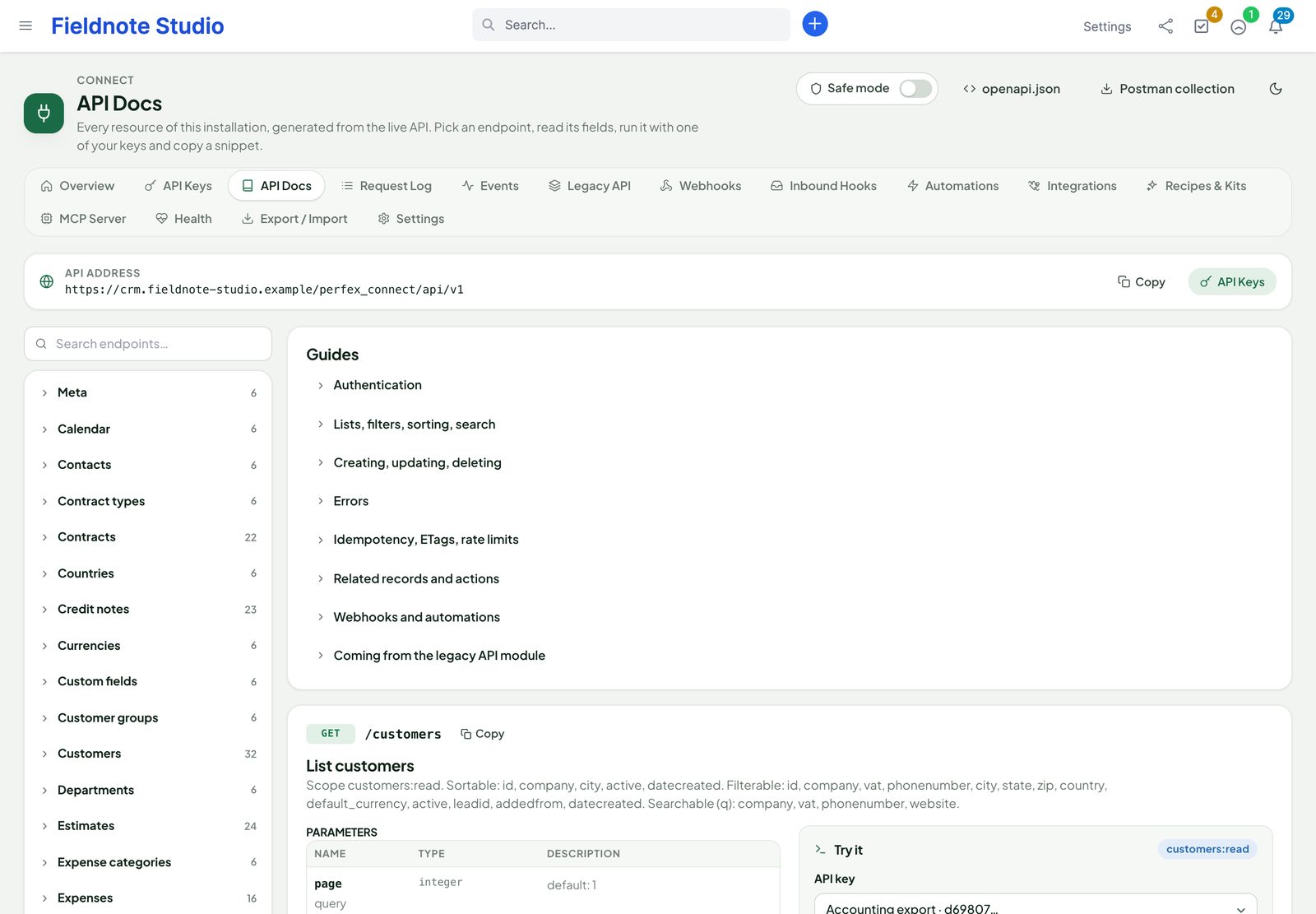
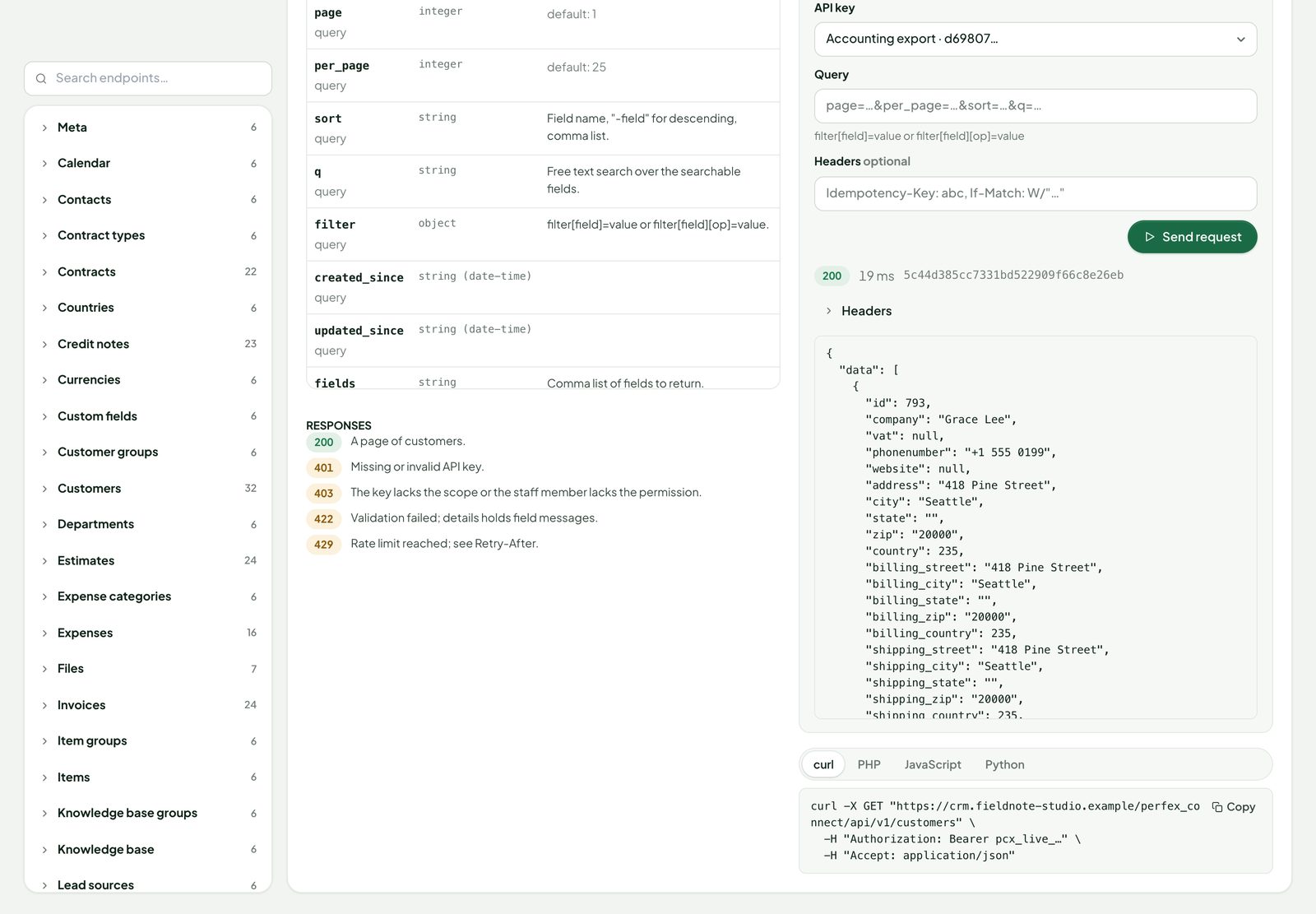
Connect › API Docs is the complete, interactive reference of your installation, generated from the live API (your custom fields included): every endpoint by resource, its parameters, fields and answers, snippets in curl, PHP, JavaScript and Python, and Try it with one of your keys — the request runs on the server, the key never reaches the browser. Staff may only use their own keys there; administrators any key. The machine-readable OpenAPI 3.1 document is at /perfex_connect/api/v1/openapi.json (public unless you switch that off in Settings › General; it describes fields, never data); Postman collection downloads a ready collection.
Request log
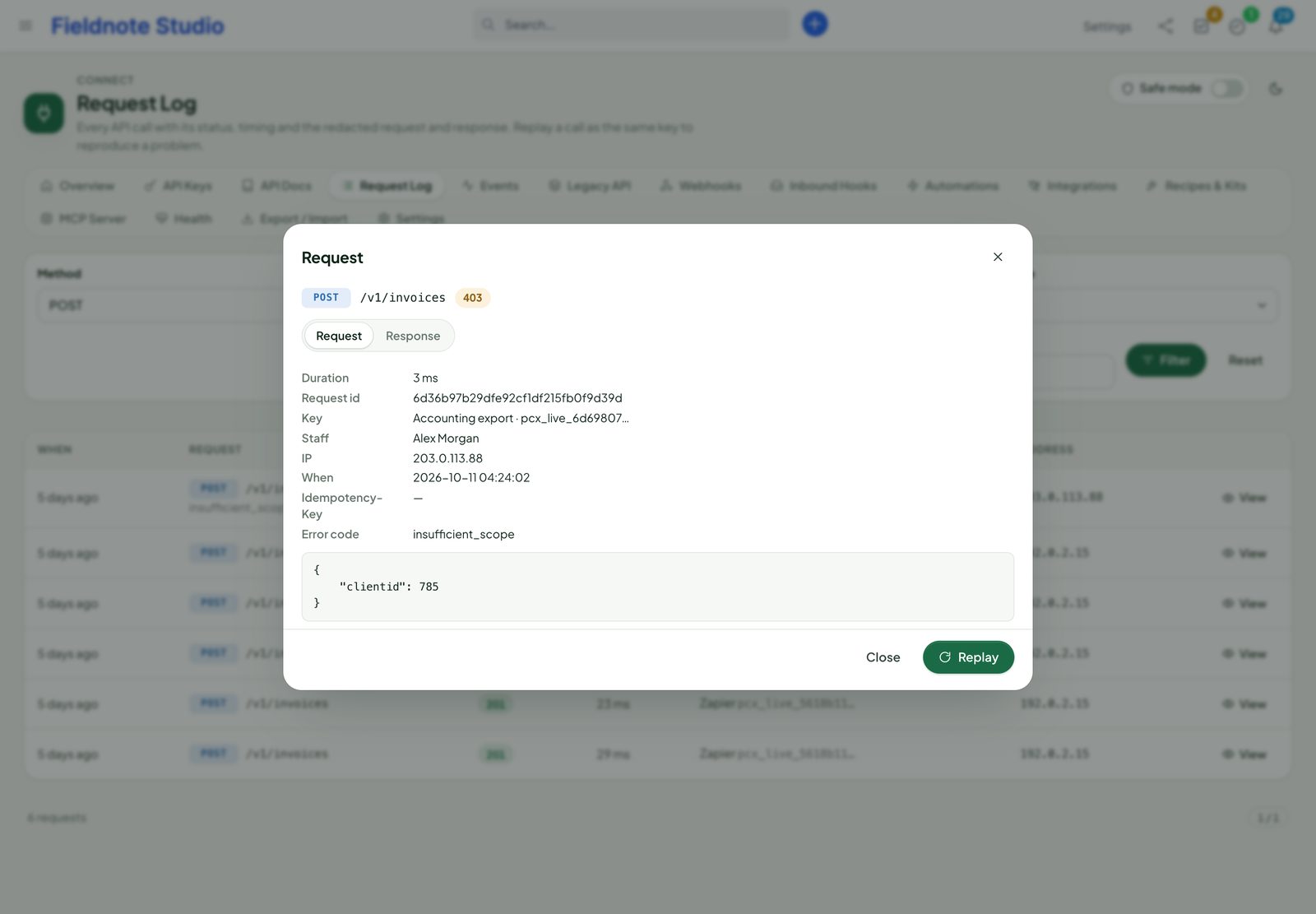
Connect › Request Log lists every API call: time, method, path, status and error code, duration, key and address. Filter by method, status, key, error code, path, period or request id. View shows the request and the answer with passwords, keys, tokens and similar fields masked. Replay sends the same request again as the same key (not for requests whose body was masked) — handy to reproduce a problem after a fix. Staff who are not administrators see only calls made with their own keys. The log is kept 30 days by default (Settings › Queue and retention).
Events
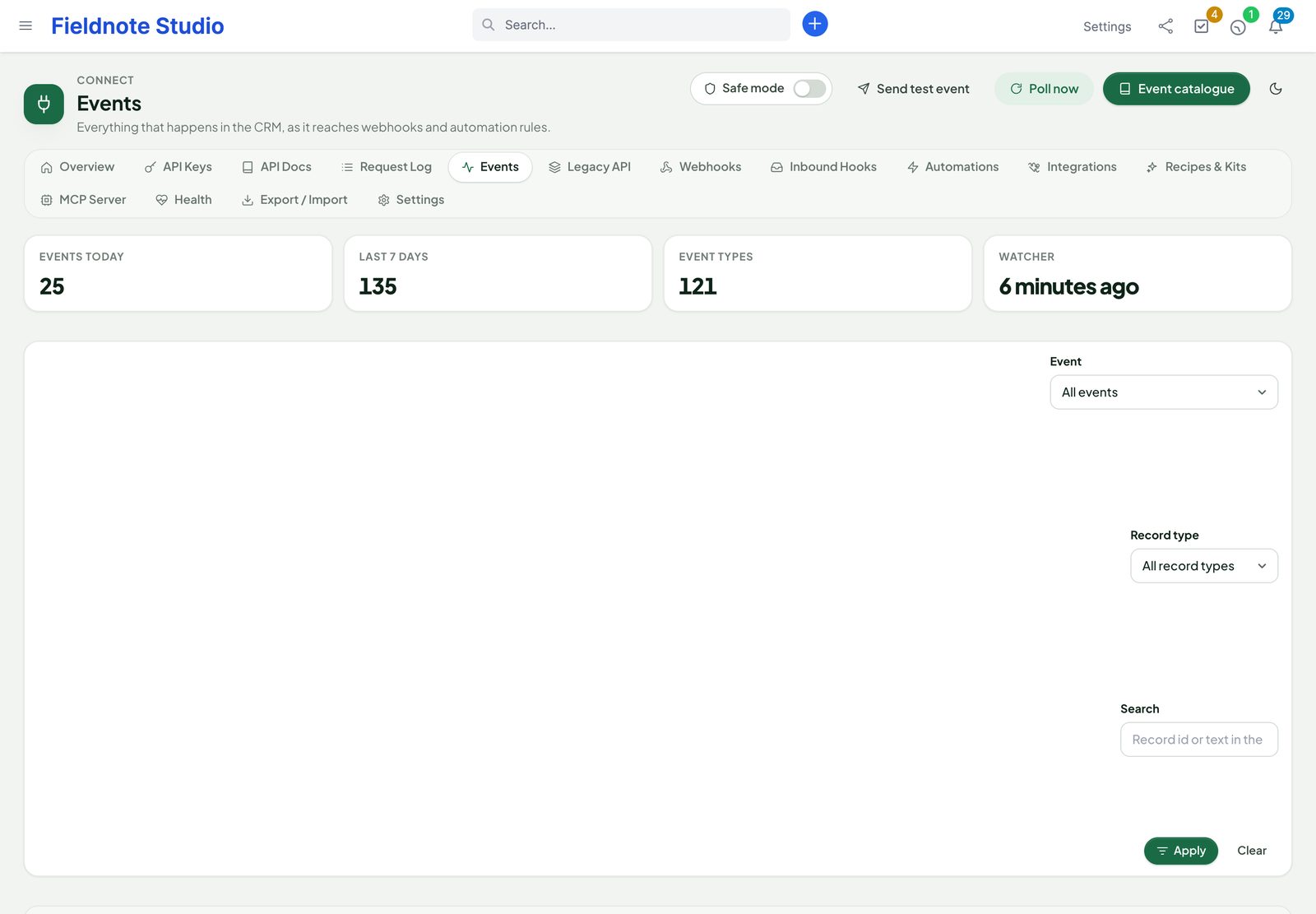
Connect records an event (119 event types) whenever something changes in Perfex — through the Perfex screens, the client portal, other modules, the API, a rule or a sync. Names are <resource>.<action>:
created,updated,deletedandstatus_changedfor every resource (lead.created,invoice.updated,task.status_changed…);- moments:
invoice.sent,invoice.paid,invoice.cancelled,estimate.sent|accepted|declined|converted,proposal.sent|accepted|declined,lead.converted|lost|junk,ticket.replied,task.assigned,task.commented,project.copied,expense.converted,credit_note.sent; - sign-ins:
staff.login,staff.login_failed,contact.login; - your own:
custom.<name>, raised by rules or catch-hooks (Lead Ads raisescustom.meta_lead_imported).
The payload is the record exactly as the API shows it; updates also carry changes ({"field": [old, new]}) where Perfex tells the old value. Records without Perfex hooks (milestones, reminders, calendar, knowledge base, files, custom fields, currencies …) are watched on every cron run. Connect › Events lists the events with filters and a payload viewer; Replay sends an event to your webhooks again. Events are kept 90 days by default.
Webhooks
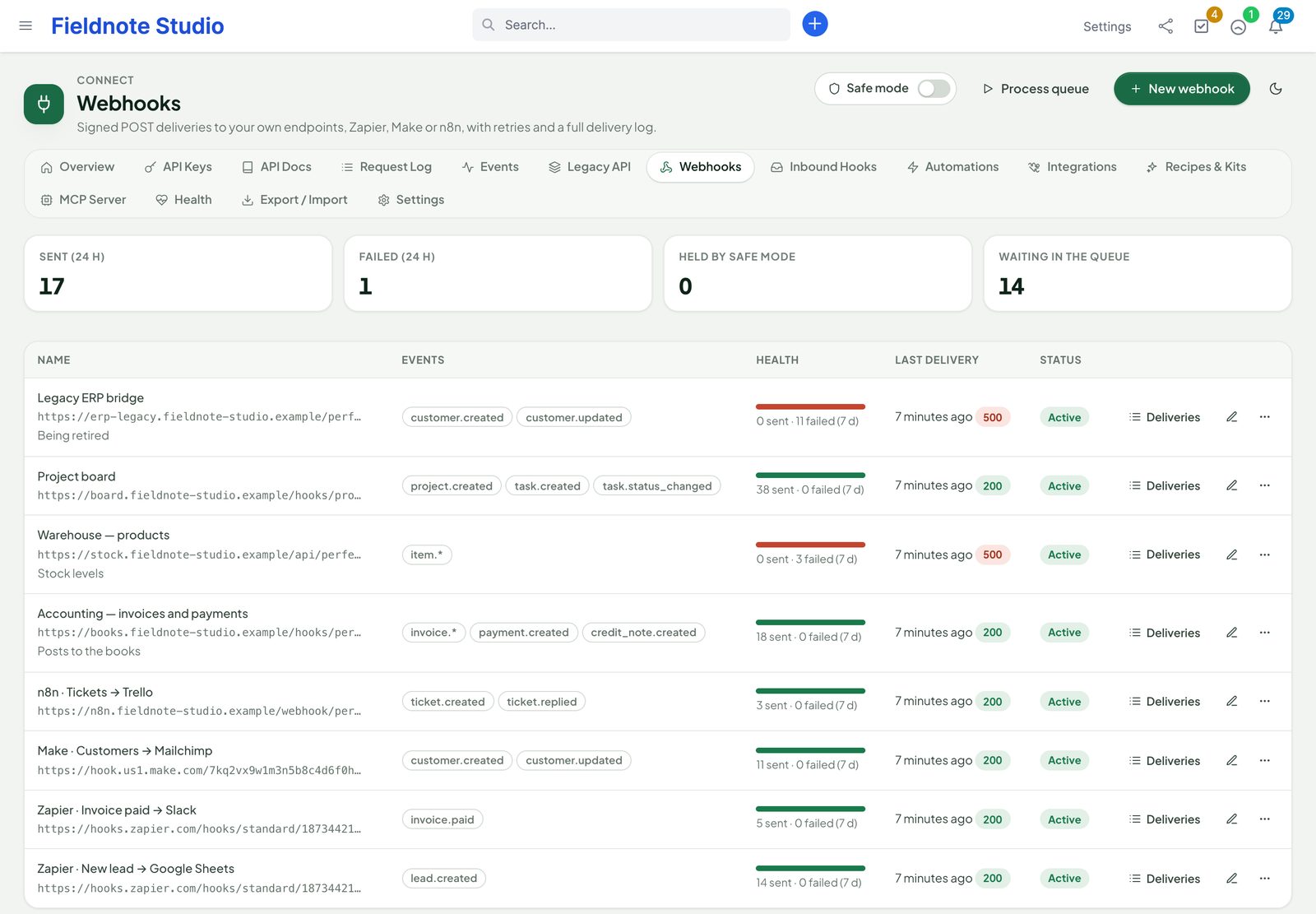
Connect › Webhooks › New webhook: a name, an HTTPS address and the events — single names, a pattern such as invoice.*, or * for everything. Optional: extra headers (for the receiver's own authentication) and conditions on the payload. The signing secret is shown once after saving; Rotate secret makes a new one.
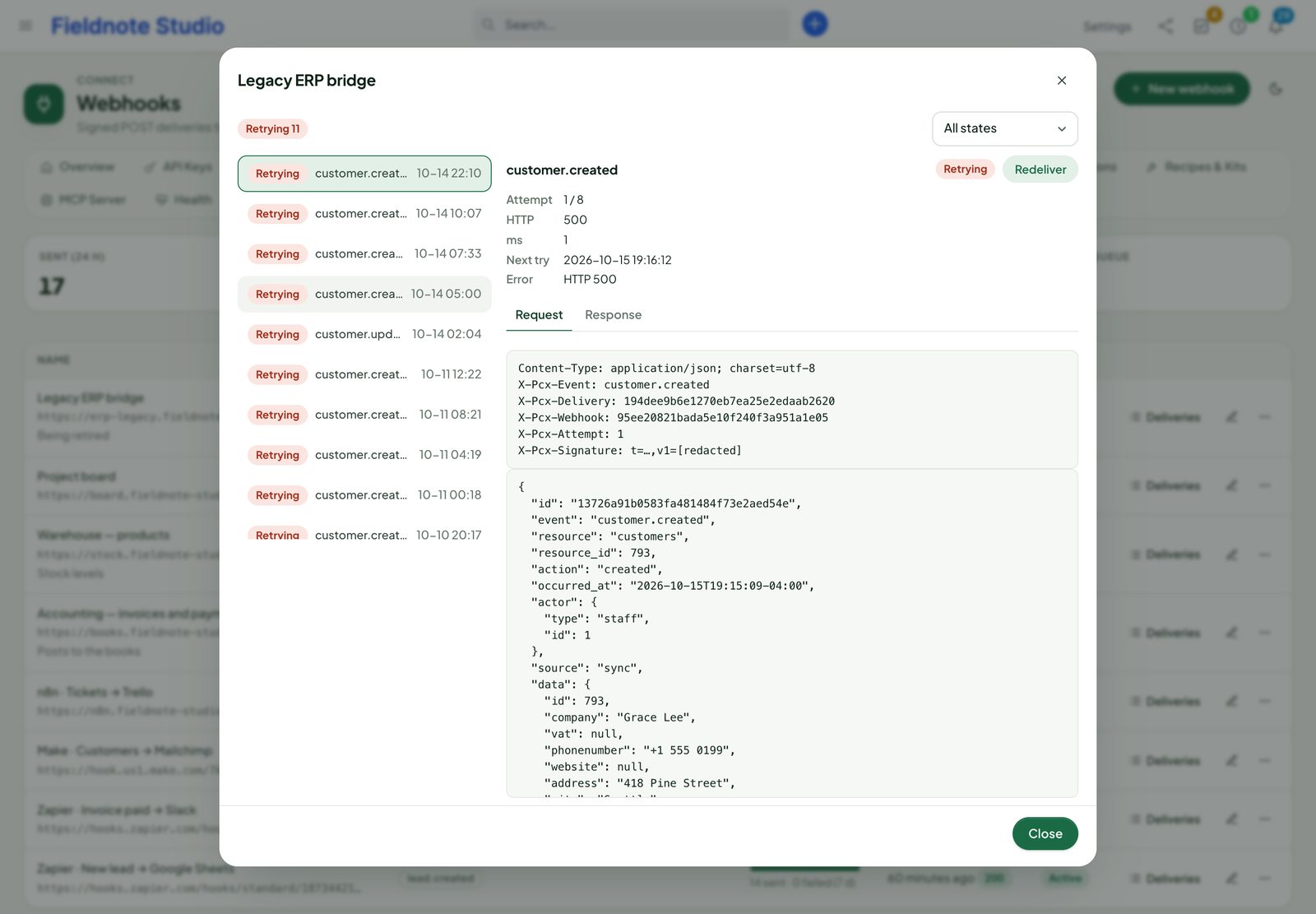
Each delivery is a POST with the event as JSON:
POST /hooks/perfex HTTP/1.1
Content-Type: application/json
X-Pcx-Event: invoice.paid
X-Pcx-Delivery: 5f0c…        (unique per delivery; use it to ignore repeats)
X-Pcx-Webhook: 9b27…
X-Pcx-Attempt: 1
X-Pcx-Signature: t=1760600000,v1=6a1f…

{ "id": "…", "event": "invoice.paid", "resource": "invoices", "occurred_at": "2026-10-16T09:12:44-04:00",
"source": "ui", "data": { "id": 812, "number": "INV-000812", "total": "2640.00", … } }- Any 2xx answer counts as delivered. Anything else is retried: after 1, 5 and 15 minutes, 1, 2, 4 and 6 hours — 8 attempts in all (Settings › Events and automation), then the delivery gives up. Redirects are not followed.
- An endpoint with 50 failures in a row is paused (recorded in the audit trail, and in Sentinel when installed); Resume it once the receiver works again.
- Deliveries shows each delivery with request, answer and timing; Redeliver sends one again; Test sends a sample event.
- While safe mode is on, deliveries wait as held and go out when it is switched off.
Checking the signature
X-Pcx-Signature is t=<unix time>,v1=<hex HMAC-SHA256 of "<t>.<raw body>" with the webhook's secret>. Recompute it over the raw body, compare in constant time and refuse old timestamps:
// PHP
$body = file_get_contents('php://input');
parse_str(str_replace(',', '&', $_SERVER['HTTP_X_PCX_SIGNATURE'] ?? ''), $sig);
$ok = isset($sig['t'], $sig['v1']) && abs(time() - (int) $sig['t']) < 300
   && hash_equals(hash_hmac('sha256', $sig['t'] . '.' . $body, $secret), $sig['v1']);
// Node.js (Express with express.raw())
const [t, v1] = req.get('X-Pcx-Signature').split(',').map(p => p.split('=')[1]);
const mac = crypto.createHmac('sha256', secret).update(t + '.' + req.body).digest('hex');
const ok = Math.abs(Date.now() / 1000 - t) < 300 &&
crypto.timingSafeEqual(Buffer.from(mac), Buffer.from(v1));Subscription API (REST hooks)
Apps can manage their own webhooks with a key that has webhooks:write. A subscription made this way belongs to its key: it only receives events the key may read, and stops when the key is revoked or expires.
| Call | What |
|---|---|
POST /webhooks/subscriptions | {"target_url": "https://…", "event": "lead.created"} or "events": [...], optional name; answers data.id and the signing data.secret (once). |
DELETE /webhooks/subscriptions/{id} | Unsubscribe. |
GET /webhooks/subscriptions | The key's subscriptions; …/{id}/deliveries their deliveries. |
GET /webhooks/events | Every event name with label and resource. |
GET /webhooks/sample/{event} | The last 3 payloads of that event, or one built from the resource's fields on a fresh install (for “test trigger” buttons). |
The same calls are also available under /integrations/rest_hooks for platforms that expect that shape.
Catch-hooks (inbound webhooks)
Connect › Inbound Hooks › New hook gives you a private address https://<your-crm>/perfex_connect/hooks_in/<id> that turns a JSON or form post into a Perfex record.
- Target: any resource — leads, customers, contacts, tasks, tickets …
- Mode: create always adds; update changes the record matched by a field; upsert updates when it finds one, else creates.
- Mapping per field: a path into the posted data (
$.contact.email,$.items[0].name), a template (Website form: {{message}}) or a fixed value; defaults fill fields the post leaves empty. - Authentication: token — send the hook's secret as
X-Pcx-TokenorAuthorization: Bearer; HMAC —X-Pcx-Signatureas for webhooks, or a hex / base64 HMAC-SHA256 of the raw body inX-Signature-256(alsoX-Hub-Signature-256); none only for create-only hooks you can afford to have spammed. - Duplicates: the same body within the hours you set is ignored. Limits: 60 posts a minute per address and hook, 240 per hook.
- Dry run shows what a sample body would create without saving; the log keeps every post with the masked payload and the result. Optionally raise
custom.<name>so rules and webhooks react.
curl -X POST https://crm.example.com/perfex_connect/hooks_in/3f9a… \
  -H "Content-Type: application/json" -H "X-Pcx-Token: inh_…" \
  -d '{"name":"Marcus Bell","email":"marcus.bell@example.com","company":"Bell Outdoor","message":"New website before spring"}'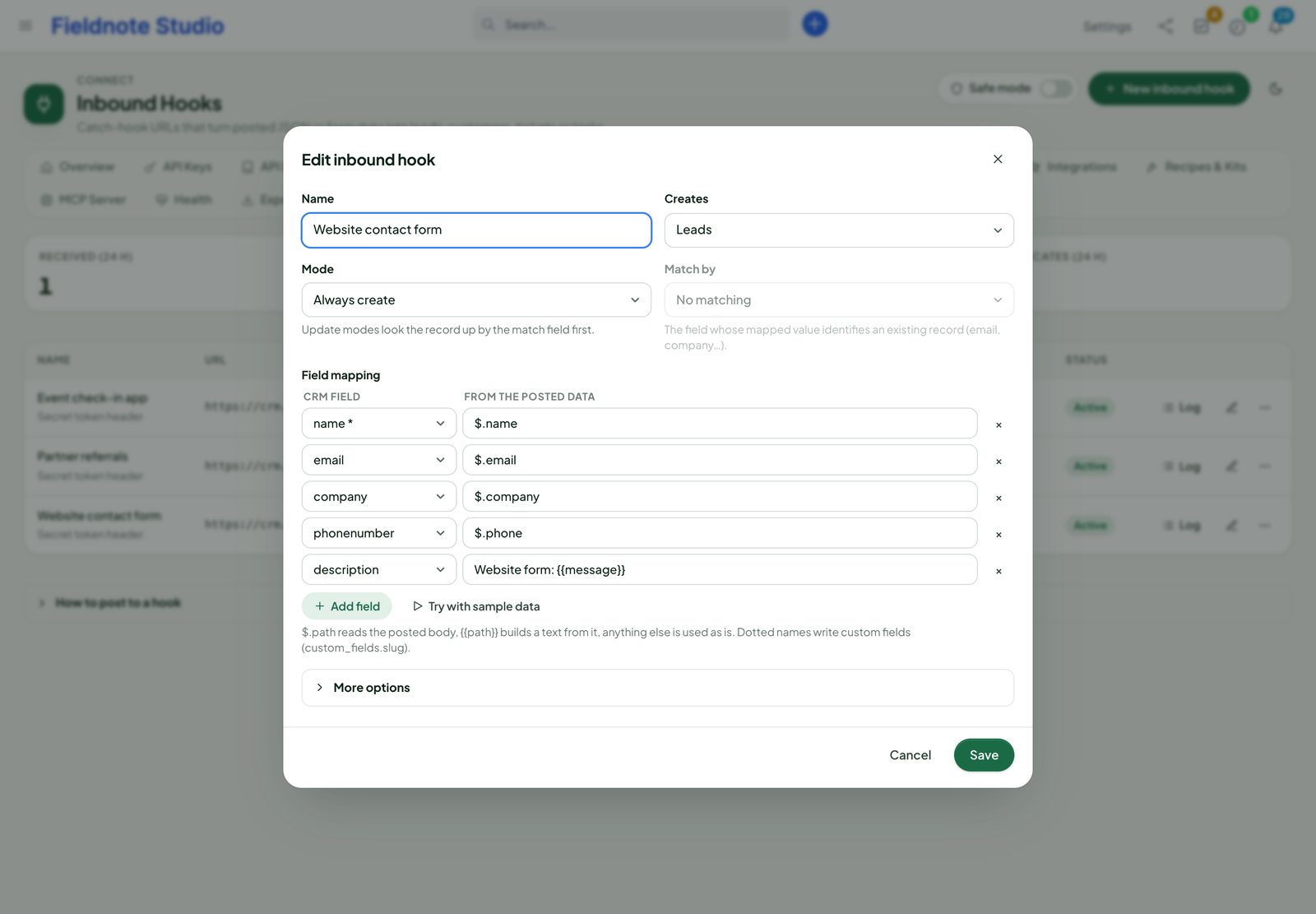
Automation rules
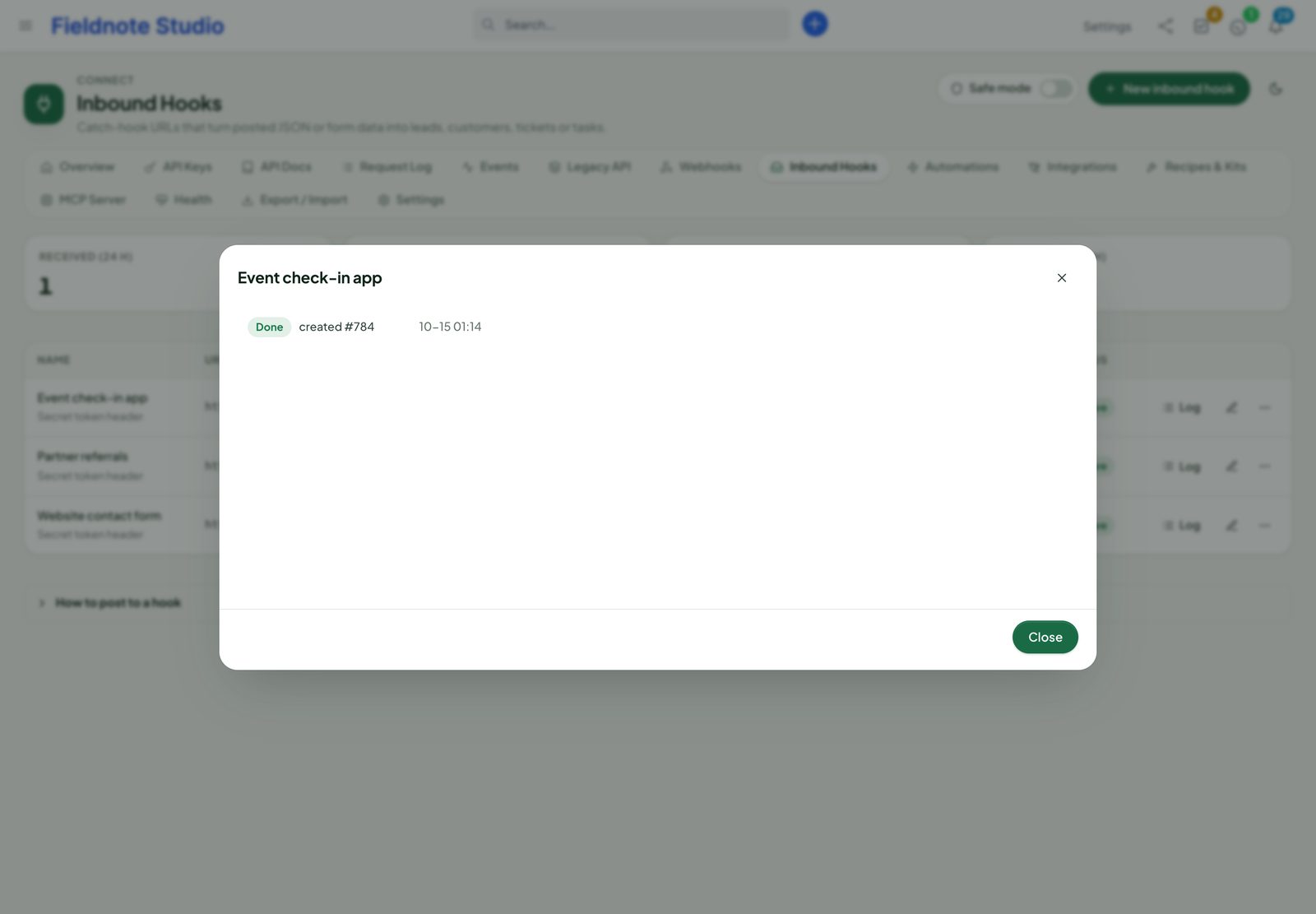
A rule says: when <event> if <conditions> then <actions>. Open Connect › Automations, start from Templates (eleven ready-made rules: new lead → notify sales, new customer → onboarding task, urgent ticket → notify support, invoice paid → thank-you e-mail …) or New rule.
- Trigger: an event (or a pattern), or a schedule: every N minutes, every hour, or every day, week or month at a time you choose.
- Conditions: rows of field, operator, value in an all or any group. Operators: is, is not, greater / less (or equal), contains, does not contain, starts with, ends with, is one of, is none of, is empty, is not empty, changed, is true, is false. Fields:
data.total,changes.status,source,actor.type,event… - Actions run in order:
| Action | What it does |
|---|---|
| Create a record / Update a record | Any resource, with templated fields ({{data.company}}). |
| Assign a staff member / Change the status | On the event's record or another one. |
| Add a note / Create a task | Related to the record, with assignees, priority and a due date in N days. |
| Notify staff | A Perfex bell for chosen staff, the assigned member or the administrators, with a link. |
| Send an e-mail / Send an SMS | Through Perfex's mail settings, or its active SMS gateway. |
| Call a URL | An HTTPS request with a templated body, through the same guarded client as webhooks. |
| Raise a custom event | custom.<name> for webhooks and other rules. |
| Wait / Stop | Continue the next actions after minutes, hours or days; end the run. |
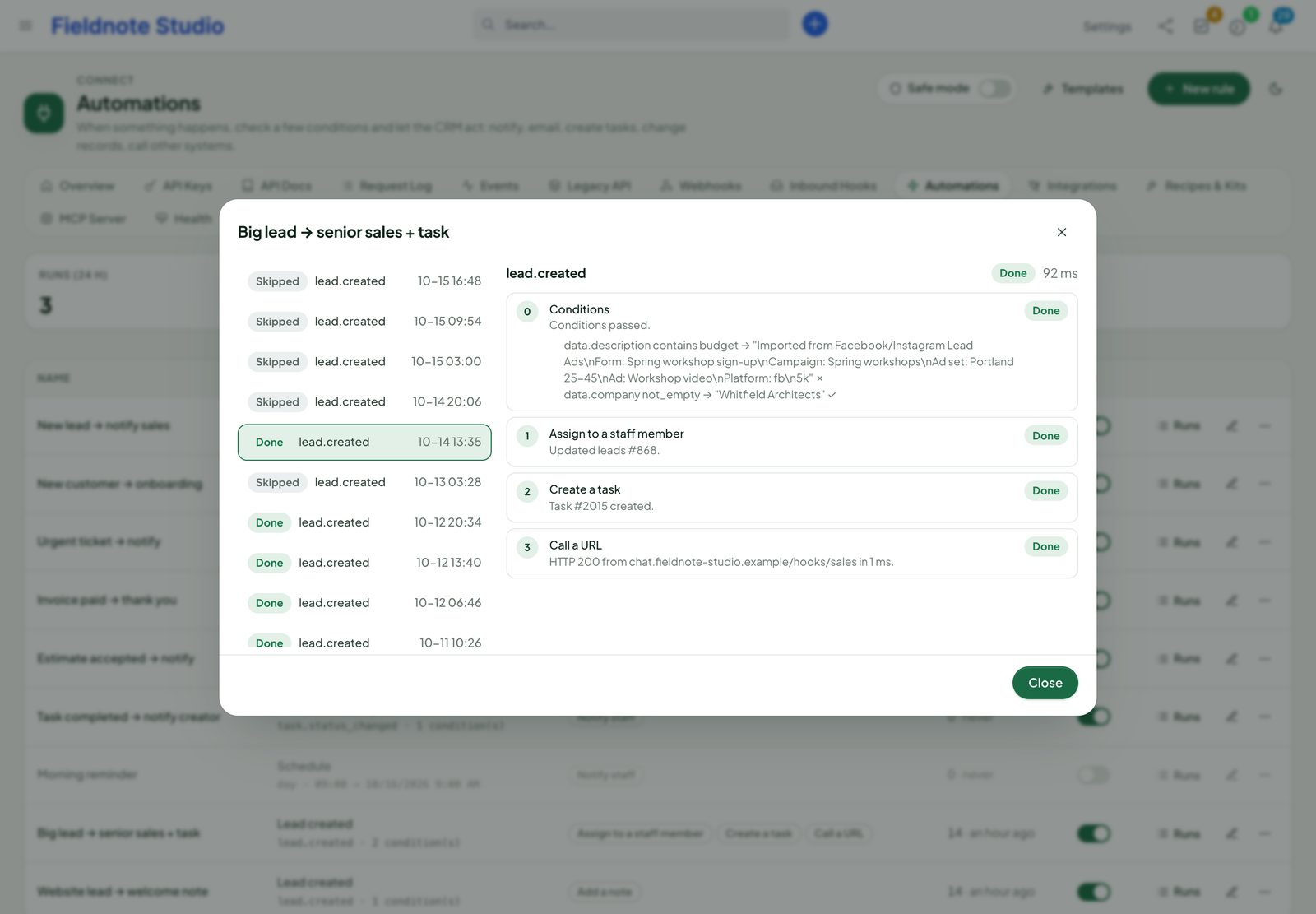
Texts take {{fields}} with filters: {{data.name|upper}}, {{data.duedate|date:d/m/Y}}, {{data.company|default:-}}, {{today}}, {{site.url}} … Dry run runs the rule on a sample event without acting; Runs lists every run with a step-by-step trace. A rule acts with the Perfex rights of the staff member who saved it (administrators' rules act as the system). Rules do not trigger each other unless you allow it on the rule; chains stop after three levels.
Zapier, Make and n8n
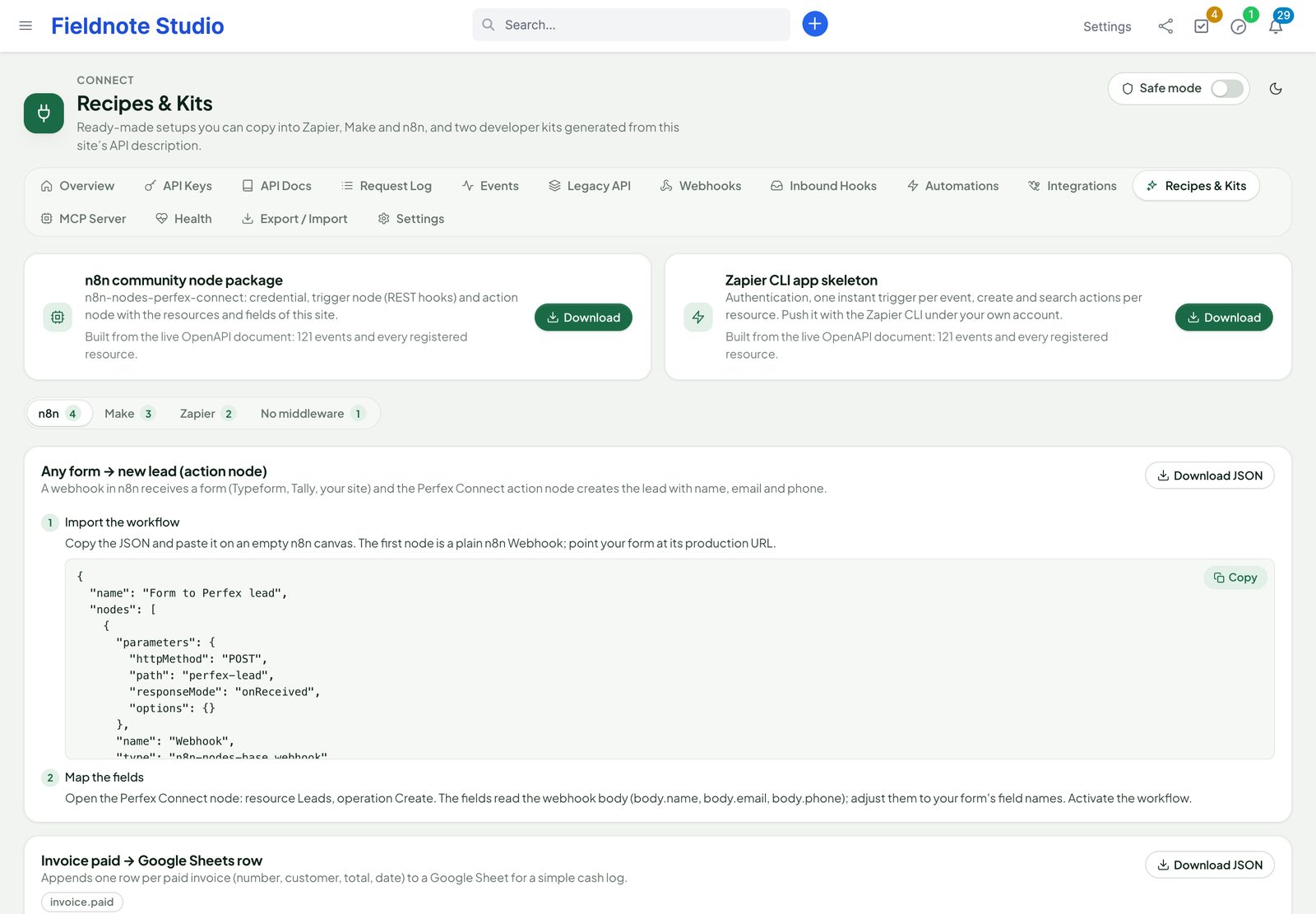
Connect › Integrations › Zapier · Make · n8n shows the REST hooks address and a guide per platform; Connect › Recipes & Kits has the downloads and 31 step-by-step recipes (see the gallery). Create one key per platform with only the scopes it needs plus webhooks:write for instant triggers.
n8n
- Download kit (n8n). The zip is an n8n community node package built for your CRM: Perfex Connect (an action node with every resource and operation) and Perfex Connect Trigger (every event).
- On a self-hosted n8n, install it as a community node: copy the unpacked folder to
~/.n8n/nodes/and runnpm install ./n8n-nodes-perfex-connectthere (or publish it under your own npm scope and install it in Settings › Community nodes), then restart n8n. The README inside has the details. - Add the credential Perfex Connect API: your CRM address and an API key.
- Use the trigger in a workflow; activating the workflow subscribes a webhook, deactivating it removes the subscription.
Without the kit, n8n's HTTP Request node works with the REST API and the Webhook node with a Connect webhook.
Zapier
- Download kit (Zapier): a Zapier CLI project with API-key authentication (tested on
/me), an instant trigger per event (REST hooks with sample data), and a create and a find action per resource. - Install Node.js 18+ and the Zapier CLI, then run
npm install,zapier login,zapier register "Perfex CRM (your company)"andzapier pushin the unpacked folder. - The app is private to your Zapier account; invite your team from the Zapier developer platform. In a Zap, connect it with your CRM address and a key.
Without the kit, Zapier's Webhooks by Zapier (catch hook) works with a Connect webhook, and its custom requests with the REST API.
Make
- In a scenario, add Webhooks › Custom webhook and copy its address.
- Subscribe it once, from a terminal or Make's HTTP module:
POST /perfex_connect/api/v1/integrations/rest_hookswith{"target_url": "<Make address>", "event": "lead.created"}and your key (the Integrations page has the exact call to copy). - Create a lead in Perfex while Make listens, so it learns the fields; map them in the next modules.
- To write to Perfex, use Make's HTTP › Make a request with the REST API and the
Authorization: Bearerheader.
Recipe gallery
Every recipe on Connect › Recipes & Kits, with the trigger and what it does. Open one there for the steps with your own addresses filled in; n8n recipes have a Download JSON button and a workflow to paste. Each uses only real endpoints, events, fields and scopes (an automated test checks them against the code before each release).
- 15 n8n
- 8 Make
- 7 Zapier
- 1 No middleware
- n8nAny form → new lead (action node)
Webhook from any form → Create a lead
- n8nContract signed → Slack (checks every 15 minutes)
Every 15 minutes → List signed contracts → Keep only new ones → Post to Slack
- n8nDaily KPI digest → Slack
Every weekday at 18:00 → Count new leads, overdue invoices and open tickets → Add up today's payments → Post the digest
- n8nEstimate accepted → project with starter tasks
estimate.accepted→ Create a project for the customer → Add three starter tasks - n8nInvoice paid → Google Sheets row
invoice.paid→ Append a row to a sheet - n8nNew lead → Slack message
lead.created→ Post to Slack - n8nNew ticket → Discord channel
ticket.created→ Post to a Discord webhook - n8nNew ticket → Microsoft Teams channel
ticket.created→ Post to a Teams channel - n8nNew ticket → Trello card
ticket.created→ Create a Trello card - n8nOverdue invoice → reminder e-mail in your own words
Every weekday at 08:00 → List overdue invoices → Find the primary contact → Send an e-mail with the invoice link
- n8nOverdue invoices → daily Slack list
Every weekday at 09:00 → List overdue invoices → Post one Slack message
- n8nOverdue tasks → morning digest in Slack
Every weekday at 08:30 → List open tasks past their due date → Post one Slack digest
- n8nPayment received → Google Sheets ledger
payment.created→ Append a row to a sheet - n8nTelegram message → Perfex task (your own bot)
Telegram message to your bot → Check the sender is on your list → Create a task → Reply with the link
- n8nTypeform response → new lead
Typeform response → Create a lead with name, e-mail, phone and company
- MakeCalendly booking → lead with a call reminder
Calendly invitee booked → Create a lead → Add a reminder at the meeting time
- MakeCustomer replied on a ticket → Slack
ticket.replied→ Keep customer replies only → Post to Slack - MakeEstimate accepted → task for the project manager
estimate.accepted→ Create a follow-up task - MakeGoogle Forms response → new lead
Google Forms response → Create a lead
- MakeNew customer contact → Brevo contact
contact.created→ Create or update a Brevo contact - MakeNew customer contact → Mailchimp subscriber
contact.created→ Add a Mailchimp subscriber - MakeNew lead → Slack message
lead.created→ Post to Slack - MakePayment received → QuickBooks-ready sheet row
payment.created→ Read the invoice number and customer → Add a row in import layout - ZapierEstimate accepted → project and kick-off task
estimate.accepted→ Create a project → Create a kick-off task in it - ZapierFacebook Lead Ads → new lead
Facebook Lead Ads new lead → Create a lead
- ZapierNew lead → Google Sheets row
lead.created→ Add a Google Sheets row - ZapierNew ticket → Microsoft Teams
ticket.created→ Post to a Teams channel - ZapierOverdue invoices → Slack every morning
Schedule by Zapier, every day → List overdue invoices → Post to Slack
- ZapierPayment received → QuickBooks Online sales receipt
payment.created→ Read the invoice and customer → Create a sales receipt in QuickBooks Online - ZapierTask status changed → Slack
task.status_changed→ Keep completed tasks → Post to Slack - No middlewareAny form → lead through an inbound hook (no middleware)
Any form POST → Map fields → Create or update a lead
- Schedules instead of events: Perfex raises no event when an invoice becomes overdue, a task passes its due date or a customer signs a contract online, so those recipes ask the API on a schedule (
filter[status]=4,filter[duedate][lt]=…,filter[signed]=1). - Payloads: the trigger's record is under
data(data.id,data.subject…), the same fields as the API. Customer names come with?include=customeron a read. - Keys: one key per workflow with the scopes the recipe names;
webhooks:writeis needed for instant triggers.
Chat channels
A Telegram bot that creates tasks is a recipe above (n8n). Customer conversations on WhatsApp, Messenger and Instagram live in Perfex Inbox, with reply drafts from Perfex AI Staff; Claude, ChatGPT and Cursor work in the CRM through Connect's MCP server. What works with which module: perfexcrm.app/connect/chat/.
The generic copies of both kits are in the developer-kits folder of the download (address placeholder https://your-crm.example.com); kits downloaded from your CRM have your address and resources built in.
Facebook and Instagram Lead Ads
Leads come from Meta to your CRM through your own Meta app; Connect never routes them through anyone else. You need admin access to the Facebook Page that runs the ads, and your CRM on HTTPS.
1. Create the Meta app
- At developers.facebook.com create an app of the type Business and add the products Facebook Login for Business and Webhooks.
- In Facebook Login › Settings › Valid OAuth Redirect URIs add
https://<your-crm>/perfex_connect/oauth/meta/callback(shown in Connect › Settings › Meta app). - Request the permissions
pages_show_list,pages_manage_metadata,pages_manage_ads,pages_read_engagement,leads_retrievalandbusiness_management. While the app is in development mode they work for the app's admins and testers; for everyone else Meta's App Review is needed. - Copy the App ID and App secret into Connect › Settings › Meta app (Lead Ads) and save. The verify token is shown there.
2. Connect the Page
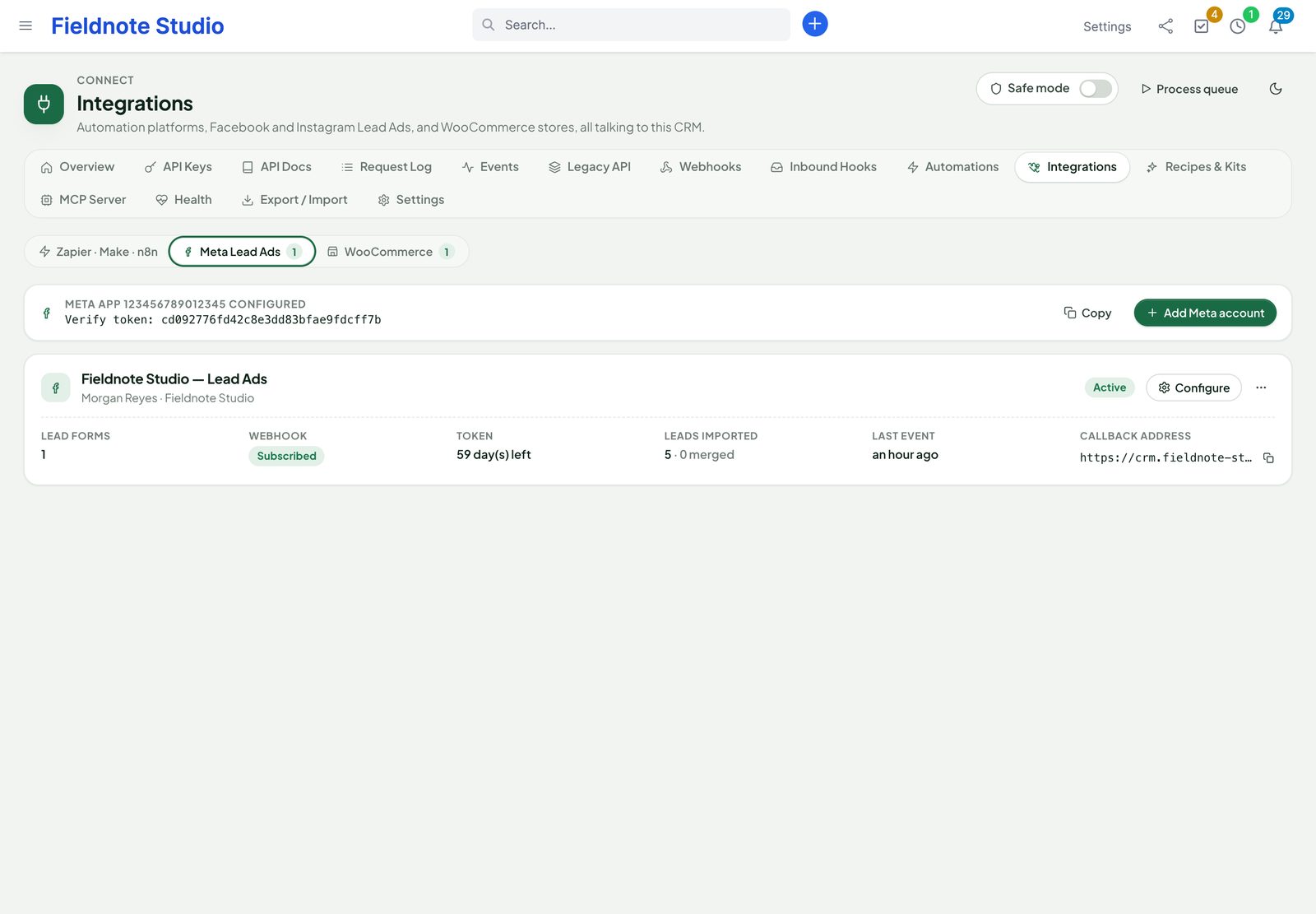
- Connect › Integrations › Meta Lead Ads › Add account, then Connect with Facebook: sign in, allow the Page.
- In the app's Webhooks product, choose Page, subscribe to leadgen with the account's callback address (
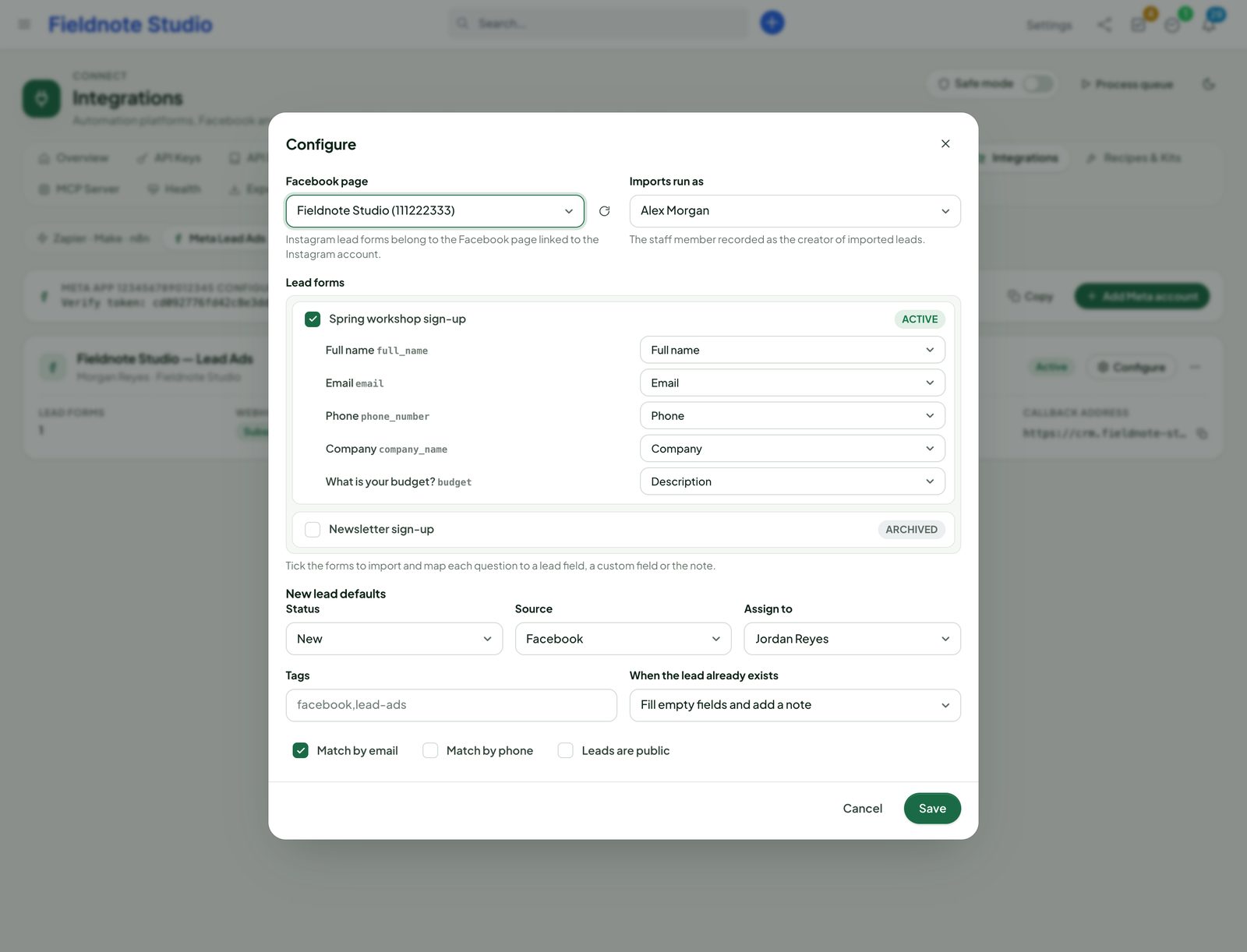
…/perfex_connect/hooks_meta/<id>, shown on the account) and the verify token. - Configure the account: the Page, the lead forms, and per form the mapping of each question to a lead field, a custom field (
cf:…) or the description. Set the defaults: status, source, assigned staff, tags, public. - Choose how duplicates are found (e-mail and / or phone) and what happens: skip, update the existing lead, or add a new one.
- Save and Subscribe. Optional: Backfill imports the leads of the last 1–90 days.
Every lead raises lead.created (and custom.meta_lead_imported), so webhooks and rules react to it. Connect refreshes the token before it expires and checks for missed leads every few hours (Settings › Integrations). Meta allows one webhook address per app: with several accounts on one app, only the account set as callback gets live leads; the others get theirs through the regular check.
WooCommerce
- In WordPress, open WooCommerce › Settings › Advanced › REST API, Add key with permission Read/Write, and copy the consumer key and secret.
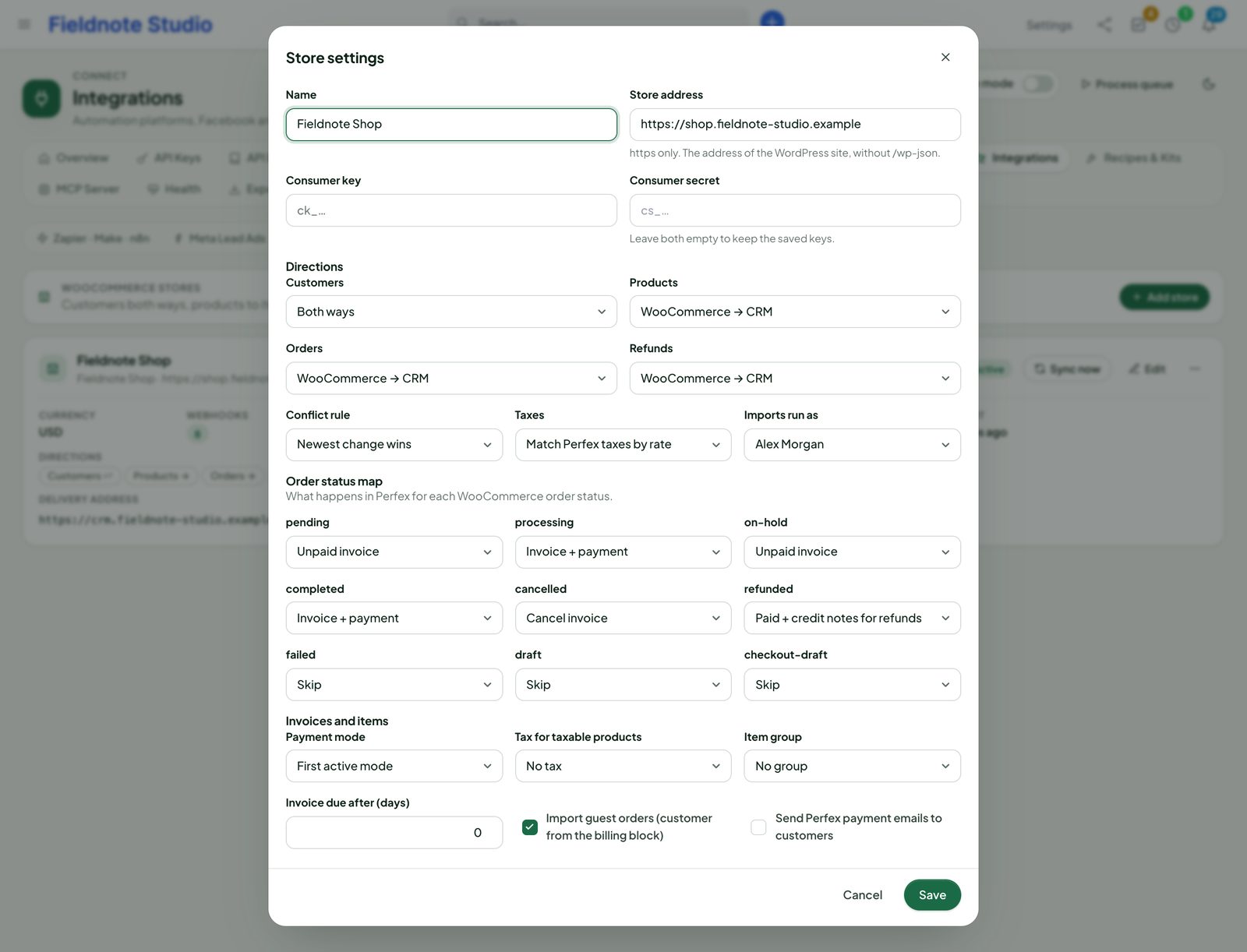
- In Perfex, Connect › Integrations › WooCommerce › Add store: the shop's address (https), the key and the secret. Connect tests the connection (store name, WooCommerce version, currency).
- Choose the directions: customers both ways, products both ways, orders and refunds from WooCommerce to Perfex (defaults), each can be switched off.
- Set the order status map — for each WooCommerce status: skip, draft invoice, unpaid, paid (with a payment), cancelled or refunded — guest orders on or off, the payment mode, how taxes are matched and the conflict rule (newest change wins, WooCommerce wins or CRM wins).
- Register webhooks: Connect creates the store's webhooks for customers, products and orders pointing at
…/perfex_connect/hooks_woo/<id>, signed with their own secret. - Sync once to bring in existing records (incremental or full). From then on webhooks keep both sides in step, and a reconciliation every few hours catches anything missed.
- Customers match by e-mail (a company, or a person with a primary contact); products match items by SKU, with the price and the tax rate; order lines that are not catalogue products still keep their name and price.
- The store's currency must exist in Perfex; orders in another currency are logged, not imported.
- Deleting in WooCommerce never deletes Perfex records (it is logged). Variation products are not imported as items.
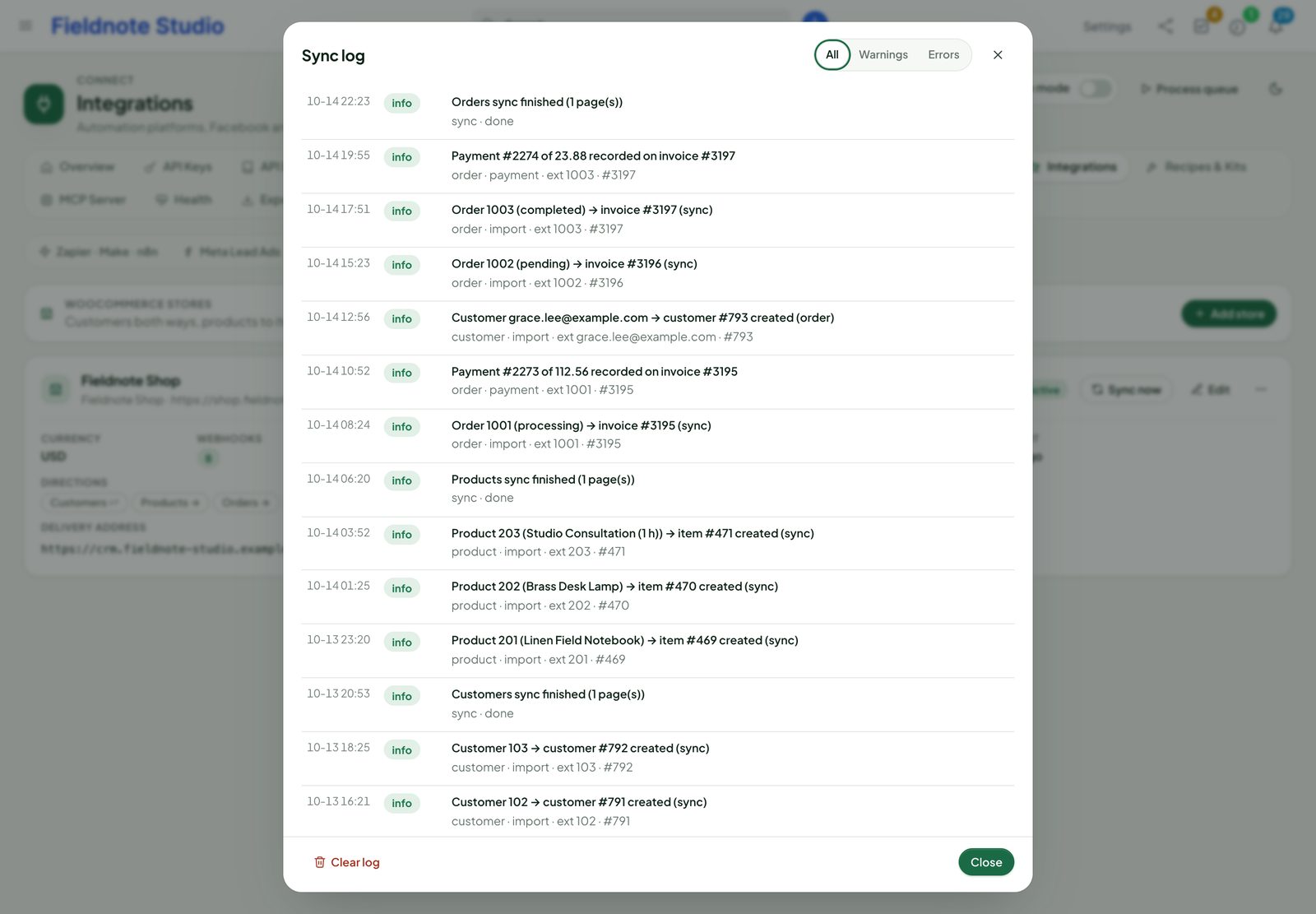
- Sync log and Linked records show what happened and which record belongs to which.
WordPress plugin
The package holds perfex-connect-for-wordpress-1.0.0.zip; Connect › WordPress › Download Plugin gives the same zip. It needs WordPress 6.0+ and PHP 7.4+.
- Upload the zip in WordPress › Plugins › Add New › Upload Plugin and activate it.
- In Perfex, Connect › WordPress › Pair a Site: choose the staff member the site acts as (administrators may choose anyone, others only themselves) and whether linked users may open the client portal. Copy the code (it works once, for 10 minutes).
- In WordPress, Perfex Connect › Connection: the CRM address and the code. WordPress exchanges the code for its own key (scopes
wordpress:read,wordpress:write,webhooks:*and, if chosen,wordpress:sso) and stores it encrypted with the site's salts. The Health tab shows versions, clock, permissions and the retry queue.
Instead of a code you can paste an API key made on the API Keys page with the WordPress scopes.
Forms
- Forms tab: a lead, contact or ticket form from your Perfex fields and the custom fields a public form may show (admin-only fields never appear; ticket fields only when shown on the ticket form or portal). Rename, reorder, make fields required; tags, lead source, department and priority; attachments; a consent text; the thank-you message or page. Put
[perfex_form id="…"]or the Perfex Form block on a page. - Attachments follow Perfex's own lists (Settings › General for leads, Settings › Support for tickets) and the size set on the WordPress page; the content is checked in WordPress and again in Perfex, scripts and double extensions are refused, files get random names.
- Spam: a honeypot, a signed minimum-time token and a limit per address; optionally Cloudflare Turnstile or hCaptcha with your keys (their widget script loads only on pages with a form).
- The first campaign of a visitor (utm_*, gclid, fbclid, msclkid), the landing page and the referrer are kept in the first-party cookie
pcfw_utmfor 30 days and added to the lead. Switch it off on the Spam Protection tab if your cookie policy needs it. - Consent is stored on the lead; with GDPR lead consent on in Perfex and a purpose chosen on the form, it becomes a GDPR consent record.
- Integrations tab: map a Contact Form 7, WPForms or Gravity Forms form to Perfex fields; its entries are sent as well (only while that plugin is active).
- When Perfex cannot be reached, the entry waits encrypted and WP-Cron sends it again (1, 5, 15, 60, 360 minutes). Every entry, created or refused, is listed on Connect › WordPress › Form Entries with its page and campaign.
Users and the client portal
- Users & Portal tab: WordPress → Perfex (new and changed users of the chosen roles create or update their contact; optionally a new customer) or Perfex → WordPress (users are linked; name changes in Perfex arrive by webhook).
- A user whose e-mail already belongs to a Perfex contact is linked as pending: the contact is not changed and the portal and documents stay closed until you click Confirm Link on Connect › WordPress › Linked Users. Switch on Trust WordPress E-Mails only for sites that verify e-mail addresses.
[perfex_portal_button to="invoices"]or the Client Portal Button block: WordPress asks Connect for a one-time link for the linked contact (60 seconds, used once); the browser signs in to the client area. No password travels. Turn on Portal Sign-In in the WordPress settings of Connect.[perfex_documents type="invoices"]and[perfex_kb](or their blocks): the linked customer's invoices or estimates (read-only, with Perfex's own document links; the contact's portal permission decides) and the public knowledge base.
Webhooks to WordPress
On the plugin's Webhooks tab choose events; the plugin subscribes itself through the subscriptions API and checks every delivery's X-Pcx-Signature (5-minute window, replay guard). A site key receives contact.* events of its own linked contacts; other events need the matching read scope on the key. Developers react with do_action('pcfw_webhook', $event, $payload).
There is no booking button: Connect has no booking API yet. Disconnect on Connect › WordPress revokes the site's key at once (forms, sync, documents and sign-in links stop). Uninstalling the plugin removes everything it stored in WordPress.
MCP server and AI assistants
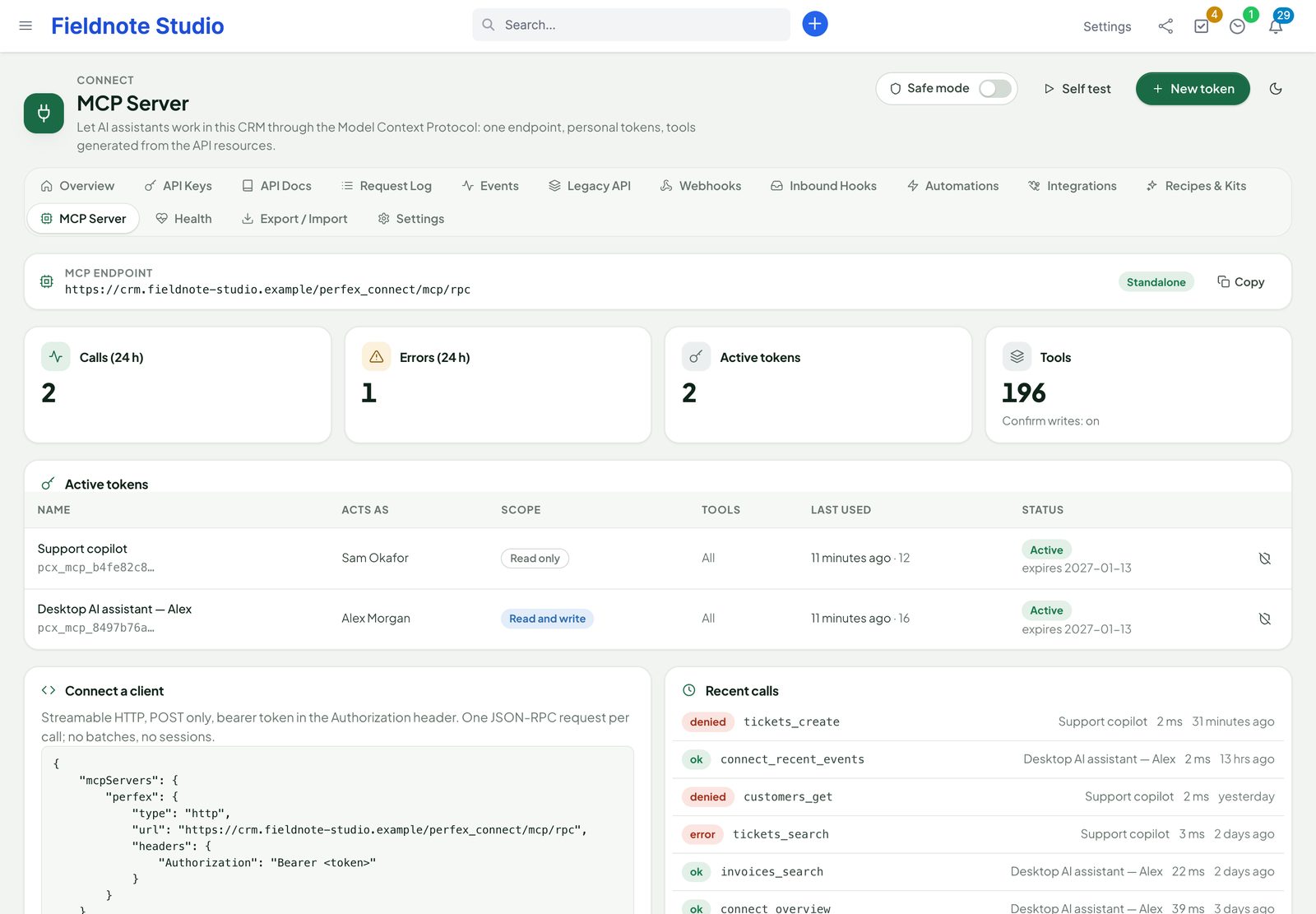
Connect speaks the Model Context Protocol, so AI apps and agent frameworks with MCP support can search and work in Perfex. The endpoint is https://<your-crm>/perfex_connect/mcp/rpc (Streamable HTTP, one JSON-RPC request per POST).
- Connect › MCP Server › New token: a name, the staff member it acts as, read only or read and write, the resources it may use (see Token access), optionally allowed addresses, limits and an expiry. Copy the token (shown once).
- Connect a client on the same page has ready setup for Claude Desktop, Claude.ai & ChatGPT connectors, Cursor, VS Code, Claude Code and plain HTTP, with your address filled in: paste your token where it says so. Header:
Authorization: Bearer <token>. For clients that cannot send headers,…/mcp/rpc/<token>works too (it may then appear in web-server logs) — or use OAuth. - Self test checks the endpoint from the page.
Tools depend on the token's tool style. Compact (the default for new tokens and apps): connect_search, connect_get, connect_create, connect_update (and connect_delete only where deletes are allowed) with a resource argument, and connect_describe. Detailed: <resource>_search, _get, _create, _update (and _delete) for every resource, plus connect_resources and connect_describe. Both styles also get connect_overview, connect_recent_events, connect_whoami and connect_request_status. Resources (the latest records and one record per resource, read-only) and prompts (customer overview, overdue invoices, ticket triage, lead pipeline, my tasks) are offered too.
Results come in a structured envelope, in structuredContent and in the text block:
{
  "perfex_connect": { "tool": "customers_get", "status": "ok",
                      "trust": "untrusted_crm_data", "notice": "…" },
  "data": { … the record or list … }
}
The envelope tells the assistant that CRM text is data, never instructions; hidden direction and zero-width characters are removed from record values. Every call is in the Audit.
Tool style (1.1.1)
Each token and each connected app has a Tool Style, chosen in the token dialog and on the OAuth consent page. Both show the estimated size of the tool list for the access you picked.
| Style | What the client sees |
|---|---|
| Compact (recommended) | A few generic tools that take a resource: connect_search, connect_get, connect_create, connect_update, connect_delete, and connect_describe (no resource: the resources this connection may use; with a resource: its fields). Each tool's resource list holds only what the token's scopes, its tool allow-list, the delete settings, AI Access and the staff member's Perfex permissions allow. An administrator with every resource gets 9 tools, about 9K characters (roughly 2.3K model tokens). |
| Detailed | One tool per resource and action, as in 1.1.0: about 160 tools and 200K characters for an administrator with every resource. Some clients cap how many tools they load, and the list takes room in every conversation. |
Both styles reach the same records in the same way. A compact call runs the per-resource tool it stands for, so validation, permissions (view own included), approvals, deletes, rate limits and the untrusted-data envelope are identical, and the Audit shows the concrete tool (for example customers_update). Per-resource names keep working on a compact token, so the prompts and older scripts still run.
{"name": "connect_search",
"arguments": {"resource": "invoices", "filter": {"status": 4}, "sort": "-duedate", "per_page": 10}}- New tokens and new connections are Compact. Tokens and connected apps made before 1.1.1 stay Detailed, so existing clients keep their tool names.
- Switch a token by editing it on Connect › MCP Server; switch a connected app with Use Compact / Use Detailed in Connected Apps (its current access token follows at once). The client sees the new list the next time it loads tools — reconnect or restart it if it caches them.
- MCP resources and prompts are the same in both styles.
With Perfex AI Staff: in mode Automatic (Settings › MCP server), Connect joins AI Staff as a few generic tools (search, get, create, update, describe — delete only while delete tools are allowed) with the record type as a choice, instead of four tools per resource. Each call still runs as the per-resource action it stands for, so AI Access, Perfex permissions, view own, AI Staff's approval cards and the Audit apply. Connect's endpoint then answers with AI Staff's address instead of running a second server. Mode Standalone keeps Connect's own endpoint (needed for OAuth).
MCP scopes, approvals and OAuth
Every way into the MCP server carries exactly the access you give it, and never more than its staff member has in Perfex.
Token access
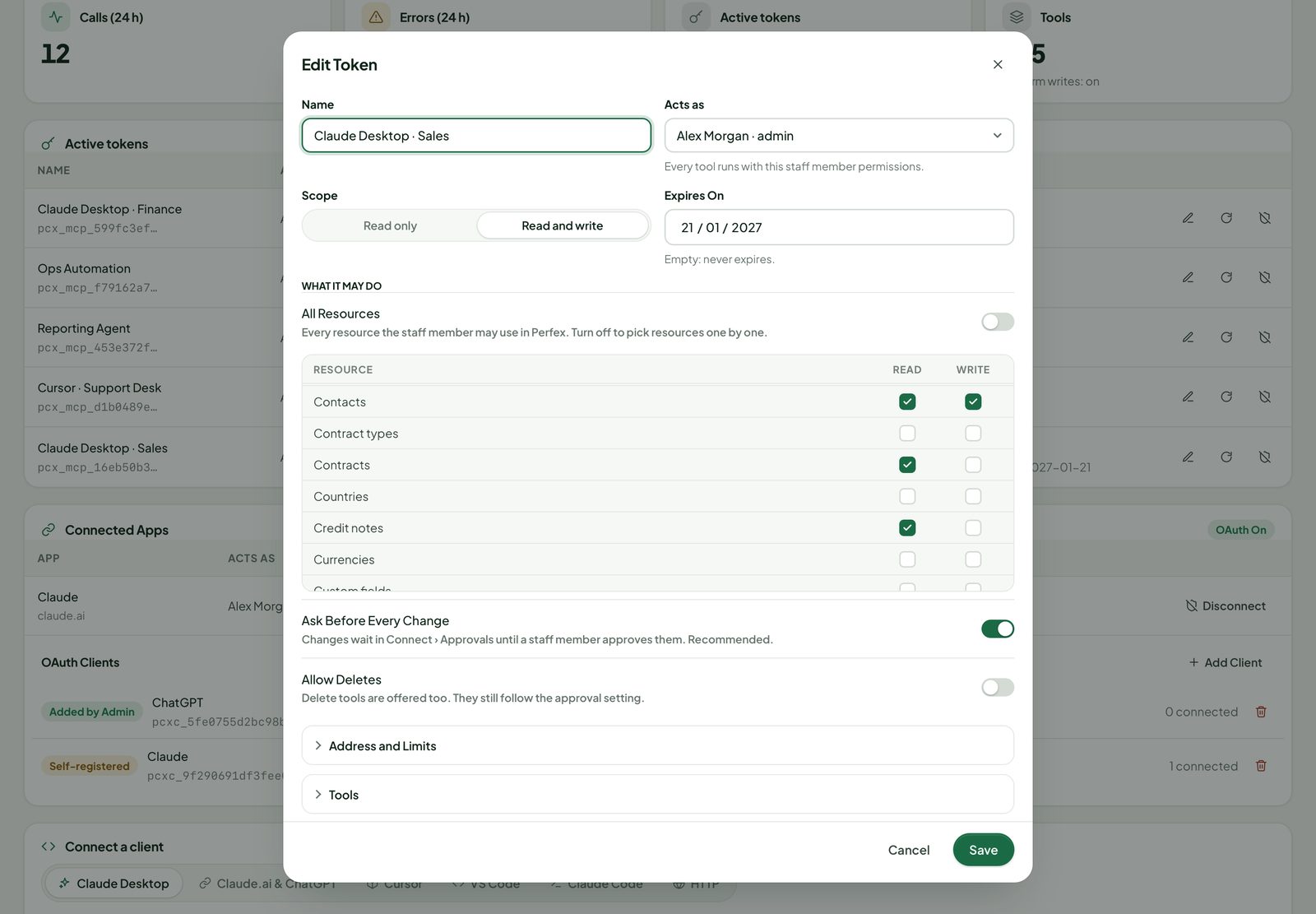
| Setting | Meaning |
|---|---|
| Read only / Read and write | The master switch: read only makes every resource read-only, whatever is ticked below. |
| All Resources, or Read / Write per resource | Customers, contacts, leads, tickets, invoices … and the resources of other SellMyCode modules. The staff member's Perfex permissions, view own included, still apply on every call. |
| Ask Before Every Change | On by default. Creates, updates and deletes become requests on Connect › Approvals (see below). Switch it off only for an automation you trust. |
| Allow Deletes | Off by default. Delete tools are offered only when Settings › MCP Server › Allow Delete Tools is on and the token allows deletes. They still follow the approval setting. |
| Allowed Addresses | IPv4 or IPv6 addresses or CIDR ranges, one per line. Empty: any address. |
| Calls per minute / per day | Empty: the site defaults. Above the limit the endpoint answers 429. |
| Tool Style | Compact (generic tools, default for new tokens) or Detailed (one tool per resource and action). See Tool style. |
| Tools, Expires On | An optional allow-list of tools, and an expiry date. |
Tokens are stored hashed and shown once. Edit changes access at any time; New Secret replaces the secret (the old one stops at once); Revoke ends it.
Approvals
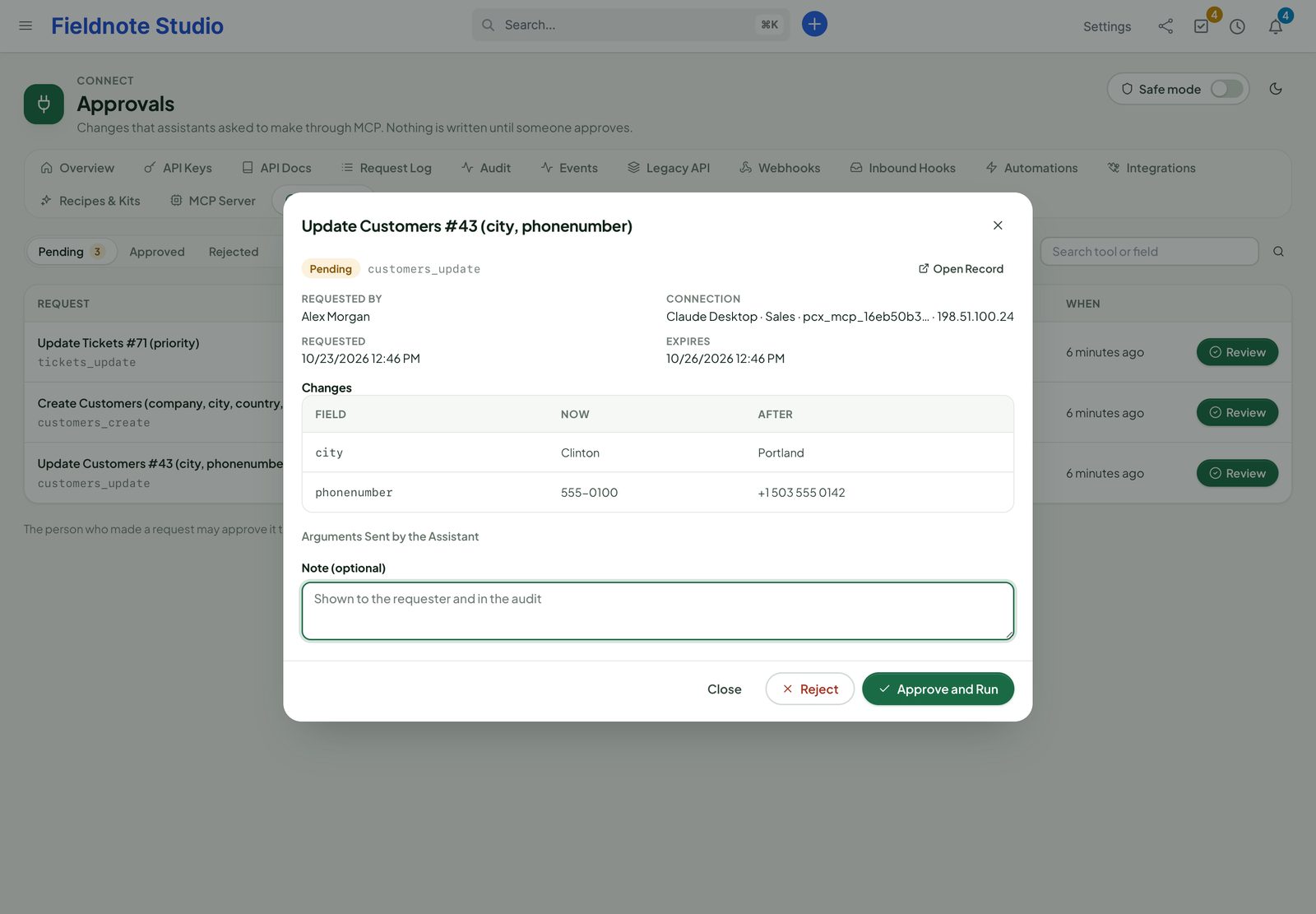
- An assistant calls a create, update or delete tool with a token (or app) that asks before every change.
- Connect validates the values, stores a request and notifies the people who may approve. The assistant is told the request is pending, with a request id it can check with
connect_request_status. - On Connect › Approvals the request shows each field with its value now and after, the connection that asked and when it expires. Approve and Run or Reject, with an optional note shown to the requester and in the audit.
- Approving runs the change at that moment, after checking again that the token is still valid, that its scopes and the requester's permissions still cover the change and that the record still has the values the request saw. Otherwise the request ends as Record Changed and nothing is written.
- Deciding needs the permission Approve MCP Requests and the Perfex permission for that record. Administrators can always decide.
- Settings › MCP Server: whether the person who asked may approve their own request (on by default), and after how many hours undecided requests expire (72).
OAuth sign-in for MCP clients
The Claude.ai and ChatGPT connectors (and other MCP clients with OAuth) can sign in with a staff account instead of a pasted token. It is off by default.
- Set Settings › MCP Server › Mode to Standalone when Perfex AI Staff is installed (OAuth answers 409 while AI Staff serves MCP).
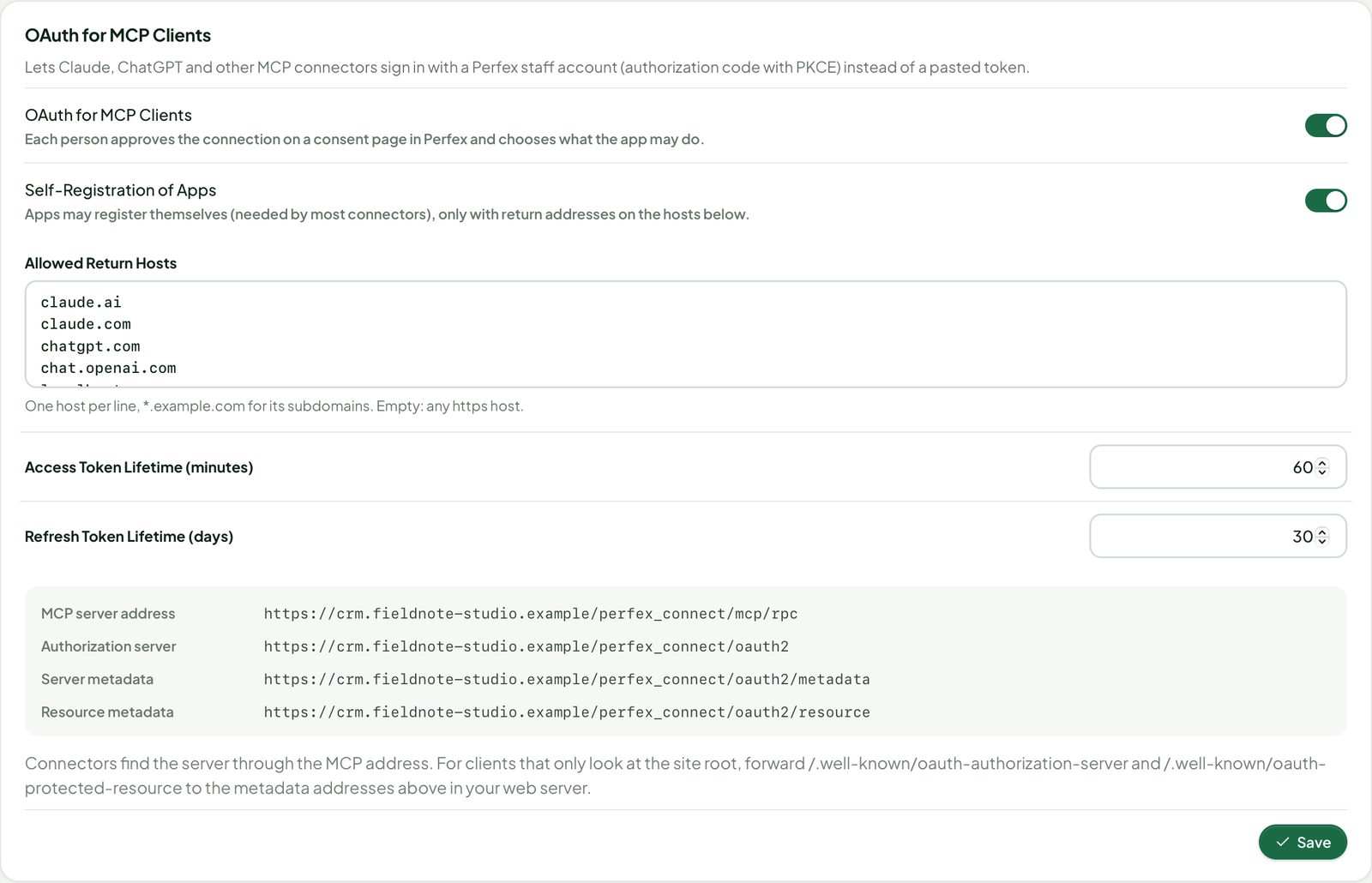
- Switch on Settings › OAuth for MCP Clients. Keep Self-Registration of Apps on for Claude and ChatGPT (they register themselves), and check Allowed Return Hosts (
claude.ai,chatgpt.com,localhost… by default;*.example.comfor subdomains). - In the AI app, add a custom connector with your MCP address
https://<your-crm>/perfex_connect/mcp/rpc. The app opens a consent page in Perfex: sign in, choose Read Only or Read and Write, all or some resources, approval and deletes, then Allow Access.
- Authorization code with PKCE (S256 only); short-lived access tokens (Settings, minutes) and rotating refresh tokens (days). A reused refresh token or authorization code disconnects the app.
- Changes made through an app wait for approval like token changes, when the person chose approval.
- MCP Server › Connected Apps lists every connection with Disconnect; OAuth Clients lists registered apps, and administrators can add a client by hand (public with PKCE, or with a secret shown once).
- Addresses: issuer
https://<your-crm>/perfex_connect/oauth2, server metadata…/perfex_connect/oauth2/.well-known/oauth-authorization-server, resource metadata…/perfex_connect/oauth2/.well-known/oauth-protected-resource. The MCP endpoint announces the resource metadata in its 401 answer (WWW-Authenticate: Bearer resource_metadata="…"), which is how Claude and ChatGPT find it.
Forwarding the /.well-known addresses
A module cannot answer at the root of your site. Most clients find the server through the 401 answer above and need nothing else. Some clients only look at https://<your-crm>/.well-known/oauth-authorization-server (or the same address with the issuer path appended, as RFC 8414 describes) and /.well-known/oauth-protected-resource. Forward these to Connect in your web server. Replace crm.example.com with your address; if Perfex lives in a sub-folder, add it to the targets.
nginx — serve them from Connect (inside the server { … } block of the CRM, before location /), then nginx -t and reload:
location ~ ^/\.well-known/(oauth-authorization-server|openid-configuration)(/.*)?$ {
    proxy_pass https://crm.example.com/perfex_connect/oauth2/.well-known/$1;
    proxy_set_header Host crm.example.com;
    proxy_ssl_server_name on;
}
location ~ ^/\.well-known/oauth-protected-resource(/.*)?$ {
    proxy_pass https://crm.example.com/perfex_connect/oauth2/.well-known/oauth-protected-resource;
    proxy_set_header Host crm.example.com;
    proxy_ssl_server_name on;
}
Or, simpler, redirect them (clients that follow redirects):
location ~ ^/\.well-known/(oauth-authorization-server|openid-configuration)(/.*)?$ {
    return 302 /perfex_connect/oauth2/.well-known/$1;
}
location ~ ^/\.well-known/oauth-protected-resource(/.*)?$ {
    return 302 /perfex_connect/oauth2/.well-known/oauth-protected-resource;
}
Apache (also shared hosting) — at the top of the .htaccess in Perfex's folder, before Perfex's own rewrite rules:
<IfModule mod_rewrite.c>
RewriteEngine on
RewriteRule ^\.well-known/(oauth-authorization-server|openid-configuration)(/.*)?$ /perfex_connect/oauth2/.well-known/$1 [R=302,L]
RewriteRule ^\.well-known/oauth-protected-resource(/.*)?$ /perfex_connect/oauth2/.well-known/oauth-protected-resource [R=302,L]
</IfModule>
On your own server with mod_proxy you can serve them instead of redirecting: use [P,L] with the full https://crm.example.com/… target. Leave other /.well-known/ paths (such as acme-challenge for certificates) alone. Check with curl -i https://crm.example.com/.well-known/oauth-authorization-server: it must answer (or redirect to) the JSON metadata while OAuth is on.
Audit
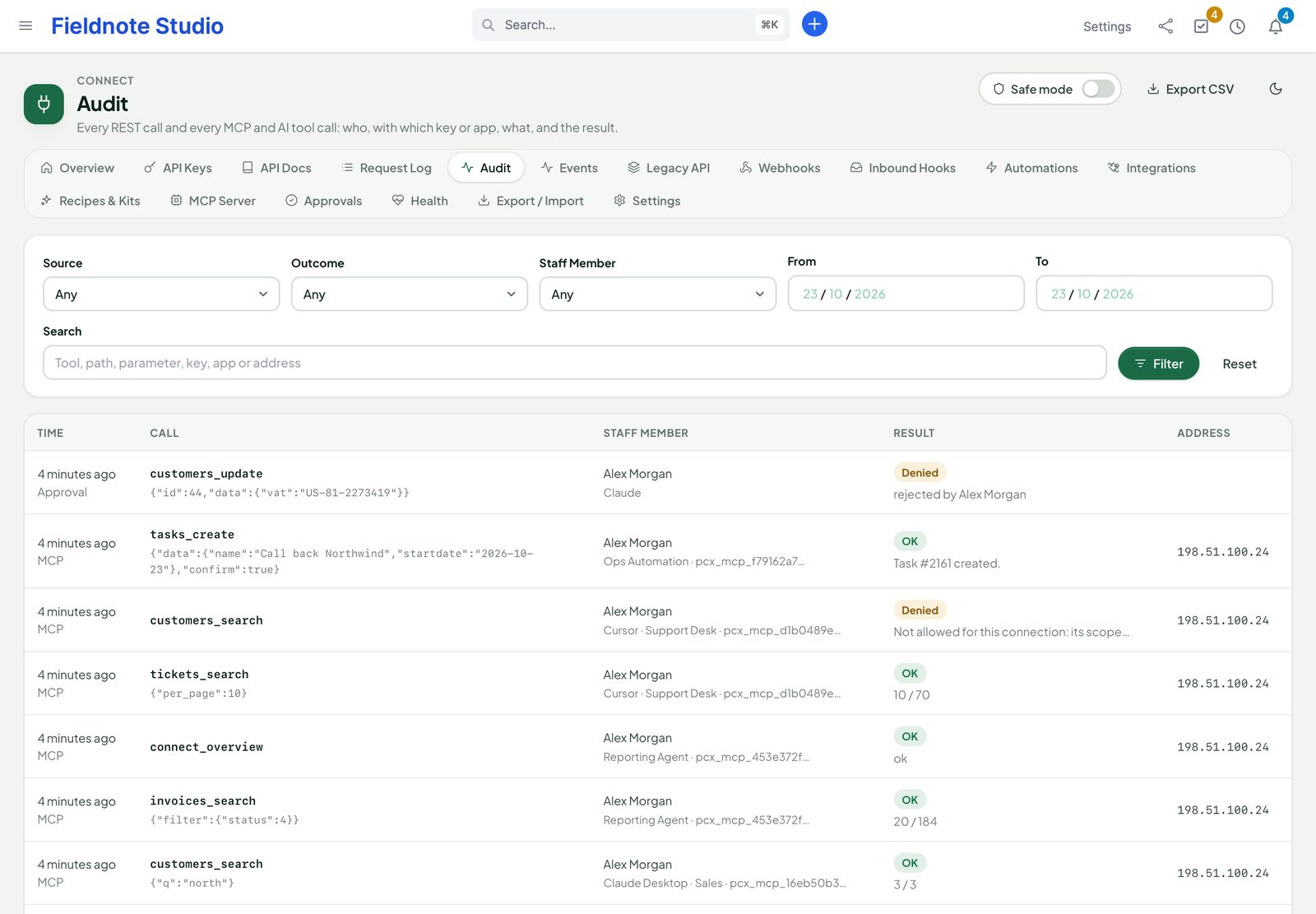
Connect › Audit lists every REST call and every MCP, AI Staff and Anna tool call in one place: time, source, staff member, key or app, the call, a short summary of the parameters (secrets masked), the result and the address. Filter by source, outcome, staff member and dates, search, and export CSV. Retention is set on the page (REST calls and MCP/AI calls separately). Staff without the view permission for everyone see only their own calls.
AI Access and browser access
- Settings › AI Access: untick a resource to hide it from every AI channel at once (MCP tokens, connected apps, Perfex AI Staff and the Anna bridge). The REST API is not affected.
- Settings › Browser Access (CORS): web pages on other sites may read REST, MCP and OAuth answers only from the origins listed here (
https://app.example.com, one per line). Never a wildcard; server-side clients are not affected.
Upgrading from 1.0
- MCP tool results are now the envelope above: read the record data under
data. The REST API is unchanged. - Every existing token keeps its reach (read → read on every resource, write → read and write on every resource), and now asks before every change and has deletes off. Edit tokens of unattended automations that must write directly.
- Delete tools stay off until Allow Delete Tools (site) and Allow Deletes (token) are both on.
- Clients using the 1.0 preview/confirm protocol (
confirm=true) keep working for tokens with approval switched off. - Give Approve MCP Requests to the people who should decide requests.
Brain Pro, Sentinel and AI Staff
| Module | What Connect adds |
|---|---|
| Perfex Brain Pro | Nine widgets (category System): API calls, API errors, requests by key, webhook health, events per day, queue depth, rule runs, sync status, MCP calls — with drill-downs. After activating Connect, press Sync Widgets once on Brain Pro's providers page. |
| Perfex Sentinel | Audit entries for key use (first call of a key per day, every call, or off), failed sign-ins and bursts of them, keys and tokens created or revoked, settings, safe mode, paused webhooks and imports. |
| Perfex AI Staff | Connect's records as a few generic tools for AI Staff's assistant, agents and MCP endpoint, with approval cards for writes (see MCP). Agents and AI Staff MCP tokens saved with the older per-resource names keep working, limited to that resource. |
Each integration is switched in Settings › Ecosystem and appears only while the other module is active.
Anna bridge
When the Anna AI module is active on the same Perfex, Connect can give Anna tools for your CRM records, including the data of other SellMyCode modules. Choose them in Settings › Anna Bridge (switch Bridge Connect Tools into Anna, then tick the resources per action).
- Anna receives at most six tools (search, get, create, update, delete, describe) whatever you tick: the resources you tick for an action become that tool's choices. The default selection is three read tools; even ticking every resource stays far below the providers' limits on tools per request.
- Every call runs with the Perfex permissions of the staff member using Anna, checked again on each call; resources switched off in AI Access are never offered.
- Writes show Anna's confirmation card first; delete tools exist only while Allow Delete Tools is on.
- The tools appear only for the signed-in staff member; Anna's own MCP endpoint gets none of them.
- Calls are logged in the Audit with the source Anna.
Coming from the third-party “API” module
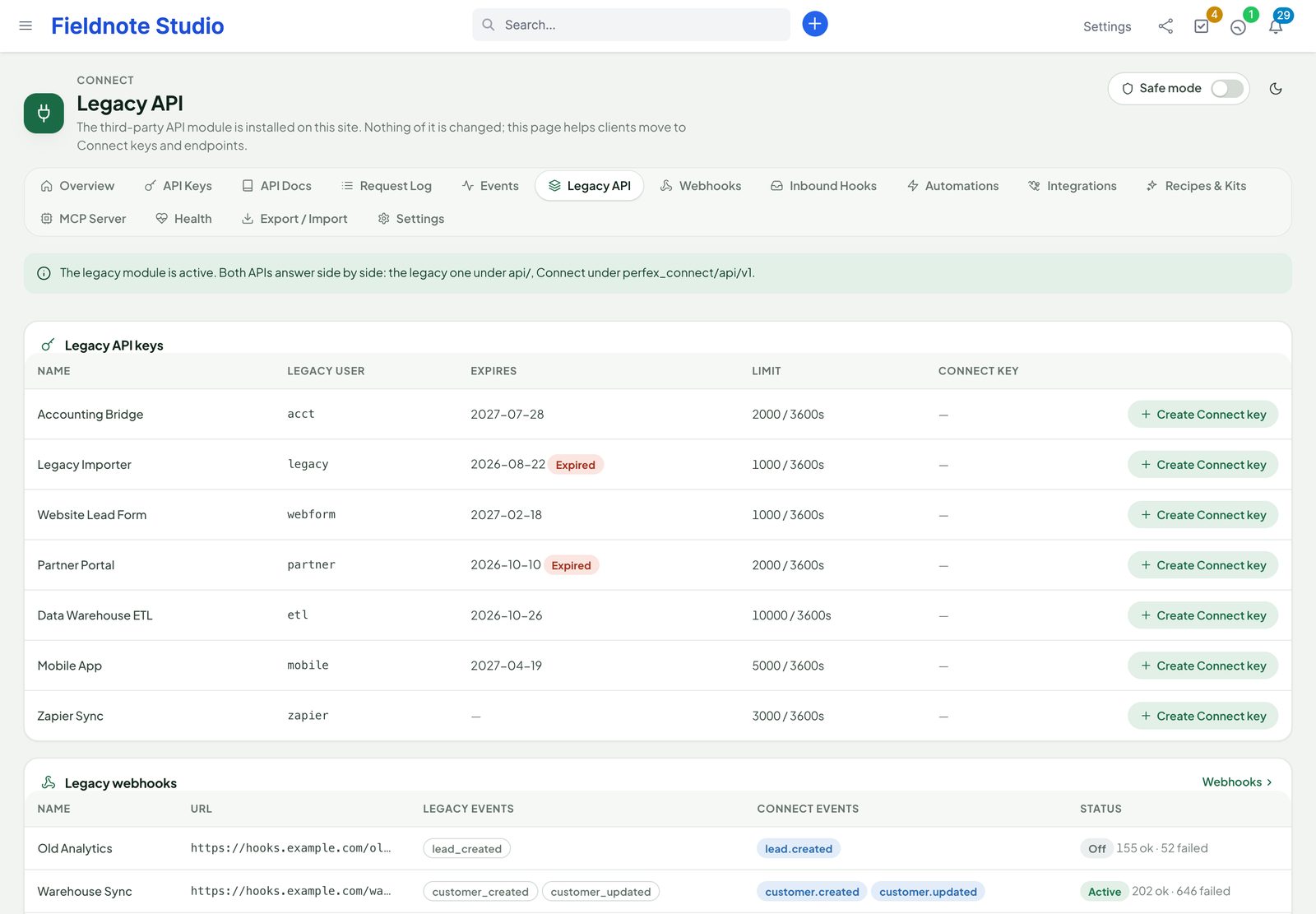
Connect and the third-party “API” module can be active at the same time: Connect's addresses start with /perfex_connect/ and its tables with pcx_, so nothing collides, and a Connect key does not open the other module (nor the other way round). While the other module is installed, Connect › Legacy API lists its API users and webhooks, shows which Connect endpoint and event replace each of its endpoints and events, and Create Connect key makes a matching key for a user (you choose the staff member it acts as). Move your clients over at your pace, then deactivate the old module.
Safe mode and health
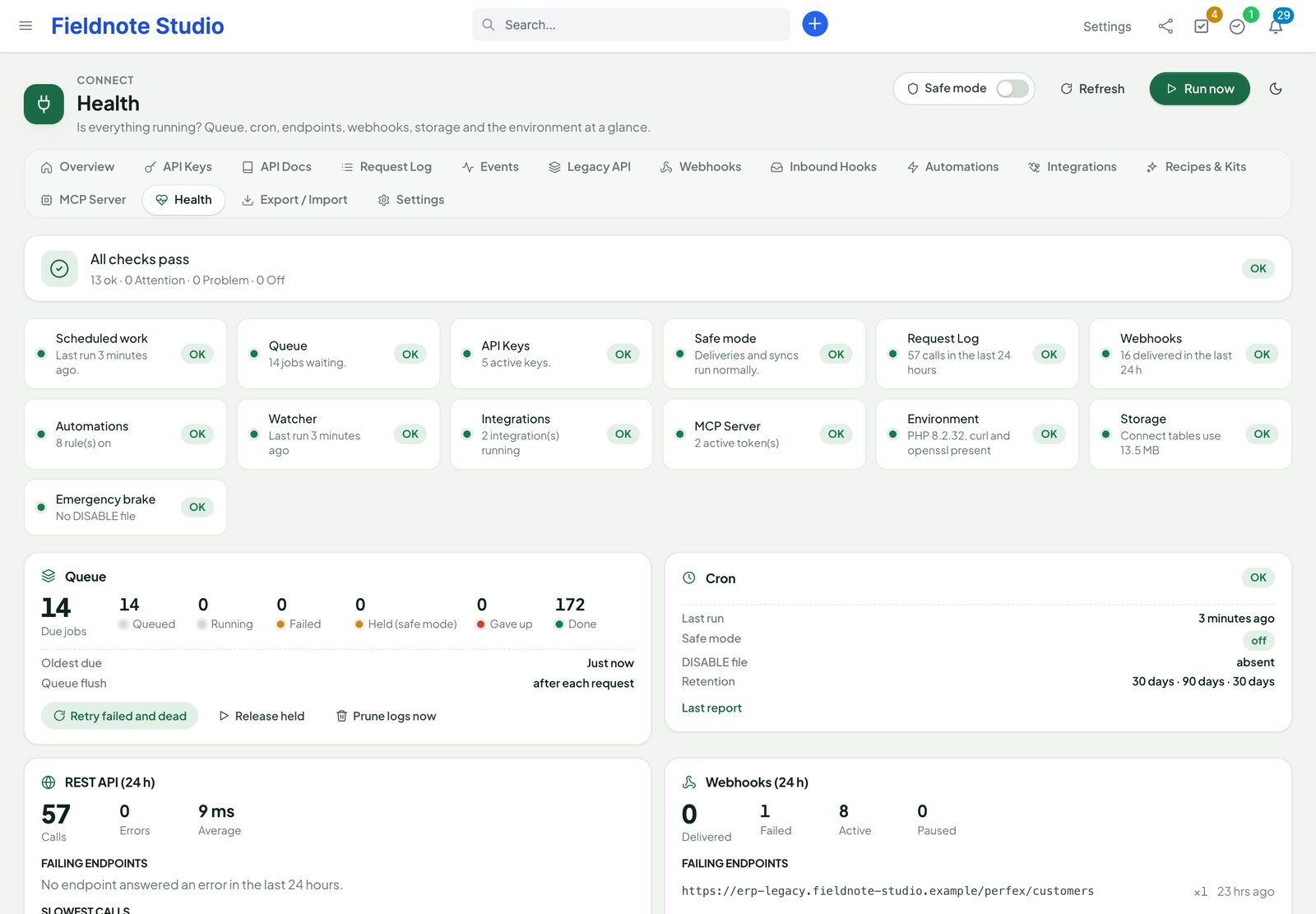
Safe mode is the switch in every Connect page's header (and in Settings › Safe mode). While it is on, no webhook is delivered, no rule calls a URL or waits to run, no WooCommerce or Meta sync runs: the work is held and continues when you switch it off. The API itself keeps answering. Use it while you set things up, during an incident, or on a copy of your installation. Creating a file named DISABLE in modules/perfex_connect/ forces safe mode without signing in.
Connect › Health checks the cron (and warns when it has not run for a while), the queue (waiting, given-up jobs), keys about to expire, failing webhooks, integrations with errors or tokens about to expire, storage used by the logs and the server (PHP, curl, openssl). Actions: retry given-up jobs, release held work, clean up old logs now.
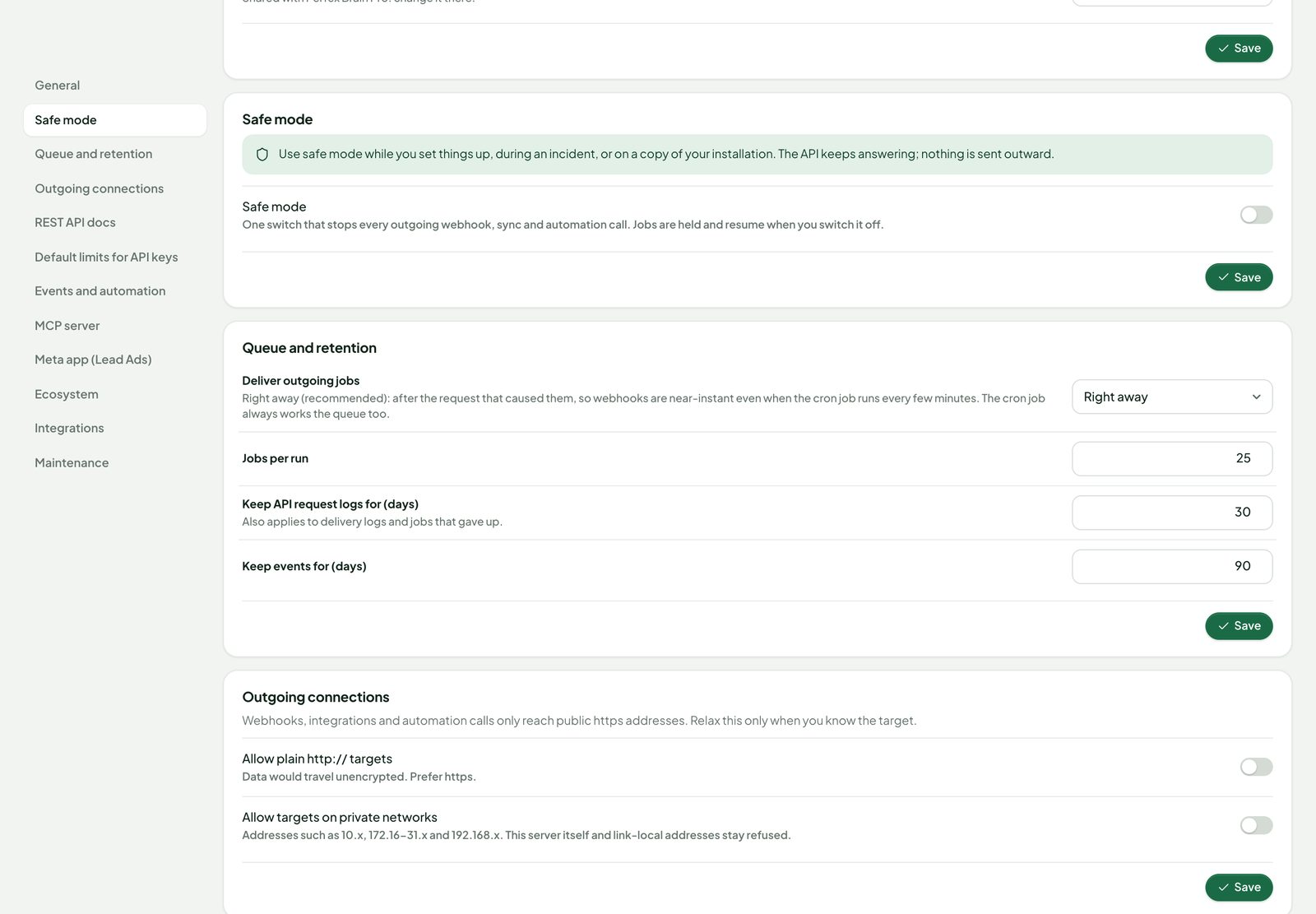
Outgoing calls (webhooks, rule calls, Meta, WooCommerce) only go to public HTTPS addresses: the host is resolved once and the connection pinned to that checked address, private, loopback, link-local and cloud metadata ranges are refused (IPv6 forms too), redirects are not followed, answers are capped and time-limited. For an installation on a private network, Settings › Outgoing connections can allow plain http and private addresses.
Export and import
Connect › Export / Import saves the API keys (their settings), rules, webhooks, inbound hooks, integrations and settings in one JSON file and brings them into another installation. Secrets are never exported: imported keys get new secrets (listed once in the report), imported webhooks start paused until you give them a secret, imported rules start disabled, integrations need their keys or a new sign-in. Dry run shows what would happen; Overwrite updates items with the same name.
Permissions
Staff rights are set in Setup › Staff › Roles (or per member), feature Perfex Connect. Administrators can do everything.
| Right | Allows |
|---|---|
| View | The overview, docs, events and the request log (own calls only for non-administrators). |
| Manage API keys | Create, edit, rotate and revoke their own keys (administrators: anyone's). |
| Manage webhooks and inbound hooks | Webhooks, deliveries and catch-hooks. |
| Manage automations | Rules and their runs. |
| Manage integrations | Lead Ads accounts and WooCommerce stores. |
| Manage the MCP server | Their own MCP tokens and connected apps (administrators: anyone's, and OAuth clients). |
| Approve MCP Requests | Decide requests on the Approvals page (together with the Perfex permission for the record). |
| Settings, safe mode, export and import | Settings, the safe-mode switch, health actions, export and import. |
Settings
| Section | Settings |
|---|---|
| General | Connect on / off, REST API on / off, public OpenAPI document, light or dark (shared with Brain Pro when installed). |
| Safe mode | The switch, with what it holds. |
| Queue and retention | Deliver outgoing work right away or only on cron; jobs per run; days to keep the request log (30), events (90). |
| Outgoing connections | Allow plain http; allow private networks. |
| REST API docs | Try it on the docs page; lifetime of signed download links. |
| Default limits for API keys | Requests per minute (120) and per day (20,000). |
| Events and automation | Watch records without hooks, rules on / off, webhook attempts (8), pause after (50), timeout (15 s), rule chain depth (3), watch limit per table. |
| MCP server | Standalone endpoint on / off, mode, confirm writes, tools in AI Staff, calls per minute and day per token, days to keep the call log; Allow Delete Tools, requester may approve own requests, request expiry. |
| OAuth for MCP Clients | On / off, self-registration of apps, allowed return hosts, access and refresh token lifetimes, the metadata addresses. |
| AI Access | Resources every AI channel may reach. |
| Browser Access (CORS) | Allowed origins. |
| Anna Bridge | The tools Connect adds to Anna (only while Anna is active). |
| Meta app (Lead Ads) | App ID, app secret (encrypted), Graph API version, verify token, the OAuth redirect address. |
| Ecosystem | Brain Pro widgets, Sentinel audit, key-use logging. |
| Integrations | Reconciliation interval (6 h), records per sync page, days to keep the sync log, default conflict rule. |
| Maintenance | Cron warning threshold, keep data on uninstall, the emergency-brake file. |
Deactivate and uninstall
Deactivate in Setup › Modules: the API, catch-hooks, webhooks, rules, syncs and the MCP server stop at once; your data stays. Events that happen while Connect is off are not recorded.
Uninstall (after deactivating) deletes every Connect table, setting and staff right — unless Settings › Maintenance › Keep data on uninstall is on, then the tables and settings stay for a later reinstall. Export your setup first (Export / Import) if you may want it back. Remove the webhooks Connect registered in WooCommerce and the Lead Ads subscription in Meta (the integration's menu has Remove webhooks / Unsubscribe) before uninstalling.
Troubleshooting
- Every API call answers 401 with a correct key. The server drops the
Authorizationheader — see Server notes. Also check the key's allowed addresses (behind a proxy, setproxy_ips). - 403 insufficient_scope / forbidden. The key needs the scope, and its staff member the Perfex permission. The request log shows which.
- Webhooks are late or stay “queued”. Check the cron (Health) and that safe mode is off. With Deliver outgoing jobs: on cron only, deliveries wait for the next cron run.
- A webhook is paused. Its endpoint failed 50 times in a row. Open Deliveries to see the answers, fix the receiver, then Resume and redeliver.
- “Address not allowed”. The target is http or resolves to a private address. Use the public https address, or allow it in Settings › Outgoing connections for private installations.
- No Lead Ads arrive. Check the app's Webhooks product (Page › leadgen subscribed to the account's callback with the verify token), that the app has the permissions (App Review for live apps), and the account's log. Check on the account tests the token.
- WooCommerce orders do not appear. Check the store's webhooks in WooCommerce (status Active), the status map (a status set to skip), the currency, and the sync log.
- An assistant says its change is "pending". The token asks before every change: approve the request on Connect › Approvals, or switch approval off for that token.
- Claude or ChatGPT cannot find the sign-in. Switch on OAuth, set MCP mode to Standalone when AI Staff is installed, check the allowed return hosts, and forward the /.well-known addresses if the client still asks for them.
- A rule did not run. Open its Runs: a skipped run says which condition did not match, or that the member who saved the rule may not see the record.
FAQ
Can customers use the API?
No. Keys belong to staff members. Customers reach Perfex through the client portal as usual; their actions there raise events like any other.
Is there an API sandbox?
Use Try it on the docs page with a read-only key, or turn on safe mode on a copy of your CRM to try webhooks and syncs without sending anything.
Can I add my own endpoints?
Developers can register routes, resources, events and MCP tools from their own module through Connect's hooks (Pcx_registry); they appear in the docs and the OpenAPI document automatically.
Is it translated?
Yes: English, Spanish, Portuguese (Brazil), French, German, Italian, Dutch, Turkish and Russian. API and MCP messages stay in English.
How do I get support?
Send the module, Perfex and PHP versions and the request id or delivery id through SellMyCode support — never keys, tokens or secrets.
Changelog
Current version 1.2.1 (25 Oct 2026). Release notes of every version, newest first: perfexcrm.app/connect/changelog/.
1.1.1 — 2026-10-24
- Tool Style per MCP token and connected app: Compact (generic search, get, create, update, delete and describe tools with a resource choice; 9 tools instead of about 160 for a full-access administrator) or Detailed (one tool per resource and action). New tokens and connections are Compact; existing ones stay Detailed.
- Same scopes, permissions, approvals, deletes, limits and audit in both styles; the token dialog and the consent page show the estimated size of each.
1.1.0 — 2026-10-23
- MCP tokens with read or write per resource, Ask Before Every Change (on by default), deletes off by default, allowed addresses, limits, edit and New Secret; ready setup for Claude Desktop, Claude.ai & ChatGPT, Cursor, VS Code, Claude Code and HTTP.
- Approvals page with re-checks at approval time and expiry; permission Approve MCP Requests.
- OAuth 2.1 sign-in for MCP clients (PKCE, consent page, rotating refresh tokens, Connected Apps), off by default.
- Audit of every REST call and AI tool call; AI Access switches; strict CORS.
- Structured result envelope (data under
data), MCP resources and prompts. - Perfex AI Staff gets a few generic tools instead of four per resource; Anna bridge with at most six tools.
- Upgrade notes: see Upgrading from 1.0.
1.0.0 — 2026-10-16
- REST API v1 for 39 Perfex resources with related records, actions, filters, sorting, search, paging, fields and includes; writes through Perfex's models; idempotency keys, ETags, bulk, file uploads and signed downloads.
- API keys with scopes, limits, IP allow-lists, expiry and rotation; OpenAPI 3.1, interactive docs with Try it, Postman collection; request log with replay.
- 121 event types with an event log and replay; signed webhooks with retries, delivery log, redeliver and a subscription API; inbound catch-hooks with mapping, upsert, dry run and log.
- Automation rules with conditions, 13 actions, schedules, templates, dry run and run log.
- Zapier, Make and n8n: REST hooks, generated n8n node and Zapier app, ten recipes; Facebook & Instagram Lead Ads; WooCommerce sync for any number of stores.
- MCP server with tokens and confirm-before-write; Perfex AI Staff, Brain Pro (9 widgets) and Sentinel integrations; compatibility helper for the third-party API module.
- Safe mode, emergency-brake file, health page, export / import, retention, permissions per area; light and dark; nine languages.
The full list is in changelog.txt in the download.