New in 1.1 · MCP scopes · Approvals · OAuth · Audit

Your CRM.
Connected to everything.

A complete REST API with keys you control, signed webhooks on every change, rules that act when something happens, and ready connections to Zapier, Make, n8n, Facebook and Instagram Lead Ads, WooCommerce and AI assistants — inside Perfex, with one switch that stops everything outgoing when you need calm.

  • 39Perfex resources in the REST API
  • 119event types for webhooks and rules
  • 197MCP tools for Claude, ChatGPT and Cursor
  • 31ready workflow recipes
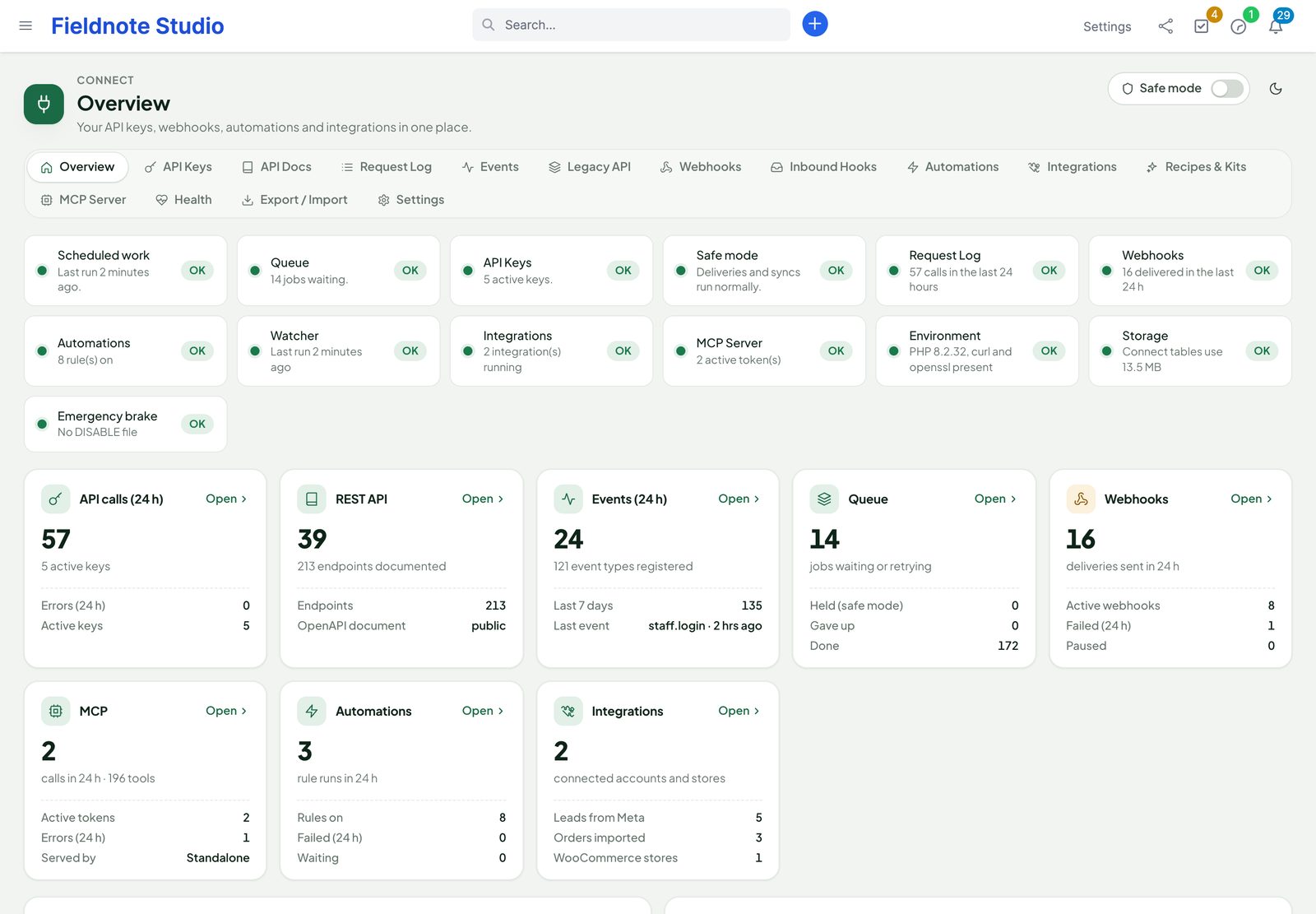
The Connect overview: health checks, API calls, events, queue, webhooks, MCP, automations and integrations at a glance, with the latest API calls and activity
Actual module interface on a Perfex 3.4.1 installation with fictional demonstration data.

By the numbers

Counted from the code, not from a brochure.

  • 39Perfex resources in the REST API, read and write through Perfex's own models
  • 486API operations in an OpenAPI 3.1 file generated from the code on every request
  • 119event types for signed webhooks, Zapier / Make / n8n triggers and rules
  • 197MCP tools for AI clients, or 9 generic ones in compact style
  • 31workflow recipes for n8n, Make and Zapier, checked against the API
  • 2,600+automated checks in the release test suites
  • 9interface languages
  • 0Perfex core files changed; AI writes wait for a person by default

Counts of Connect on a plain Perfex 3.4. Other modules add theirs: Product Hub, for example, adds four API resources.

Why Perfex Connect

Perfex stops being an island.

Your website collects leads, your shop takes orders, your accountant wants invoices, your team lives in chat and spreadsheets. Connect is the one place where Perfex talks to all of them — safely, with a record of every call.

“Can we get the data out?”

Developers ask for an API, agencies ask for an export, nobody wants a shared admin password.

With ConnectEvery Perfex resource has a documented REST endpoint. Each integration gets its own key with only the scopes it needs, its own limits, an expiry and an address allow-list — and every call lands in the request log.

“Why didn't the other system notice?”

Polling every few minutes is slow, and nobody sees when it silently stops.

With ConnectWebhooks fire the moment a record changes — signed, retried with backoff and logged with the full answer. Zapier, Make and n8n subscribe by themselves, so their triggers are instant.

“Somebody copies leads by hand.”

Facebook forms, shop orders and website forms are retyped into the CRM, late and with typos.

With ConnectLead Ads arrive as Perfex leads in seconds, WooCommerce customers, products and orders sync both ways, and any form can post to a catch-hook that creates the record — mapped, de-duplicated and logged.

What is inside

Four ways in and out of Perfex.

One module with one look, one permission set and one safety switch. Use the parts you need; the others stay out of the way.

  1. 1 · REST APIRead and write everything39 resources with filters, sorting, search and paging, created and changed through Perfex's own models — with keys, scopes, limits, live docs and a log.
  2. 2 · EventsHear every change119 event types to signed webhooks, catch-hooks that take data in, and an event log you can replay.
  3. 3 · RulesAct without codeWhen an event happens and conditions match, create or change records, assign, notify, e-mail, call a URL or wait.
  4. 4 · IntegrationsReady connectionsZapier, Make and n8n kits and recipes, Facebook & Instagram Lead Ads, WooCommerce stores and an MCP server for AI.

REST API

Every Perfex resource. One consistent API.

Version 1 lives at /perfex_connect/api/v1 on your own CRM. Lists, records, related records and actions all answer the same JSON envelope, and writes go through Perfex's models — activity log, notifications, custom fields and other modules' hooks behave exactly as when a colleague clicks.

  • Lists: page, per_page, sort=-date, q= search, filter[total][gte]=500, updated_since, fields=, include=customer,custom_fields
  • Related records: a customer's contacts, invoices and files; a project's tasks, milestones and timesheets; a task's comments and checklist
  • Actions: send or mark invoices, estimates, proposals, contracts and credit notes; convert estimates and proposals
  • Idempotency-Key on writes, ETag / If-Match against lost updates, a bulk endpoint for up to 100 operations
  • File uploads and signed, expiring download links; custom fields read and written like any field
  • Customers
  • Contacts
  • Leads
  • Projects
  • Tasks
  • Tickets
  • Invoices
  • Estimates
  • Proposals
  • Contracts
  • Expenses
  • Payments
  • Credit notes
  • Items
  • Staff
  • Departments
  • Custom fields
  • Files
  • Calendar
  • Notes
  • Reminders
  • Milestones
  • Timesheets
  • Knowledge base
  • Currencies
  • Taxes
  • Statuses
  • …
curl "https://crm.example.com/perfex_connect/api/v1/invoices\
?filter[status]=4&sort=-duedate&include=customer" \
  -H "Authorization: Bearer pcx_live_…"

{
  "data": [
    { "id": 812, "number": "INV-000812",
      "total": "2640.00", "status": 4,
      "duedate": "2026-10-02",
      "customer": { "id": 63, "company": "Northwind Agency" } }
  ],
  "meta": { "page": 1, "per_page": 25, "total": 7 },
  "links": { "next": null, "prev": null }
}

API docs

Documentation that is always right.

The OpenAPI 3.1 document is generated from the live API of your installation — including your custom fields — so the reference never drifts. Connect turns it into an interactive reference inside Perfex.

  • Every endpoint by resource, with search, parameters, field types and allowed values
  • Try it with one of your keys; the key is used on the server and never reaches the browser
  • Ready snippets in curl, PHP, JavaScript and Python
  • Download openapi.json or a Postman collection; generate a client in any language
  • Guides for authentication, filters, errors, idempotency, rate limits and webhooks
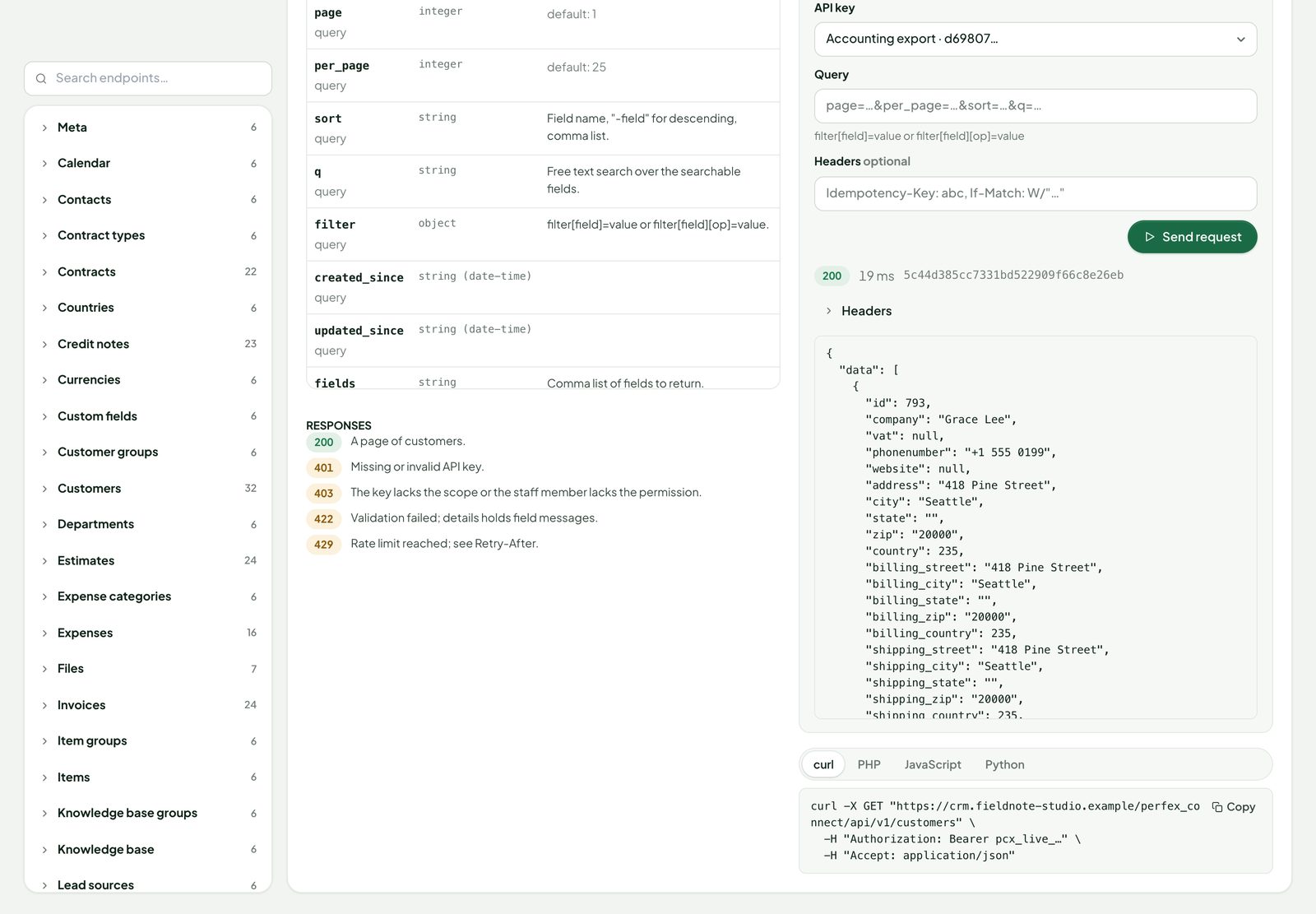
The interactive API reference: the list customers operation with its parameters, the Try it panel with a chosen key and the answer, and snippets in four languages
Actual module interface with fictional demonstration data.

Keys & request log

A key per integration. A line per call.

Each key belongs to a staff member, so Perfex's own permissions apply — someone with View (Own) only gets their own records through the API too. On top come the key's scopes and limits.

  • Scopes per resource and read or write — or everything read-only
  • Limits per minute and per day, an IP allow-list in CIDR form, an expiry date
  • Shown once, stored hashed, rotated or revoked with one click; last use and address on record
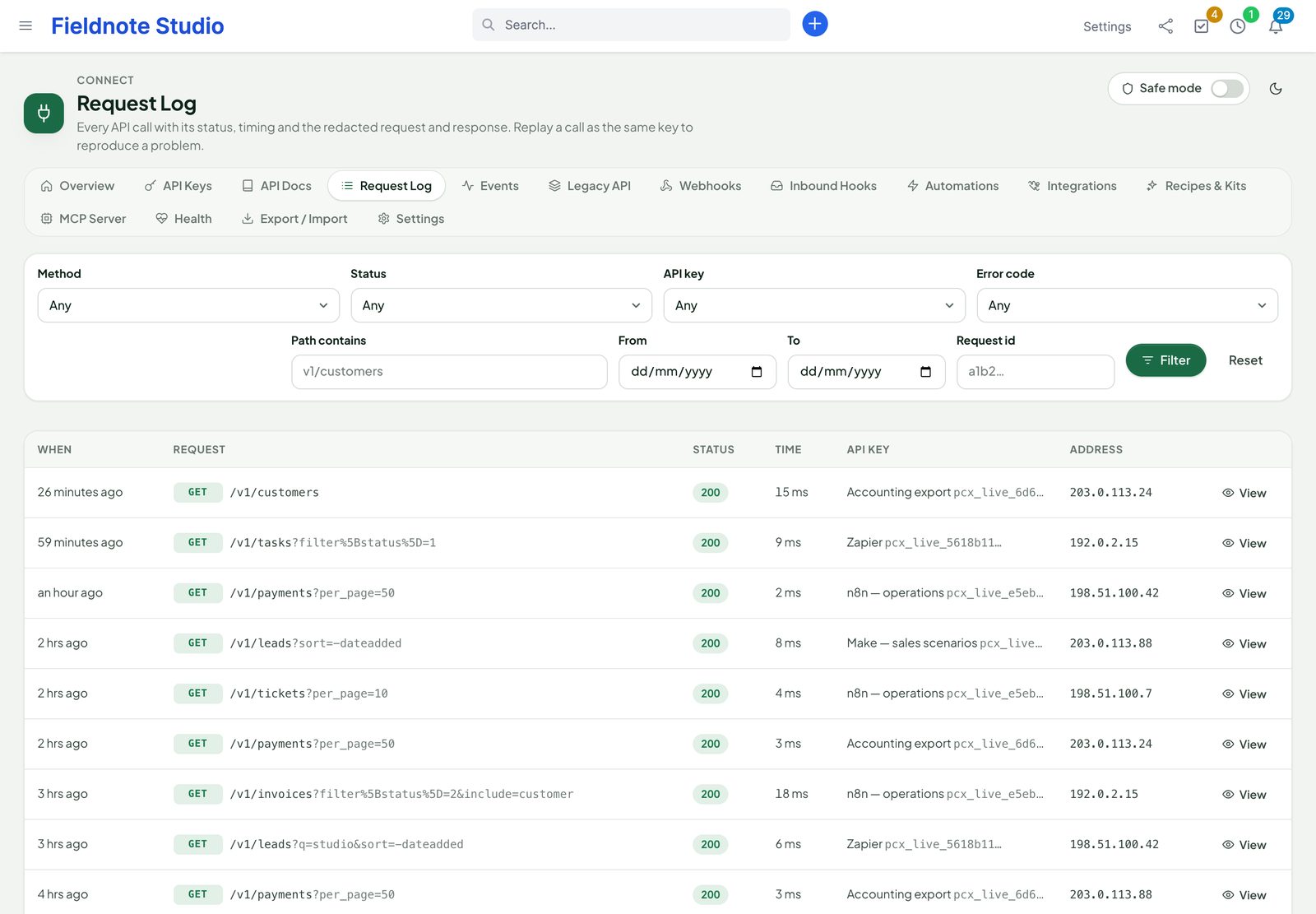
  • Request log with method, path, status, timing, key and address; the redacted request and answer; replay a call as the same key
  • Failed sign-ins throttled per address, and reported to Perfex Sentinel when it is installed
The request log: filters, and every API call with its method, path, status, duration, key and address
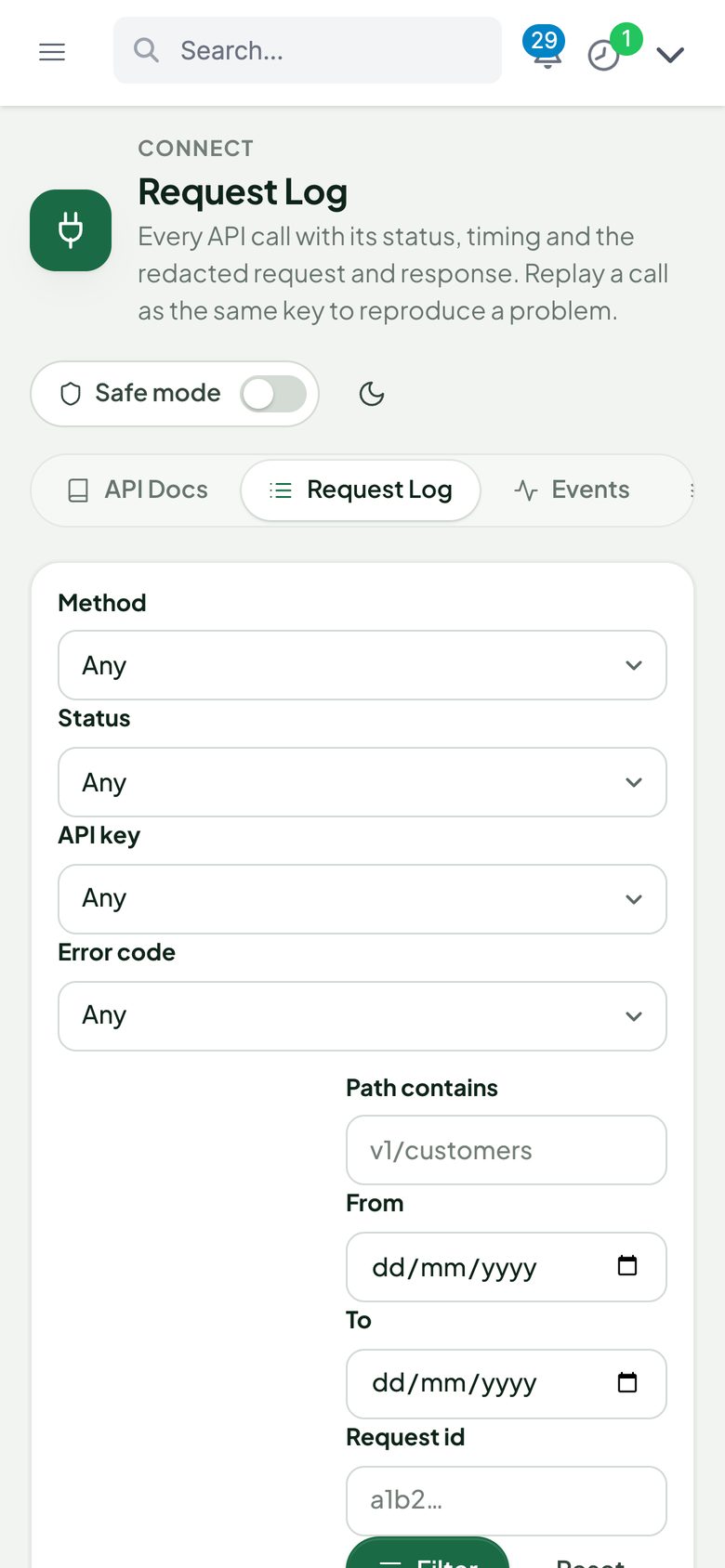
The request log on a phone

Webhooks

Every change, delivered. And proven.

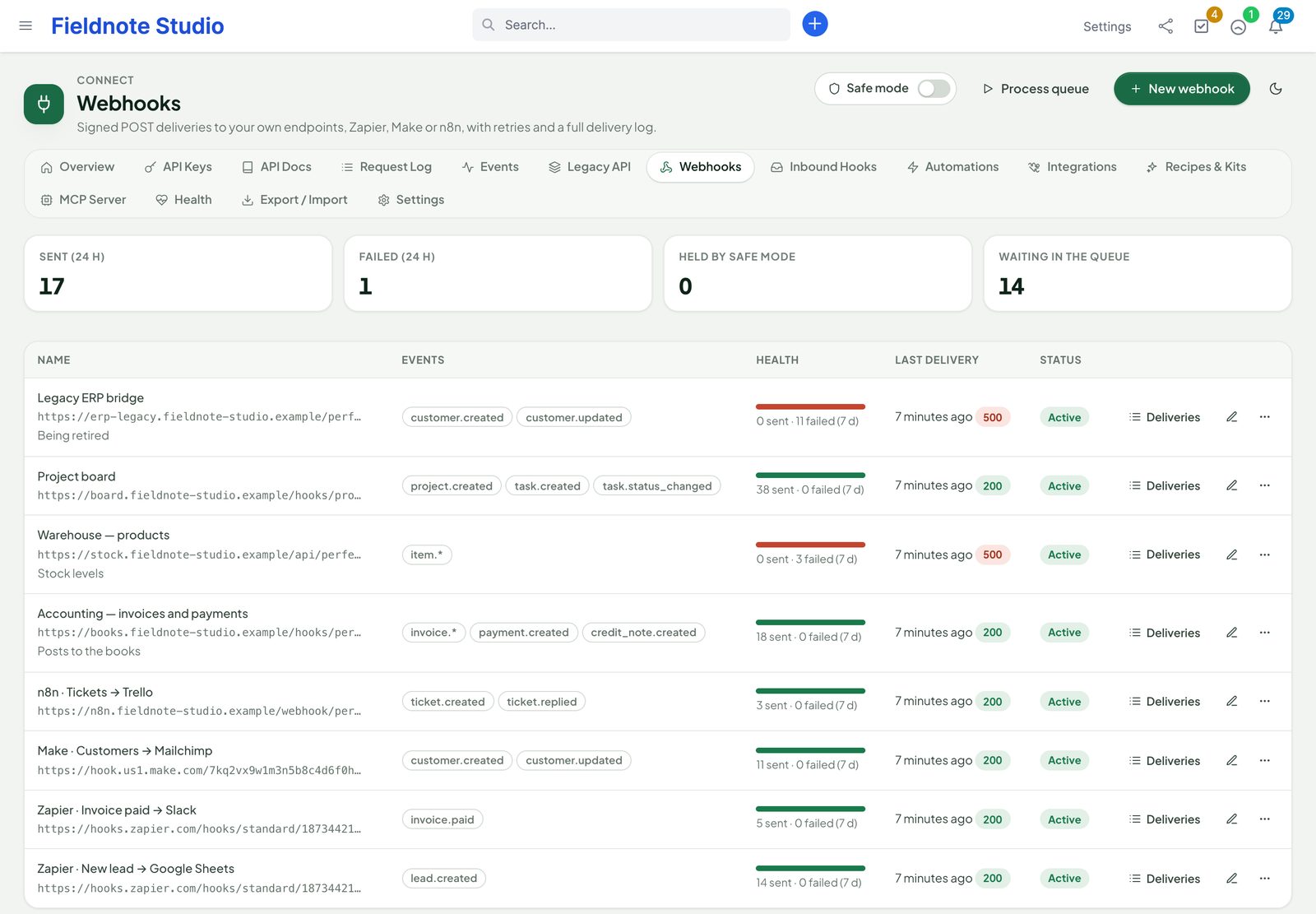
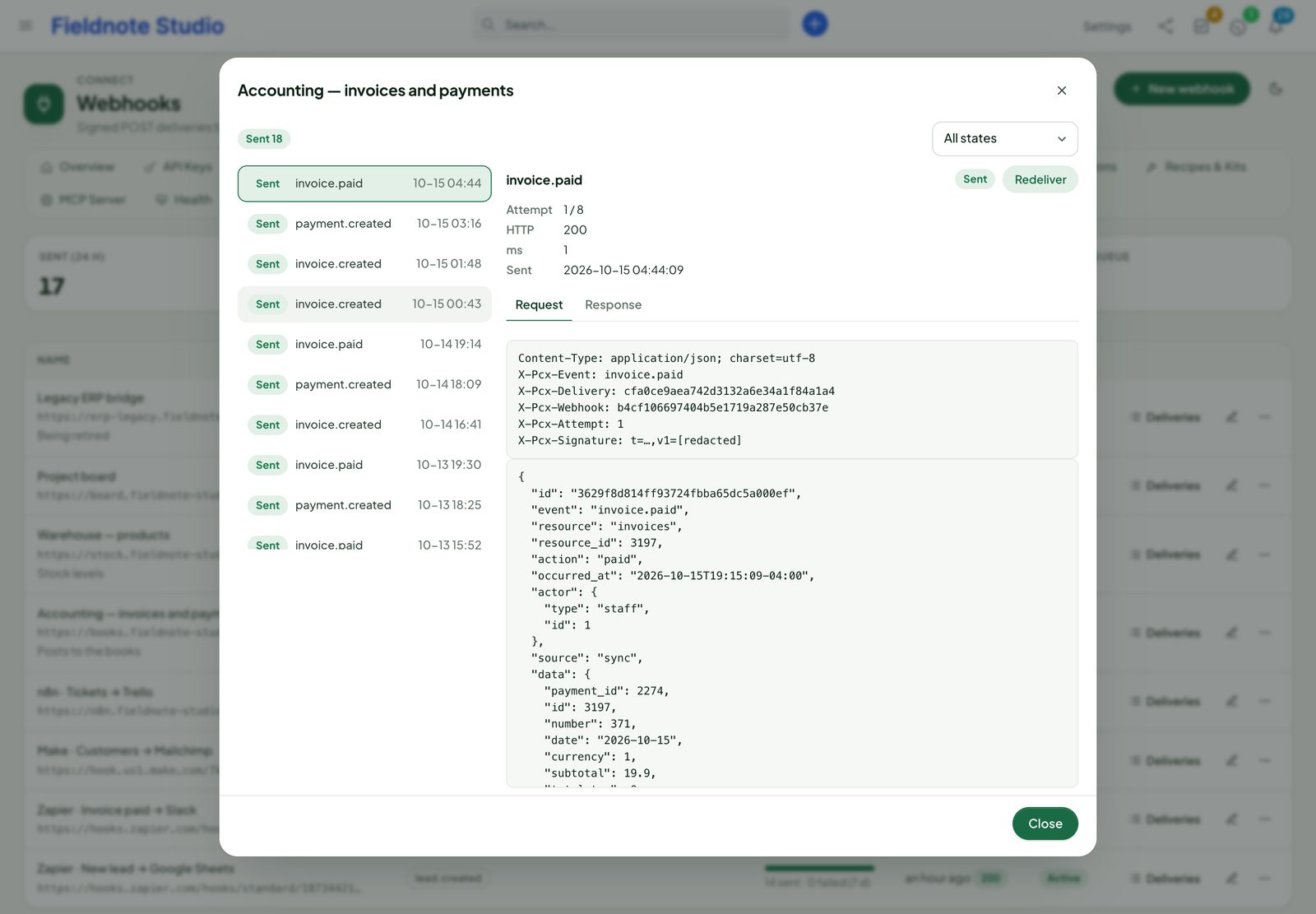
Pick events — one, a pattern like invoice.*, or everything — and an HTTPS address. Connect posts the record exactly as the API shows it, with the changed fields on updates, and keeps the full story of every delivery.

  • 119 event types: created, updated, deleted and status changed for every resource, plus invoice paid, estimate accepted, ticket replied, task assigned, sign-ins and your own events
  • HMAC-SHA256 signature with a timestamp, delivery id and attempt in the headers
  • Retries over 8 attempts from 1 minute to 6 hours; an endpoint that keeps failing pauses itself
  • Delivery log with request and answer, redeliver, test send, secret rotation, extra headers and conditions
  • Subscription API so Zapier, Make, n8n and your own apps subscribe and unsubscribe themselves
Webhooks to accounting, a project board, a warehouse, Zapier, Make and n8n with their events, delivery health, last answer and status
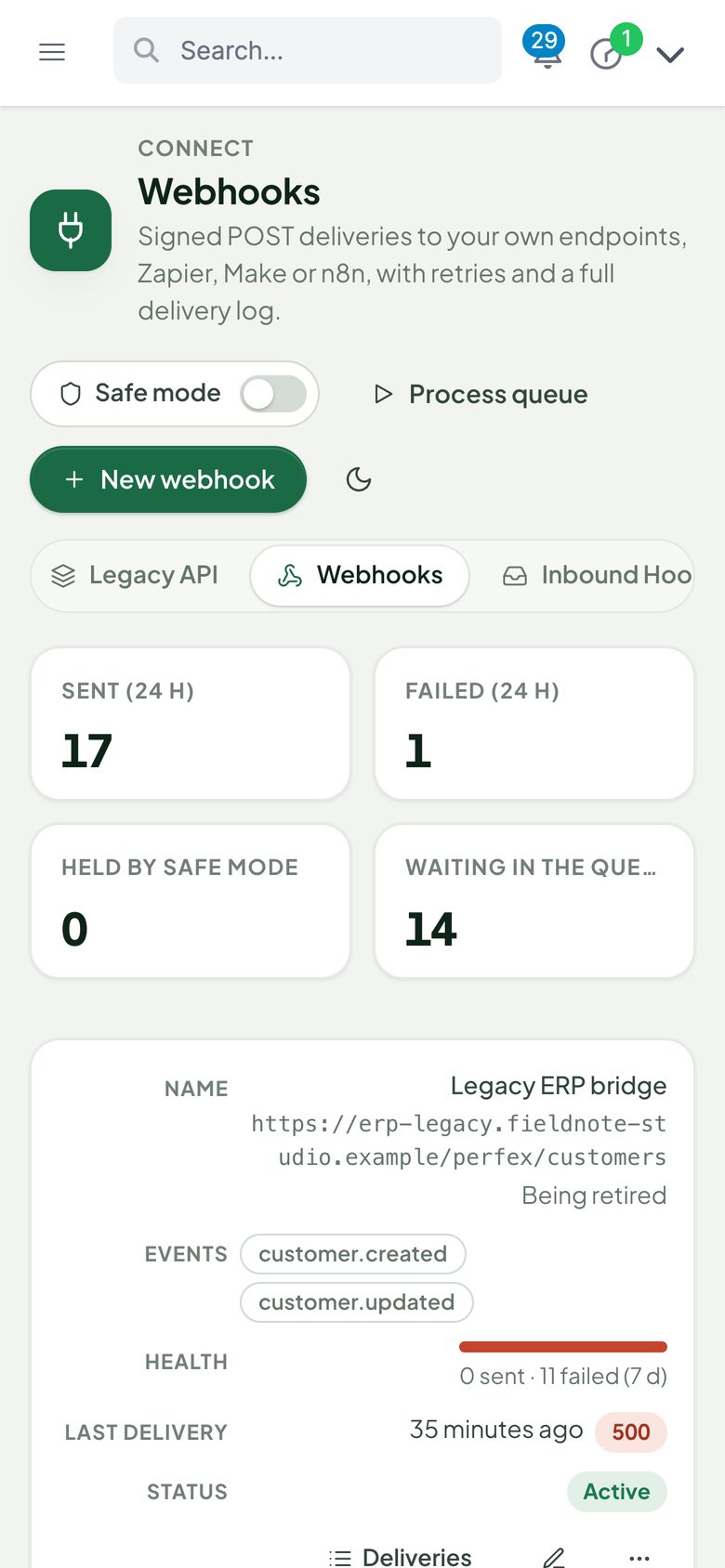
Webhooks on a phone
The delivery log of the accounting webhook: every invoice and payment event with its status, attempt, answer code and timing
Actual module interface with fictional demonstration data.

Catch-hooks

Let anything post into Perfex.

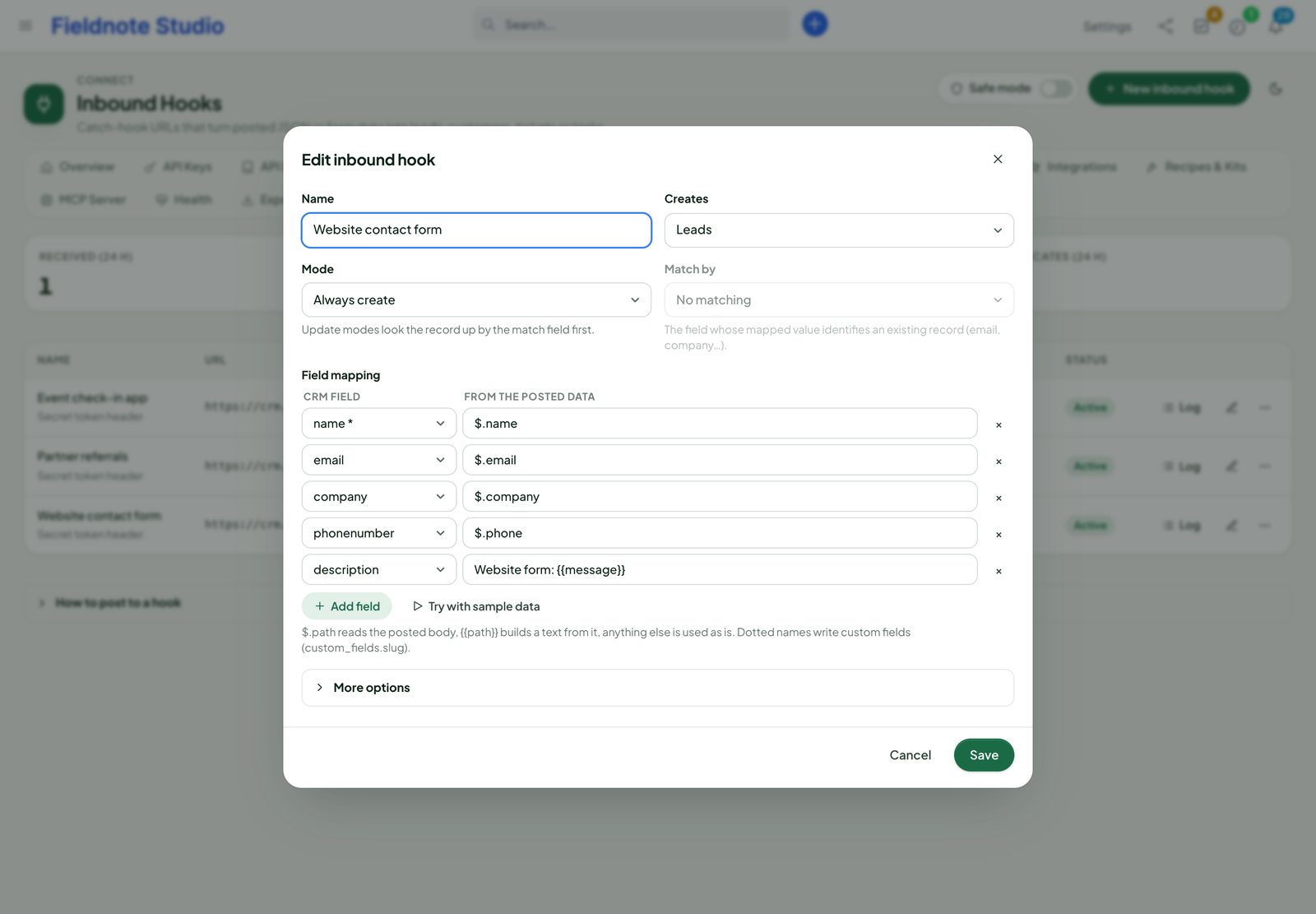
A catch-hook is a private address that turns a JSON or form post into a Perfex record. Point your website form, landing-page builder, booking tool or partner's system at it — no code on either side.

  • Create, update or upsert leads, customers, contacts, tasks, tickets or any other resource, matched by a field you choose
  • Field mapping with paths ($.contact.email), templates (Form {{form}}) and defaults
  • Token or HMAC authentication, duplicate protection, per-address limits
  • Dry run with a sample body before going live; a log of every post with the redacted payload
  • Optionally raise a custom event, so webhooks and rules react to it too
Editing the website contact form catch-hook: target leads, mode create, token authentication and the mapping of the form fields to lead fields
Actual module interface with fictional demonstration data.

Automations

When this happens, Perfex does that.

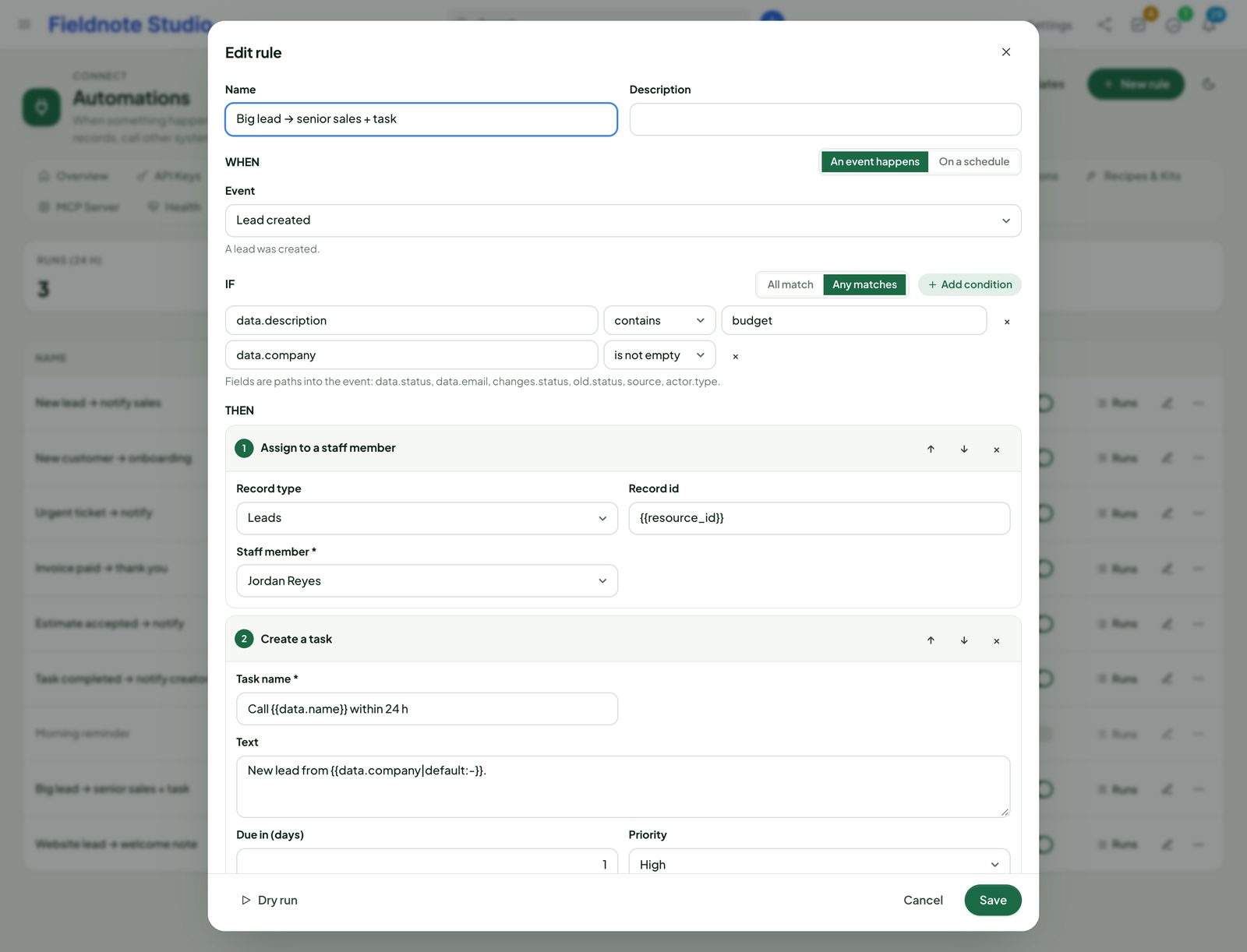
Rules read like a sentence: when an event happens, if the conditions match, then run the actions in order. Start from one of the ready-made rules or build your own in a dialog — no code, no browser pop-ups.

  • Actions: create or update any record, assign, change status, add a note or a task, notify staff, send an e-mail or SMS through Perfex, call a webhook, raise an event, wait, stop
  • Conditions in all / any groups with 17 operators, including “changed”
  • {{fields}} of the event in every text, with filters for dates, case, defaults and more
  • Dry run against a sample event; a run log with each step's result
  • On a schedule too — every morning, every hour
The rule builder: when a lead is created, if it has a company or a budget, assign it to a salesperson, create a call task and post to the team chat
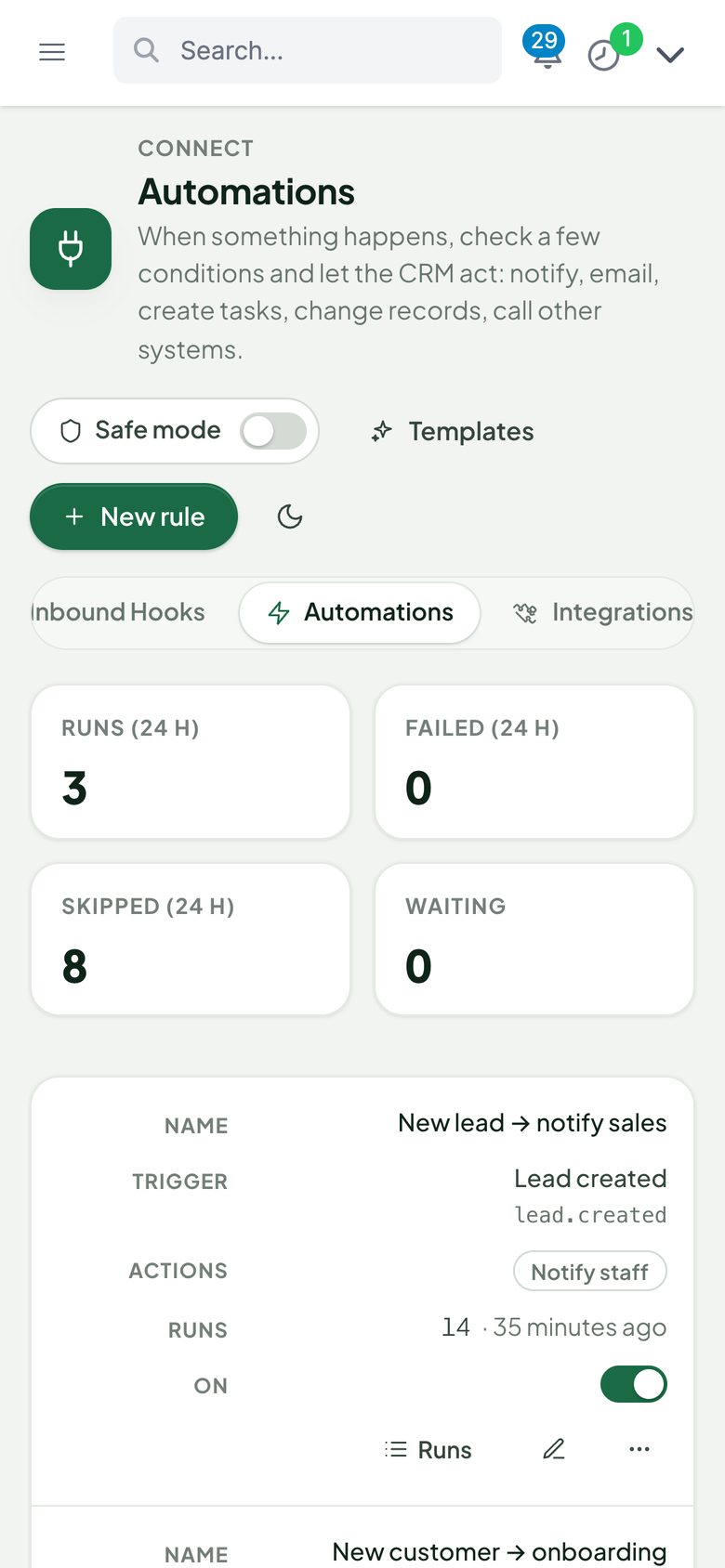
Automation rules on a phone

Zapier · Make · n8n

Instant triggers. Thousands of apps.

Automation platforms subscribe to Connect's events through REST hooks, so a new lead, a paid invoice or a closed ticket reaches Google Sheets, Slack, Mailchimp or Trello in seconds — not on the next poll.

  • n8n community node generated for your CRM: a trigger for every event and an action node for every resource
  • Zapier CLI app skeleton for your own private Zapier app: instant triggers, create and find actions
  • Make: custom webhook plus the REST API, with the exact calls to copy
  • 31 recipes with step-by-step guides and n8n workflows to paste: overdue invoices, payments to your books, tickets to Teams or Discord, estimate to project, daily KPIs …
  • Sample payloads for every event, so mapping fields works before the first real record
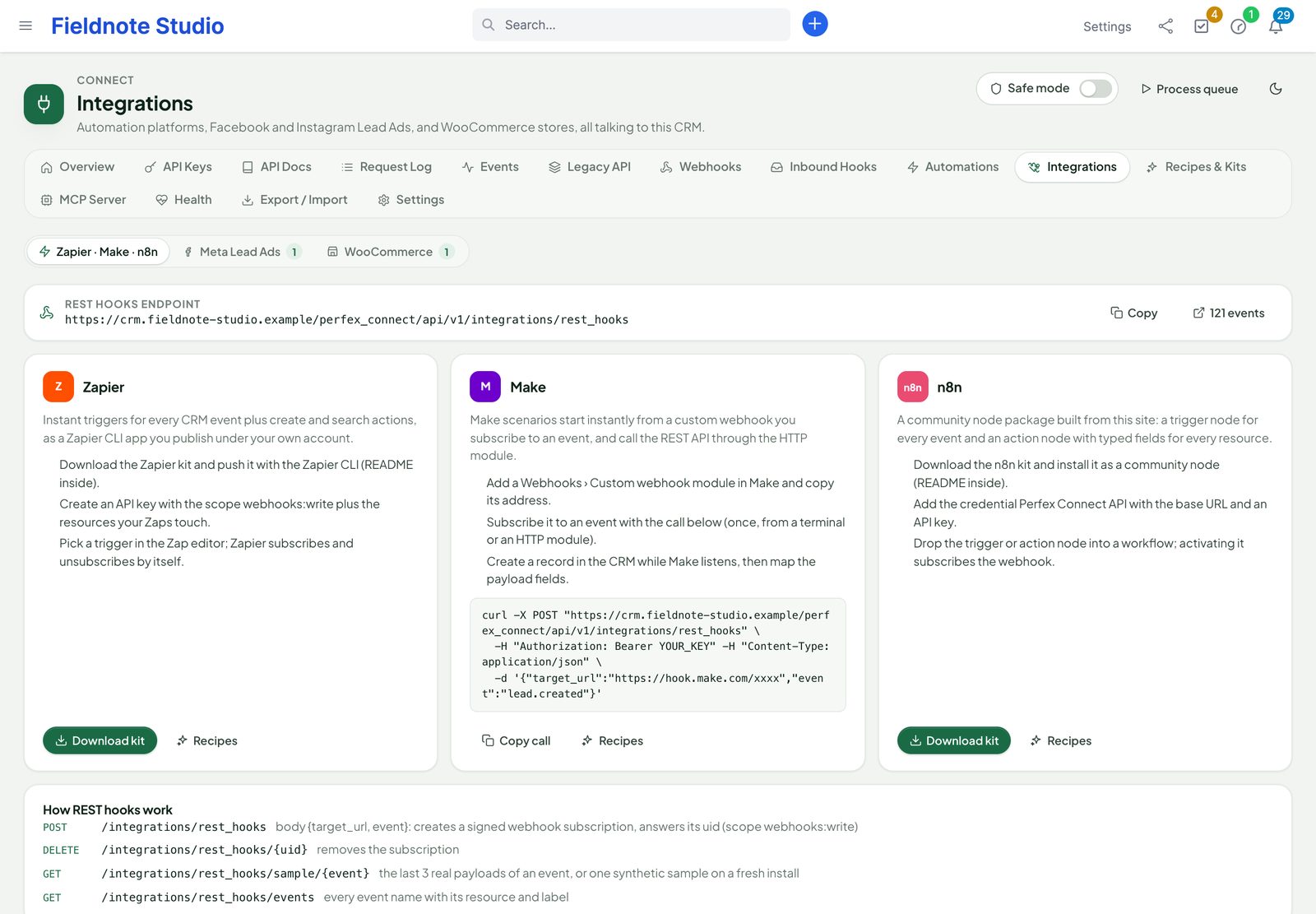
Zapier, Make and n8n with the REST hooks address, the kit downloads, the steps for each platform and how REST hooks work
Actual module interface with fictional demonstration data.

Workflow recipes

31 ready workflows. Copy, paste, switch on.

Each recipe is a step-by-step guide on Connect's Recipes page, with your own addresses filled in; the n8n ones are whole workflows to paste on the canvas. Every endpoint, event, field and scope they use is checked against the code by an automated test before each release.

  • 15 n8n
  • 8 Make
  • 7 Zapier
  • 1 No middleware
  • n8nAny form → new lead (action node)

    Webhook from any form → Create a lead

  • n8nContract signed → Slack (checks every 15 minutes)

    Every 15 minutes → List signed contracts → Keep only new ones → Post to Slack

  • n8nDaily KPI digest → Slack

    Every weekday at 18:00 → Count new leads, overdue invoices and open tickets → Add up today's payments → Post the digest

  • n8nEstimate accepted → project with starter tasks

    estimate.accepted → Create a project for the customer → Add three starter tasks

  • n8nInvoice paid → Google Sheets row

    invoice.paid → Append a row to a sheet

  • n8nNew lead → Slack message

    lead.created → Post to Slack

  • n8nNew ticket → Discord channel

    ticket.created → Post to a Discord webhook

  • n8nNew ticket → Microsoft Teams channel

    ticket.created → Post to a Teams channel

  • n8nNew ticket → Trello card

    ticket.created → Create a Trello card

  • n8nOverdue invoice → reminder e-mail in your own words

    Every weekday at 08:00 → List overdue invoices → Find the primary contact → Send an e-mail with the invoice link

  • n8nOverdue invoices → daily Slack list

    Every weekday at 09:00 → List overdue invoices → Post one Slack message

  • n8nOverdue tasks → morning digest in Slack

    Every weekday at 08:30 → List open tasks past their due date → Post one Slack digest

  • n8nPayment received → Google Sheets ledger

    payment.created → Append a row to a sheet

  • n8nTelegram message → Perfex task (your own bot)

    Telegram message to your bot → Check the sender is on your list → Create a task → Reply with the link

  • n8nTypeform response → new lead

    Typeform response → Create a lead with name, e-mail, phone and company

  • MakeCalendly booking → lead with a call reminder

    Calendly invitee booked → Create a lead → Add a reminder at the meeting time

  • MakeCustomer replied on a ticket → Slack

    ticket.replied → Keep customer replies only → Post to Slack

  • MakeEstimate accepted → task for the project manager

    estimate.accepted → Create a follow-up task

  • MakeGoogle Forms response → new lead

    Google Forms response → Create a lead

  • MakeNew customer contact → Brevo contact

    contact.created → Create or update a Brevo contact

  • MakeNew customer contact → Mailchimp subscriber

    contact.created → Add a Mailchimp subscriber

  • MakeNew lead → Slack message

    lead.created → Post to Slack

  • MakePayment received → QuickBooks-ready sheet row

    payment.created → Read the invoice number and customer → Add a row in import layout

  • ZapierEstimate accepted → project and kick-off task

    estimate.accepted → Create a project → Create a kick-off task in it

  • ZapierFacebook Lead Ads → new lead

    Facebook Lead Ads new lead → Create a lead

  • ZapierNew lead → Google Sheets row

    lead.created → Add a Google Sheets row

  • ZapierNew ticket → Microsoft Teams

    ticket.created → Post to a Teams channel

  • ZapierOverdue invoices → Slack every morning

    Schedule by Zapier, every day → List overdue invoices → Post to Slack

  • ZapierPayment received → QuickBooks Online sales receipt

    payment.created → Read the invoice and customer → Create a sales receipt in QuickBooks Online

  • ZapierTask status changed → Slack

    task.status_changed → Keep completed tasks → Post to Slack

  • No middlewareAny form → lead through an inbound hook (no middleware)

    Any form POST → Map fields → Create or update a lead

n8n, Make and Zapier are your own accounts. Signed contracts and overdue items are checked on a schedule, because Perfex raises no event for them. Running Perfex from WhatsApp, Messenger or Telegram: Chat Channels.

Facebook & Instagram Lead Ads

Ad leads in Perfex. Seconds later.

Connect your own Meta app once, pick a Page and its lead forms, and map each question to a lead field. Every new lead from Facebook or Instagram arrives as a Perfex lead with the status, source and owner you chose.

  • Your own Meta app: the data goes from Meta to your CRM, nowhere in between
  • OAuth sign-in, Page and form picker, Lead Ads webhooks with signature check
  • Map questions to lead fields and custom fields, or into the description
  • Duplicates found by e-mail and / or phone: skip, update or add
  • Backfill of past leads (up to 90 days), token refresh and a regular check for missed leads
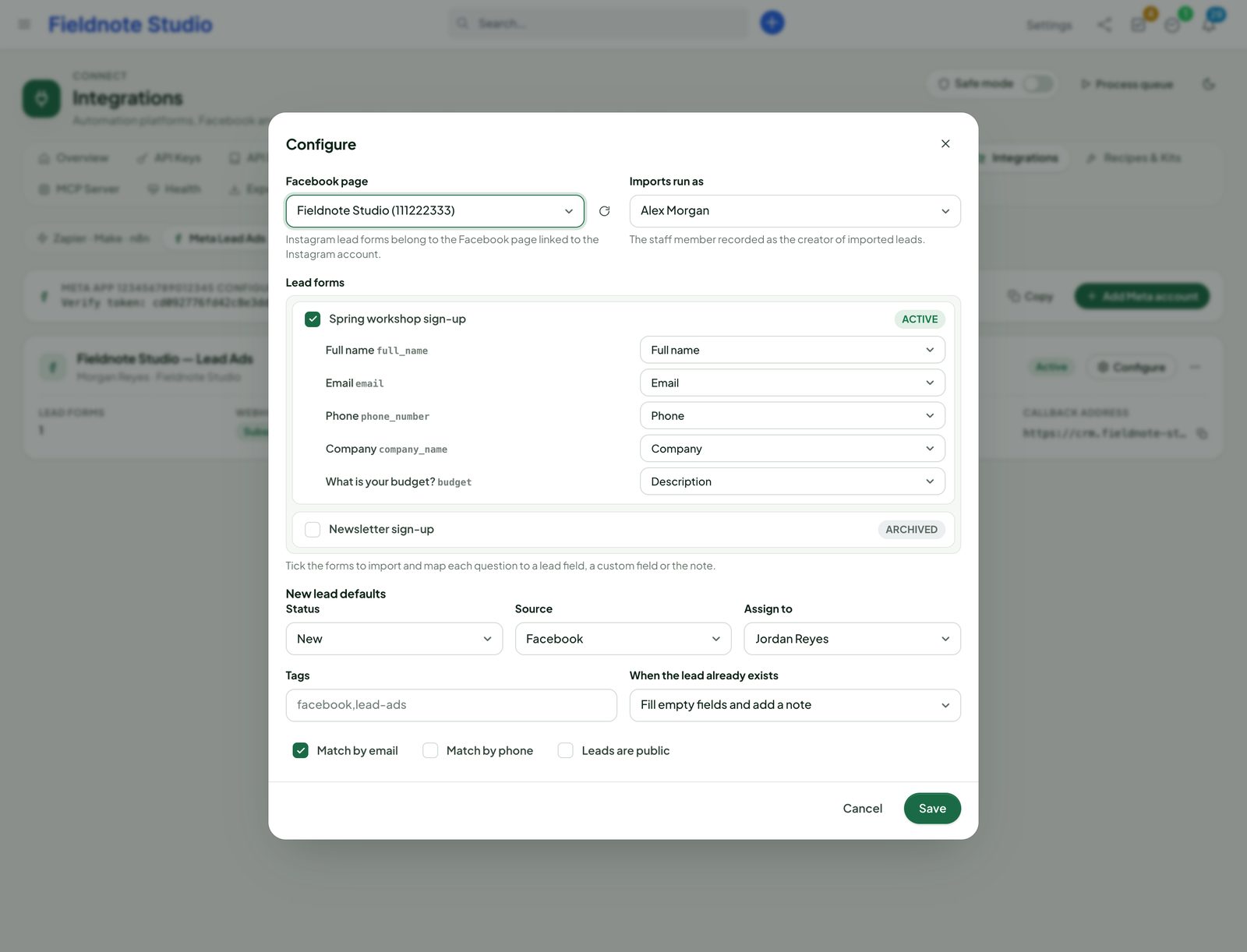
Configuring Lead Ads: the Page, the spring workshop sign-up form, its questions mapped to lead fields and the defaults for status, source and assignee
Actual module interface with fictional demonstration data.

WooCommerce

Your shop and your CRM, in step.

Connect one or several WooCommerce stores with their REST keys. Connect registers the store's webhooks itself and keeps customers, products and orders in step — with a status map you control.

  • Customers ↔ customers matched by e-mail; products ↔ items by SKU, with price and tax
  • Orders → invoices with your status map, payments when paid, refunds → credit notes; guest orders optional
  • Direction per kind and a conflict rule: newest change, WooCommerce or CRM wins
  • Signed WooCommerce webhooks plus a scheduled reconciliation; a full sync on demand
  • Sync log and the map of linked records; currency check before anything is created
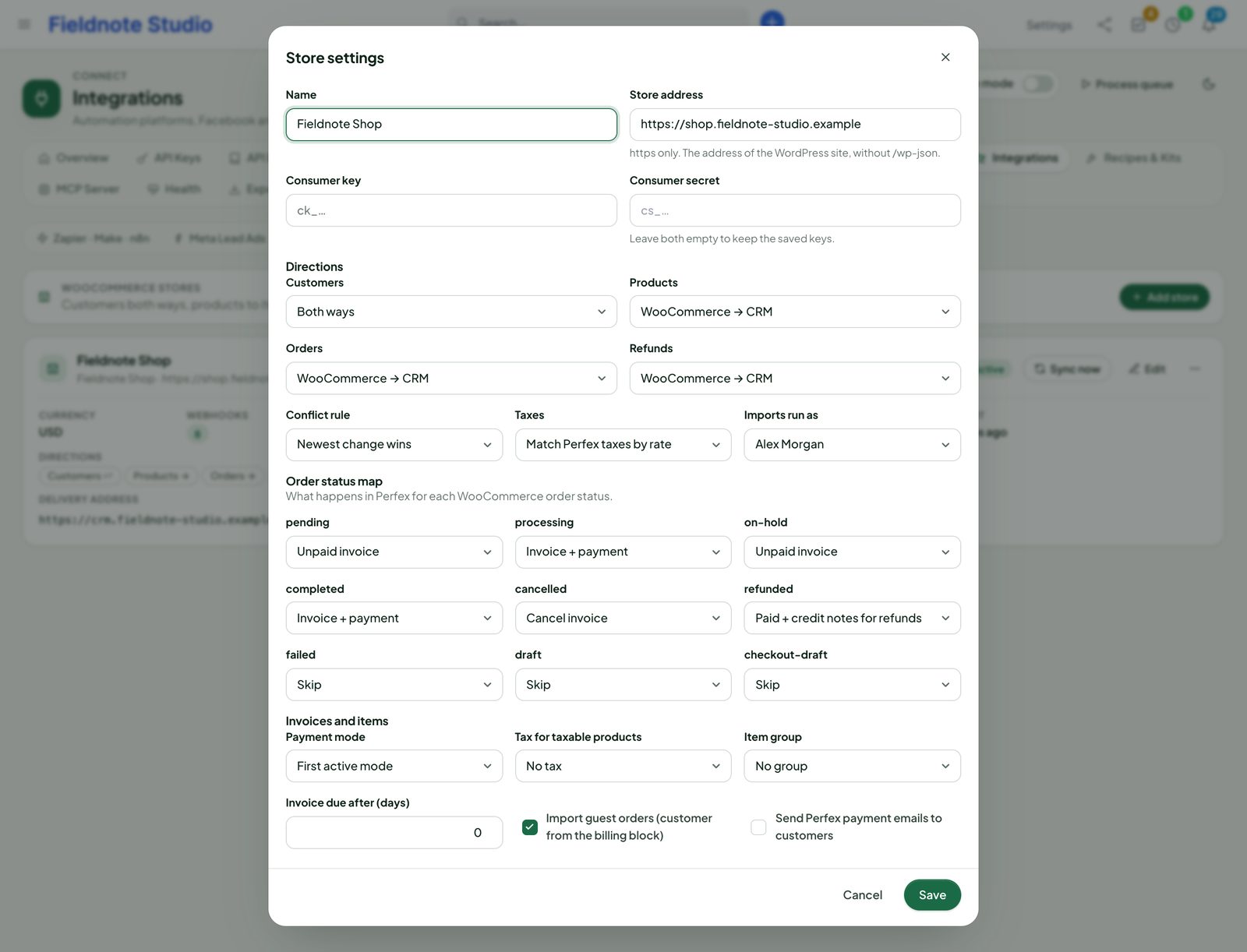
WooCommerce store settings: directions for customers, products and orders, the order status map and the conflict rule
Actual module interface with fictional demonstration data.

WordPress

Your website feeds your CRM.

The included plugin Perfex Connect for WordPress pairs with your CRM in one step: a one-time code from Connect, pasted into WordPress. No keys to copy, nothing loaded from a CDN.

  • Lead, contact and ticket forms built from your Perfex fields and custom fields, as a shortcode or a block, with attachments, consent and campaign capture (utm, gclid, fbclid)
  • Spam protection without a third party (honeypot, minimum time, limit per address), optional Turnstile or hCaptcha, and a retry queue so no entry is lost
  • Contact Form 7, WPForms and Gravity Forms entries to Perfex by field mapping
  • User sync in the direction you choose, and an Open Client Portal button with a one-time link — never a second password
  • Invoices, estimates and knowledge base on your site for linked customers, read-only; signed webhooks back to WordPress
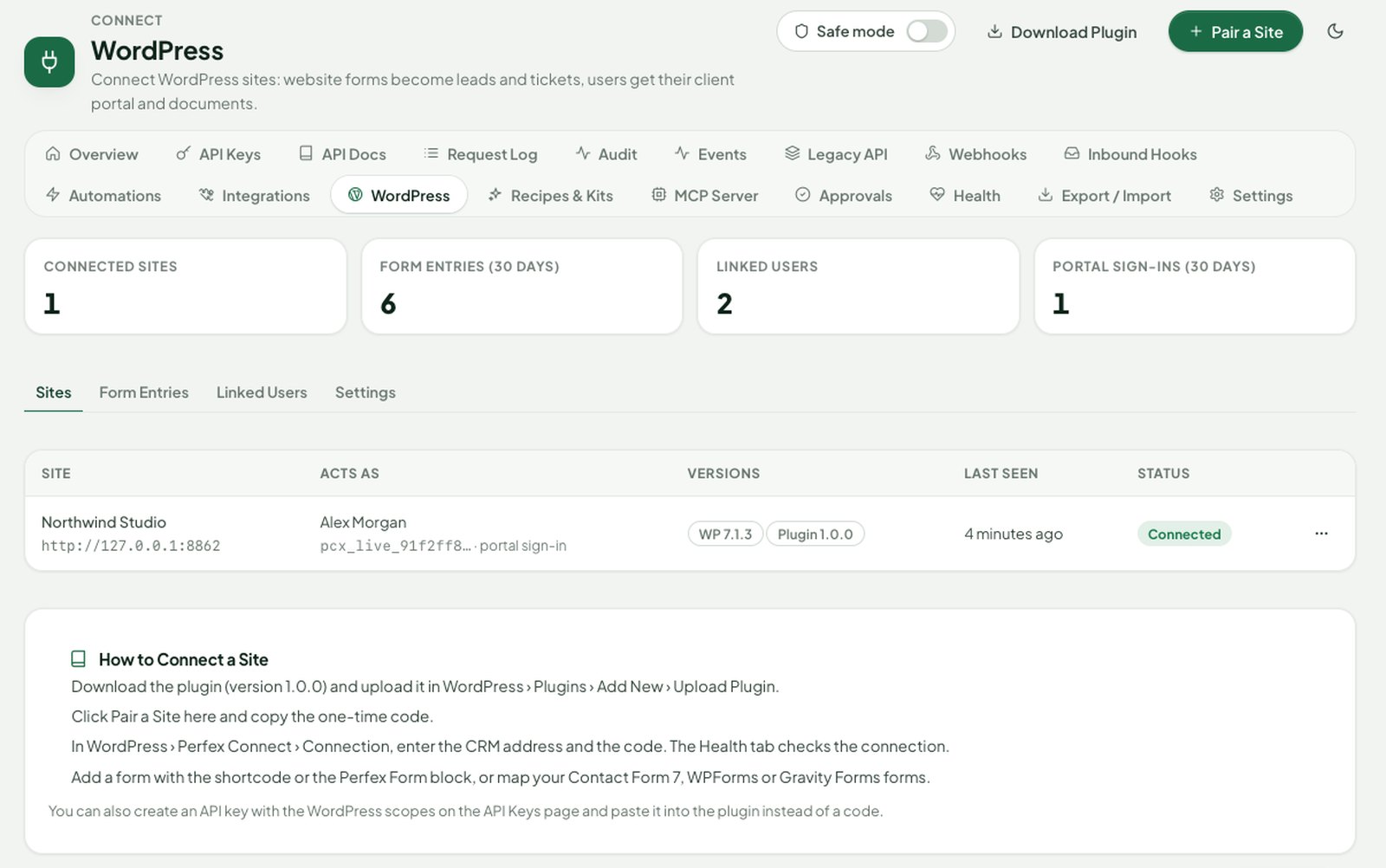
Connect WordPress page: connected sites with versions, the staff member each site acts as and portal sign-in, with KPIs for form entries, linked users and portal sign-ins
Actual module interface with fictional demonstration data.

MCP & AI · new in 1.1

Let AI assistants work in your CRM — on a leash.

Connect is a Model Context Protocol server. Claude, ChatGPT, Cursor and other MCP clients search, read and prepare changes in Perfex — with a token or an OAuth sign-in that carries exactly the access you give it, never more than its staff member has in Perfex.

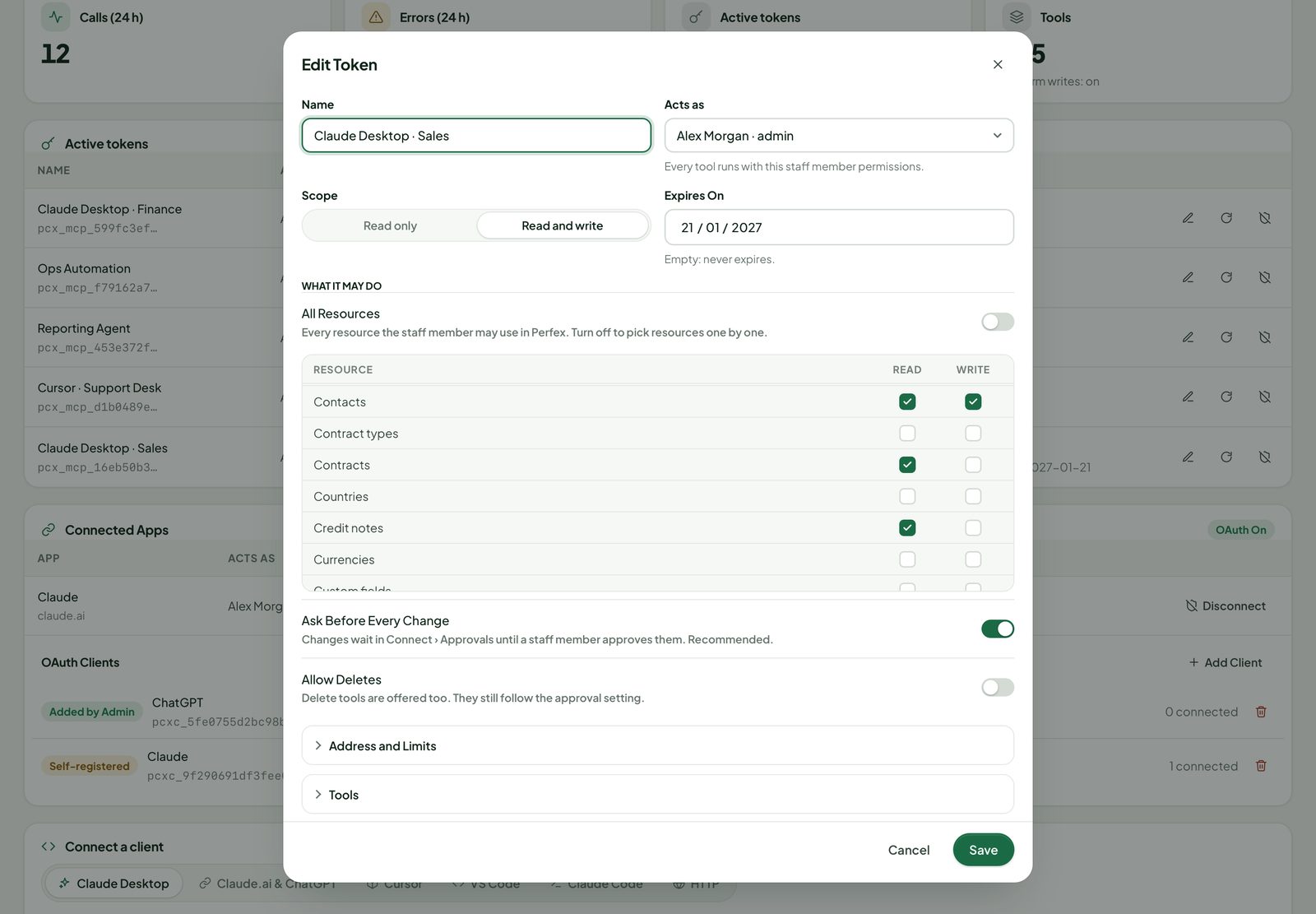
  • Read or write per resource, allowed addresses, limits per minute and day, expiry and New Secret
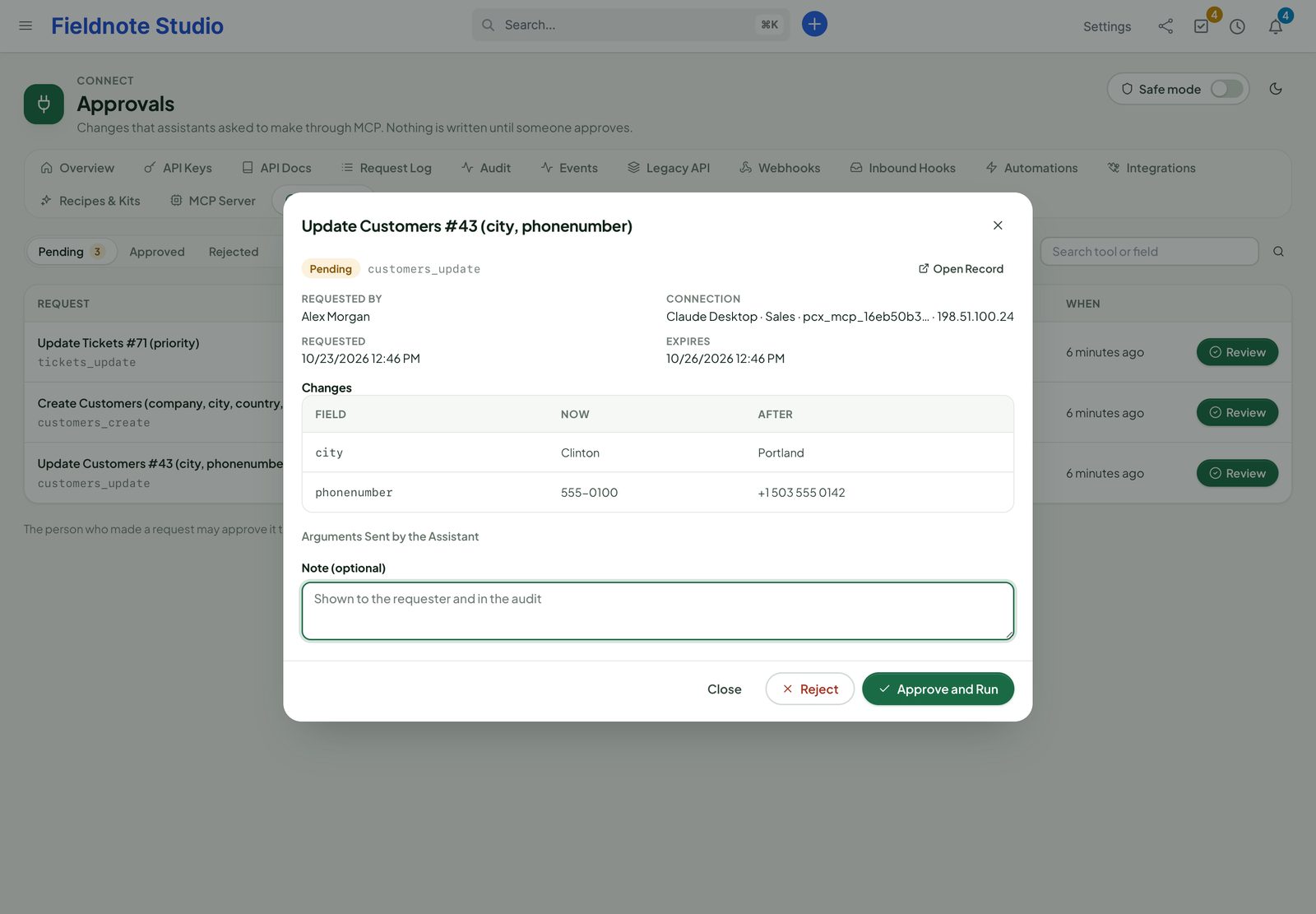
  • Ask before every change is on by default: writes wait on the Approvals page
  • Delete tools are off until you allow them for the site and the token
  • Compact tool style: 9 generic tools instead of up to 197 — a small tool list every client can load (1.1.1)
  • Ready setup for Claude Desktop, Claude.ai & ChatGPT, Cursor, VS Code, Claude Code and plain HTTP
  • With Perfex AI Staff installed, Connect joins it as a few generic tools — every call still checked per resource
  • Customer chats on WhatsApp and Messenger, a Telegram bot, AI chat: how Connect, Inbox and AI Staff fit together
Edit Token dialog: name, staff member, read and write scope, expiry, read and write per resource, Ask Before Every Change switched on and Allow Deletes off

Approvals, OAuth & audit · new in 1.1

Every AI change waits for a person. Every call is on the record.

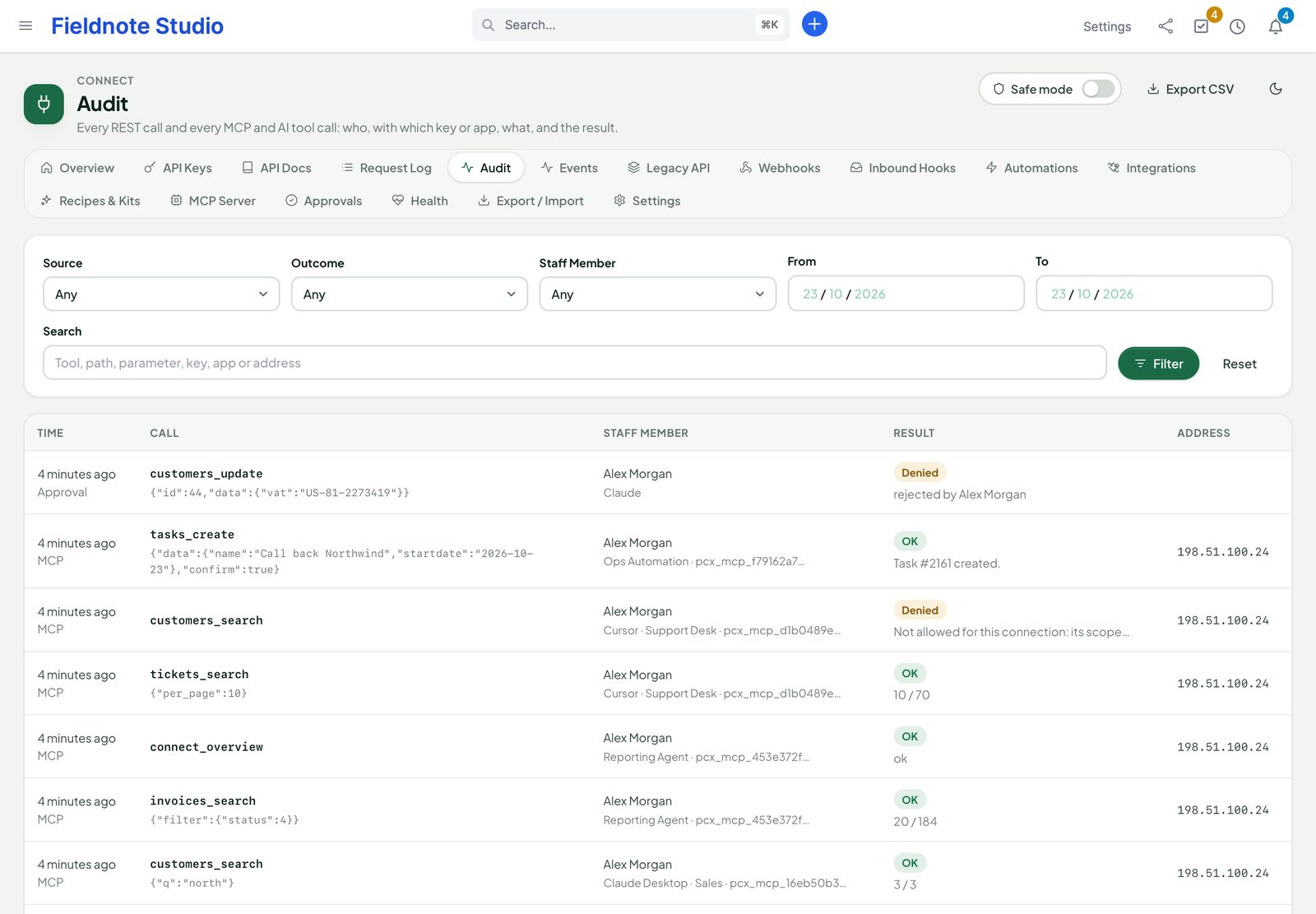
A write from an AI client becomes a request with each field, its value now and after. Approving runs it at that moment, after checking the token, its scopes, the approver's rights and that the record has not changed since. The Audit page lists every REST call and every AI tool call in one place.

OAuth for connectors

Claude and ChatGPT connectors sign in with a staff account: PKCE, a consent page in Perfex, short-lived tokens, Disconnect at any time. Off until you switch it on.

Untrusted data, marked

Tool results arrive in an envelope that labels CRM text as data, never instructions; hidden characters are stripped.

AI Access switch

Hide resources from every AI channel at once, while the REST API keeps working.

Strict CORS

Browsers on other sites read nothing unless you list their origin. Never a wildcard.

Our modules

Works on its own. Plugs into our other modules.

▤

Perfex itself

All core resources, Perfex's permissions per staff member, e-mail templates, SMS gateways, notifications and cron. No core file is changed.

✦

Perfex AI Staff

Every Connect tool becomes an AI Staff tool, with its approval cards for writes — one MCP server instead of two.

▦

Perfex Brain Pro

Nine widgets: API usage, requests by key, errors, webhook health, rule runs, sync status, events, queue and MCP calls.

⛨

Perfex Sentinel

Key and token use, failed sign-ins and bursts, settings, safe mode, paused webhooks and imports in Sentinel's audit log.

⇄

The “API” module

Already use the third-party API module? Both run side by side. A helper lists its users, maps its endpoints and creates matching Connect keys.

⚡

Every other module

Records other modules create through Perfex's models raise Connect events too, so webhooks and rules see them.

Security & control

Open to the right systems. Closed to everything else.

An integration hub is a door into your CRM. Connect was built so that each door has a key, a limit and a log — and so that one switch closes every outgoing one.

  • Safe mode: one switch holds every webhook, rule call and sync until you switch it off — nothing is lost
  • Keys and tokens hashed and shown once; secrets encrypted; tokens and signatures masked in every log
  • Outgoing calls only to public HTTPS addresses: private and cloud metadata ranges refused, DNS pinned, no redirects
  • Inbound hooks and Meta / WooCommerce webhooks verified by token or signature
  • Health page, retention for every log, permissions per area, export / import without secrets
  • Every admin change is a POST with Perfex's CSRF token; API access only with a key, never a session
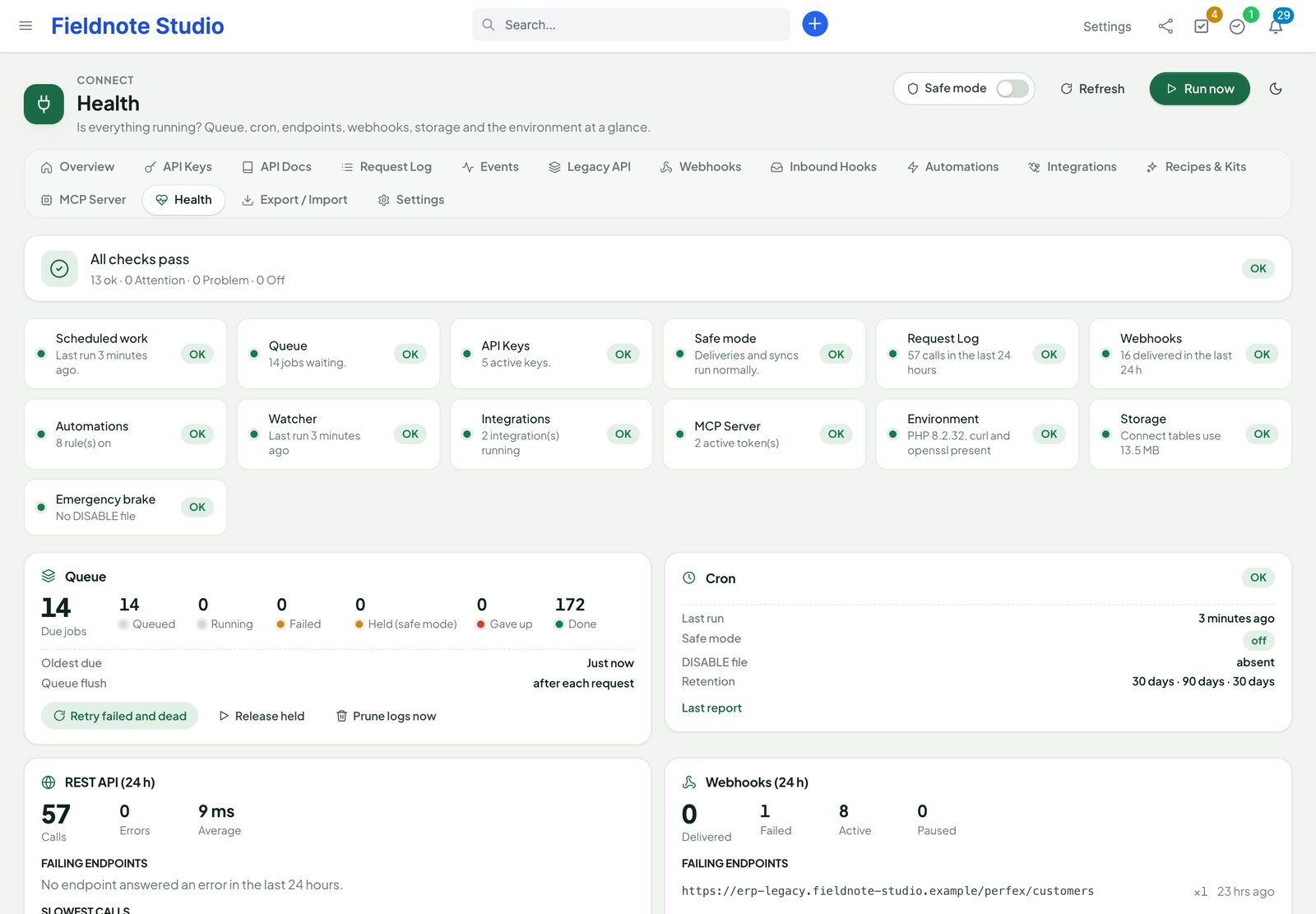
The health page: cron, queue, keys, webhooks, integrations, storage and server checks with repair actions
Actual module interface with fictional demonstration data.

Up and running in three steps

  1. 1

    Upload and activate

    Setup › Modules › upload the zip and activate Perfex Connect. Make sure Perfex's cron runs every minute.

  2. 2

    Create a key

    Open Connect › API Keys, give the key a name, a staff member and only the scopes it needs. Copy it — it is shown once.

  3. 3

    Connect something

    Try a call in API Docs, add a webhook, install the n8n or Zapier kit, or connect Lead Ads and your shop.

Roadmap

What comes next for Connect

What we are building and planning. Plans can change, and we never promise dates: an item ships when it is ready and tested.

  • Planned

    TeamPulse in the API

    Time entries, approvals and meetings over REST and webhooks.

  • Planned

    Every new module in the API

    REST resources, webhooks and MCP tools for each new SellMyCode module.

  • Planned

    More workflow recipes

    Ready-made recipes for the new modules, validated against the API.

  • Planned

    One-click updates

    Update the module from the Perfex admin, with a backup first and a way back.

Pricing

One price. Every integration, every key.

Perfex Connect

$129one-time

One installation, unlimited keys, calls, webhooks, rules, stores and Lead Ads forms. Licence and support terms are shown on the SellMyCode listing. No per-call or per-user fees. Sold by SellMyCode.

Buy on SellMyCode Read the documentation
  • REST API v1 for 39 resources: filters, sorting, search, paging, related records, actions, bulk
  • API keys with scopes, limits, IP allow-lists, expiry and rotation
  • OpenAPI 3.1, interactive docs with Try it, Postman collection
  • Request log with replay; event log with replay
  • Signed webhooks on 119 events with retries, delivery log and a subscription API
  • Inbound catch-hooks with mapping, upsert, dry run and log
  • Automation rules with conditions, 13 actions, schedules, dry run and run log
  • Zapier, Make and n8n: REST hooks, kits and 31 recipes
  • Facebook & Instagram Lead Ads and WooCommerce sync
  • MCP server with per-resource scopes, approvals, OAuth sign-in, client setup and an audit of every call
  • AI Staff, Brain Pro and Sentinel integrations
  • Safe mode, health page, export / import; module zip, offline documentation, developer kits and license notices

Interface in nine languages. Meta, WooCommerce, Zapier, Make, n8n and AI apps are your own accounts. Connect works completely without our other modules.

Questions

Does it need anything besides Perfex?

No. Connect works with Perfex CRM alone. Zapier, Make, n8n, Meta and WooCommerce are only needed for those integrations; AI Staff, Brain Pro and Sentinel add tools, widgets and audit entries when they are installed.

Is the API safe to open to the internet?

Every call needs a key; keys are hashed, scoped, rate-limited, optionally bound to addresses and expiring, and act with the Perfex permissions of their staff member. Failed attempts are throttled and logged. The API can be switched off in one place, and outgoing traffic stops with safe mode.

We already use the third-party API module. Do we have to switch?

No. Both run side by side: Connect uses its own addresses (/perfex_connect/api/v1/…) and tables. When you are ready, the Legacy API page shows how its endpoints and events map to Connect and creates Connect keys for its users.

How fast are webhooks?

By default Connect sends right after the request that caused the event, so deliveries are near-instant; Perfex's cron sends the rest and the retries. Failed deliveries retry for about a day with growing pauses.

Does the Zapier app appear in Zapier's directory?

The kit is a Zapier CLI project you push to your own Zapier developer account as a private app, which you can share with your team. You can also use Zapier's Webhooks and the REST API without the kit; n8n and Make work out of the box.

What do I need for Facebook and Instagram Lead Ads?

Your own Meta app with Facebook Login and Webhooks, and access to the Page that runs the ads. The documentation walks through every step, including the permissions Meta asks to review.

Which WooCommerce versions work?

Stores with the WooCommerce REST API v3 (WooCommerce 3.5 or newer) reachable over HTTPS, with a REST key with read / write access. Several stores can be connected to one CRM.

Can an AI assistant change or delete records on its own?

Not by default. Every token and connected app asks before every change: the write becomes a request on Connect › Approvals and nothing is written until a person approves it. Delete tools are off until an administrator allows them for the site and the token. You can switch approval off per token for an automation you trust.

How do Claude or ChatGPT connect?

Either with a token (the MCP Server page shows ready setup for Claude Desktop, Cursor, VS Code, Claude Code and plain HTTP) or, for the Claude.ai and ChatGPT connectors, with OAuth: switch it on in Settings, add your CRM's MCP address as a connector, and sign in with your Perfex account. The documentation shows how to forward the /.well-known addresses in nginx or Apache for clients that need them.

We use Connect 1.0 with an MCP client. What changes in 1.1?

Tool results now come in an envelope, with the record data under data; writes wait for approval and delete tools are off unless allowed. Existing tokens keep their reach. The changelog in the download lists the upgrade steps.

Does it change Perfex core files?

No. Connect uses Perfex's module hooks and its own tables. Deactivate it and its API, webhooks and syncs stop at once; your data stays until you uninstall (and can be kept on uninstall too).

What are the requirements?

Perfex CRM 3.4 or newer (tested on 3.4.1), PHP 8.0 or newer with curl, openssl and zip, MySQL or MariaDB, and Perfex's cron running every minute. Webhooks, Lead Ads and WooCommerce need outgoing HTTPS from your server; Meta and WooCommerce need to reach your CRM over HTTPS.

Is it translated?

Yes. The interface ships in English, Spanish, Portuguese (Brazil), French, German, Italian, Dutch, Turkish and Russian. API messages stay in English, like HTTP itself.

How do I get support?

Contact us through sellmycode.net. Six months of support are included with every licence. Please add the module, Perfex and PHP versions and the request id or delivery id from the log — never keys, tokens or secrets.
Connect Perfex to the rest of your business.

An API you control, events that arrive, rules that act and integrations that just work — inside the CRM your team already uses.