For Perfex CRM 3.4 · Ledger · Bills · Banking · Multi-currency · Tax · Reports

Your CRM already knows the money.
Now it keeps the books.

Perfex Books is real double-entry accounting inside Perfex. Invoices, payments, credit notes and expenses post themselves to a chart of accounts you control; add vendor bills, import bank statements and reconcile them, and read a profit and loss, balance sheet and cash flow that always tie back to the documents behind them.

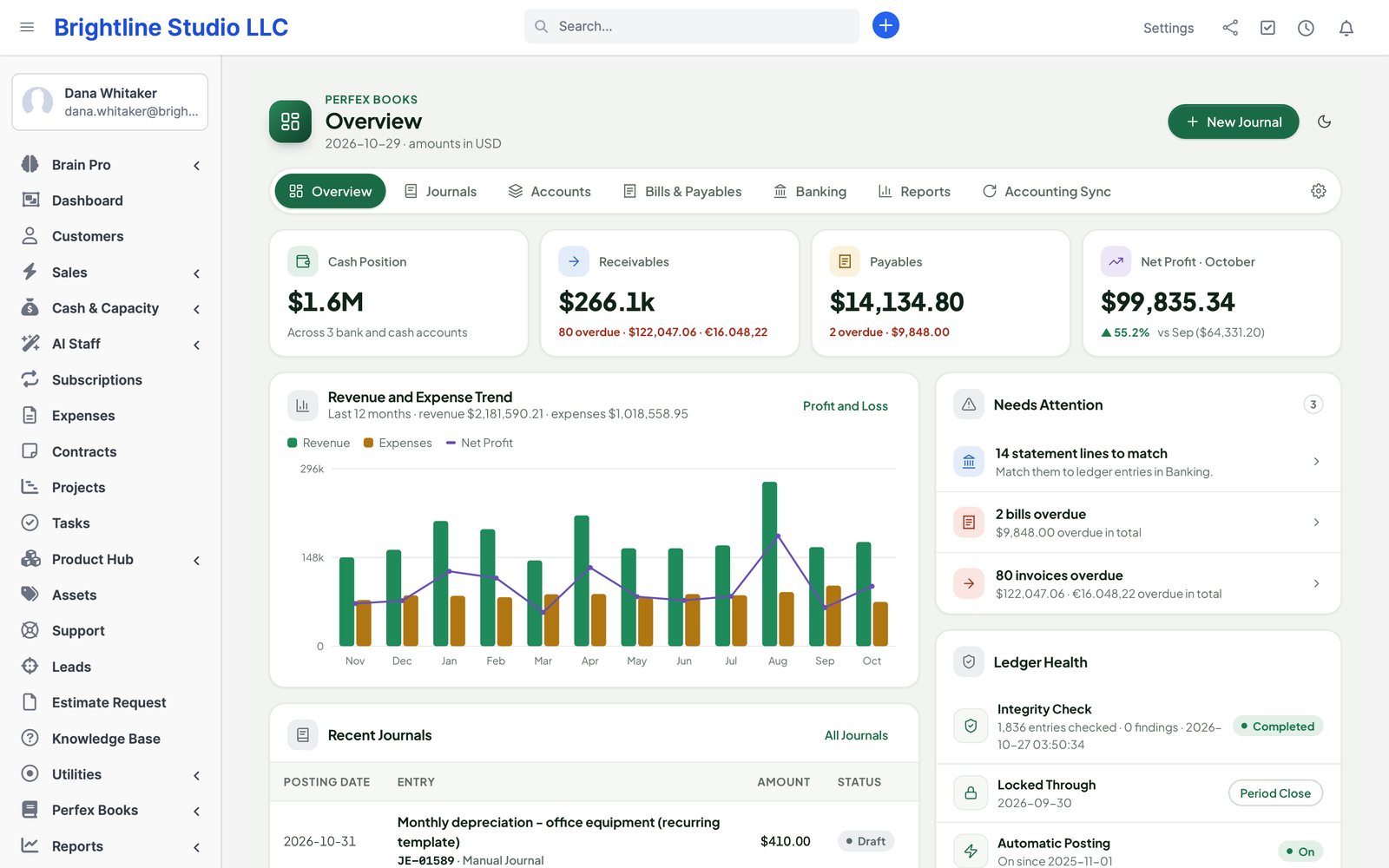
  • $Cash positionAll banksEvery bank and cash account in your base currency, foreign accounts converted at your rates.
  • ↘ReceivablesAged AROpen invoices by age bucket, per customer and currency, from the ledger itself.
  • ↗PayablesAged APVendor bills due and overdue, partly paid bills and unapplied vendor credits.
  • ≈Net profitThis monthCompared with last month, with a 12-month revenue and expense trend.
The Perfex Books overview: what needs attention, cash position, receivables, payables and net profit, a 12-month revenue and expense trend, lock date and the integrity check
Actual module interface on a Perfex 3.4.1 installation with fictional demonstration data.

Why Perfex Books

One set of numbers, not three.

Perfex sends the invoices and records the payments. The books then live in a spreadsheet or another app, re-typed every month, and never quite agree. Books keeps them where the documents already are.

“We re-type every invoice into the accounting app.”

Hours a month, and a mistake in every batch.

With Perfex BooksInvoices, payments, credit notes, refunds and expenses post automatically to the accounts you mapped, each journal linked to its document. Existing history is imported once, from a date you choose, after a preview that checks the totals against Perfex.

“Someone edited an invoice from last quarter.”

The report you sent the bank no longer matches.

With Perfex BooksPosted entries never change. An edit or cancellation adds a reversal and a new entry, and a locked period stays locked: the correction lands on the first open day, linked to the original date.

“Is the bank balance right?”

Ticking statement lines against payments by hand.

With Perfex BooksImport the statement, accept the matching suggestions, let rules handle the bank fees and reconcile to the statement's closing balance. If a later posting changes reconciled history, Books tells you.

What is inside

Six areas, one ledger.

Every part writes balanced journal entries to the same general ledger, so the reports, the statements and the bank always agree.

  • LedgerChart of accounts and journalsHierarchical accounts with types, codes and starter templates; manual, recurring and reversing journals with approval.
  • PostingFrom Perfex, automaticallyInvoices, payments, credit notes, refunds and expenses, with an account mapping screen and a reconciled backfill.
  • PayablesVendors and billsBills with lines, tax, due dates and attachments; partial payments, vendor credits and aged payables.
  • BankingImport and reconcileCSV, OFX/QFX and CAMT.053 statements; suggestions, rules, splits, transfers and reconciliation reports.
  • Currency & taxMulti-currency and taxDated exchange rates, realised and unrealised FX, Perfex taxes mapped to tax accounts and a tax summary per period.
  • ReportsStatements you can openP&L, balance sheet, cash flow, trial balance, ledgers, aged AR/AP, statements and budget vs actual.
  1. 1InvoiceYou invoice in Perfex as always — nothing new to type.
  2. 2PostBooks posts receivables, income and tax to the accounts you mapped.
  3. 3ReconcileThe payment lands in the bank; the statement line matches it.
  4. 4ReportP&L, balance sheet and tax summary, with drill-down to the invoice.

The ledger

Exact to the last cent. Never rewritten.

Every posting is a balanced journal entry — debits equal credits, in the document currency and in your base currency — written in one database transaction. Money is stored as exact decimals, never floating point.

  • Immutable: a posted entry is corrected by a reversal and a new entry, both linked to the original
  • Idempotent: each source document and revision posts once, even when a background job runs twice
  • Lock date: nothing posts on or before it; it cannot move backwards
  • Year-end close rolls profit into retained earnings; an opening balances wizard gets you started
  • Dimensions on every line: customer, vendor, project, cost centre and tags
  • A nightly integrity check reports unbalanced entries, orphans and balance drift — and changes nothing
AccountDebitCredit
1200 Accounts Receivable1,080.00
4000 Sales Income1,000.00
2200 Sales Tax Payable80.00
Invoice INV-0002141,080.001,080.00
An invoice of $1,000 plus 8% tax, posted automatically. Edit the invoice and Books adds a reversal and a new entry; this one stays as it was.

Chart of accounts

Your accounts, ready on day one.

Start from a generic small-business template or a service or product variant, then add, rename and archive accounts. Types and sub-types drive the reports: assets, liabilities, equity, income, expenses and cost of goods sold.

  • Parent and child accounts with codes, sub-types and active or archived status
  • Protected system accounts: receivables, payables, undeposited funds, sales tax, FX gain and loss, retained earnings, opening balance equity, inventory and COGS
  • CSV import with column mapping and a dry run before anything is written
  • Opening balances per customer, vendor and bank account
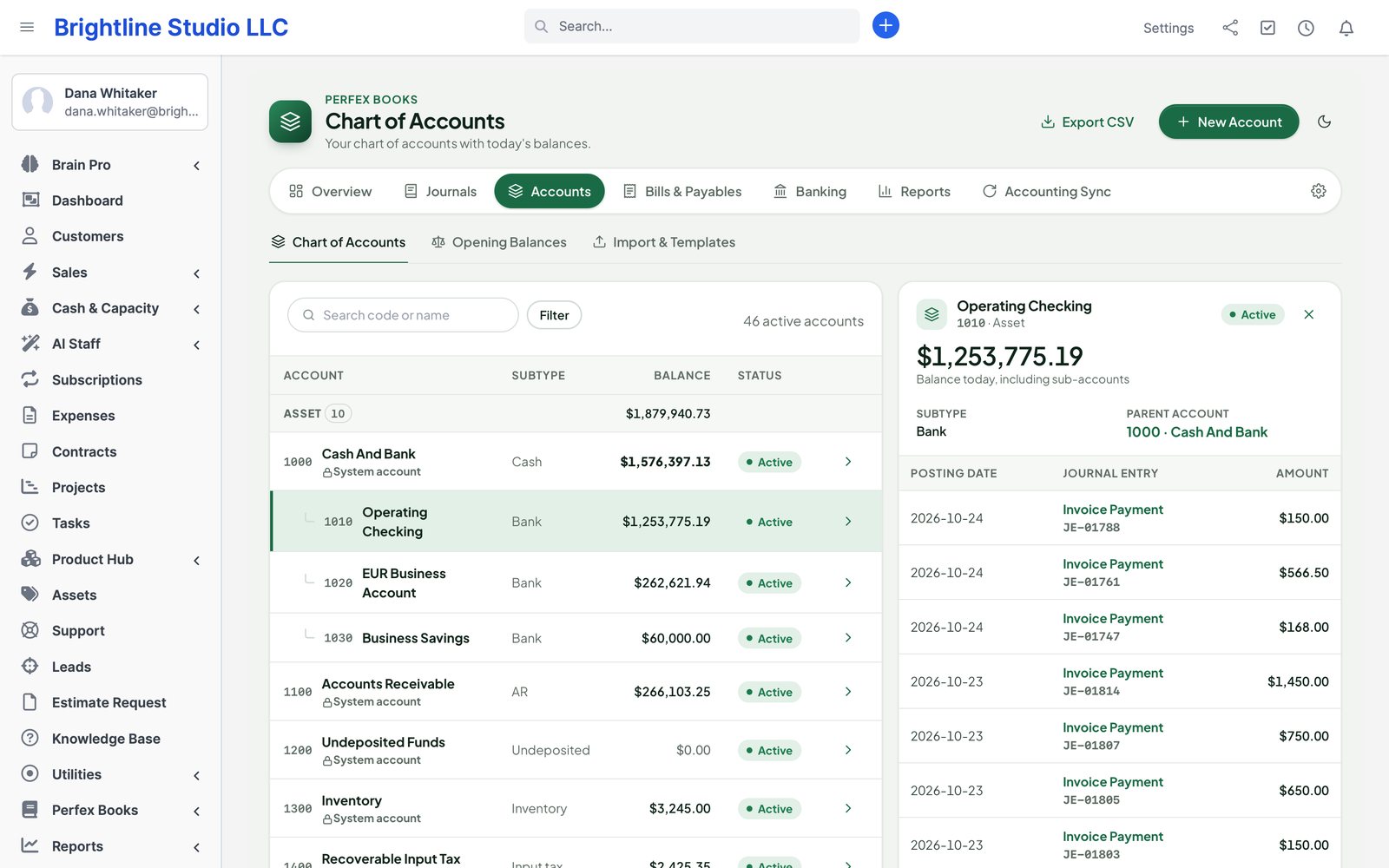
The chart of accounts: codes, names, types and status of the accounts from the service template

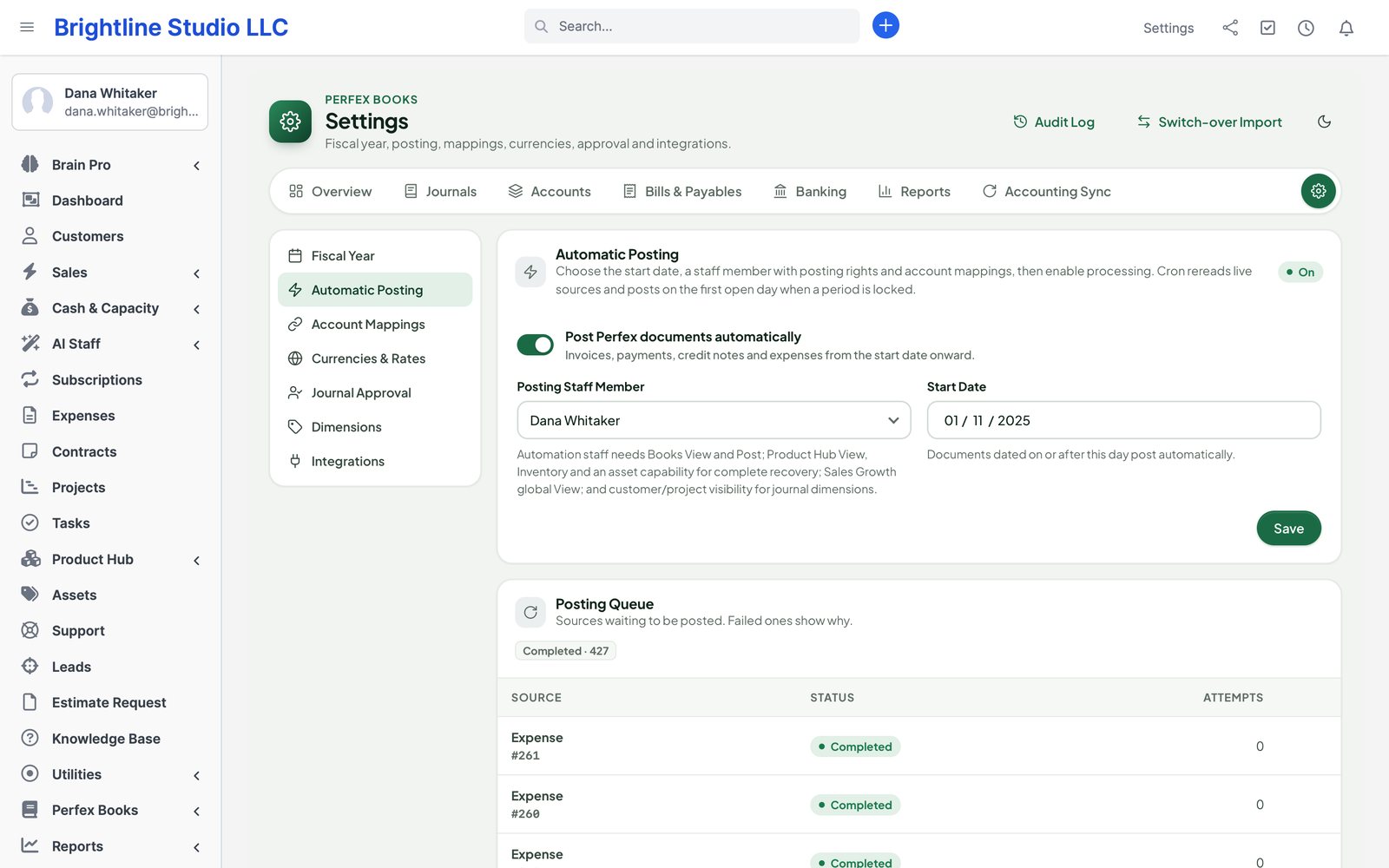
Automatic posting

Perfex documents in, journal entries out.

Choose a go-live date and map once: income per item or item group, a bank or undeposited funds per payment mode, an expense account per category, a tax account per Perfex tax. From then on Books posts by itself through the Perfex cron.

  • Invoices with discounts, adjustments and tax lines; subscriptions through the invoices they create
  • Payments, overpayments and customer credits; credit notes and refunds
  • Expenses with tax, paid from a bank or left unpaid in a clearing account
  • Edits and cancellations reverse and repost, with the history kept
  • Historical backfill from a date you choose: a preview first, totals compared with Perfex's own, differences listed by document
  • Accrual by default; P&L and tax reports can switch to cash basis from the same data
Automatic posting settings: go-live date, posting basis and the account mapping for payment modes, expense categories and taxes

QuickBooks Online and Xero

Already on QuickBooks or Xero? Keep it.

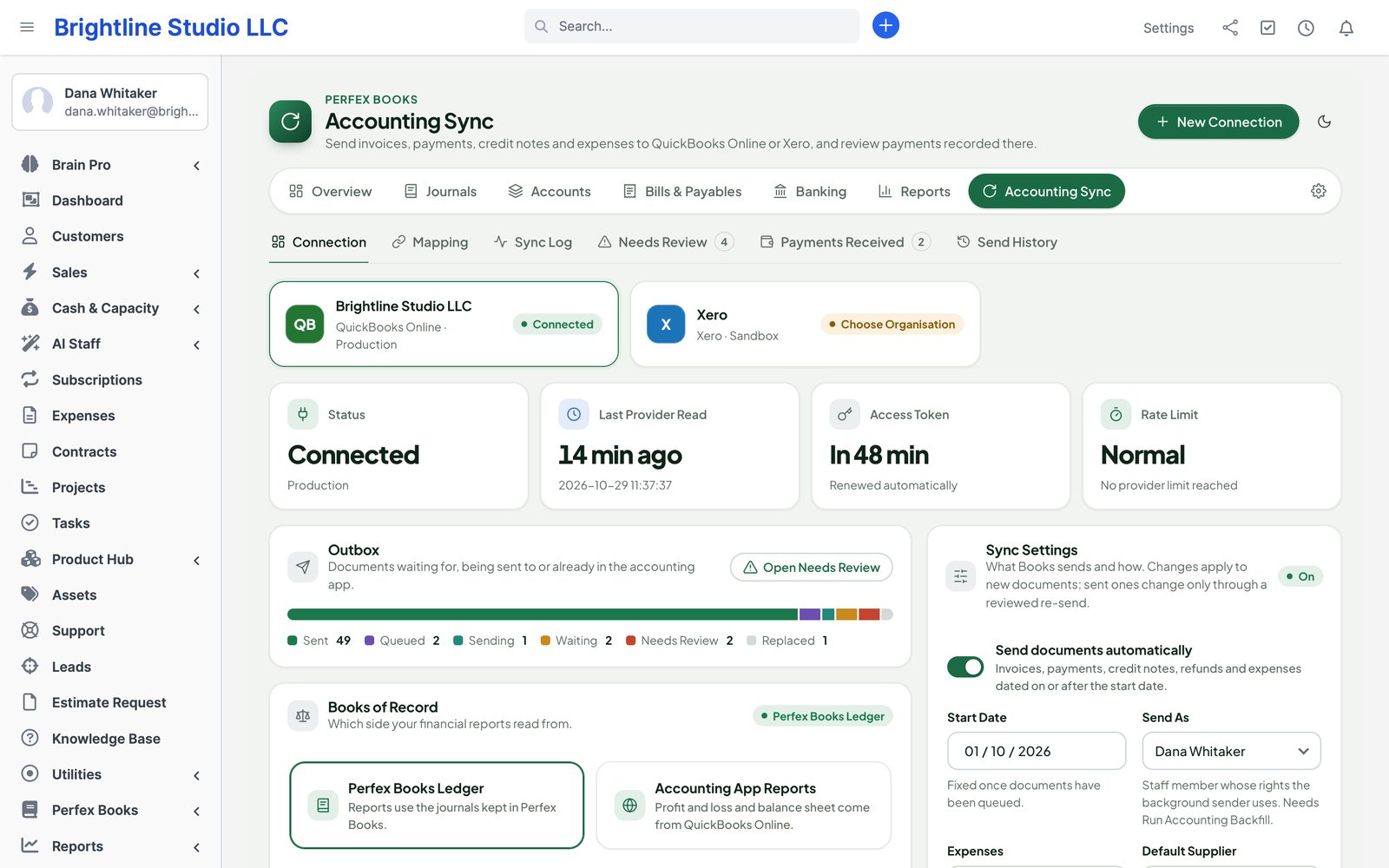
Connect a QuickBooks Online company or a Xero organisation with your own app keys. Books sends what you do in Perfex, waits politely when the provider says slow down, and asks before it touches anything it is not sure about.

  • Customers, invoices, credit notes, payments, refunds and expenses with their lines, taxes, discounts and currency
  • Edits update and cancellations void the same document — a replay never creates a second one
  • Mapping with searchable pickers from your accounting app and suggestions you confirm
  • Sync log, Needs Review and Send History: retries, side-by-side review and a preview before older documents go out
  • Payments entered in QuickBooks or Xero come back for review; recording them on the Perfex invoice is your choice
  • Run the Books ledger, the accounting app or both, and pick which one your reports read
Perfex Books accounting sync: a QuickBooks Online connection with status, last read, token and rate limit, the outbox and sync settings

Vendors and bills

What you owe, and when.

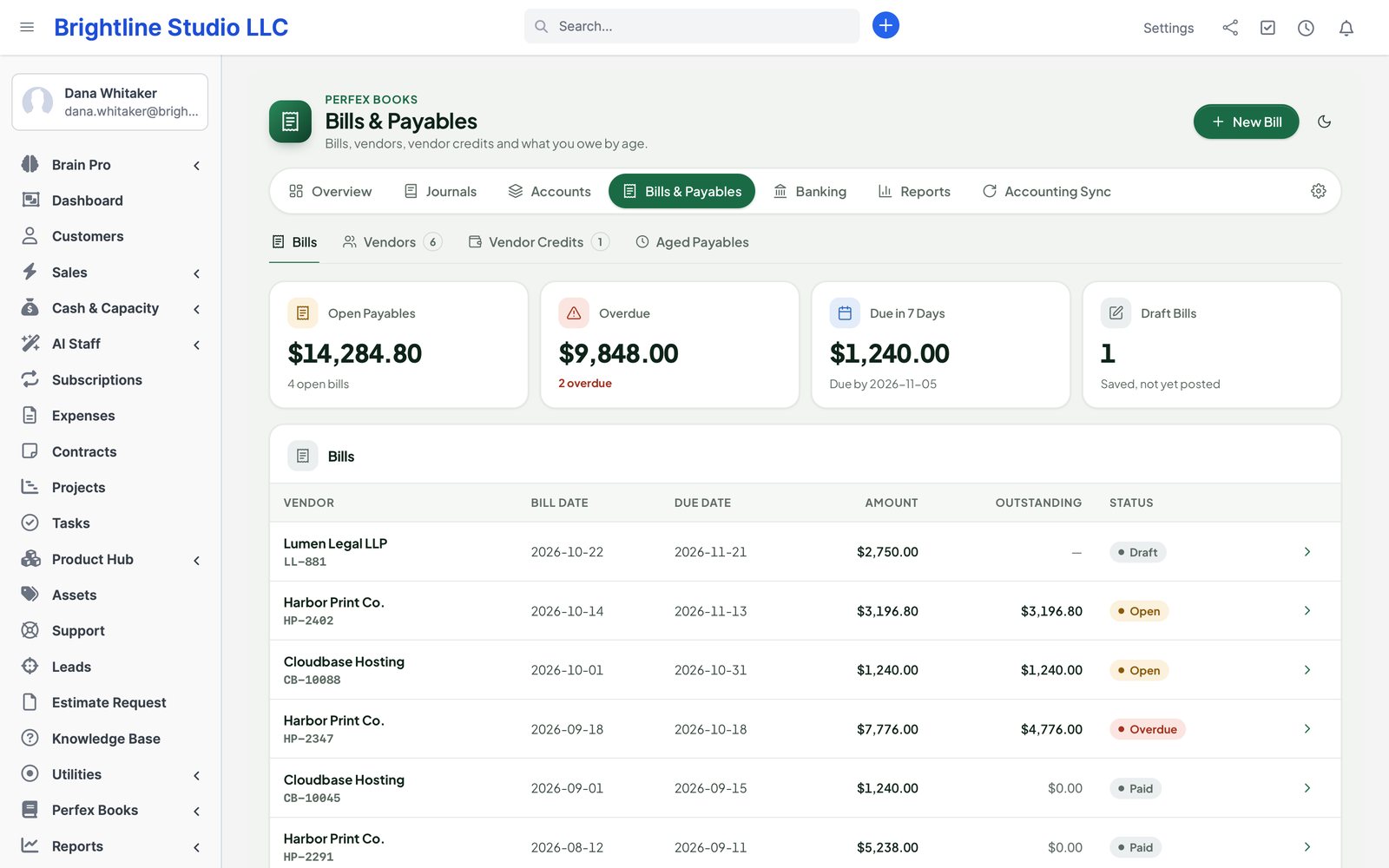
Record vendor bills with lines, tax, due dates and the PDF attached. Pay them in full or in parts from any bank account, apply vendor credits, and see aged payables at a glance.

  • Draft, posted, partly paid and paid bills; void after reversing what was applied
  • Vendor credits applied partly to bills of the same vendor and currency
  • Attachments through a drop zone, checked by type
  • Vendor statements and aged payables per vendor and currency
Payables: vendor bills with due dates, amounts outstanding and status

Banking and reconciliation

The bank, ticked off in minutes.

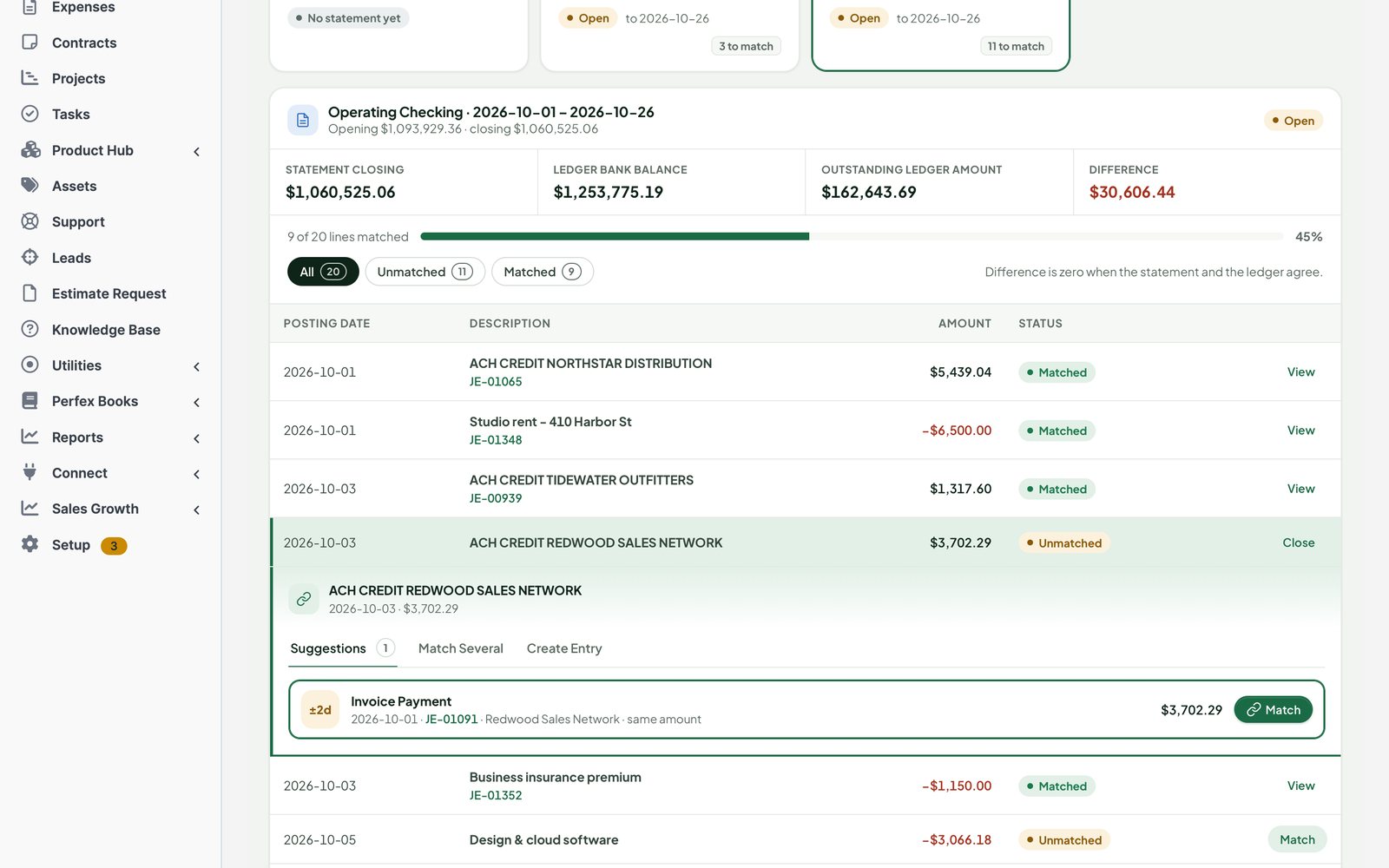
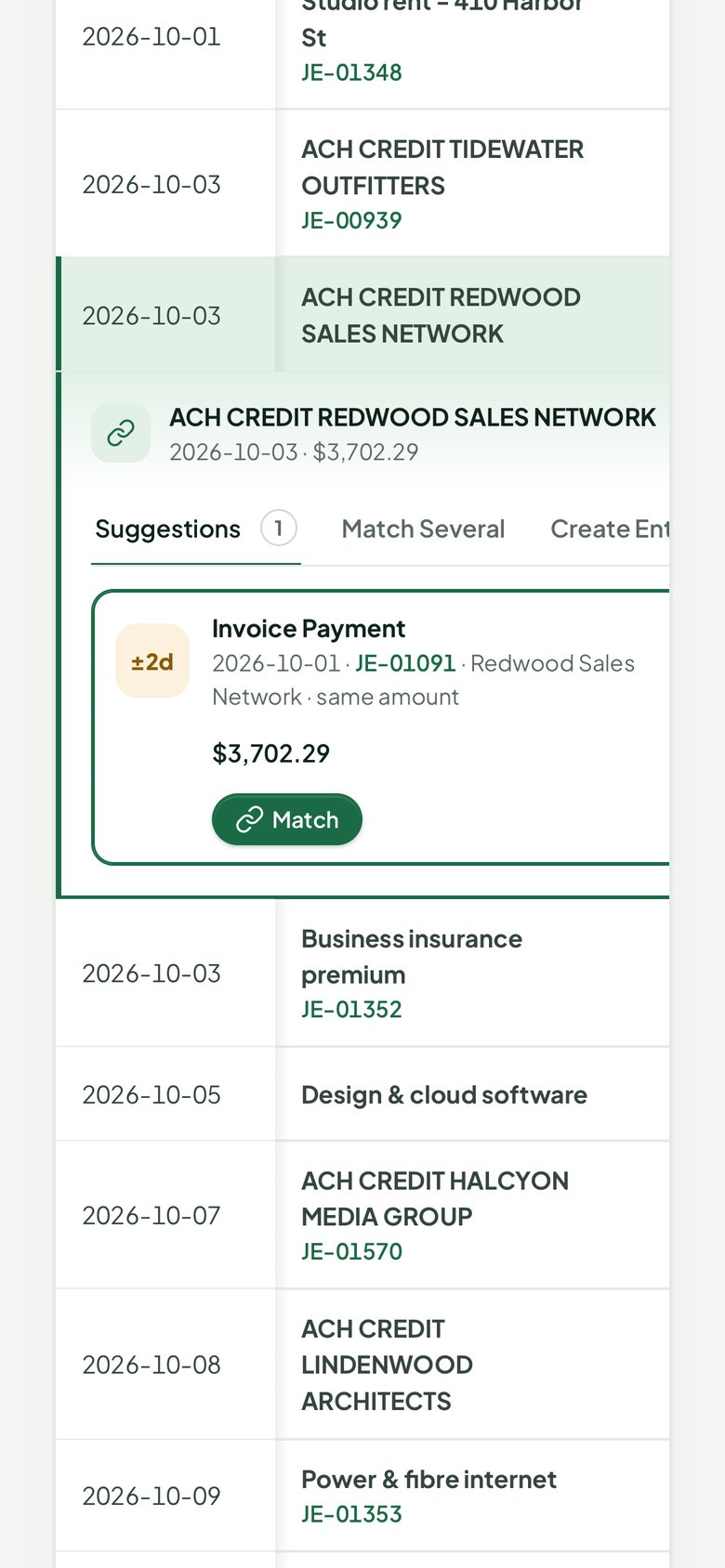
Import a statement from your bank, check the preview, and match each line to what Books already posted. Suggestions use amount, date, reference and party; rules post the recurring lines for you.

  • Formats: CSV with saved column templates per bank, OFX/QFX and CAMT.053
  • Match one line to several receipts, group receipts into a deposit, split a line, transfer between accounts
  • Rules: “if the description contains X, post to account Y for vendor Z”
  • Reconcile to the statement's ending balance; reconciliation report; undo the last reconciliation
  • Duplicate lines spotted on import; XML parsed safely with size limits
An open bank statement: matched and unmatched lines, and matching suggestions for the selected line
Banking on a phone

Multi-currency and tax

Foreign invoices, real exchange differences.

Invoice in euros, get paid in euros, report in dollars. Books keeps both amounts on every line and works out the difference when the money arrives.

€

Rates per date

A dated exchange-rate table with each currency's own precision. Rates are never guessed: a missing rate stops the posting and tells you.

±

Realised and unrealised FX

Realised gain or loss on settlement; optional period-end revaluation of receivables, payables and foreign bank accounts, reversed on the next day.

%

Tax summary

Perfex taxes mapped to tax accounts. Collected against paid per rate and period, accrual or cash basis, with drill-down; closed tax periods stay closed.

Reports

Every number opens.

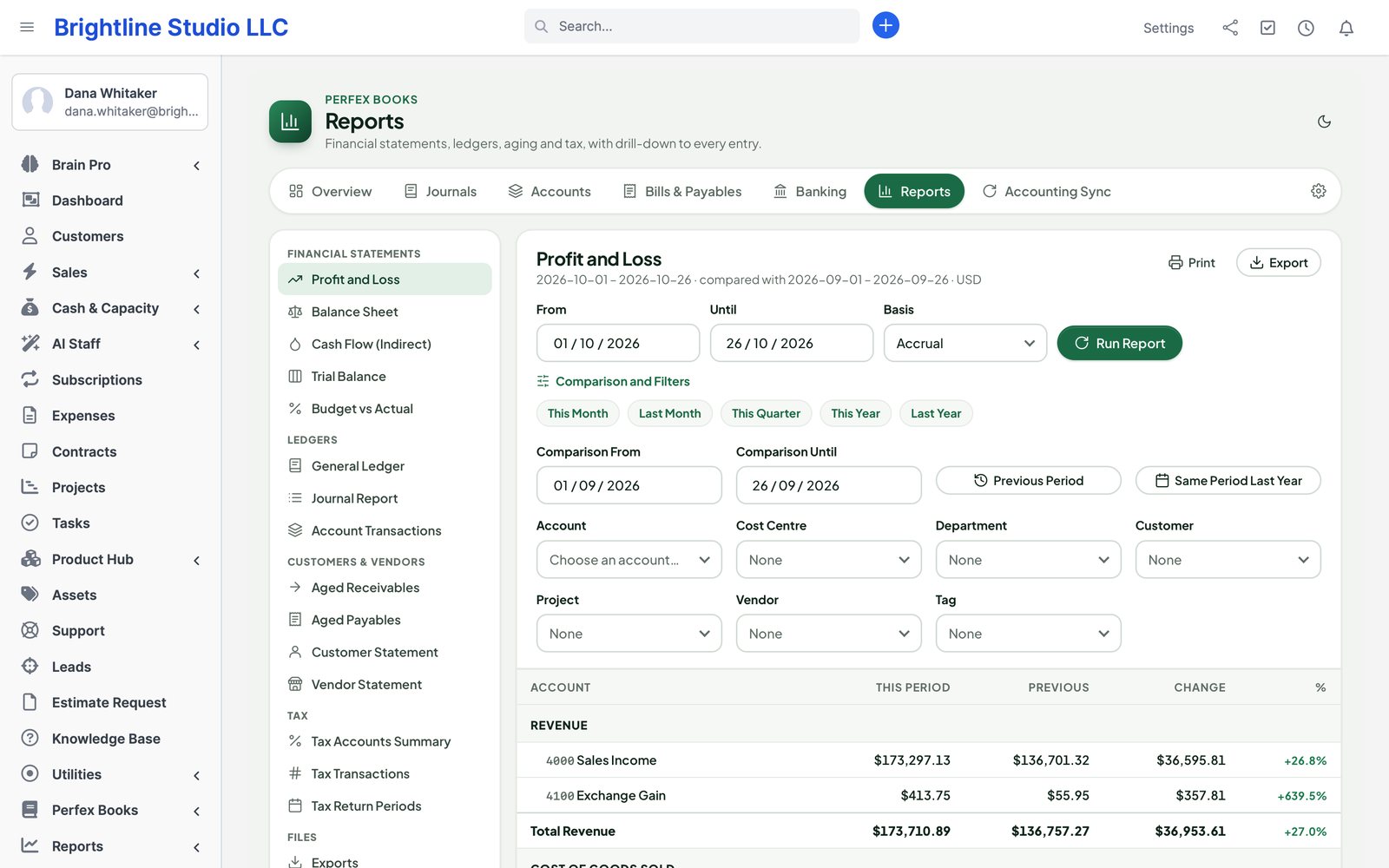
Pick a period, compare it with another, filter by customer, vendor, project or cost centre, and click through to the journal and the Perfex document behind it.

  • Profit and loss, balance sheet, cash flow (indirect method), trial balance
  • General ledger, journal report and account transactions
  • Aged receivables and payables, customer and vendor statements
  • Tax summary and budget against actual by account and month
  • Export to CSV, XLSX and PDF — spreadsheet-safe, numbers stay numbers
  • Staff without a customer's rights still see the totals, but not that customer's names or documents
Profit and loss for October compared with September: income, cost of goods sold, expenses and net profit

Journals and adjustments

For the entries Perfex does not make.

✎

Manual journals

Balanced entries with dimensions and attachments. Entries above an amount you set wait for another person to approve them.

↻

Recurring and reversing

Depreciation or rent every month through the cron; accruals that reverse themselves on the date you choose.

▤

Periods and audit

Lock dates, fiscal year close with retained earnings, and an audit log of every posting, reversal, reconciliation, close and settings change.

Switching from another accounting module

Bring your books with you.

Already keeping accounts in another Perfex accounting module? Books reads it on the same database — it never changes a thing in the old module — and shows you what it will import before it does.

  • 1 · Dry runAccounts, mappings, journal history or opening balances and bank accounts, with totals, debits against credits and what cannot be mapped.
  • 2 · ChooseFull history with cutover balances, or opening balances only on the day you switch.
  • 3 · ImportOne batch, posted as balanced entries; each source row is imported once, however often you run it.
  • 4 · UndoChanged your mind? Undo the batch: Books posts reversals and archives the imported accounts.

Read-only by design. The old module's tables are only read. Past bank reconciliations come across as reference; you reconcile fresh statements in Books.

Integrations

Works on its own. Plugs into our other modules.

▤

Perfex itself

Invoices, payments, credit notes, refunds, expenses, subscriptions, taxes, payment modes, customers, projects, staff permissions and the cron.

☺

Perfex People

Each approved pay run posts one payroll journal — gross pay, deductions, net pay and employer costs — and adjustments post their difference.

▣

Product Hub and Sales Growth

Stock value and cost of goods sold from Product Hub; commission and loyalty accruals from Sales Growth, each posted once.

▦

Perfex Brain Pro

Seven widgets for your dashboards: cash, profit, receivables, payables, the profit trend and receivables and payables ageing.

✦

Perfex AI Staff

Ask “What was our profit last quarter?” or “Which bills are overdue?” — answers from the same ledger, within each person's rights.

⚡

Perfex Connect

Accounts, journal entries and reports as read-only API resources for your other tools.

◎

Perfex Cash & Capacity

Actual results from the ledger next to your forecasts.

☁

Perfex SaaS Studio

Each workspace keeps its own books; nothing is written inside the module folder.

Security & control

The right people, the right buttons.

Separate Perfex permissions for viewing, reports, drafting, posting, approving, reconciling, closing periods and settings. Staff without View see nothing of Books at all.

  • Every action is a POST with a CSRF token and a permission check; record access checked per row
  • Locked periods enforced on the server, not just hidden in the form
  • Imports checked for size and type; XML without external entities
  • Exports safe to open in a spreadsheet: no formula injection
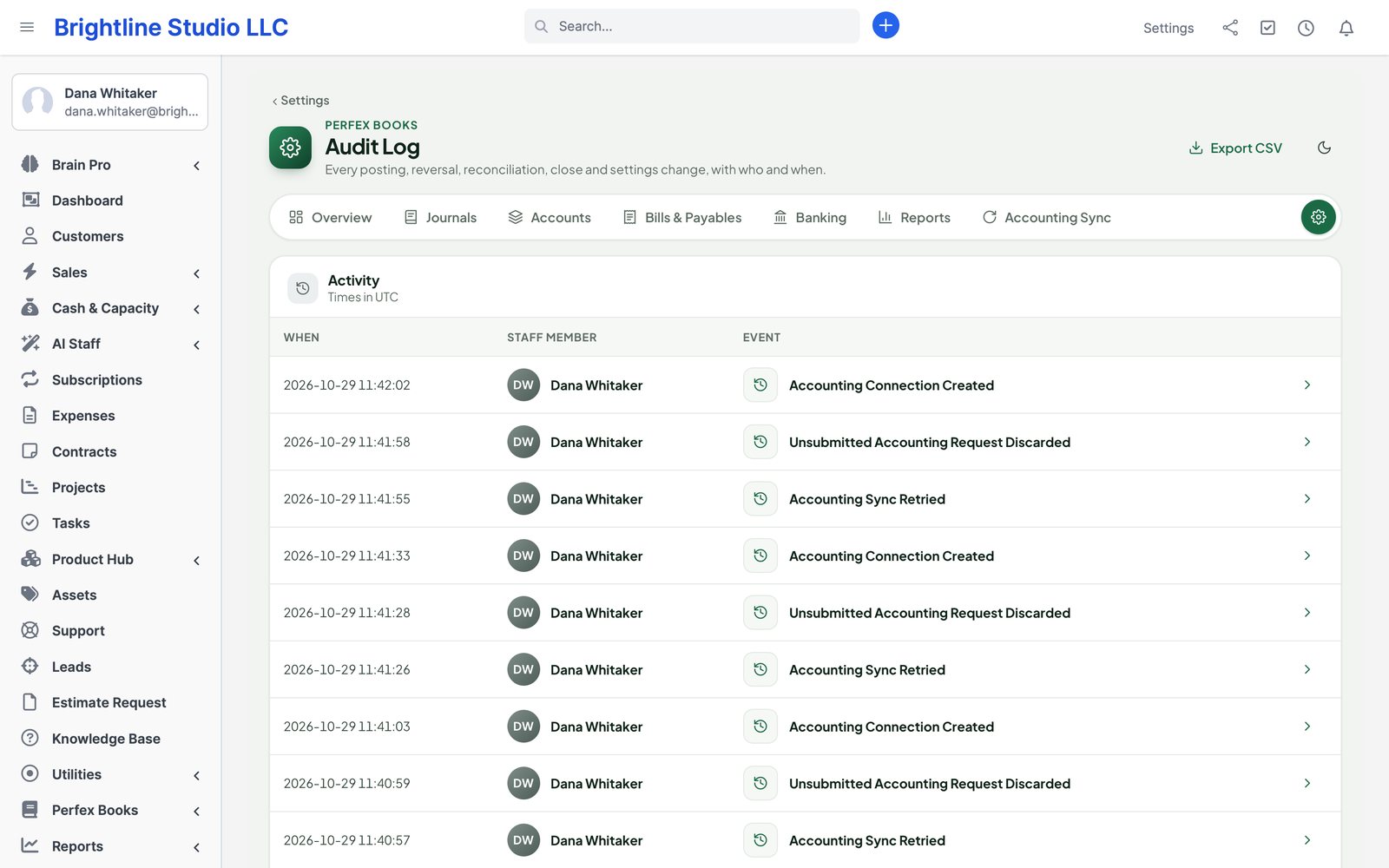
  • Audit log of postings, reversals, reconciliations, closes and settings, with who, when and what
The audit log: each posting, reversal, reconciliation and settings change with staff member and time
Actual module interface with fictional demonstration data.

Up and running in three steps

  1. 1

    Pick a template

    Activate Books, choose a starter chart of accounts and set your fiscal year and lock date.

  2. 2

    Map and go live

    Map payment modes, expense categories and taxes, enter opening balances and choose the go-live date.

  3. 3

    Bring in history

    Preview the backfill from the date you want, compare it with Perfex's totals and confirm.

Roadmap

What comes next for Books

What we are building and planning. Plans can change, and we never promise dates: an item ships when it is ready and tested.

  • Next

    Bank feeds

    Statements straight from your bank instead of a file, through a feed provider.

  • Planned

    One-click updates

    Update the module from the Perfex admin, with a backup first and a way back.

Pricing

One price. Every accountant, every company file.

Perfex Books

$159one-time

One installation, unlimited staff, accounts and transactions. Licence and support terms are shown on the SellMyCode listing. No per-user fees. Sold by SellMyCode.

Buy on SellMyCode Read the documentation
  • Chart of accounts, journals, periods and audit log
  • Automatic posting from Perfex with a reconciled backfill
  • Vendor bills, payments and credits
  • Bank import and reconciliation
  • Multi-currency, FX and tax summary
  • Financial reports with drill-down and export
  • Interface in nine languages

Interface in nine languages. Requires PHP 8.1 with BCMath. Books keeps accounting records; it does not file tax returns or move money.

Questions

Does it replace my accountant?

No. It gives you and your accountant clean, balanced books inside Perfex, with every number traceable to a document. Year-end judgement and tax filing stay with your accountant.

What happens to the invoices I already have?

Nothing until you choose. Books posts new documents from your go-live date. To bring in older ones, run the historical backfill from a start date: it previews every document, compares the totals with Perfex's and only posts after you confirm.

What if someone edits or deletes an invoice?

Books adds a reversal and a new entry. The original entry stays, so the audit trail is complete. If the date is in a locked period, the correction posts on the first open day and keeps a link to the original date.

Can I connect my bank directly?

Not in 1.0. You import statements as CSV, OFX/QFX or CAMT.053, which every bank offers. Books has a hook for live bank-feed providers later.

Does it sync with QuickBooks Online or Xero?

Yes. Connect either with your own free developer app keys; Books sends customers, invoices, credit notes, payments, refunds and expenses, keeps edits and cancellations in step, and shows payments recorded there for review. You can use the Books ledger, the accounting app or both.

Do I need a QuickBooks or Xero partner account?

No. You create a free app in the Intuit or Xero developer portal, paste its keys into Books and sign in once. Your tokens stay encrypted in your own Perfex database; nothing passes through our servers.

We invoice in several currencies.

Every line keeps the document amount and the base amount at the rate of that date. Settlements post realised gains and losses; a period-end revaluation is optional. A missing rate stops the posting rather than guessing.

Can it file my VAT or sales tax return?

No. It gives you a tax summary per period — collected against paid, per rate and tax code, accrual or cash — that you or your accountant file. Country e-filing is out of scope.

Who can see what?

Staff need Books View to see anything. Reports, drafting, posting, approving, reconciling, closing periods and settings are separate permissions. Report totals are company-wide; document names and links follow each person's own Perfex customer and project rights.

Does it change Perfex core files?

No. Books uses Perfex's module hooks and its own tables. Deactivate it and posting stops; your books stay until you remove them.

What are the requirements?

Perfex CRM 3.4 or newer (tested on 3.4.1), PHP 8.1 or newer with BCMath, MySQL or MariaDB with InnoDB, and Perfex's cron job.

Is it translated?

Yes. The interface ships in English, Spanish, Portuguese (Brazil), French, German, Italian, Dutch, Turkish and Russian, with standard accounting terms in each.

Is there a demo?

Yes: the live demo runs Books with fictional data. Sign in as the admin demo account shown on the login page (demo@perfexcrm.app, password demo1234). Settings, uploads and anything that sends e-mail or connects to an outside service are switched off there, and the data resets every few hours.

How do I get support?

Contact us through sellmycode.net. Six months of support are included with every licence. Please add the module, Perfex and PHP versions and a screenshot — never passwords or secrets.
Close the month inside Perfex.

Automatic posting, bills, bank reconciliation and reports that tie back to every invoice.