Version 1.1.1 · For Perfex CRM

Your team's HR.
Inside Perfex.

Perfex People keeps employee records, leave, attendance, payroll, recruitment and onboarding in one module, next to the projects and customers your team already works on. Salary, bank and ID details are encrypted, and only the people who should see them can.

  • 1module for records, leave, attendance, payroll and hiring
  • 8areas, from first application to final settlement
  • 9languages, light and dark, phone layouts
  • 0Perfex core files changed
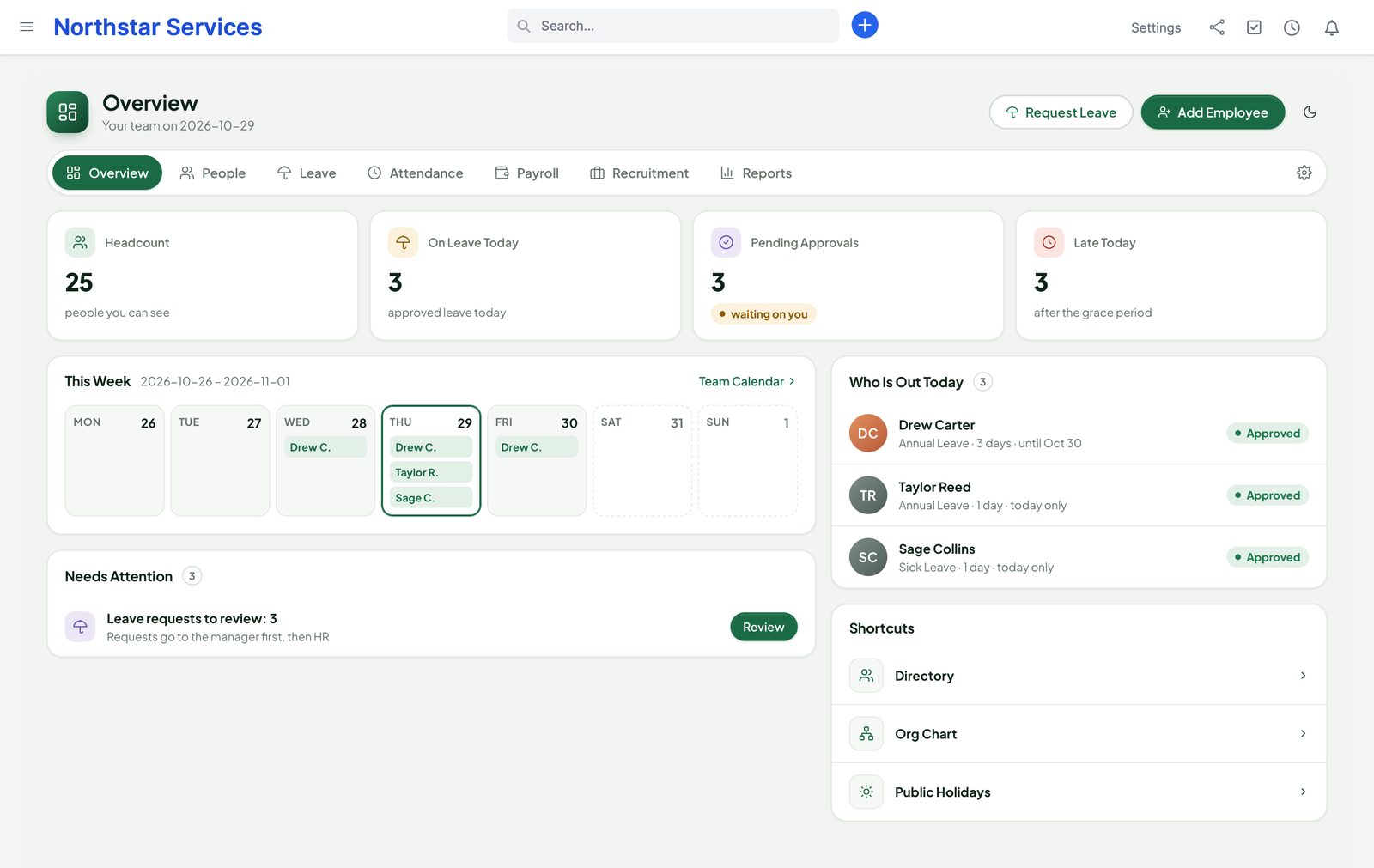
People overview: headcount, three people on leave today, pending approvals, late arrivals, the week with who is out, and leave requests that need review
The running module with fictional demo data (Northstar Services).

Why Perfex People

One HR module instead of several.

Many Perfex teams run separate add-ons for staff records, timesheets, payroll and hiring, each with its own screens and its own copy of the same people. Perfex People does all of it in one place, on top of Perfex staff.

“Who has seen my salary?”

Pay and bank details sit in plain fields that every admin screen loads.

With PeopleProtected values are encrypted and never load with the page. Payroll roles and the employee open them with Reveal, and every view and export is in the audit trail.

“How many days do I have left?”

Leave lives in a spreadsheet, and balances are recounted by hand.

With PeopleLeave types accrue by month or year, requests show the working days and the balance after them, and the manager and HR approve in turn.

“Why is this payslip different?”

Payroll runs are hard to check and easy to change after the fact.

With PeopleEvery run is reviewed against the last one, approved by a second person and locked. Corrections go into an adjustment run, so a paid run never changes.

What is inside

Eight areas. One set of people.

Each area uses the same employee record, the same permissions and the same audit trail. Use the parts you need; the others stay out of the way.

  • RecordsEmployee recordsProfiles, departments, managers, contracts, documents, org chart and self-service.
  • LeaveLeave and holidaysAccrual, carry-over, half days and hours, approvals, team calendar, holidays per location.
  • AttendanceTime and attendanceWeb clock in and out, shifts and rosters, late and absent flags, overtime, approvals.
  • PayrollPayroll runsPay components and formulas, locked runs, payslips, bank files and Books posting.
  • HiringRecruitmentOpenings, careers page, pipeline, interviews, scorecards, offers, hire to employee.
  • ChecklistsOn- and offboardingChecklists per role as Perfex tasks, exit interviews and the final settlement.
  • NumbersReportsHeadcount, turnover, leave liability, absence, overtime, payroll cost and hiring funnel.
  • Moving inSwitchingRead-only importers from other HR, payroll, timesheet and recruitment modules.

Employee records

Everything about a person. Only for those who may see it.

Each Perfex staff member gets an employee profile next to their staff account. Nothing is added to Perfex's own staff table.

  • Job title, department, manager, location and employment type
  • Contract dates and probation, flagged on the overview before they end
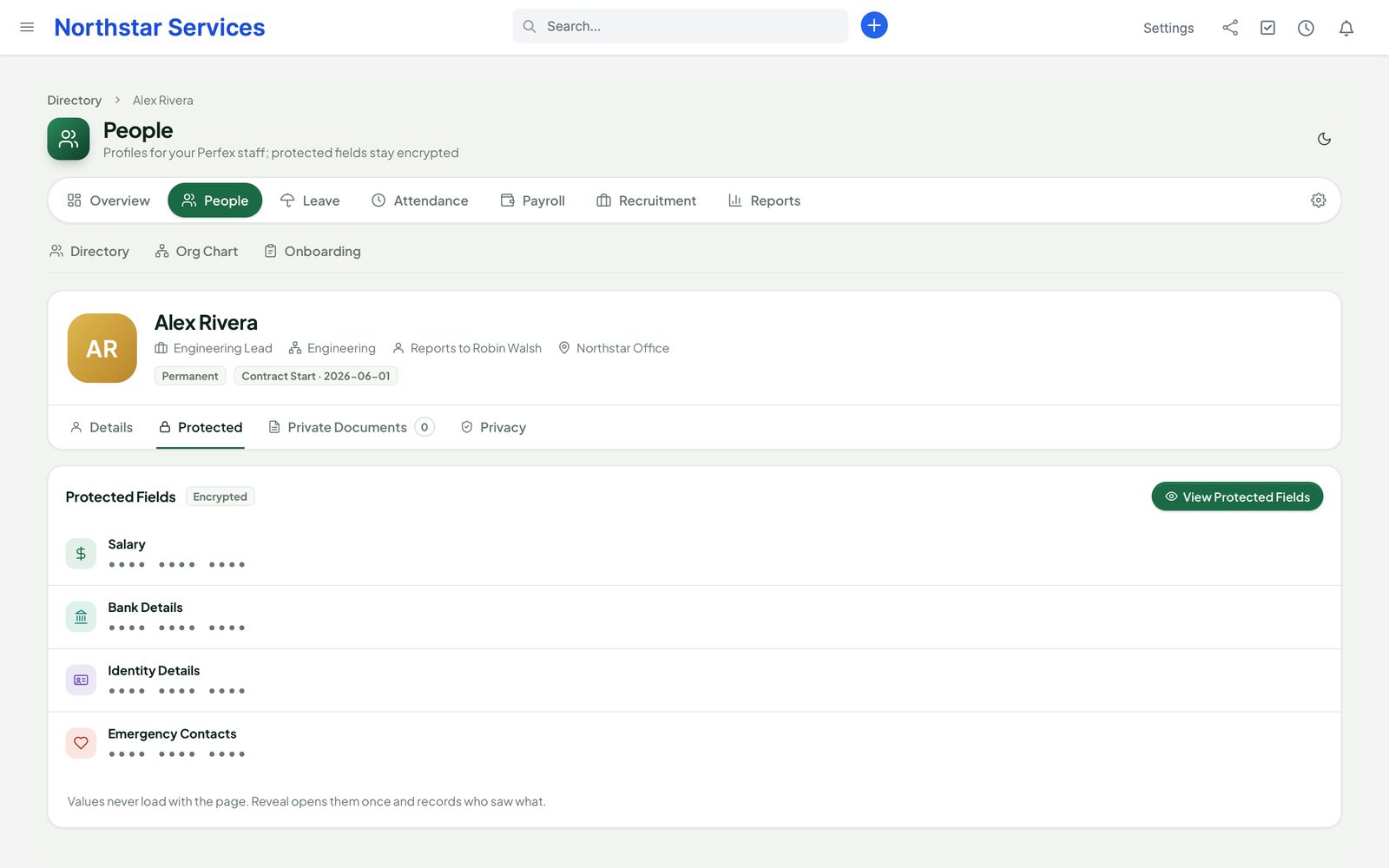
  • Protected fields — salary, bank, ID and emergency contacts — encrypted and masked until an audited Reveal
  • Private documents with a drop zone, stored encrypted outside the public folder
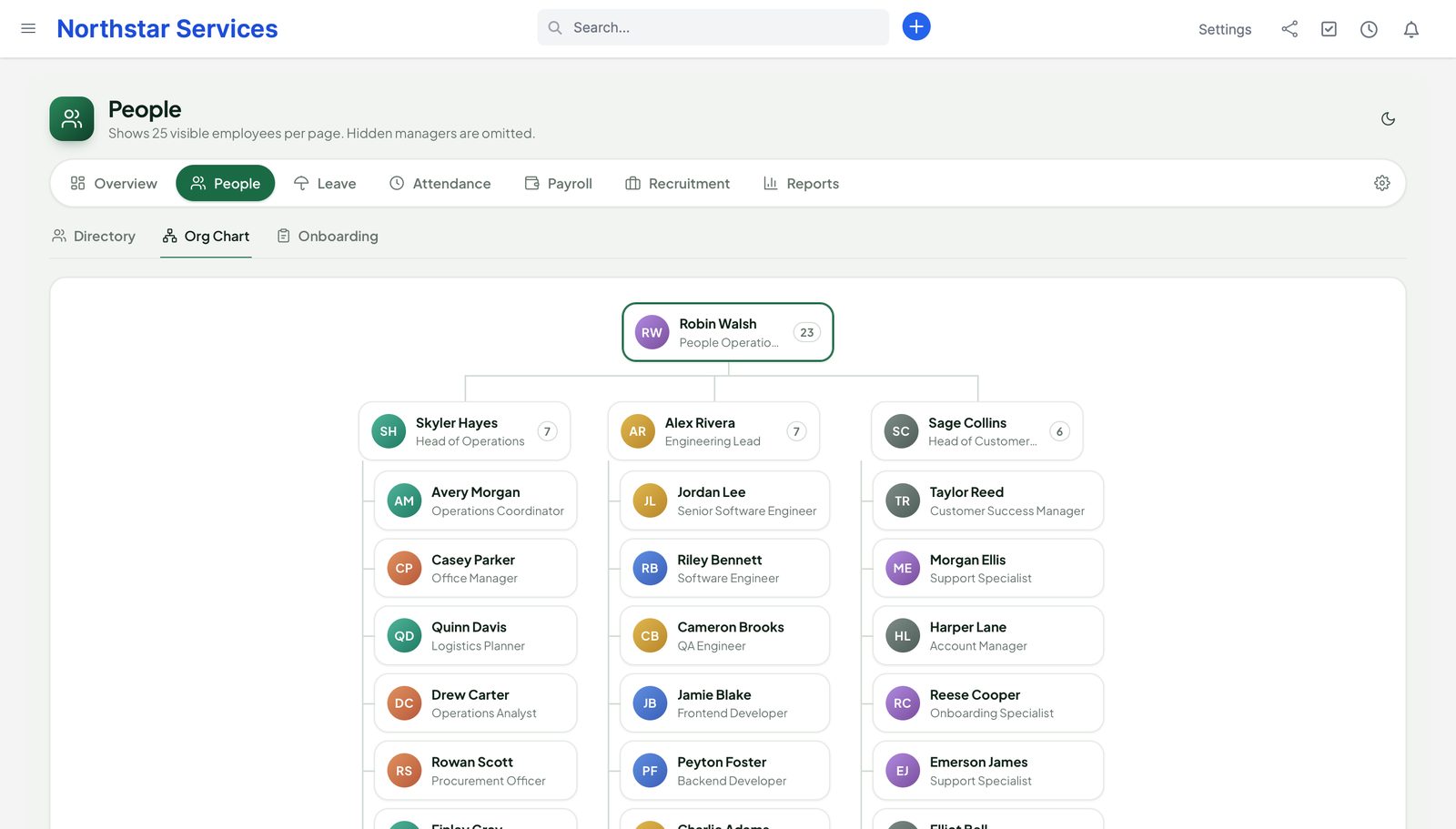
  • Org chart built from managers and departments, and your own custom fields
  • Self-service: staff see their own profile, leave, attendance, payslips and documents
An employee profile on the Protected tab: salary, bank details, identity details and emergency contacts masked until View Protected Fields
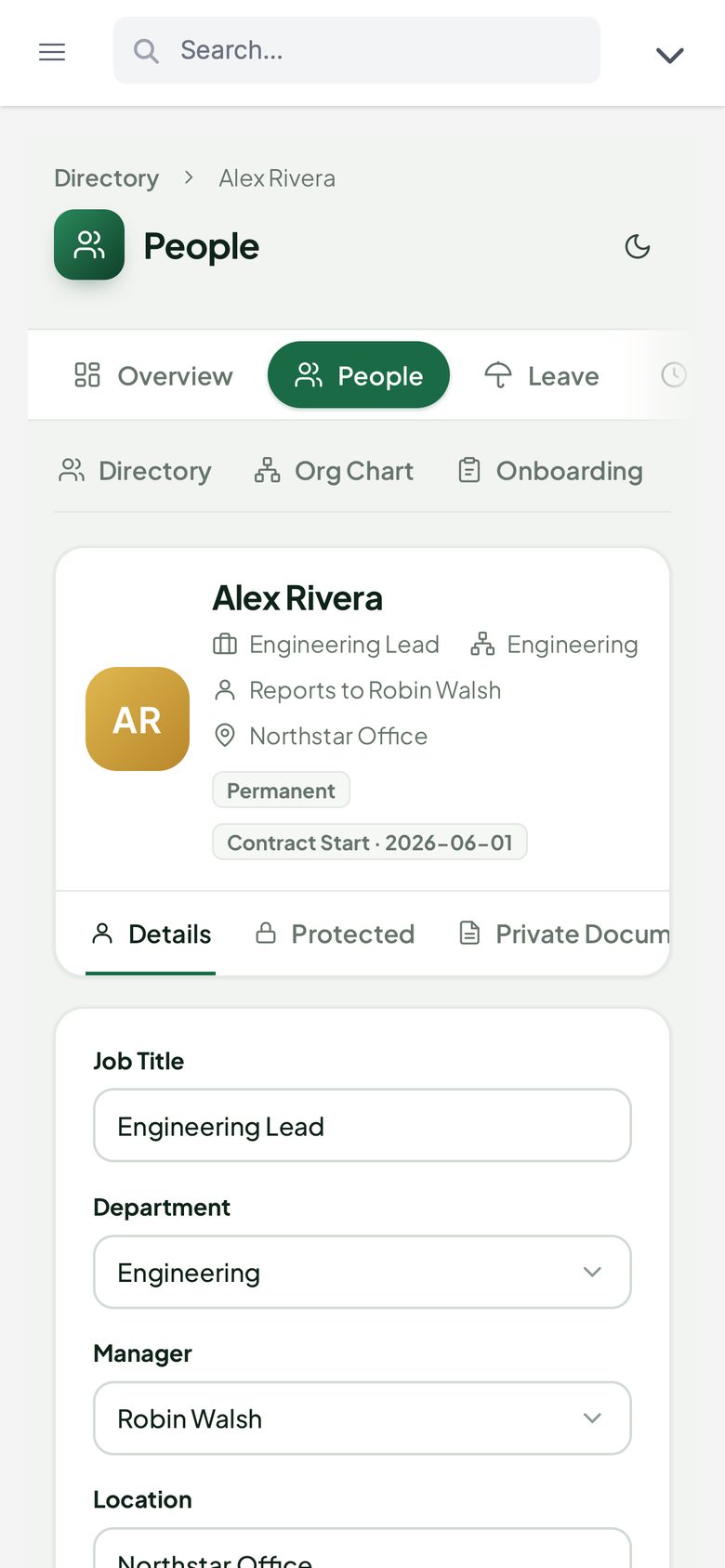
The same employee profile on a phone: job, department, manager and location

Leave

Requests that count the days for you.

Staff pick a leave type and the dates. People counts the working days, skips public holidays, shows the balance after the request and warns when too many of the team are out.

  • Leave types with monthly or yearly accrual, carry-over caps and pro-rata for people who join mid-year
  • Full days, half days or hours, in the employee's time zone
  • Approval by the manager, then HR — two different people; managers see only their own team
  • Team calendar and conflict warnings
  • Public holidays per location, imported from CSV or iCal
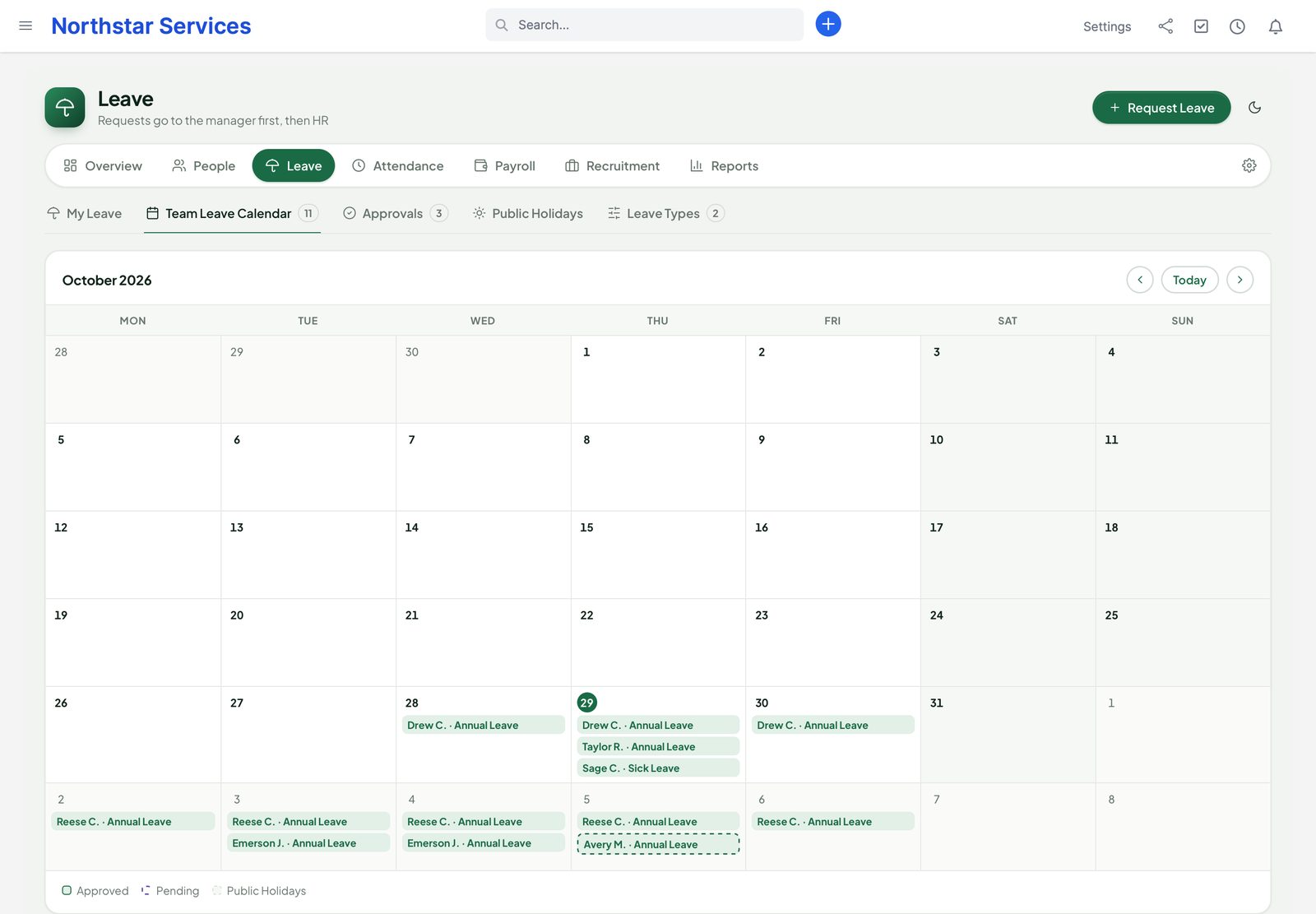
The team leave calendar for October with annual and sick leave per person, approved and pending

Attendance

Who is in, who is late, what was worked.

Staff clock in and out in the browser. The Today board shows who is in, late, on leave or not in yet; finished time goes to the manager and then HR for approval, and the monthly grid shows every day with its overtime.

  • Web clock in and out, with an optional IP or location rule
  • Shifts and rosters, late and absent flags with a grace period
  • Overtime per day against the roster, ready for payroll once approved
  • Approvals one by one or in bulk; a monthly grid per person
  • With TeamPulse 1.2.1 or later: approved hours and overtime feed payroll. Without it, People uses its own clock, rosters and overtime rules
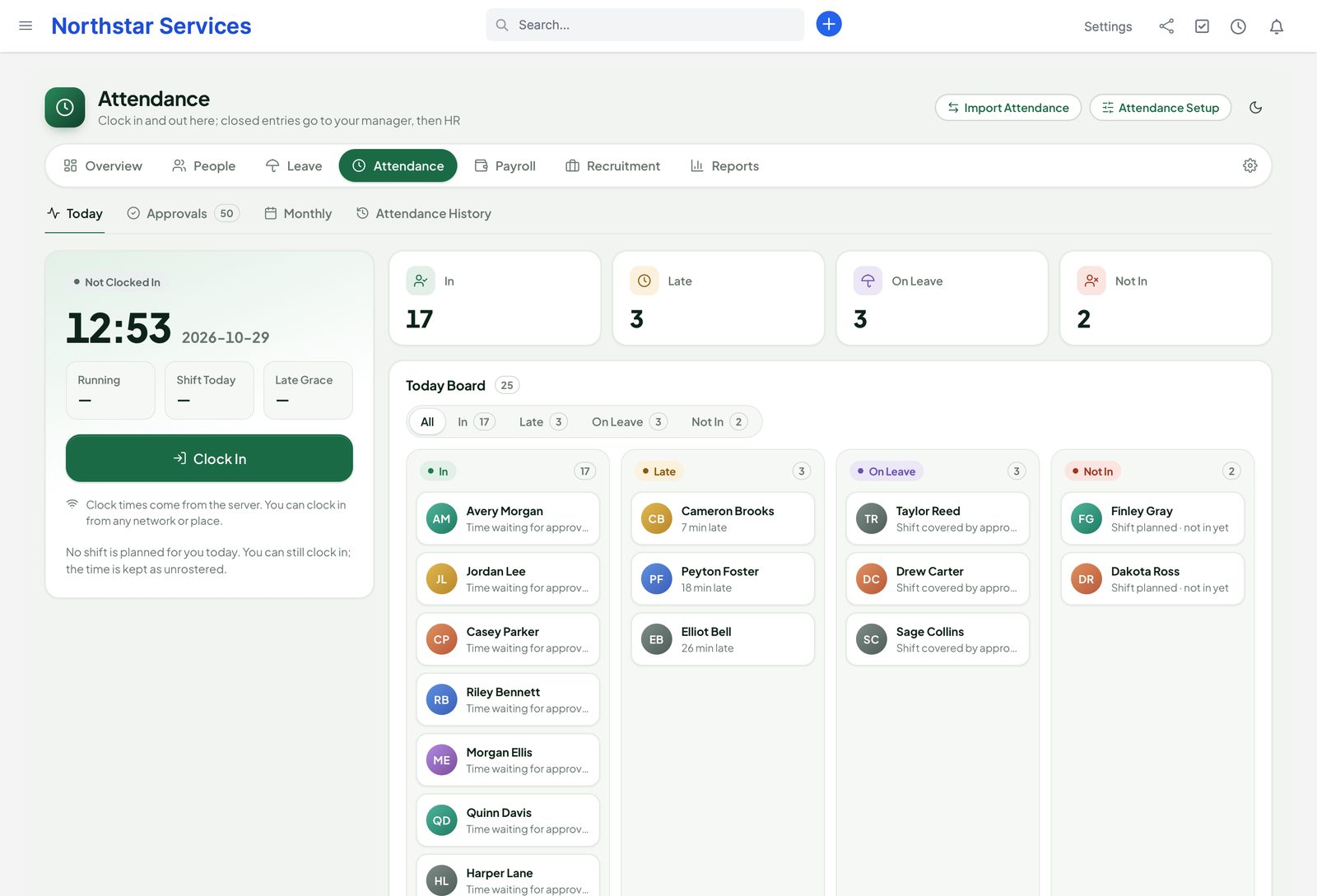
Attendance today: the clock card, 17 people in, 3 late, 3 on leave and 2 not in yet on the Today board

Payroll

A payroll engine you set up. Runs you can check.

People does not ship one country's rules. You define the pay components, the pay groups and, where you need them, the tax tables. People calculates, shows what changed since the last run, and locks the run once a second person approves it.

  1. 1 · DraftThe run collects pay components, approved overtime and unpaid leave for the period.
  2. 2 · ReviewTotals per person and per component, compared with the last run.
  3. 3 · ApproveA different payroll role approves. A run that would pay a negative net stops.
  4. 4 · LockThe run can no longer change. Corrections go into an adjustment run.
  • Earnings, deductions and employer contributions as a fixed amount, a percentage, a formula or a tax table you enter; formulas use a safe evaluator, never code
  • Formulas can use paid days, period days, worked and overtime hours and unpaid leave from attendance and leave
  • Pay groups and periods: monthly, semi-monthly or weekly; exact decimals with rounding per currency
  • Payslips as PDF, in self-service and, if you switch it on, by e-mail with delivery status
  • Bank payment file as CSV or SEPA pain.001; pay reductions in a correction are listed for you to recover outside the file
  • With Perfex Books active, locked runs post to the ledger — gross pay, employer costs, deductions and net pay payable — and corrections post as a separate entry
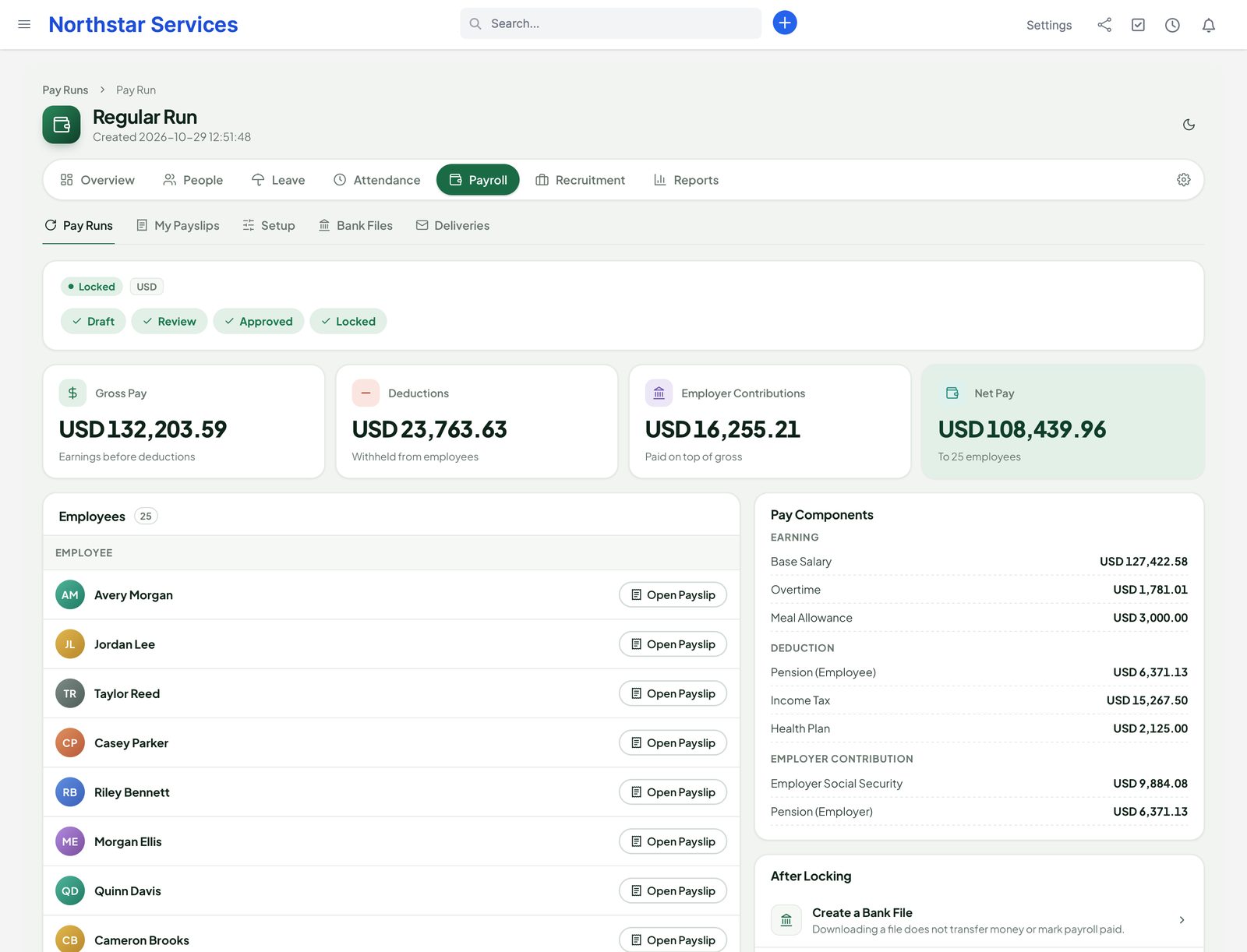
A locked monthly pay run for 25 people: gross pay, deductions, employer contributions and net pay, with totals per pay component

Tax tables are your data. People ships neutral examples only. It makes no claim of legal or tax compliance for any country: check your components and tables with your accountant or local rules. People creates bank files; it does not send money.

Recruitment

From job opening to first day.

Publish an opening on your careers page, move candidates across the pipeline, and link the person you hire to their staff account and onboarding checklist.

  • Job openings and a public careers page with an apply form, spam protection and PDF upload limits
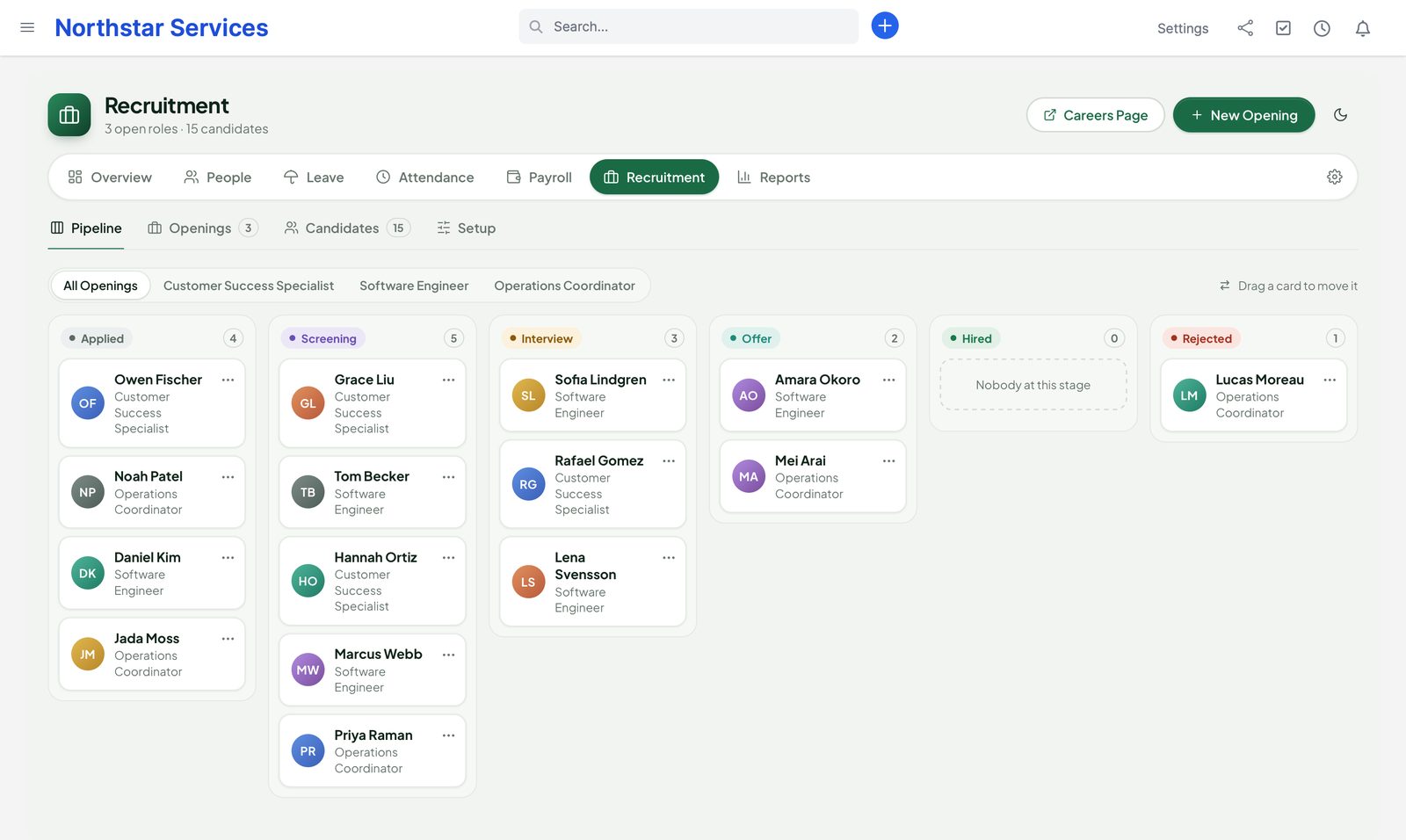
  • Kanban pipeline: drag a candidate to the next stage
  • Interviews and scorecards from each interviewer
  • Offers, then hire → employee after you confirm the staff account
  • Applicant consent, and automatic deletion after the retention date you set
The recruitment pipeline for three openings: applied, screening, interview, offer, hired and rejected

On- & offboarding

Nobody forgets the laptop.

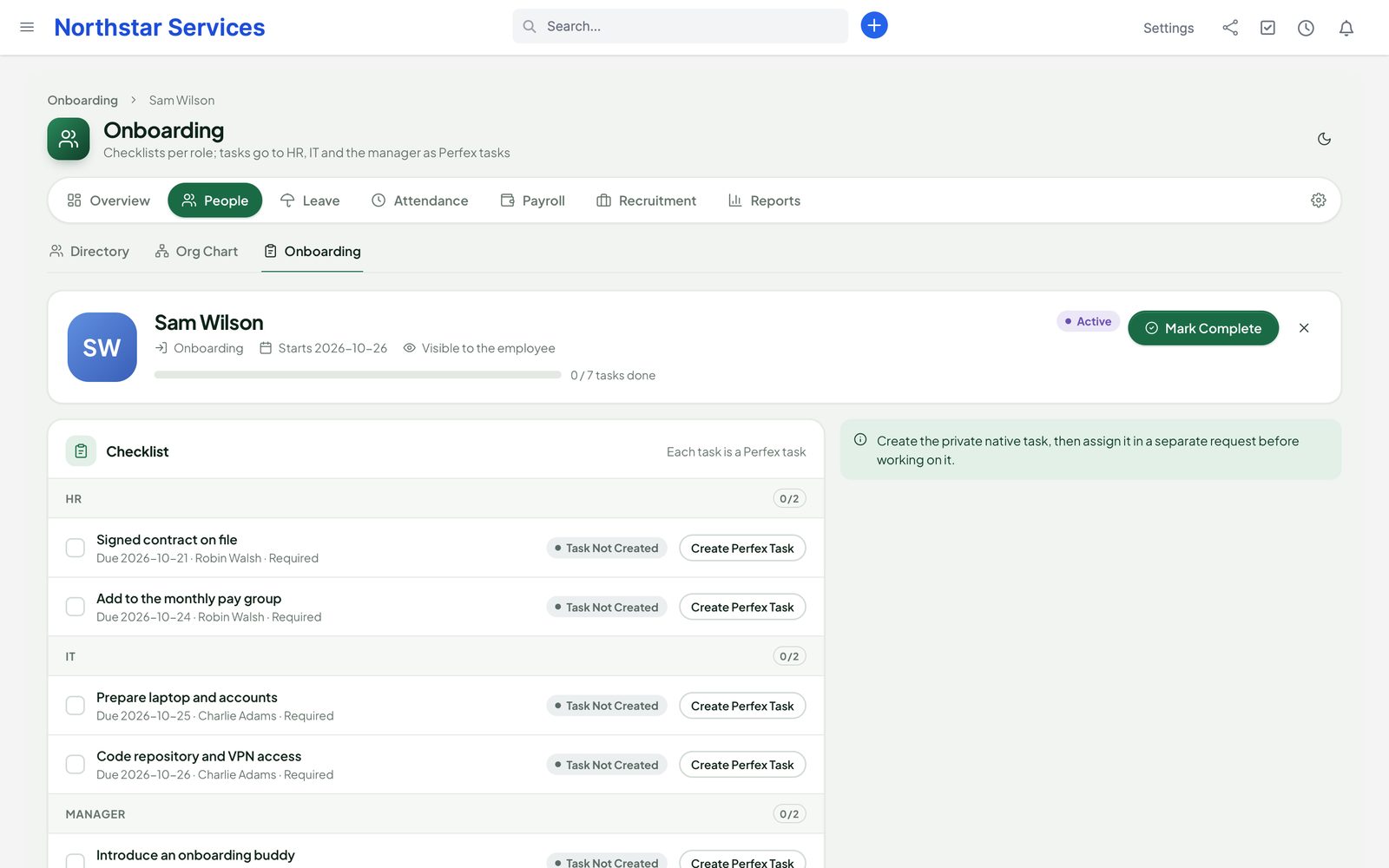
Checklists per role become Perfex tasks for HR, IT and the manager, so the work shows up where your team already looks.

  • Onboarding checklists per role, with due dates from the start day
  • Offboarding checklists with an encrypted exit interview
  • The final settlement is approved separately and paid in the next payroll run
An onboarding checklist for a new engineer: HR, IT and manager items with due dates, each one a Perfex task

Reports

The HR numbers, without a spreadsheet.

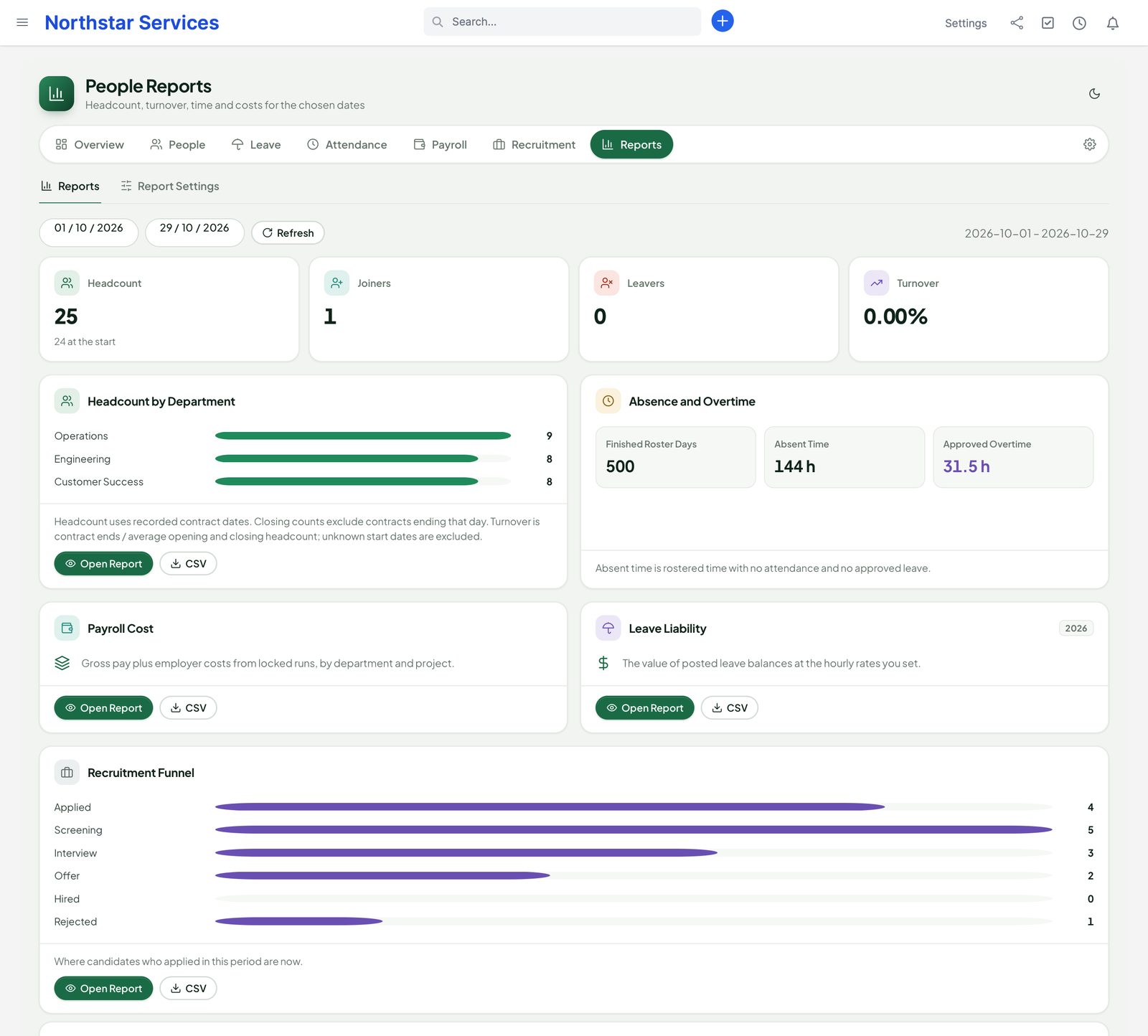
Headcount, turnover, leave liability, absence, overtime, payroll cost and the recruitment funnel, for the dates you choose.

  • Payroll cost by department or project, from locked runs
  • CSV exports that are safe to open in a spreadsheet (no formulas run)
  • Salary figures only for payroll roles
People reports: headcount, joiners, leavers and turnover, headcount by department, absence and approved overtime, payroll cost, leave liability and the recruitment funnel

Switching from another HR module

Move in without risk to your old data.

People can read the data of other HR, payroll, timesheet and recruitment modules already on your Perfex installation, show you what it found, and import it in batches you can undo.

  1. 1 · FindPeople detects the other module by its tables, even when that module is switched off.
  2. 2 · Dry runCounts, fields that have no place yet and conflicts with records you already have.
  3. 3 · ImportIn batches. Protected values are encrypted on the way in.
  4. 4 · UndoAny batch can be undone. Running the import again does not create duplicates.

Read-only. The importers never change or delete the other module's tables. Past payslips come in as history and are never run again.

Our modules

Works on its own. Connects when the others are there.

▤

Perfex itself

Perfex staff, departments, tasks, e-mail, permissions and cron. People adds its own tables and never edits Perfex core files.

◷

Perfex TeamPulse

With TeamPulse 1.2.1 or later: approved hours and overtime feed payroll. Without it, People uses its own clock, rosters and overtime rules.

$

Perfex Books

Locked pay runs post one balanced journal to the ledger, without employee details. People and Books will also be sold together as a Back Office bundle.

▦

Perfex Brain Pro

HR widgets on your dashboards.

✦

Perfex AI Staff & Flow Studio

Read tools for AI Staff that respect field permissions; triggers and actions for Flow Studio workflows.

⇄

Perfex Connect & Document Studio

Work profiles in the REST API, without salary fields. Document Studio templates for offers and payslips.

Privacy & security

Personal data handled like it should be.

HR data is the most sensitive data in a company. People is built so that the default is closed.

  • Salary, bank and ID details encrypted at rest
  • Per-field permissions: salary only for payroll roles and the employee
  • Protected values never load with the page; an audited Reveal opens them
  • Audit of every view and export of sensitive fields
  • GDPR export and erasure per employee; candidates deleted after their retention date
  • No Perfex core file changes; 9 languages; light and dark; works on phones
The org chart built from managers and departments: a People Operations lead with three department heads and their teams

Roadmap

What comes next for People

What we are building and planning. Plans can change, and we never promise dates: an item ships when it is ready and tested.

  • Planned

    Back Office bundle with Perfex Books

    People and Perfex Books sold together; each keeps working fully on its own. Payroll already posts to Perfex Books today.

  • Planned

    More example payroll templates

    Example pay components and tax tables you adapt to your own rules. Data you check, never a compliance claim.

  • Planned

    New Flow Studio and AI Staff tools

    More triggers, actions and read tools as other SellMyCode modules add data.

  • Planned

    One-click updates

    Update the module from the Perfex admin, with a backup first and a way back.

Pricing

One price for the whole HR module.

Perfex People

$159one-time

One installation, unlimited employees. Version 1.1.1. Licence and support terms are shown on the SellMyCode listing. No per-user fees. Sold by SellMyCode.

Buy on SellMyCode Read the documentation
  • Employee records, encrypted documents, custom fields, org chart and self-service
  • Leave types with accrual, carry-over and pro-rata; half days and hours; approvals; holidays per location
  • Web clock in and out, shifts, rosters, overtime and attendance approval
  • Payroll engine with formulas, locked pay runs, adjustment runs, PDF payslips and CSV/SEPA bank files
  • Recruitment with careers page, pipeline, interviews, scorecards and offers
  • Onboarding and offboarding checklists as Perfex tasks
  • Reports with formula-safe CSV export
  • Read-only importers from another HR module, with dry run and undo
  • Encrypted protected fields, audited Reveal, GDPR export and erasure
  • Books posting, TeamPulse time (TeamPulse 1.2.1 or later), Brain Pro, AI Staff, Flow Studio, Connect and Document Studio integrations

Works fully on its own. Later also sold with Perfex Books as a Back Office bundle.

Questions

Does the payroll comply with the tax rules of my country?

People makes no such claim for any country. The payroll engine is country-neutral: tax tables and pay components are data that you enter, and People ships neutral examples only. Check your setup with your accountant or your local rules.

Does People pay my employees?

No. People calculates pay from the rules you enter and creates a CSV or SEPA file for your bank. Downloading the file does not send money or mark anyone as paid; you approve the payment in your bank as usual.

Does it change Perfex core files?

No. People uses Perfex's module hooks and its own tables. Employee profiles sit next to Perfex staff in a separate table; nothing is added to Perfex's staff table.

Can I move from my current HR module?

Yes. Read-only importers detect other HR, payroll, timesheet and recruitment modules by their tables. You get a dry run with counts, unmapped fields and conflicts first, then import in batches that you can undo one by one. Running it again does not create duplicates, and the other module's tables are never changed.

Do I need Perfex Books or Perfex TeamPulse?

No. People works fully on its own. When Books is active, locked pay runs post to its ledger; with TeamPulse 1.2.1 or later, its approved hours and overtime feed payroll. Without it, People uses its own clock, rosters and overtime rules.

Who can see salaries?

Payroll roles and the employee. Protected values never load with the page: they open with Reveal, and every view and export is recorded.

What are the requirements?

Perfex CRM 3.4.x, PHP 8.1 or newer with BCMath, MySQL 5.7+ or MariaDB 10.3+, and Perfex's cron job.

Which languages are included?

English, Dutch, French, German, Italian, Brazilian Portuguese, Russian, Spanish and Turkish.

Is there a demo?

Yes: the live demo runs People with fictional data. Sign in as the admin demo account shown on the login page (demo@perfexcrm.app, password demo1234). Settings, uploads and anything that sends e-mail or connects to an outside service are switched off there, and the data resets every few hours.

How do I get support?

Contact us through sellmycode.net. Please add the module, Perfex and PHP versions to your message.
HR that lives where your team works.

Records, leave, attendance, payroll and hiring in one Perfex module.